
Image d'épingle Pinterest
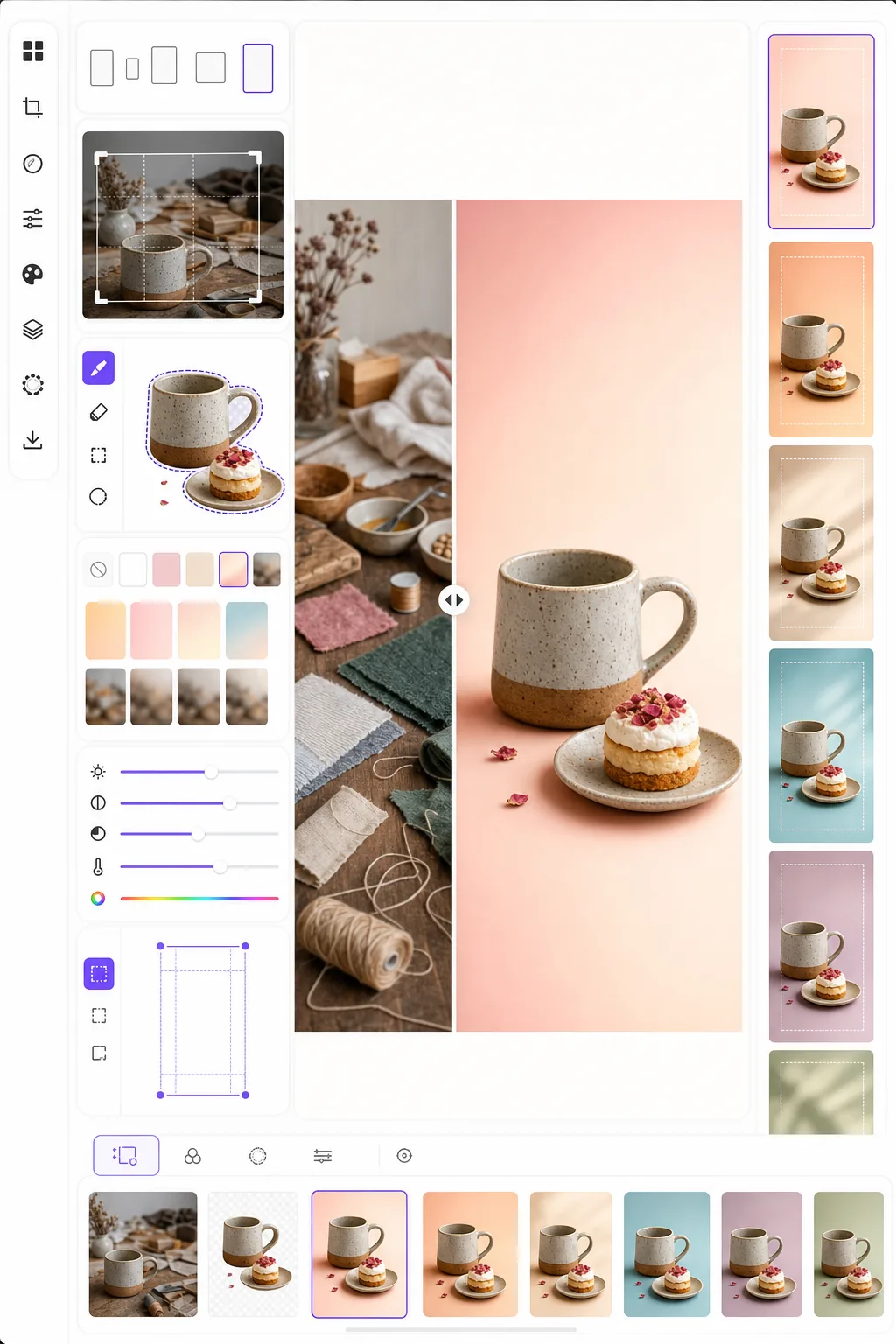
Créez des images d'épingles qui arrêtent le défilement et génèrent des enregistrements. Ce modèle met en forme les photos au ratio vertical 2:3 optimal de Pinterest, supprime les arrière-plans chargés pour des compositions épurées centrées sur le produit, renforce l'éclat des couleurs pour le fil Pinterest et produit des images prêtes à épingler, nettes aussi bien sur mobile que sur ordinateur.
Essayer ce modèle gratuitementSocial Media template preview
Ce que fait ce modèle
Optimise les images pour un engagement maximal sur Pinterest, où les épingles hautes et visuellement marquantes surpassent les photos paysage standard de trois à cinq fois en taux d'enregistrement. Background Eraser isole votre sujet — produit, plat de recette, tenue ou objet artisanal — et le place sur un arrière-plan épuré, coloré ou en dégradé qui fait ressortir le sujet dans un fil chargé. L'éclat des couleurs est renforcé pour correspondre à la tendance de Pinterest à privilégier les contenus lumineux et saturés dans son algorithme. Le modèle produit des images en 1000 × 1500 px, les dimensions exactes recommandées par Pinterest pour les épingles standard.
Paramètres du modèle
| Format d'image | 2:3 vertical (1000 × 1500 px — standard Pinterest) |
| Options d'arrière-plan | Blanc épuré, couleur unie, dégradé doux ou original flouté |
| Renforcement des couleurs | +20% de saturation pour la visibilité dans le fil (réglable) |
| Cadrage du sujet | Centrage automatique avec 10% de marge pour l'espace de superposition de texte |
| Format de sortie | PNG (pour superposition de texte) ou JPEG (pour téléchargement direct) |
Comment utiliser ce modèle
Téléversez votre image source
Téléversez une photo de produit, une photo de plat, une photo de tenue ou toute image que vous souhaitez transformer en épingle Pinterest. Le modèle accepte les images en paysage, carré ou portrait et les recadrera au ratio vertical 2:3 optimal grâce à un recadrage intelligent qui maintient le sujet centré.
Arrière-plan et composition
Background Eraser isole votre sujet et le place sur un arrière-plan épuré. Choisissez entre un blanc pur, une couleur de marque unie, un dégradé doux ou une version floutée de l'arrière-plan d'origine. Le sujet est automatiquement positionné pour laisser de l'espace en haut et en bas pour les superpositions de texte.
Optimisation des couleurs et de la netteté
Les couleurs sont renforcées de 20% de saturation pour se démarquer dans le fil Pinterest, où les images ternes ont tendance à être ignorées. La netteté est améliorée pour le sujet tandis que l'arrière-plan reste doux, créant une profondeur visuelle qui attire le regard vers le sujet principal.
Exportez votre épingle
Téléchargez en 1000 × 1500 px au format PNG (si vous prévoyez d'ajouter des superpositions de texte dans Canva ou un autre éditeur) ou JPEG (pour un téléchargement direct sur Pinterest). Le profil colorimétrique est réglé sur sRGB pour un affichage précis sur tous les appareils et navigateurs.
Conseils de pro pour de meilleurs résultats
- ✓Laissez les 20% supérieurs et 15% inférieurs de l'épingle relativement épurés pour les superpositions de texte. Le modèle positionne votre sujet de manière à laisser cet espace, mais choisir un arrière-plan uni ou en dégradé dans ces zones rend le texte plus lisible qu'un arrière-plan photographique chargé.
- ✓Utilisez des arrière-plans aux tons chauds (rose poudré, terracotta, crème) pour les épingles lifestyle et cuisine, et des neutres froids (blanc, gris clair, bleu pâle) pour les épingles produits et tech. Les données d'engagement de Pinterest montrent constamment que les épingles aux palettes de couleurs intentionnelles surpassent celles aux arrière-plans aléatoires.
- ✓Créez plusieurs versions d'épingles pour le même contenu — même sujet avec différentes couleurs d'arrière-plan et recadrages. Pinterest récompense la variété de contenu, et tester deux à trois conceptions d'épingles par contenu aide à identifier quel style visuel résonne auprès de votre audience.
Outils
Questions fréquentes
Puis-je ajouter du texte à l'épingle ?
+
Le modèle produit une image épurée optimisée pour la superposition de texte, mais n'ajoute pas de texte directement. Exportez au format PNG et ajoutez du texte dans Canva, Photoshop ou tout outil de conception. Le sujet est positionné pour laisser de l'espace pour les titres en haut et les appels à l'action en bas.
Qu'en est-il des Idea Pins (vidéo) ?
+
Ce modèle est destiné aux épingles statiques standard. Les Idea Pins (anciennement Story Pins) utilisent des formats vidéo et multi-pages qui nécessitent d'autres outils. Les sorties du modèle fonctionnent bien comme images de couverture pour les Idea Pins si vous avez besoin d'une miniature statique.
Cela fonctionne-t-il pour les épingles de style infographie ?
+
Pour les épingles infographiques, le modèle est idéal pour préparer des images individuelles ou des photos de produits que vous disposez ensuite dans une mise en page infographique plus haute (1000 × 2100 px ou plus). Chaque élément peut être traité séparément puis combiné dans un outil de conception.
Créez des épingles Pinterest qui arrêtent le défilement
Téléversez n'importe quelle image et obtenez une composition verticale prête à épingler avec des arrière-plans épurés et des couleurs optimisées pour un maximum d'enregistrements et de clics.
Essayer gratuitementRelated templates
More social media templates for your workflow.
Modèle de recadrage carré optimisé pour Instagram à 1080 × 1080px. Des arrière-plans épurés, des couleurs vives et des détails nets qui ressortent dans le flux.
Modèle de bannière YouTube à 2 560 × 1 440 px avec guides de zones de sécurité. Suppression nette de l'arrière-plan pour les photos des créateurs, mise en page adaptée à l'appareil et illustration de chaîne cohérente avec la marque.
Modèle de photo de couverture Facebook à 820 × 312 px pour ordinateur de bureau et recadrage mobile 640 × 360 px. Nettoyez les images de marque avec des zones de sécurité appropriées pour le chevauchement des photos de profil et le placement des boutons CTA.
Créez des images d'en-tête Twitter/X professionnelles à la dimension exacte de 1 500 × 500 px. Prend en compte le chevauchement des photos de profil et fonctionne à la fois en mode sombre et en mode clair.
Améliorez les photos de profil de rencontres avec un lissage naturel de la peau, un nettoyage de l’arrière-plan, une correction de l’éclairage et un étalonnage subtil des couleurs qui semble authentique – non filtré.
Créez des photos de couverture vidéo TikTok accrocheuses avec des arrière-plans épurés, un cadrage de sujet audacieux et des dimensions verticales optimisées de 9:16 pour une cohérence de la grille de profil.