
Modèle de story pour réseaux sociaux
Concevez des stories verticales 9:16 optimisées pour Instagram, TikTok, Snapchat et YouTube Shorts. Ce modèle recadre et repositionne les photos pour le format vertical allongé, supprime ou remplace les arrière-plans pour un impact visuel, et garantit que votre sujet est placé dans les zones de sécurité du texte afin que les superpositions, autocollants et légendes ne masquent jamais le point focal.
Essayer ce modèle gratuitementSocial Media template preview
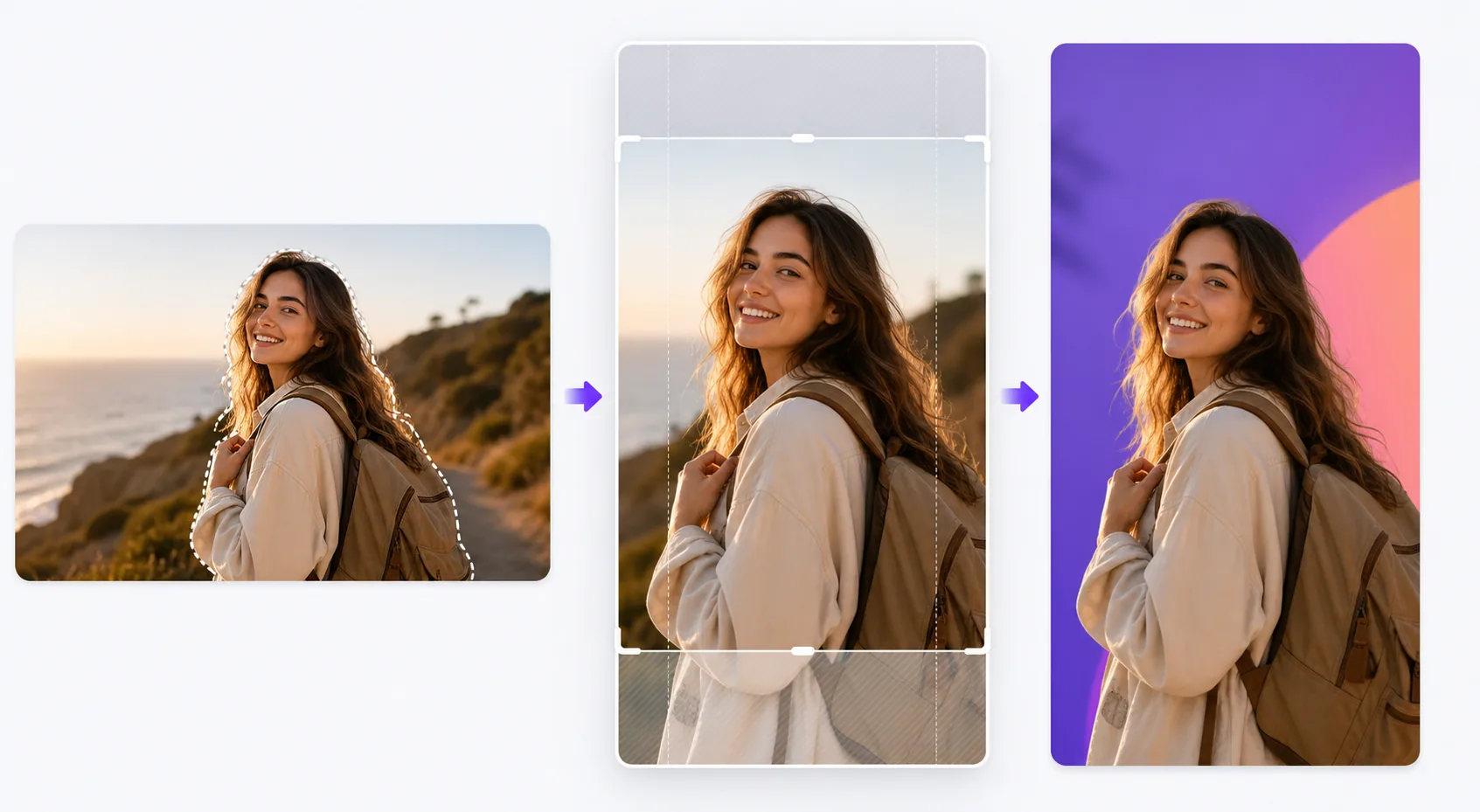
Ce que fait ce modèle
Résout le défi de mise en forme qui nuit à l'engagement sur les plateformes de stories : photos horizontales comprimées dans des cadres verticaux avec des bandes noires, sujets coupés à des endroits gênants et détails visuels importants masqués derrière les éléments d'interface. Le modèle recadre intelligemment votre photo en 9:16, centre le sujet et applique un recadrage assisté par IA lorsque la composition d'origine ne se prête pas bien au format vertical. Background Eraser vous permet de placer votre sujet sur des couleurs unies vives, des dégradés ou des arrière-plans environnementaux floutés qui font ressortir la story dans le fil d'actualité. Les guides de zones de sécurité garantissent que les 15 % supérieurs (où se trouvent les icônes de profil et les horodatages) et les 20 % inférieurs (où apparaissent les invites de balayage et les légendes) restent dégagés de tout contenu visuel essentiel.
Paramètres du modèle
| Format d'image | 9:16 (1080×1920px) — natif pour les stories Instagram, TikTok et Snapchat |
| Style d'arrière-plan | Couleur unie, dégradé, original flouté ou image personnalisée |
| Positionnement du sujet | Recadrage par IA pour centrer le sujet dans la zone de sécurité verticale |
| Zones de sécurité | 15 % en haut et 20 % en bas dégagés pour les éléments d'interface de la plateforme |
| Format de sortie | JPEG à 95 % de qualité ou PNG avec transparence pour des modifications ultérieures |
Comment utiliser ce modèle
Importez votre photo
Importez n'importe quelle photo — horizontale, verticale ou carrée. L'IA détecte le sujet principal (personne, produit, point focal de la scène) et détermine le meilleur recadrage vertical qui maintient le sujet en évidence et la composition équilibrée dans le cadre 9:16.
Choisissez le traitement de l'arrière-plan
Conservez l'arrière-plan d'origine (recadré pour s'adapter), remplacez-le par une couleur unie ou un dégradé pour un impact graphique, ou floutez l'arrière-plan pour créer une séparation de profondeur. Background Eraser fournit un détourage net si vous souhaitez incruster le sujet sur un arrière-plan entièrement nouveau.
Positionnez dans les zones de sécurité
Le modèle vous montre où les éléments d'interface de la plateforme se superposeront à l'image — horodatages, icônes de profil en haut, invites de balayage ou zones de légende en bas. Votre sujet est automatiquement placé dans la zone de sécurité centrale, et vous pouvez ajuster la position si nécessaire.
Exportez pour la publication
Téléchargez en 1080×1920px, la résolution native des formats de story. Le fichier est optimisé pour minimiser les artefacts de compression lorsque les plateformes réencodent l'import. L'export PNG est disponible si vous souhaitez ajouter du texte, des autocollants ou d'autres modifications dans une autre application avant de publier.
Conseils de pro pour de meilleurs résultats
- ✓Utilisez des couleurs d'arrière-plan vives et contrastées derrière les sujets détourés. Un arrière-plan corail vif ou bleu électrique fait ressortir visuellement un produit ou une personne face aux fils d'actualité neutres que la plupart des utilisateurs parcourent, augmentant les chances qu'ils s'arrêtent sur votre story.
- ✓Gardez les 20 % inférieurs du cadre visuellement simples. Sur Instagram, la barre de réponse et le texte de la légende se trouvent dans cette zone. Y placer un contenu visuel important garantit qu'il sera masqué lorsque les spectateurs regarderont la story.
- ✓Pour les stories en carrousel, conservez la même couleur d'arrière-plan et la même position du sujet sur toutes les images. La cohérence visuelle rend la série intentionnelle et soignée, ce qui augmente le taux de balayage.
Outils
Questions fréquentes
Puis-je utiliser des photos horizontales en paysage ?
+
Oui. L'IA recadre la composition en identifiant le sujet principal et en recadrant en une tranche verticale qui conserve l'impact visuel. Pour les prises de vue panoramiques très larges, le recadrage peut être important, donc les images avec un sujet centré donnent les meilleurs résultats.
Cela fonctionne-t-il aussi pour les miniatures de vidéo ?
+
Le modèle traite les images fixes. Cependant, vous pouvez utiliser l'image exportée comme image de couverture pour une story vidéo, que les plateformes affichent avant la lecture de la vidéo et dans les grilles de stories à la une.
Quelles plateformes utilisent le format 9:16 ?
+
Instagram Stories et Reels, TikTok, Snapchat, YouTube Shorts, Facebook Stories, Pinterest Idea Pins et LinkedIn Stories utilisent tous le format vertical 9:16. La sortie 1080×1920px est la résolution standard acceptée par toutes ces plateformes.
Rendez chaque story impossible à ignorer
Importez n'importe quelle photo et obtenez en quelques secondes une image de story verticale parfaitement formatée et optimisée pour les plateformes.
Essayer gratuitementRelated templates
More social media templates for your workflow.
Modèle de recadrage carré optimisé pour Instagram à 1080 × 1080px. Des arrière-plans épurés, des couleurs vives et des détails nets qui ressortent dans le flux.
Modèle de bannière YouTube à 2 560 × 1 440 px avec guides de zones de sécurité. Suppression nette de l'arrière-plan pour les photos des créateurs, mise en page adaptée à l'appareil et illustration de chaîne cohérente avec la marque.
Modèle de photo de couverture Facebook à 820 × 312 px pour ordinateur de bureau et recadrage mobile 640 × 360 px. Nettoyez les images de marque avec des zones de sécurité appropriées pour le chevauchement des photos de profil et le placement des boutons CTA.
Créez des images d'en-tête Twitter/X professionnelles à la dimension exacte de 1 500 × 500 px. Prend en compte le chevauchement des photos de profil et fonctionne à la fois en mode sombre et en mode clair.
Améliorez les photos de profil de rencontres avec un lissage naturel de la peau, un nettoyage de l’arrière-plan, une correction de l’éclairage et un étalonnage subtil des couleurs qui semble authentique – non filtré.
Créez des images d'épingles Pinterest à couper le souffle avec des arrière-plans épurés, des dimensions verticales 2:3 optimales, une amélioration des couleurs éclatantes et une composition prête à épingler.