
Conception de tableau de menu
Créez des graphiques de tableau de menu professionnels à partir de vos propres photos de plats. Ce modèle isole chaque plat individuel des dressages de table et des arrière-plans encombrés, uniformise l'apparence de tous les articles pour un menu cohérent, et exporte des images prêtes pour la mise en page optimisées pour les tableaux de menu numériques, les menus imprimés et les fiches sur les plateformes de livraison comme DoorDash, Uber Eats et Grubhub.
Essayer ce modèle gratuitementFood template preview
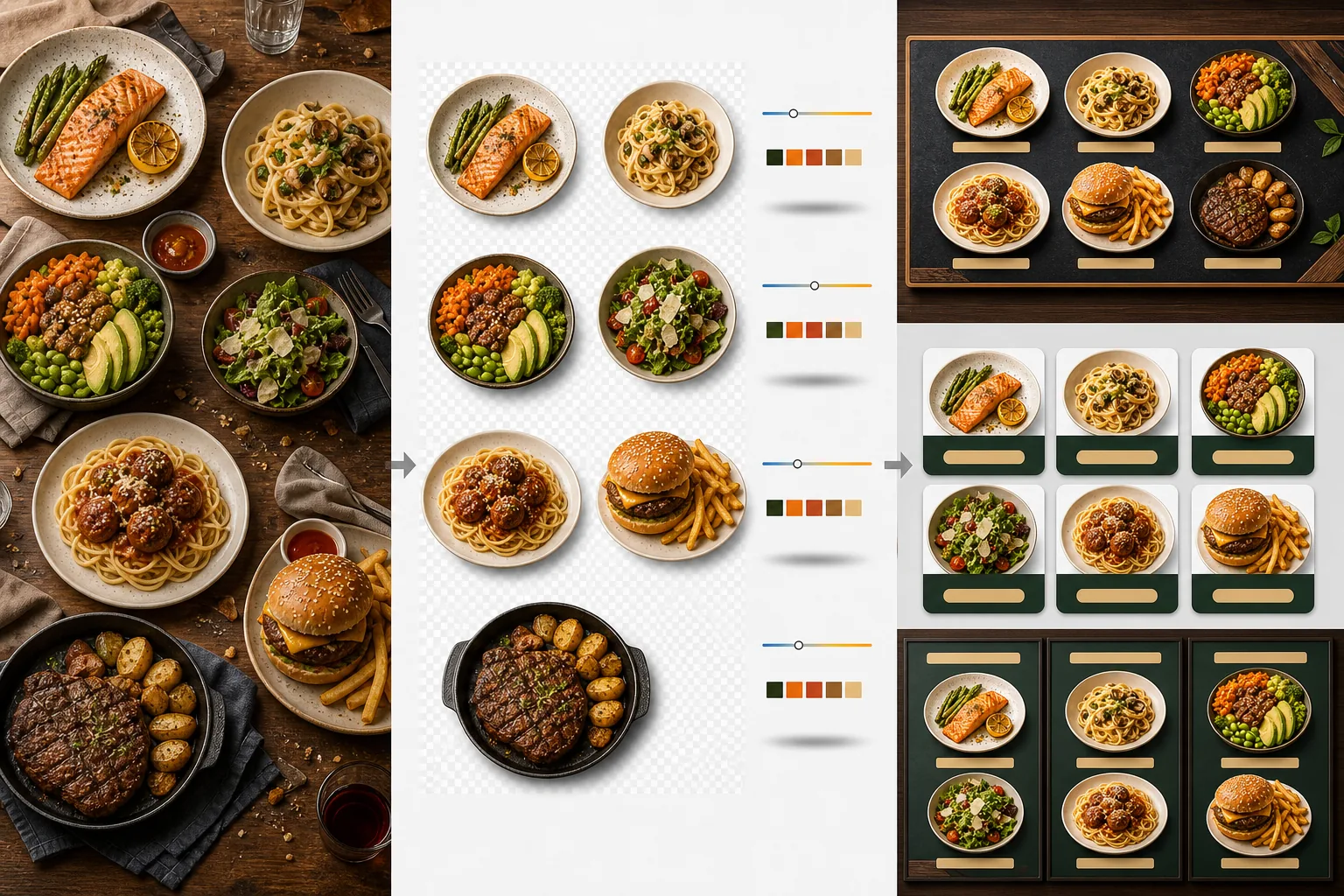
Ce que fait ce modèle
Transforme des photos de plats incohérentes prises à des moments différents, sous des éclairages différents et sur des tables différentes en un ensemble unifié d'images prêtes pour le menu. Background Eraser isole chaque plat — assiette, bol ou emballage — de son dressage de table d'origine et remplace l'arrière-plan par une couleur ou une texture cohérente assortie à l'image de marque de votre restaurant. La température de couleur est normalisée sur tous les articles afin que les photos prises sous une lumière tungstène chaude, des panneaux LED froids et la lumière naturelle d'une fenêtre paraissent toutes cohérentes. Les couleurs des aliments sont rehaussées pour les rendre appétissants sans basculer dans l'irréaliste — les verdures sont éclatantes, les viandes chaudes et juteuses, et les sauces brillantes. Le résultat est un ensemble d'images qui fonctionne comme un système de menu visuel unifié plutôt qu'une collection aléatoire de photos prises au téléphone.
Paramètres du modèle
| Arrière-plan | Couleur unie (assortie à la marque), texture bois, ardoise ou transparent |
| Normalisation de la température de couleur | Aligner tous les articles sur une balance des blancs lumière du jour de 5000K |
| Rehaussement des couleurs des aliments | Boost appétissant (protéines chaudes, verdures éclatantes, sauces brillantes) |
| Style d'ombre | Ombre portée subtile pour donner de la profondeur sur les arrière-plans unis |
| Tailles d'exportation | 1200×1200px (plateformes de livraison), 800×600px (tableaux de menu numériques), personnalisé |
Comment utiliser ce modèle
Importer les photos de plats
Importez les photos de chaque article du menu. Les photos prises au téléphone pendant le service, les séances de photographie culinaire professionnelle et les photos des fiches sur les plateformes de livraison fonctionnent toutes. Le modèle traite chaque plat séparément pour des résultats cohérents sur l'ensemble de votre menu.
Isoler les plats des arrière-plans
Background Eraser sépare chaque plat de sa table, de son set de table ou de son comptoir. La détection des contours suit précisément le bord de l'assiette, le rebord du bol ou le contour de l'emballage. Les garnitures et les accompagnements qui dépassent du bord de l'assiette — une branche de persil, un filet de sauce — sont conservés.
Uniformiser la couleur et le style
La température de couleur est normalisée afin que tous les plats apparaissent sous le même éclairage cohérent. Les couleurs des aliments sont rehaussées pour stimuler l'appétit. Une ombre subtile est ajoutée sous chaque plat pour un rendu ancré et tridimensionnel sur le nouvel arrière-plan.
Exporter pour les menus et les plateformes
Téléchargez en 1200×1200px pour les fiches DoorDash, Uber Eats et Grubhub. Exportez en 800×600px pour les tableaux de menu numériques et les écrans TV. Des exportations PNG transparentes sont disponibles pour les graphistes qui créent des menus imprimés et de la signalétique personnalisés.
Conseils de pro pour de meilleurs résultats
- ✓Photographiez les plats directement du dessus (à plat) ou sous un angle de 45 degrés. Ces deux angles produisent la suppression d'arrière-plan la plus nette car le contour de l'assiette est entièrement visible et l'IA peut séparer le plat de la table avec précision.
- ✓Essuyez le bord de l'assiette avant de photographier. Les traces de sauce et les miettes sur le bord de l'assiette deviennent partie intégrante de l'image isolée et paraissent négligées sur le nouvel arrière-plan propre.
- ✓Traitez tous les articles du menu en un seul lot avec les mêmes paramètres. La cohérence sur chaque photo de plat est ce qui donne au menu un aspect professionnel — des températures de couleur et des teintes d'arrière-plan dépareillées font paraître amateurs même les meilleurs plats.
Outils
Questions fréquentes
Puis-je l'utiliser pour les boissons ?
+
Oui. Les verres, tasses, bouteilles et cocktails sont isolés avec la même précision que les plats dressés. Les boissons transparentes comme l'eau, le vin et les cocktails clairs conservent leur transparence sur le nouvel arrière-plan.
Les aliments auront-ils l'air artificiellement retouchés ?
+
Le rehaussement des couleurs est calibré pour rendre les aliments les plus appétissants possible sans basculer dans l'irréaliste. Pensez-y comme à la différence entre un plat photographié sous une lumière fluorescente dure et un plat photographié à la lumière naturelle du jour — le modèle fait paraître chaque plat comme s'il avait été photographié dans des conditions idéales.
Cela fonctionne-t-il pour les photos de menu des plateformes de livraison ?
+
Oui. La sortie carrée de 1200×1200px répond aux exigences d'image de DoorDash, Uber Eats, Grubhub et Postmates. Les restaurants dont les photos de menu paraissent professionnelles sur les plateformes de livraison reçoivent systématiquement des taux de commande plus élevés que ceux qui utilisent des clichés non traités pris au téléphone.
Créez un menu qui rend chaque plat irrésistible
Importez des photos de plats et obtenez des images de menu cohérentes et appétissantes, prêtes pour les tableaux numériques, les menus imprimés et les plateformes de livraison.
Essayer gratuitementRelated templates
More food templates for your workflow.
Créez des photos appétissantes de menus de livraison de nourriture avec une amélioration de l'éclat des couleurs, des arrière-plans épurés, des effets de vapeur et de fraîcheur et des dimensions optimisées pour la plate-forme.
Améliorez les photos de recettes pour les livres de cuisine et les blogs culinaires grâce à une netteté de qualité d'impression, une précision des couleurs des ingrédients, un nettoyage de scène stylisé et une sortie haute résolution.