
Photo de menu de livraison
Rendez les plats de votre menu de livraison aussi appétissants qu'ils sont savoureux. Ce modèle sublime les couleurs des plats pour un maximum d'appétit, supprime les arrière-plans de cuisine encombrés, renforce la chaleur visuelle et la fraîcheur des plats, et génère des images optimisées pour DoorDash, Uber Eats, Grubhub et d'autres plateformes de livraison.
Essayer ce modèle gratuitementFood template preview
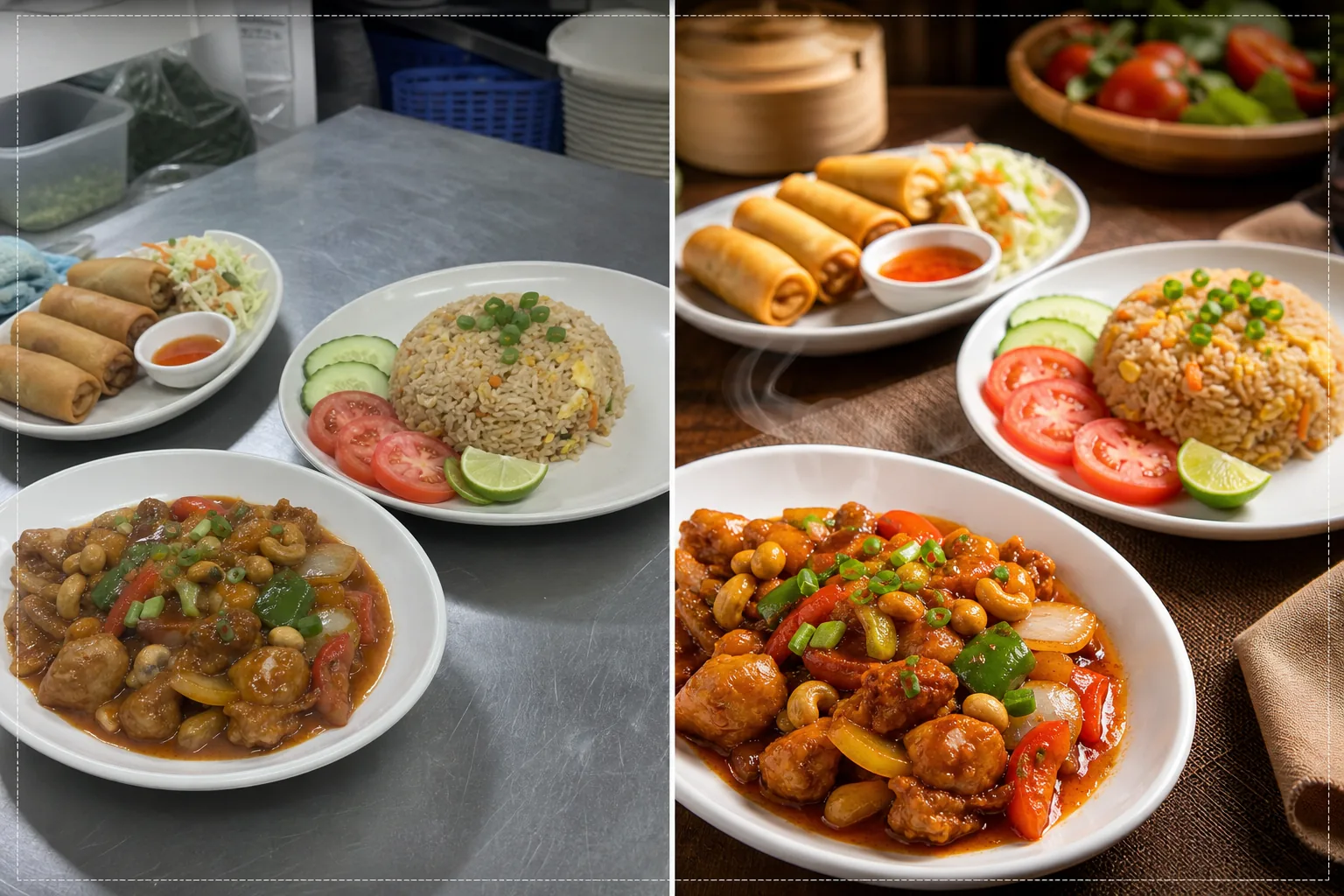
Ce que fait ce modèle
Transforme des photos prises rapidement en cuisine en images de qualité menu qui stimulent les commandes sur les plateformes de livraison de nourriture. Les restaurants photographient souvent leurs plats dans des cuisines animées, sous un éclairage fluorescent qui rend la nourriture peu appétissante — poulet aux reflets verdâtres, riz brun terne et sauces délavées. Ce modèle corrige la température de couleur vers des tons chauds et appétissants et accentue la saturation des ingrédients naturellement vifs comme les tomates, les légumes verts et les poivrons. Background Eraser supprime les arrière-plans de cuisine encombrés et les remplace par des surfaces nettes adaptées à la nourriture. AI Enhance accentue les textures des plats pour que les clients voient le croustillant des fritures, la vapeur qui s'élève des plats chauds et la fraîcheur des garnitures.
Paramètres du modèle
| Chaleur des couleurs | Tons chauds et appétissants (+15 % de décalage chaud, corrige le vert fluorescent) |
| Saturation des plats | Accentuation sélective des rouges, verts et jaunes (couleurs naturelles des aliments) |
| Amélioration des textures | Accentuation des détails de croustillant, d'humidité et de brillance |
| Arrière-plan | Surface de table nette, couleur unie ou fond sombre et tamisé |
| Dimensions de sortie | 1200 × 800 px (optimal pour les plateformes de livraison) et 1080 × 1080 px (réseaux sociaux) |
Comment utiliser ce modèle
Téléchargez la photo de votre plat
Photographiez le plat dressé directement par le dessus (à plat) ou à un angle de 45 degrés — les deux compositions conviennent bien aux menus de livraison. Utilisez la meilleure lumière naturelle disponible ou placez le plat près d'une fenêtre. Téléchargez directement depuis votre téléphone — aucun studio nécessaire.
Correction des couleurs et de la chaleur
Le modèle corrige la dominante de couleur due à l'éclairage fluorescent et LED de la cuisine, en orientant les tons des plats vers des teintes chaudes et appétissantes. Les sauces paraissent plus riches, les protéines plus dorées et les légumes plus frais. La correction met en valeur ce qui est naturellement présent plutôt que de donner à la nourriture un aspect coloré artificiellement.
Amélioration de l'arrière-plan et des textures
Background Eraser remplace l'arrière-plan de cuisine par une surface nette — table en bois, marbre, ardoise ou simple couleur unie. AI Enhance accentue les textures des plats pour mettre en valeur le croustillant des fritures, la brillance des sauces et la fraîcheur des produits. L'image globale acquiert une qualité de photographie culinaire professionnelle.
Exporter pour les plateformes de livraison
Téléchargez en 1200 × 800 px pour les listes de menus des plateformes de livraison (DoorDash, Uber Eats, Grubhub) ou en 1080 × 1080 px pour les publications culinaires Instagram. Le profil de couleur chaud garantit que le plat reste appétissant sur tous les appareils et types d'écran.
Conseils de pro pour de meilleurs résultats
- ✓Photographiez les plats immédiatement après le dressage, lorsque la vapeur, l'humidité et la fraîcheur des garnitures sont à leur apogée. La photographie culinaire dispose d'une fenêtre d'environ trois à cinq minutes avant que les sauces ne se figent, que les garnitures ne se flétrissent et que la vapeur ne se dissipe. Le modèle met en valeur ces indices de fraîcheur mais ne peut pas les créer.
- ✓Utilisez une assiette blanche ou de couleur claire pour les photos de menu. Les assiettes blanches créent le contraste le plus fort avec la nourriture, faisant ressortir les couleurs et permettant à l'IA de produire des contours plus nets lors de la suppression de l'arrière-plan. Les assiettes foncées conviennent aussi mais réduisent l'avantage du contraste des couleurs.
- ✓Pour les menus combinés et les commandes à plusieurs plats, disposez tous les éléments dans un seul cadre à une légère distance. Le modèle accentue chaque élément du plat individuellement, et montrer la commande complète donne aux clients de livraison une idée claire de ce qu'ils vont recevoir.
Questions fréquentes
Cela peut-il corriger les photos prises sous l'éclairage fluorescent de la cuisine ?
+
Oui. L'éclairage fluorescent est le problème le plus courant en photographie culinaire de restaurant, créant une dominante vert-jaune qui rend la nourriture peu appétissante. Le modèle corrige spécifiquement ce décalage de couleur et le remplace par des tons chauds et appétissants qui donnent à la nourriture un aspect naturellement délicieux.
Cela fonctionne-t-il pour tous les types de cuisine ?
+
Le modèle gère tous les types de plats — américaine, asiatique, mexicaine, italienne, indienne, moyen-orientale, et plus encore. La correction et l'amélioration des couleurs sont calibrées pour les couleurs naturelles des aliments de toutes les traditions culinaires, en rehaussant les rouges des plats à base de tomate, les verts des salades et les tons dorés des fritures et des plats au four.
Puis-je traiter l'ensemble de mon menu en une seule fois ?
+
Oui. Téléchargez toutes les photos des plats du menu et traitez-les par lot. Le modèle applique un traitement de couleur, un arrière-plan et des dimensions cohérents à l'ensemble de votre menu pour une galerie de menu uniforme et professionnelle sur les plateformes de livraison.
Des photos de menu qui poussent les clients à commander tout de suite
Téléchargez les photos de plats de votre cuisine et obtenez des images appétissantes, prêtes pour les plateformes, qui génèrent davantage de commandes de livraison.
Essayer gratuitementRelated templates
More food templates for your workflow.
Améliorez les photos de recettes pour les livres de cuisine et les blogs culinaires grâce à une netteté de qualité d'impression, une précision des couleurs des ingrédients, un nettoyage de scène stylisé et une sortie haute résolution.
Créez des graphiques de tableau de menu avec la suppression de l'arrière-plan des photos de plats, un style cohérent et des exportations prêtes à être mises en page pour les affichages numériques, les menus imprimés et les plateformes de livraison tierces.