
Photo de recette de livre de cuisine
Élevez les photos de recettes faites maison aux standards de qualité d'un livre de cuisine. Ce modèle améliore les couleurs des ingrédients pour une précision d'impression, accentue les textures des aliments pour une reproduction haute résolution, supprime les éléments indésirables des scènes mises en scène et produit une sortie en résolution professionnelle pour les livres de cuisine, les blogs culinaires et les fiches de recettes.
Essayez ce modèle gratuitementFood template preview
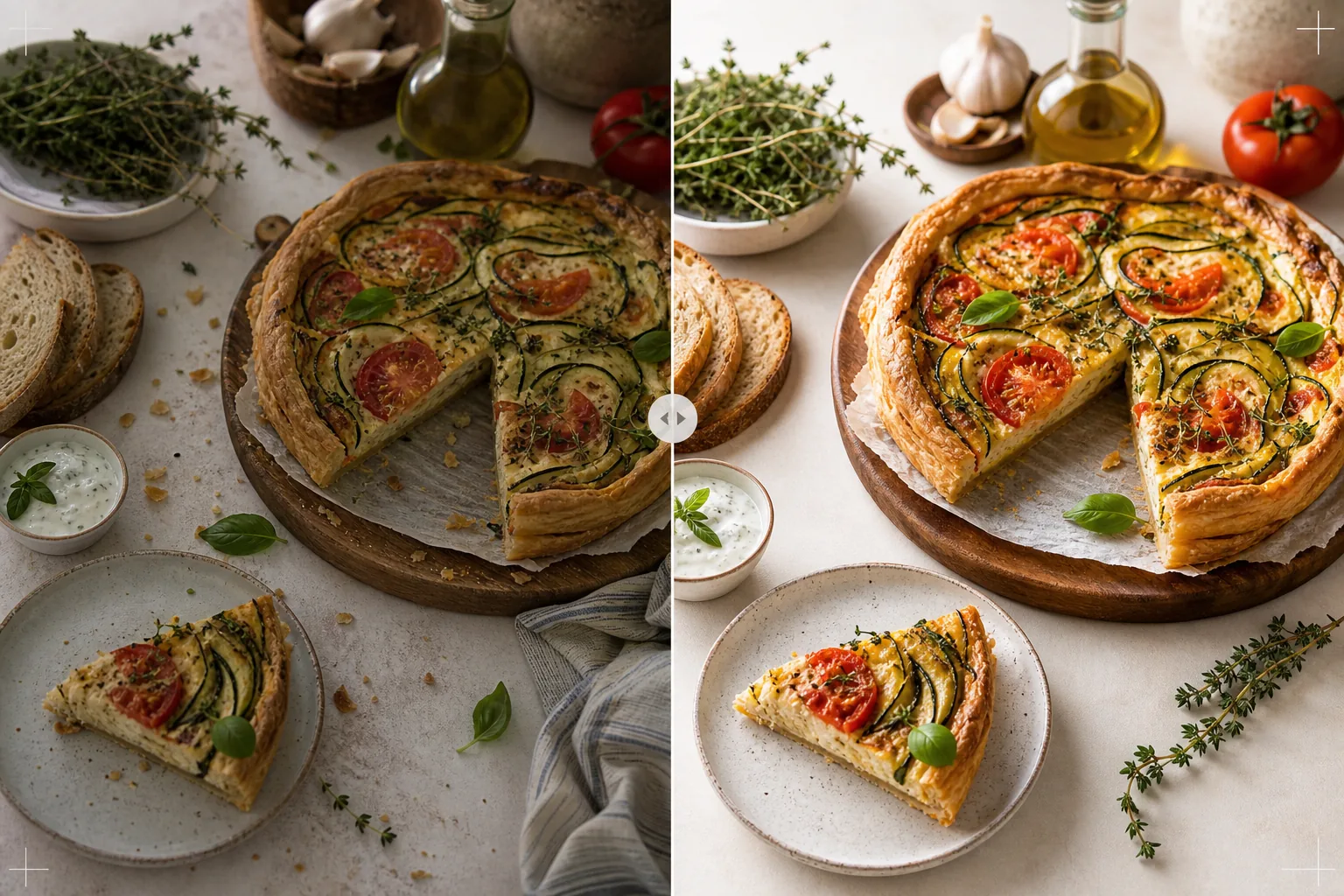
Ce que fait ce modèle
Transforme les photos de recettes prises dans une cuisine domestique en images dignes de livres de cuisine publiés et de blogs culinaires professionnels. La photographie de livre de cuisine exige des standards plus élevés que les réseaux sociaux : les couleurs doivent être fidèles à l'impression (pas seulement attrayantes à l'écran), les textures doivent être suffisamment nettes pour une impression à 300 DPI en grand format, et les scènes mises en scène doivent paraître intentionnelles sans désordre visible. AI Enhance applique une correction des couleurs calibrée pour l'impression qui garantit que les couleurs des ingrédients se reproduisent fidèlement sur le papier, et pas seulement à l'écran. Magic Eraser supprime le désordre en arrière-plan, les ustensiles égarés, la vaisselle sale visible dans la scène et les imperfections de la mise en scène culinaire qui deviennent plus évidentes à la résolution d'impression. Le résultat donne l'impression d'avoir été photographié par un photographe de livre de cuisine fort de plusieurs années d'expérience en stylisme culinaire.
Paramètres du modèle
| Profil colorimétrique | Adobe RGB pour l'impression ou sRGB pour le numérique (au choix) |
| Texture des aliments | Accentuation des détails haute fréquence pour le croustillant, la mie et le glaçage |
| Nettoyage de la scène | Supprimer les ustensiles égarés, les miettes et le désordre en arrière-plan |
| Précision des couleurs | Calibrée pour l'impression (verts, rouges et bruns fidèles sur le papier) |
| Résolution de sortie | 6000px sur le bord long (300 DPI pour une double page de livre de cuisine) |
Comment utiliser ce modèle
Téléchargez votre photo de recette
Téléchargez la photo de recette mise en scène : vue de dessus à plat, angle à 45 degrés ou gros plan détaillé du plat fini. Incluez des accessoires comme des ingrédients, des ustensiles et des textiles qui font partie de la composition souhaitée. Le modèle supprime les éléments indésirables tout en préservant la mise en scène intentionnelle.
Amélioration des couleurs et des textures
AI Enhance corrige la température de couleur pour une précision d'impression et accentue les textures des aliments : le craquant d'une croûte de pain, le brillant d'une ganache au chocolat, les couches distinctes d'une coupe transversale. Le calibrage des couleurs garantit que les verts, les rouges et les bruns dorés qui paraissent fidèles à l'écran se reproduiront aussi fidèlement une fois imprimés sur papier.
Affinage de la scène
Magic Eraser supprime les éléments qui ne servent pas la composition : miettes égarées hors de la zone prévue, coin d'un torchon dépassant du bord, désordre en arrière-plan visible à la périphérie du cadre, ou taches sur les accessoires et les surfaces. La scène mise en scène est affinée pour paraître intentionnelle et soignée.
Exportez pour l'impression ou le numérique
Téléchargez en 6000px sur le bord long en Adobe RGB pour une impression de livre de cuisine à 300 DPI jusqu'à une double page, ou en sRGB pour une utilisation sur un blog culinaire ou un site de recettes. La haute résolution préserve suffisamment de détails pour que les lecteurs voient chaque feuille d'herbe, les textures des graines et la consistance des sauces à l'agrandissement d'impression.
Conseils de pro pour de meilleurs résultats
- ✓Photographiez à la lumière naturelle d'une fenêtre venant d'une seule direction, avec un réflecteur blanc du côté de l'ombre. Cela crée l'éclairage directionnel doux qui caractérise la photographie culinaire professionnelle. Le modèle peut corriger l'éclairage artificiel, mais la lumière naturelle produit dès le départ les couleurs des aliments les plus authentiques.
- ✓Dressez d'abord le plat principal et photographiez-le dans les cinq minutes, lorsque les textures et les couleurs sont à leur apogée. Photographiez ensuite les étapes du processus. Le modèle accentue les indices de fraîcheur comme la vapeur et l'humidité, mais ne peut pas restaurer un aliment resté trop longtemps à l'air libre.
- ✓Utilisez un nombre impair d'accessoires (trois ingrédients, un ustensile, un textile) pour une composition visuellement la plus équilibrée. Le modèle nettoie la scène mais fonctionne dans le cadre de votre composition existante : un point de départ bien composé produit une image finale plus professionnelle.
- ✓Pour les coupes transversales (gâteaux coupés, pains tranchés, pâtisseries fendues), utilisez un couteau très tranchant et coupez juste avant de photographier. Le modèle accentue la définition des couches et la texture de la mie, mais ne peut pas corriger une coupe irrégulière qui masque la structure interne.
Outils
Questions fréquentes
Cela peut-il remplacer un photographe culinaire professionnel ?
+
Le modèle porte les photos de recettes prises à la maison à un niveau adapté aux livres de cuisine autoédités, aux blogs culinaires et aux fiches de recettes. Pour les livres de cuisine des grands éditeurs aux standards visuels stricts, un photographe et un styliste professionnels produisent de meilleurs résultats, mais le modèle est une excellente option pour les auteurs indépendants et les créateurs de contenu.
Qu'en est-il des photos d'étapes du processus ?
+
Les photos de processus (mélanger, hacher, verser) bénéficient de la même correction des couleurs et du même nettoyage. Le modèle gère le flou de mouvement typique des photos d'action en accentuant sélectivement les aliments tout en conservant le flou naturel des mains et des ustensiles en mouvement.
Comment fonctionne le calibrage des couleurs pour l'impression ?
+
La sortie Adobe RGB contient une gamme de couleurs plus large que le sRGB, préservant les subtiles différences de couleur dans les verts et les rouges qui sont perdues lors de la conversion sRGB. Imprimées sur une presse calibrée, ces couleurs se reproduisent plus fidèlement. Pour l'impression à domicile, la sortie sRGB produit de meilleurs résultats sur la plupart des imprimantes grand public.
Des photos de recettes dignes d'un livre de cuisine publié
Téléchargez vos photos culinaires et obtenez des images de qualité d'impression, fidèles en couleurs, avec des textures nettes et des compositions affinées.
Essayez gratuitementRelated templates
More food templates for your workflow.
Créez des photos appétissantes de menus de livraison de nourriture avec une amélioration de l'éclat des couleurs, des arrière-plans épurés, des effets de vapeur et de fraîcheur et des dimensions optimisées pour la plate-forme.
Créez des graphiques de tableau de menu avec la suppression de l'arrière-plan des photos de plats, un style cohérent et des exportations prêtes à être mises en page pour les affichages numériques, les menus imprimés et les plateformes de livraison tierces.