
Maquette de couverture de livre
Créez des maquettes photoréalistes de votre couverture de livre placée dans des scènes de style de vie, sur des étagères ou présentée comme un rendu 3D autonome avec des ombres naturelles. Ce modèle prend votre illustration de couverture à plat et la transforme en images promotionnelles pour les annonces sur les réseaux sociaux, les sites web d'auteurs, le contenu Amazon A+ et les dossiers de presse — sans aucun logiciel 3D.
Essayer ce modèle gratuitementDesign template preview
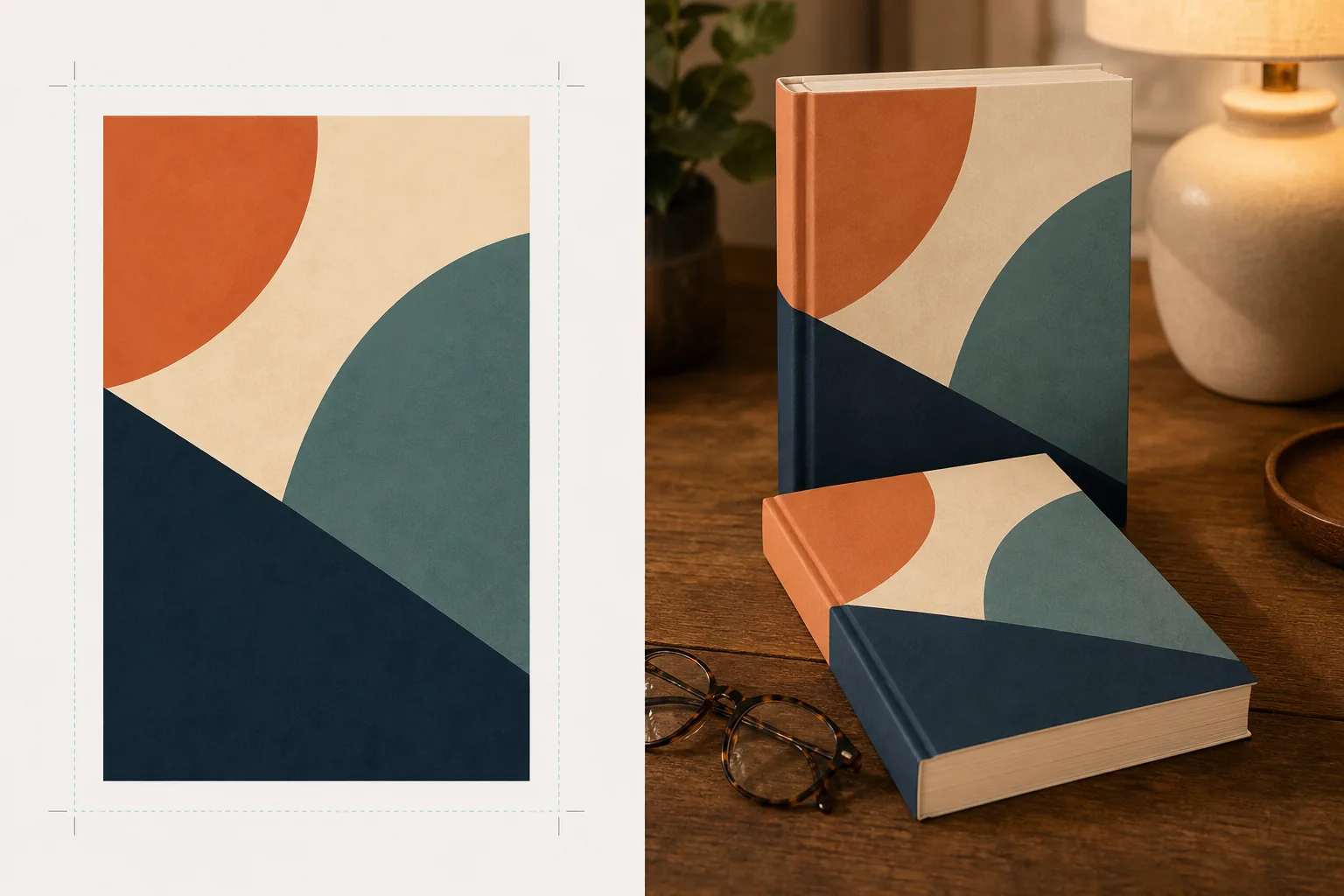
Ce que fait ce modèle
Transforme les designs de couverture à plat en images de maquette promotionnelle qui ressemblent à de la photographie de produit professionnelle. Téléchargez votre illustration de couverture sous forme de JPEG ou PNG à plat et le modèle la mappe sur une forme de livre réaliste avec une perspective correcte, une épaisseur de pages et une courbure du dos. La maquette est ensuite placée dans des scènes de style de vie — une table basse avec des lunettes de lecture, une étagère de librairie, une table de chevet à la lumière chaude d'une lampe — ou rendue comme un produit autonome sur un fond épuré avec une ombre naturelle. Pour les séries ou les promotions de plusieurs livres, plusieurs couvertures peuvent être disposées en rangée ou empilées avec une perspective cohérente. La direction de l'éclairage et des ombres correspond à l'environnement de la scène, de sorte que le livre semble physiquement présent plutôt que composité.
Paramètres du modèle
| Format du livre | Broché, relié ou relié avec jaquette |
| Apparence du nombre de pages | Mince (100 p.), moyen (250 p.), épais (400 p.+) — affecte la largeur du dos et de la tranche |
| Type de scène | Autonome avec ombre, table basse, étagère, table de chevet ou tenu en main |
| Angle de perspective | De face, trois quarts ou légère inclinaison en plongée |
| Résolution de sortie | 3000×3000px (1:1 réseaux sociaux) ou 2400×1600px (bannière 16:10) |
Comment utiliser ce modèle
Téléchargez votre illustration de couverture
Téléchargez votre couverture de livre sous forme d'image à plat — au minimum la première de couverture. Pour les maquettes de livres reliés avec jaquette, vous pouvez également télécharger le dos et la quatrième de couverture. Le modèle accepte les JPEG, PNG et PDF. Les dimensions de la couverture sont détectées automatiquement et les proportions du livre sont ajustées en conséquence.
Sélectionnez le format du livre et la scène
Choisissez entre les formats broché, relié ou avec jaquette. Sélectionnez la plage du nombre de pages afin que la largeur du dos et de la tranche corresponde à votre livre réel. Choisissez ensuite une scène : autonome avec ombre, décor de style de vie ou couleur de fond personnalisée.
Ajustez la perspective et effectuez le rendu
Choisissez l'angle de vue — de face pour la netteté des vignettes, trois quarts pour la profondeur visuelle, ou inclinaison en plongée pour les publications à plat sur les réseaux sociaux. Le modèle effectue le rendu de la maquette avec un éclairage approprié, une texture de tranche et une direction d'ombre correspondant à la scène sélectionnée.
Téléchargez les images promotionnelles
Exportez en 1:1 pour Instagram, en 16:9 pour les en-têtes Twitter/Facebook, ou aux dimensions personnalisées pour la section héros de votre site web. Chaque export inclut la maquette du livre avec une option de fond transparent afin que vous puissiez l'intégrer dans vos propres mises en page personnalisées.
Conseils de pro pour de meilleurs résultats
- ✓Téléchargez votre couverture à la plus haute résolution disponible. La transformation en perspective 3D réduit la résolution apparente sur la face fuyante du livre, donc partir d'une source haute résolution garantit que le texte sur le dos et la couverture reste lisible.
- ✓Pour le contenu Amazon A+, utilisez la maquette autonome sur fond blanc. Cela donne au livre un aspect de photographie de produit haut de gamme qui le distingue de l'image de couverture à plat déjà affichée sur la page de l'annonce.
- ✓Créez une présentation de série en téléchargeant toutes les couvertures d'une série. Le modèle les dispose en rangée avec une perspective et un espacement cohérents, ce qui a un impact visuel bien plus fort pour la promotion d'une série que d'afficher les couvertures individuellement.
Outils
Questions fréquentes
Puis-je créer une maquette d'une liseuse ou d'une tablette affichant ma couverture ?
+
Le modèle se concentre sur les maquettes de livres physiques — formats broché et relié. Pour les maquettes d'affichage sur liseuse ou tablette, vous composeriez séparément la couverture à plat sur une photo d'appareil.
Le texte du dos sera-t-il lisible ?
+
Oui, à condition que le fichier de couverture source comprenne l'illustration du dos. Le modèle enroule l'illustration du dos autour de la tranche du livre avec une perspective qui correspond à l'angle de la première de couverture. Pour les livres minces (moins de 150 pages), le dos est étroit et le petit texte peut devenir difficile à lire à de petites tailles d'affichage.
Puis-je utiliser ceci pour la promotion d'un livre audio ou d'un podcast ?
+
Oui. Le format de couverture carré utilisé pour les livres audio et les podcasts peut être rendu sous forme de maquette de style boîtier de CD ou de carré autonome avec une ombre dimensionnelle, lui conférant une présence physique que l'illustration de couverture à plat n'a pas.
Transformez votre illustration de couverture en images promotionnelles époustouflantes
Téléchargez une illustration de couverture à plat et obtenez des maquettes de livre photoréalistes pour les réseaux sociaux, les sites web d'auteurs et les campagnes marketing.
Essayer gratuitementRelated templates
More design templates for your workflow.
Créez des logos PNG transparents avec un raffinement net et une exportation multi-tailles pour les icônes du Web, de l'impression, des médias sociaux et des applications. Fonctionne sur des photos de logos imprimés et de fichiers numériques.
Concevez une pochette de podcast conforme aux spécifications Apple Podcasts et Spotify avec remplacement de l'arrière-plan, isolation du portrait de l'hôte et mises en page prêtes pour la typographie.
Préparez des œuvres d'art et des photographies numériques pour une impression grand format grâce à la mise à l'échelle de l'IA, à l'extension du canevas, à l'épreuvage aux couleurs précises et à l'exportation de fichiers prêts à imprimer.
Préparez des photos à soumettre à l'agence avec suppression de la marque, modification de la conformité des autorisations de modèle, contrôles de qualité technique et exigences de format spécifiques à l'agence.