
Préparation d'impression d'art
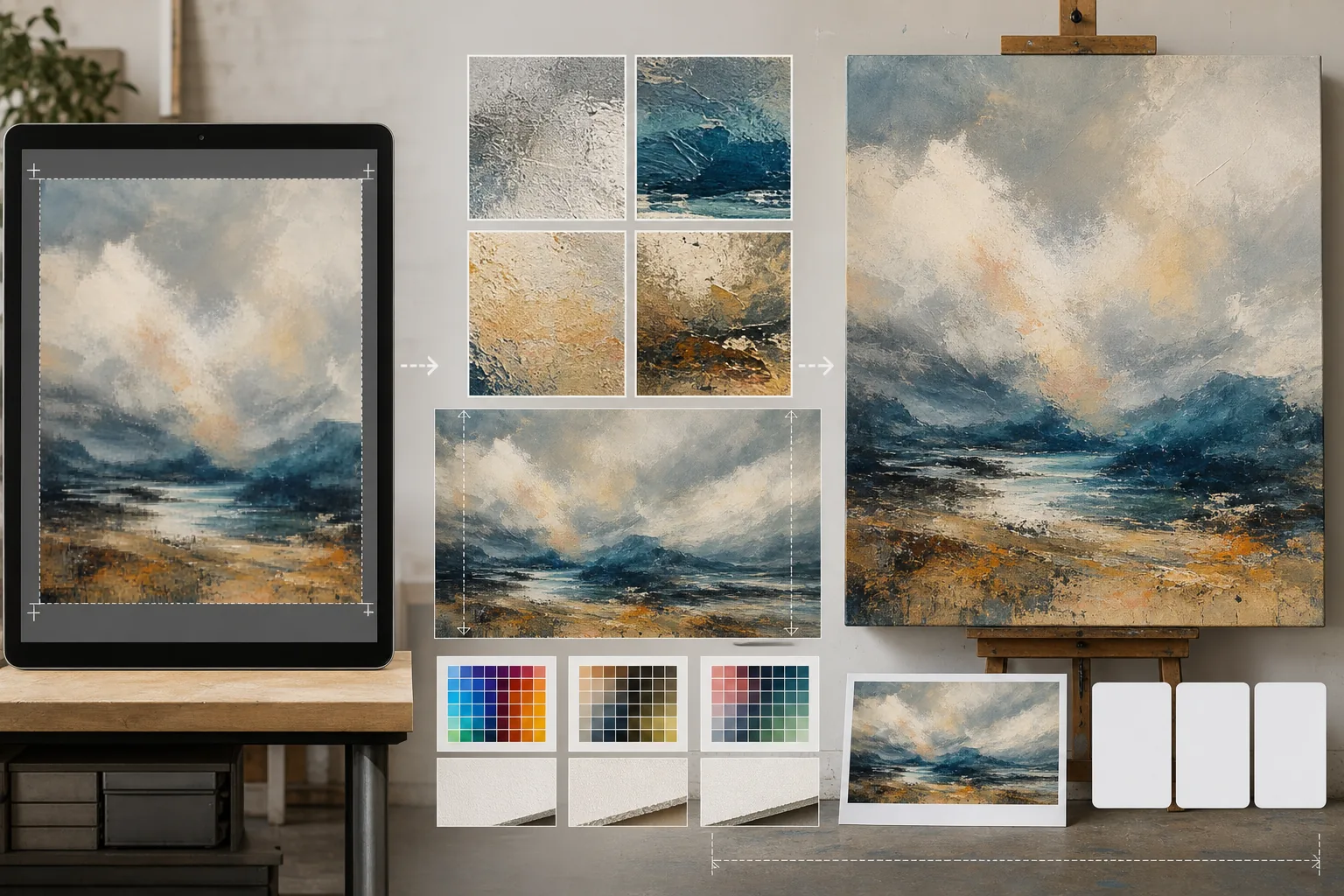
Préparez vos œuvres numériques, photographies et illustrations pour des impressions de galerie grand format, des toiles tendues sur châssis et la production d'affiches. Ce modèle utilise AI Enhance pour agrandir les images à des résolutions prêtes à imprimer sans perte de qualité, et AI Expand pour étendre les bords de la toile et créer les marges de débordement — tout en préservant la précision des couleurs pour une impression professionnelle.
Essayer ce modèle gratuitementDesign template preview
Ce que fait ce modèle
Comble l'écart entre les fichiers numériques en résolution écran et les exigences de résolution élevées de la production d'impression physique. AI Enhance agrandit les images de 2x à 4x tout en préservant les détails fins — les coups de pinceau des peintures, la structure du grain des photographies, le tracé des illustrations — sans introduire le flou ni les artefacts typiques d'une simple interpolation. AI Expand étend les bords de la toile en générant des prolongements homogènes de l'œuvre, fournissant la marge supplémentaire nécessaire aux toiles tendues sur châssis, là où l'image se replie autour du cadre. Les profils colorimétriques sont convertis en CMJN ou Adobe RGB avec une épreuve à l'écran qui montre le rendu final de l'impression sur papier, toile ou support métallique.
Paramètres du modèle
| Facteur d'agrandissement | 2x, 3x ou 4x (jusqu'à 16000px sur le grand côté pour les impressions grand format) |
| Extension de la toile | Marge de 1,5 pouce, 2 pouces ou personnalisée pour le débordement des toiles tendues |
| Préservation des détails | Adaptative : coups de pinceau pour les peintures, grain pour les photos, traits pour les illustrations |
| Profil colorimétrique | sRGB (écran), Adobe RGB (tirage photo) ou CMJN (presse commerciale) |
| Format de sortie | TIFF (impression sans perte), PNG (transparence) ou JPEG (aperçu web) |
Comment utiliser ce modèle
Téléchargez votre œuvre
Téléchargez le fichier numérique — peinture, photographie, illustration ou techniques mixtes. Le modèle accepte les fichiers JPEG, PNG, TIFF et PSD. Pour de meilleurs résultats d'agrandissement, partez de la version la plus haute résolution dont vous disposez, même si elle est inférieure aux exigences d'impression.
Agrandir à la résolution d'impression
Choisissez le facteur d'agrandissement selon la taille d'impression visée. Pour une impression de 24×36 pouces à 300 DPI, il vous faut 7200×10800 pixels. L'IA agrandit tout en préservant le caractère de l'original — les coups de pinceau restent des coups de pinceau, le grain du film reste du grain, le pixel art conserve son charme pixélisé.
Étendre la toile pour le montage sur châssis
Si vous imprimez sur toile tendue sur châssis, AI Expand génère des prolongements homogènes de l'œuvre sur les quatre bords. La marge étendue correspond au style, à la palette de couleurs et à la texture de l'original, de sorte que les bords repliés paraissent intentionnels plutôt qu'étirés ou reflétés.
Épreuvez et exportez
Vérifiez l'épreuve à l'écran qui montre le rendu de l'image dans votre profil colorimétrique cible — CMJN pour l'impression offset ou giclée, Adobe RGB pour le jet d'encre beaux-arts. Exportez en TIFF pour l'imprimeur ou en PNG pour des retouches ultérieures. Le fichier contient des données de profil ICC intégrées pour une reproduction fidèle des couleurs.
Conseils de pro pour de meilleurs résultats
- ✓Commencez toujours par le fichier original à sa résolution native. Agrandir un fichier déjà compressé et sous-échantillonné pour l'affichage web introduit des artefacts qui s'accumulent à chaque génération de traitement.
- ✓Pour les toiles tendues sur châssis, demandez une marge d'extension de 2 pouces même si le châssis ne fait que 1,5 pouce de profondeur. Le demi-pouce supplémentaire offre une tolérance lors de la tension de la toile, où un léger glissement pendant le montage peut exposer le bord de l'image.
- ✓Demandez une épreuve physique à plus petite taille avant de vous engager dans une production grand format. Les écrans et les tirages papier rendent les couleurs différemment, et une épreuve 5×7 coûte une fraction d'une toile 30×40 tout en révélant les éventuelles dérives de couleur à corriger.
Outils
Questions fréquentes
Quelle taille d'impression puis-je obtenir à partir d'une photo de téléphone ?
+
Une photo de téléphone typique de 12 mégapixels (4000×3000px) s'imprime bien en 13×10 pouces à 300 DPI. Avec un agrandissement IA de 2x, cela double pour atteindre 26×20 pouces. Avec un agrandissement de 4x, une photo de téléphone peut produire une impression nette de 40×30 pouces — adaptée à l'exposition en galerie.
L'agrandissement va-t-il modifier l'apparence de mon œuvre ?
+
L'IA adapte sa méthode d'agrandissement au type de contenu. Les peintures conservent leurs coups de pinceau et leur texture visibles. Les photographies maintiennent leur structure de grain et leur netteté caractéristiques. Les illustrations préservent la régularité de l'épaisseur des traits. L'objectif est une version plus grande qui ressemble à l'original, et non une réinterprétation.
Puis-je étendre un seul côté de la toile ?
+
Oui. Vous pouvez préciser quels bords étendre et de combien. C'est utile lorsque vous souhaitez décaler la composition au sein d'une impression — par exemple, ajouter du ciel au-dessus d'un paysage pour dégager de l'espace pour un titre, ou ajouter du premier plan pour équilibrer une composition trop axée sur l'horizon.
Imprimez votre art dans n'importe quelle taille sans perte de qualité
Téléchargez votre œuvre numérique et obtenez des fichiers prêts à imprimer grâce à l'agrandissement IA, à l'extension de la toile et à l'épreuvage colorimétrique précis.
Essayer gratuitementRelated templates
More design templates for your workflow.
Créez des logos PNG transparents avec un raffinement net et une exportation multi-tailles pour les icônes du Web, de l'impression, des médias sociaux et des applications. Fonctionne sur des photos de logos imprimés et de fichiers numériques.
Générez des maquettes réalistes de couverture de livre avec une perspective 3D, un rendu des ombres et des arrière-plans de style de vie pour le marketing des auteurs et les promotions des éditeurs.
Concevez une pochette de podcast conforme aux spécifications Apple Podcasts et Spotify avec remplacement de l'arrière-plan, isolation du portrait de l'hôte et mises en page prêtes pour la typographie.
Préparez des photos à soumettre à l'agence avec suppression de la marque, modification de la conformité des autorisations de modèle, contrôles de qualité technique et exigences de format spécifiques à l'agence.