
Mejora de fotos de boda
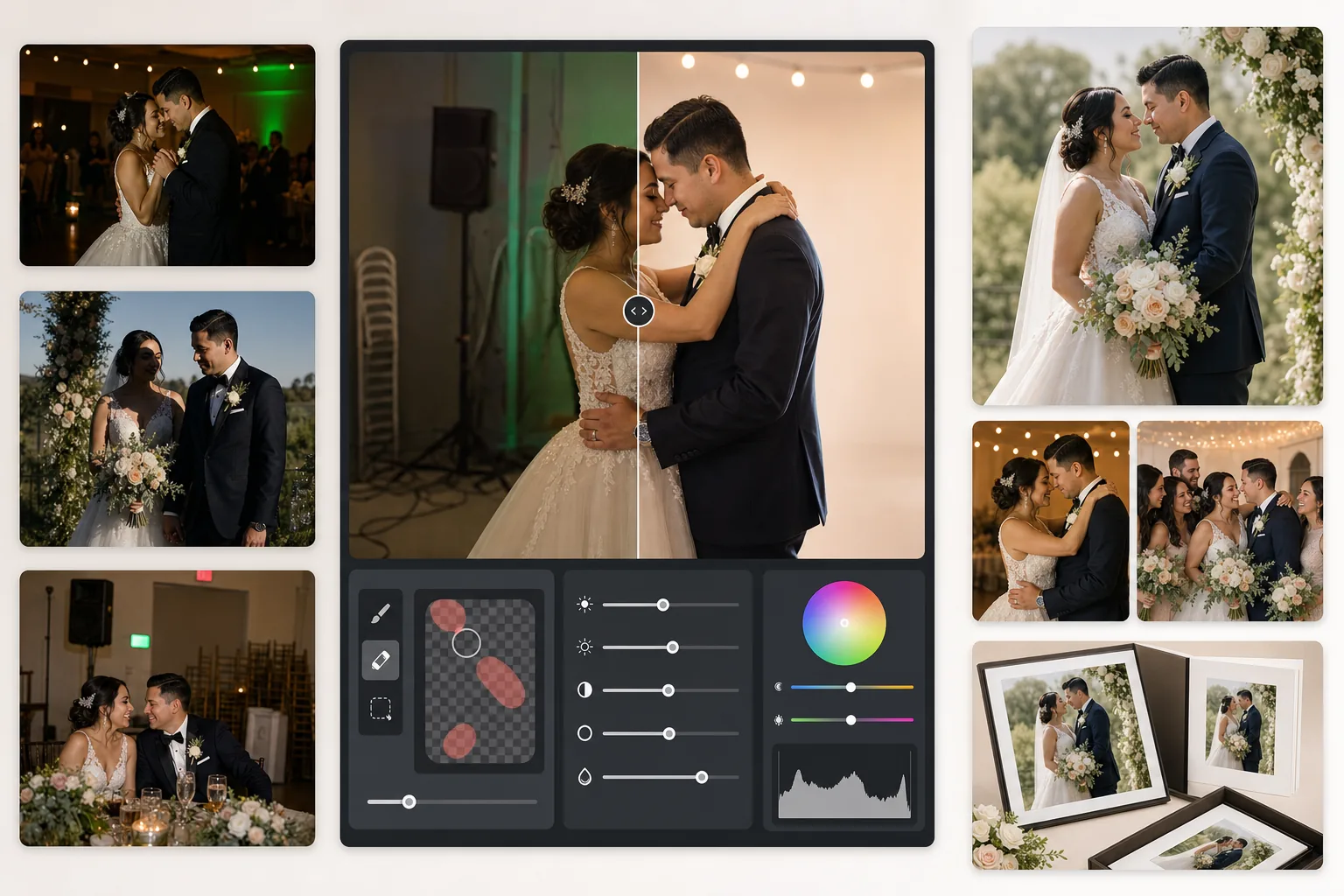
Rescate fotos de recepción subexpuestas, elimine fondos que distraen y refine los tonos de piel para obtener imágenes de boda dignas de un álbum. Esta plantilla está diseñada para las difíciles condiciones de iluminación de ceremonias y recepciones: lugares con poca luz, dominantes de color mezcladas de las luces del DJ y fondos recargados que desvían la atención de la pareja.
Probar esta plantilla gratisEvents template preview
Qué hace esta plantilla
Corrige los problemas más comunes en la fotografía de bodas: tomas de recepción subexpuestas, dominantes naranjas de tungsteno o verdes de fluorescentes, sombras duras del flash y elementos de fondo que distraen, como señales de salida, sillas apiladas y equipo de catering. AI Enhance recupera detalle de las fotos oscuras de la pista de baile y equilibra la iluminación mixta, mientras que Magic Eraser elimina objetos no deseados sin dejar rastro. Los tonos de piel se refinan para que luzcan naturales y cálidos sin un suavizado excesivo.
Ajustes de la plantilla
| Recuperación de exposición | Aclarado de sombras de +1,5 EV con preservación de altas luces |
| Balance de blancos | Corrección automática de luz mixta (tungsteno/fluorescente/luz de día) |
| Modo de tono de piel | Calidez natural (+5 calidez, +3 suavizado, detalle preservado) |
| Resolución de salida | 4000px en el lado largo (lista para imprimir a 300 DPI hasta 13×19) |
| Perfil de color | Adobe RGB (gama más amplia para impresión profesional) |
| Reducción de ruido | Adaptativa de ISO alto (preserva el detalle en las sombras aclaradas) |
Cómo usar esta plantilla
Suba sus fotos de boda
Suba tomas de recepción, imágenes de la ceremonia o fotos tomadas por los invitados con el teléfono. La plantilla gestiona de todo, desde JPEG exportados de RAW de una DSLR profesional hasta fotos comprimidas de teléfono: la IA adapta la intensidad de la mejora según la calidad de origen.
Corrija la iluminación y el color
AI Enhance aclara las escenas oscuras de la recepción, neutraliza las dominantes naranja-verde de la iluminación mixta del lugar y equilibra los primeros planos iluminados con flash con los fondos de luz ambiental. Los tonos de piel se desplazan hacia una calidez natural sin afectar los blancos del vestido ni los colores de la decoración.
Elimine las distracciones
Magic Eraser elimina señales de salida, extintores, sillas apiladas, carritos de catering, cables de corriente en el suelo e invitados que se cuelan en el fondo. La IA reconstruye el patrón del fondo de forma natural detrás de los objetos eliminados.
Exporte para álbumes e impresiones
Descargue a 4000px en el lado largo en Adobe RGB para impresión en laboratorio fotográfico profesional, o en sRGB para compartir digitalmente y galerías en línea. La salida está dimensionada para impresiones de hasta 13×19 pulgadas a 300 DPI.
Consejos profesionales para mejores resultados
- ✓Para tomas oscuras de la pista de baile, la plantilla puede recuperar aproximadamente 1,5 pasos de detalle de sombras. Si la foto original está casi completamente negra, la mejora puede introducir ruido: empiece con fotos en las que al menos pueda distinguir débilmente a los sujetos.
- ✓La corrección del tono de piel está calibrada para la calidez de la fotografía de bodas: ligeramente más cálida que el neutro, lo que favorece a la mayoría de los tonos de piel con iluminación mixta. En fotos de ceremonia al aire libre que ya tienen buena luz natural, la corrección es sutil.
- ✓Al eliminar objetos del fondo, trabaje una zona a la vez para obtener los resultados más naturales. Las señales de salida, los rociadores y los enchufes de pared son lo bastante pequeños para una eliminación limpia en una sola pasada. Los objetos más grandes, como las sillas apiladas, conviene eliminarlos por secciones.
- ✓Procese primero los retratos de la pareja, luego las fotos de grupo y después las espontáneas. Esto le permite establecer una base de gradación de color coherente en las fotos más importantes antes de pasar a las imágenes secundarias.
Herramientas
Preguntas frecuentes
¿Puede arreglar fotos de recepción borrosas?
+
AI Enhance puede enfocar una ligera falta de nitidez por velocidades de obturación lentas y recuperar un detalle de sombras significativo, pero no puede corregir un desenfoque de movimiento severo en el que los sujetos aparecen visiblemente arrastrados. Las fotos con ligero desenfoque por pulso o leve falta de enfoque mejorarán sustancialmente.
¿El vestido blanco de la novia perderá detalle?
+
El algoritmo de mapeo tonal protege específicamente el detalle de las altas luces en los blancos. La textura del vestido, los patrones de encaje y los pliegues de la tela se conservan incluso al aclarar las sombras en la misma imagen. El resultado mantiene un rango completo, desde los blancos brillantes hasta las sombras profundas.
¿Es suficiente para álbumes impresos?
+
Sí. La salida de 4000px a 300 DPI admite impresiones de hasta 13×19 pulgadas. El perfil de color Adobe RGB conserva la gama más amplia que usan los laboratorios fotográficos profesionales. Para páginas de álbum estándar de 8×10, la resolución supera con creces lo necesario para impresiones nítidas.
Convierta cada foto de boda en una imagen digna de un álbum
Suba fotos de recepción y ceremonia y obtenga en segundos imágenes mejoradas de forma profesional y listas para imprimir. Funciona tanto con fotos de cámara profesional como de teléfono.
Pruébelo gratisRelated templates
More events templates for your workflow.