
Aclarado de fotos de eventos
Recupera detalles de fotos tomadas en lugares oscuros durante conciertos, galas, fiestas de cumpleaños y eventos corporativos. Esta plantilla eleva la exposición hasta +2 EV, corrige las sombras duras del flash, elimina los ojos rojos y realza el ambiente de la escena original para que tus fotos de eventos luzcan tan vibrantes como se sintió el momento.
Prueba esta plantilla gratisEvents template preview
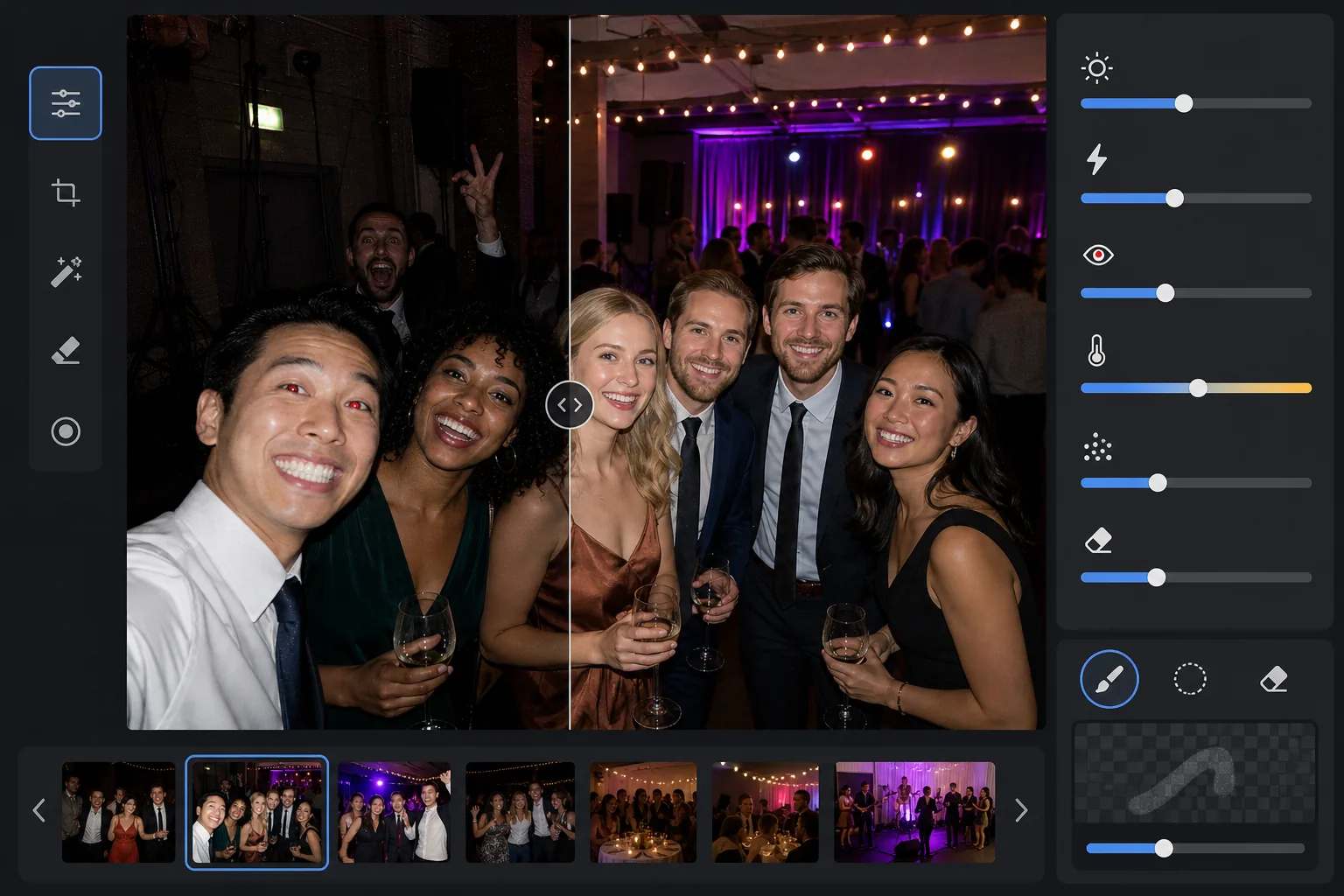
Qué hace esta plantilla
Rescata fotos de eventos tomadas en entornos difíciles con poca luz: salones de banquetes con luz tenue, salas de conciertos con iluminación de escenario de colores, fiestas nocturnas al aire libre y salas de juegos en el sótano. AI Enhance recupera hasta dos pasos de detalle en las sombras conservando el ambiente de la iluminación de colores y las decoraciones. Los defectos del flash, como las sombras duras en primer plano, los ojos rojos y los rostros sobreexpuestos, se corrigen automáticamente. Magic Eraser elimina a las personas que se cuelan en la foto, los carteles de salida, el equipo apilado y otras distracciones comunes en los eventos.
Ajustes de la plantilla
| Elevación de la exposición | Recuperación adaptativa de sombras de +2,0 EV con preservación del ambiente |
| Corrección del flash | Suavizado de sombras en primer plano, atenuación de altas luces en piel iluminada por flash |
| Eliminación de ojos rojos | Detección automática y reconstrucción del color del iris |
| Balance de blancos | Adaptativo de fuentes mixtas (luces de DJ, tungsteno, fluorescente, velas) |
| Modo ambiente | Realce cálido del ambiente (+8 de calidez, +5 de intensidad en el fondo) |
Cómo usar esta plantilla
Sube fotos del evento
Sube fotos de cualquier evento: conciertos, bodas, fiestas de cumpleaños, galas corporativas o reuniones en el patio. La plantilla detecta automáticamente el entorno de iluminación y ajusta la intensidad de la mejora según lo subexpuesta que esté la original.
Recupera la exposición y corrige el flash
AI Enhance eleva las zonas de sombra hasta +2 EV, revelando rostros y detalles que se perdían en la oscuridad. Las altas luces quemadas por el flash en los sujetos en primer plano se atenúan para recuperar la textura de la piel, y las sombras proyectadas duras detrás de los sujetos iluminados por el flash se suavizan para integrarse de forma natural.
Elimina los ojos rojos y las distracciones
Los ojos rojos por el flash directo se detectan automáticamente y se sustituyen por un color de iris natural. Magic Eraser elimina a los desconocidos que se cuelan, el equipo visible como las pilas de altavoces y los cables, los carteles de salida y demás desorden que resta valor al momento.
Exporta las fotos mejoradas
Descarga las fotos de eventos aclaradas en la resolución original para compartirlas en redes sociales, imprimirlas o archivarlas. El resultado mantiene el ambiente de la escena original —cálido resplandor de velas, coloridas luces de escenario o lucecitas titilantes— a la vez que hace claramente visibles los rostros y los detalles.
Consejos de experto para mejores resultados
- ✓La recuperación de +2 EV funciona mejor en fotos donde los sujetos son al menos tenuemente visibles en la original. Si la foto está completamente negra salvo por unas pocas fuentes de luz, las sombras recuperadas contendrán bastante ruido. Empieza con fotos en las que puedas distinguir siluetas.
- ✓En fotos de conciertos con una espectacular iluminación de escenario de colores, la corrección del balance de blancos conserva el matiz de color artístico en lugar de neutralizarlo. Los baños de escenario azules y magenta se mantienen mientras se corrigen los tonos de piel de los sujetos cercanos al escenario.
- ✓Cuando proceses un lote de fotos del mismo evento, haz primero una prueba en una foto oscura representativa y en una foto con flash. Esto te permite verificar que el nivel de brillo y la calidez sean los adecuados antes de aplicarlo a todo el lote.
- ✓La corrección de ojos rojos funciona tanto en ojos humanos como de mascotas. Para fotos de mascotas en eventos, la IA gestiona el brillo verde o amarillo de los ojos que producen los animales con el flash de la cámara, sustituyéndolo por una pupila oscura natural.
Herramientas
Preguntas frecuentes
¿Puede arreglar fotos completamente negras?
+
La plantilla recupera hasta +2 EV de detalle en las sombras, lo que equivale aproximadamente a hacer una foto cuatro veces más brillante. Si la foto original muestra al menos contornos tenues de tus sujetos, la recuperación producirá resultados utilizables. Los fotogramas completamente negros en los que solo se ven fuentes de luz puntuales no suelen contener suficientes datos del sensor para recuperar detalles significativos.
¿El aclarado hará que las fotos se vean granuladas?
+
Algo de ruido es inevitable al elevar las sombras profundas, pero la reducción de ruido adaptativa se centra específicamente en las zonas elevadas. El detalle fino en las partes bien iluminadas del encuadre se conserva mientras se suaviza el ruido en las sombras recuperadas. El resultado es notablemente mejor que simplemente aumentar el brillo en un editor de fotos básico.
¿Funciona en fotos de conciertos con iluminación de escenario?
+
Sí. La plantilla está diseñada para gestionar iluminación mixta y de colores. Los baños de escenario en azul, rojo, magenta y verde se conservan como elementos artísticos de la escena en lugar de tratarse como matices de color que corregir. Los rostros de los sujetos cercanos al escenario reciben un ajuste selectivo del balance de blancos mientras se mantiene el ambiente de la iluminación de fondo.
Haz que cada foto de evento valga la pena compartir
Sube fotos de eventos oscuras, quemadas por el flash o afectadas por ojos rojos y obtén resultados brillantes y de aspecto natural que capturan la energía del momento.
Pruébalo gratisRelated templates
More events templates for your workflow.