
Foto de menú de restaurante
Convierte las fotos de tus platos tomadas con el móvil en imágenes listas para tableros de menú y aplicaciones de entrega. Esta plantilla realza la intensidad del color de la comida, limpia los fondos de emplatado desordenados, aísla los platos para las miniaturas de las apps y exporta con las dimensiones exactas que requieren DoorDash, UberEats y Grubhub, sin necesidad de un fotógrafo de comida.
Prueba esta plantilla gratisFood & Beverage template preview
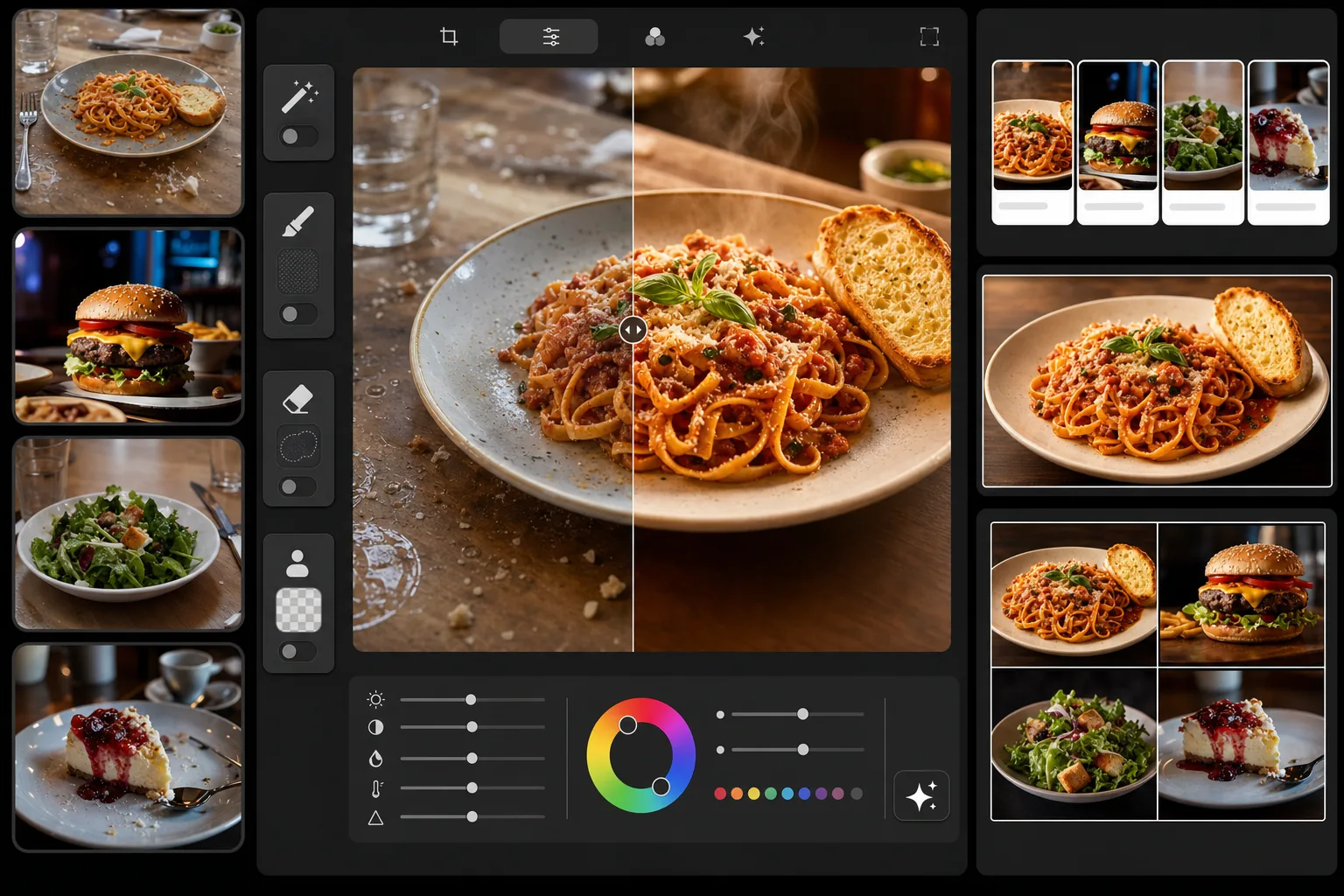
Qué hace esta plantilla
Transforma fotos de comida informales en imágenes profesionales con calidad de menú. La plantilla potencia los tonos cálidos y apetitosos que hacen efectiva la fotografía de comida: intensifica los rojos de las salsas, dora las cortezas del pan y hace que las verduras se vean frescas. Magic Eraser elimina los elementos desordenados de la mesa, las huellas dactilares en los platos y las migas sueltas. Background Eraser aísla los platos para obtener miniaturas limpias en las apps de entrega. El resultado se dimensiona para tableros de menú digitales, menús impresos y todas las grandes plataformas de entrega de comida.
Configuración de la plantilla
| Intensidad del color | Optimizada para comida (+15 % de saturación cálida, rojos/amarillos/verdes) |
| Tamaño de salida (apps de entrega) | 1200×800px (horizontal 3:2, estándar de DoorDash/UberEats) |
| Tamaño de salida (tablero de menú) | 1920×1080px (pantalla de menú digital 16:9) |
| Balance de blancos | Luz de día cálida 5200K (compensa la iluminación LED fría del restaurante) |
| Opción de fondo | Aislamiento limpio o superficie oscura (#2C2C2C) para un emplatado impactante |
| Formato de archivo | JPEG con calidad del 88 % (carga rápida en apps de entrega) |
Cómo usar esta plantilla
Fotografía tu plato
Toma la foto en un ángulo de 45 grados o directamente desde arriba. Usa la luz más brillante disponible: cerca de una ventana durante el día es lo ideal. Si es posible, apaga las luces cálidas del techo del restaurante, ya que añaden fuertes dominantes naranjas más difíciles de corregir que la luz natural.
Limpia la escena
Magic Eraser elimina el desorden de la mesa, las migas sueltas, las huellas dactilares en los platos, los aros de condensación y cualquier equipo de cocina visible al fondo. Para las miniaturas de las apps de entrega, Background Eraser aísla el plato por completo de la superficie de la mesa.
Realza los colores de la comida
AI Enhance aplica un etalonaje de color específico para comida: las salsas lucen más intensas, las cortezas del pan y la repostería adquieren un tono dorado cálido, las verduras se ven frescas y vibrantes y el queso desarrolla un brillo fundido apetitoso. La mejora está calibrada para verse apetitosa sin parecer artificialmente saturada.
Exporta para tu plataforma
Elige el ajuste preestablecido para apps de entrega (1200×800px para DoorDash, UberEats, Grubhub), el ajuste para tablero de menú digital (1920×1080px) o un tamaño personalizado para tu menú impreso. Cada exportación se comprime para una carga rápida en la plataforma de destino.
Consejos profesionales para obtener los mejores resultados
- ✓Fotografía los platos dentro de los 90 segundos posteriores al emplatado. El vapor, el brillo de la salsa y la integridad del hielo se degradan rápidamente. La plantilla puede realzar los colores, pero no puede devolver el hielo derretido ni la salsa absorbida.
- ✓Usa una toalla de papel ligeramente húmeda para limpiar el borde del plato antes de disparar. Magic Eraser puede eliminar las manchas de salsa, pero un borde limpio en la foto original ofrece el resultado más pulido.
- ✓Para las miniaturas de las apps de entrega, el ángulo cenital (vista plana) funciona mejor porque el encuadre cuadrado u horizontal muestra el plato completo. El ángulo de 45 grados es mejor para tableros de menú y menús impresos cuando quieres mostrar altura y capas.
- ✓Fotografía varios platos del menú sobre la misma superficie con la misma iluminación para que todo tu menú tenga un aspecto coherente. Las apps de entrega muestran todos tus platos en una cuadrícula, y la coherencia visual transmite profesionalismo a los clientes.
Herramientas
Preguntas frecuentes
¿Qué dimensiones requieren las apps de entrega?
+
DoorDash recomienda un mínimo de 1200×800px en horizontal (proporción 3:2). UberEats exige al menos 320×320px, pero recomienda 1200×800px para la mejor calidad de visualización. Grubhub usa un formato horizontal similar. El ajuste preestablecido para apps de entrega de la plantilla exporta a 1200×800px, lo que cumple o supera los requisitos de las tres plataformas.
¿La comida se verá mejorada de forma poco realista?
+
El etalonaje de color está calibrado específicamente para la fotografía de comida: realza las cualidades apetitosas naturales de los platos sin que se vean artificialmente saturados o de tonos neón. El resultado parece una foto de comida bien iluminada, no una publicación de Instagram con filtros.
¿Puedo usar la misma foto para mi tablero de menú y las apps de entrega?
+
La plantilla admite varios ajustes preestablecidos de exportación a partir de una sola imagen subida. Exporta a 1920×1080px para tu tablero de menú digital y a 1200×800px para las apps de entrega. El recorte se ajusta a cada formato manteniendo el plato centrado y bien encuadrado.
Haz que cada plato de tu menú luzca lo mejor posible
Sube las fotos de tu comida y obtén en segundos imágenes listas para apps de entrega y tableros de menú. No se necesita fotógrafo de comida ni habilidades de estilismo.
Pruébalo gratisRelated templates
More food & beverage templates for your workflow.