
Estilismo de fotografía de alimentos
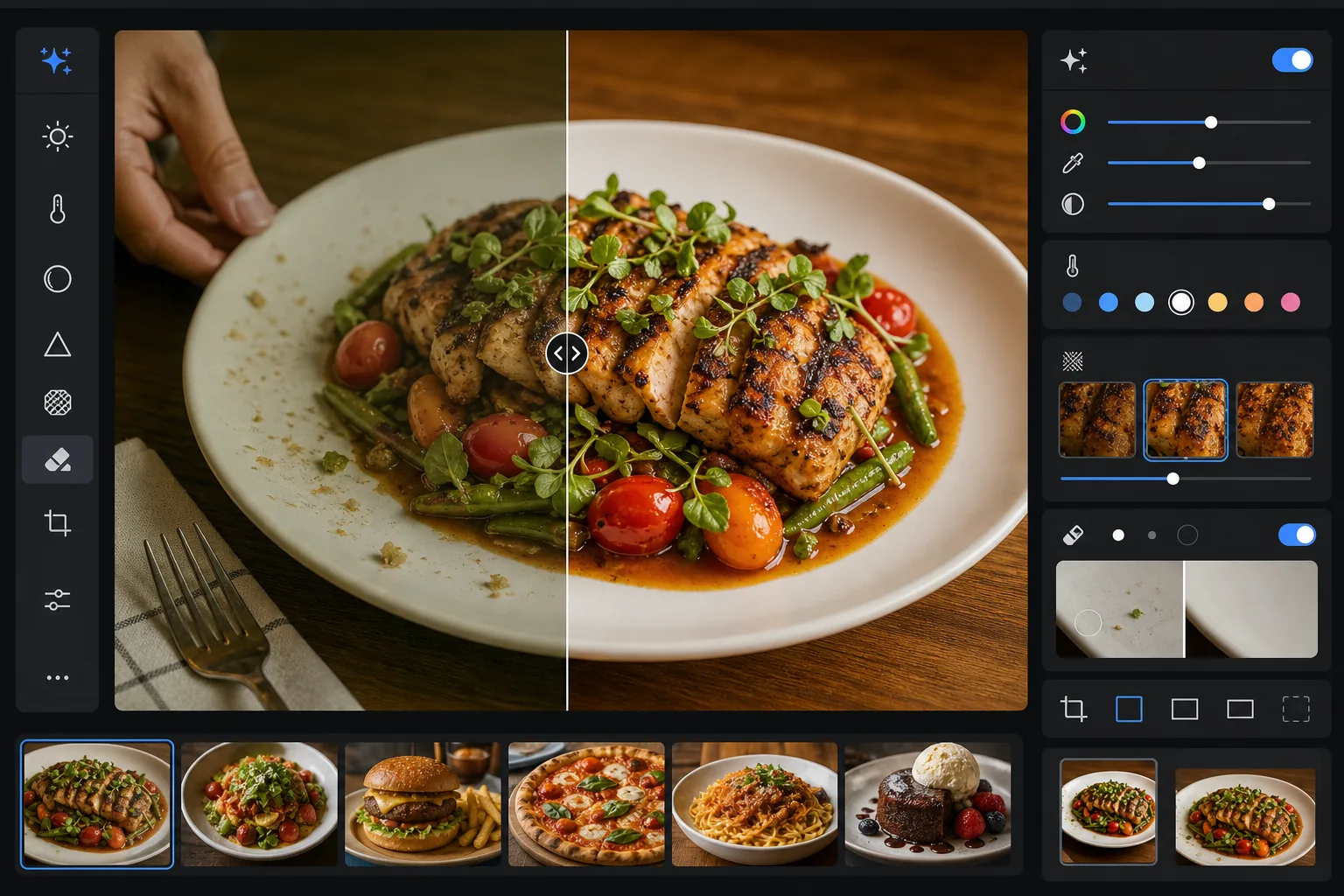
Haz que los platos se vean tan apetitosos en las fotos como en el plato. Esta plantilla realza la intensidad del color de salsas, verduras y proteínas, elimina utensilios extraviados, huellas en los platos y manos visibles, mejora las texturas de costras y guarniciones, y ajusta la imagen con tonos cálidos y apetecibles que funcionan bien en Instagram y en los tableros de menú.
Prueba esta plantilla gratisFood & Beverage template preview
Qué hace esta plantilla
Resuelve la brecha entre cómo se ve la comida en persona y cómo sale en las fotos. La iluminación de los restaurantes y la iluminación cenital suelen proyectar tintes amarillos o verdes que hacen que los ingredientes frescos se vean apagados. AI Enhance corrige el balance de blancos para que los verdes sean vibrantes, los rojos intensos y los blancos limpios, sin sobresaturar hasta el punto de parecer artificial. Magic Eraser elimina los elementos que distraen: un tenedor olvidado en el encuadre, la mano de un camarero en el borde, gotas de agua en el reborde del plato, migas en la superficie de la mesa. El enfoque selectivo resalta la textura de las superficies a la parrilla, las costras crujientes y las hierbas frescas que hacen que las fotos de comida se sientan táctiles.
Configuración de la plantilla
| Intensidad del color | +15 intensidad, +8 saturación (selectivo en rojos, verdes, amarillos) |
| Balance de blancos | Neutro optimizado para comida (elimina el tinte amarillo, conserva los tonos cálidos) |
| Enfoque de texturas | Sensible al detalle (realza costra, marcas de parrilla, detalle de hierbas) |
| Limpieza del plato | Detección automática de manchas, goteos y huellas en el reborde del plato |
| Nivel de calidez | +5 de calidez con curva de tonos estilo hora dorada |
| Salida | 1080×1080px (Instagram), 2400×1600px (menú/web) exportación doble |
Cómo usar esta plantilla
Sube tu foto de comida
Sube una foto del plato emplatado tomada desde arriba, en ángulo de 45 grados o de frente. La luz natural de una ventana ofrece el mejor punto de partida, pero la plantilla también maneja la iluminación fluorescente de restaurantes y las cálidas lámparas de mesa de tungsteno.
Realza el color y la textura
AI Enhance corrige la dominante de color, aumenta la intensidad de forma selectiva para que los verdes, rojos y tonos dorados resalten sin parecer neón, y enfoca texturas de superficie como el tostado de la parrilla, el glaseado de azúcar y las hojas de hierbas frescas. El nivel de calidez añade una acogedora sensación de hora dorada.
Limpia el encuadre
Magic Eraser elimina utensilios extraviados, esquinas de servilletas, manos visibles, huellas y goteos de salsa en el reborde del plato, migas en la mesa y cualquier accesorio que sature la composición. La IA rellena las zonas limpiadas con la superficie circundante de la mesa o el plato.
Exporta para tu plataforma
Descarga en uno o ambos formatos: 1080x1080px cuadrado para Instagram y redes sociales, o 2400x1600px horizontal para sitios web de restaurantes, tableros de menú digitales y listados de apps de entrega. Ambos están optimizados en color para la visualización en pantalla en sRGB.
Consejos profesionales para los mejores resultados
- ✓Fotografía dentro de los primeros 90 segundos tras emplatar. La lechuga se marchita, las salsas forman una película, el hielo se derrite y el vapor deja de subir rápidamente. Si te perdiste el momento, la plantilla puede realzar el color y la textura, pero no puede restaurar una ensalada marchita ni un helado derretido.
- ✓Para las tomas cenitales en plano (flat lay), asegúrate de que la fuente de luz esté a un lado en lugar de directamente encima. La luz lateral crea las microsombras en las texturas de la comida que el algoritmo de enfoque amplifica; la luz cenital directa aplana esas sombras y hace que la comida se vea menos dimensional.
- ✓Al eliminar un tenedor o utensilio que se superpone a la comida, la IA reconstruye la textura del alimento detrás. Para obtener los resultados más limpios, asegúrate de que el utensilio descanse sobre una zona sencilla como el reborde del plato o el mantel, en lugar de quedar enterrado en el propio plato.
- ✓Para los menús de restaurante, procesa todas las fotos de los platos en un solo lote para garantizar una gradación de color y una calidez consistentes en todo el menú. Una temperatura de color inconsistente entre las fotos hace que un menú se vea poco profesional incluso cuando cada foto individual se ve bien.
Herramientas
Preguntas frecuentes
¿Esto hará que mi comida se vea saturada de forma artificial?
+
La mejora del color está calibrada específicamente para la fotografía de alimentos: se centra en los rangos de saturación en los que la comida cae de forma natural (el verde de las hierbas, el rojo de los tomates y las carnes, los tonos dorados del pan y los fritos) mientras afecta menos a los demás colores. El resultado se ve apetitoso y vibrante sin caer en lo neón ni en un aspecto plástico.
¿Puedo usar esto para listados de apps de entrega?
+
Sí. La salida de 2400x1600px supera los requisitos de imagen de DoorDash, Uber Eats, Grubhub y otras plataformas de entrega. La gradación de color y el enfoque están optimizados para la visualización en pantallas pequeñas, donde las fotos de comida necesitan captar la atención de inmediato en tamaño miniatura.
¿Funciona para bebidas y cócteles?
+
Sí. La plantilla maneja bien los líquidos, la cristalería y las guarniciones. El realce de la intensidad del color funciona especialmente bien en cócteles con guarniciones de fruta y colores en capas. La limpieza elimina huellas en las superficies de vidrio, cercos de agua y herramientas de bar que quedaron en el encuadre.
Haz que cada foto de plato se vea con estilismo profesional
Sube fotos de comida desde tu teléfono o cámara y obtén imágenes vibrantes, limpias y listas para Instagram que despiertan el apetito.
Pruébalo gratisRelated templates
More food & beverage templates for your workflow.