
Home staging virtual inmobiliario
Ambienta habitaciones vacías con muebles y decoración fotorrealistas sin mover una sola pieza de mobiliario físico. Esta plantilla usa AI Fill para colocar sofás, mesas, alfombras y obras de arte en habitaciones desocupadas, mientras Magic Eraser elimina el desorden existente, los muebles viejos y los objetos personales antes de comenzar la ambientación. El resultado es una foto de anuncio cálida y acogedora que ayuda a los compradores a imaginarse viviendo en el espacio.
Prueba esta plantilla gratisReal Estate template preview
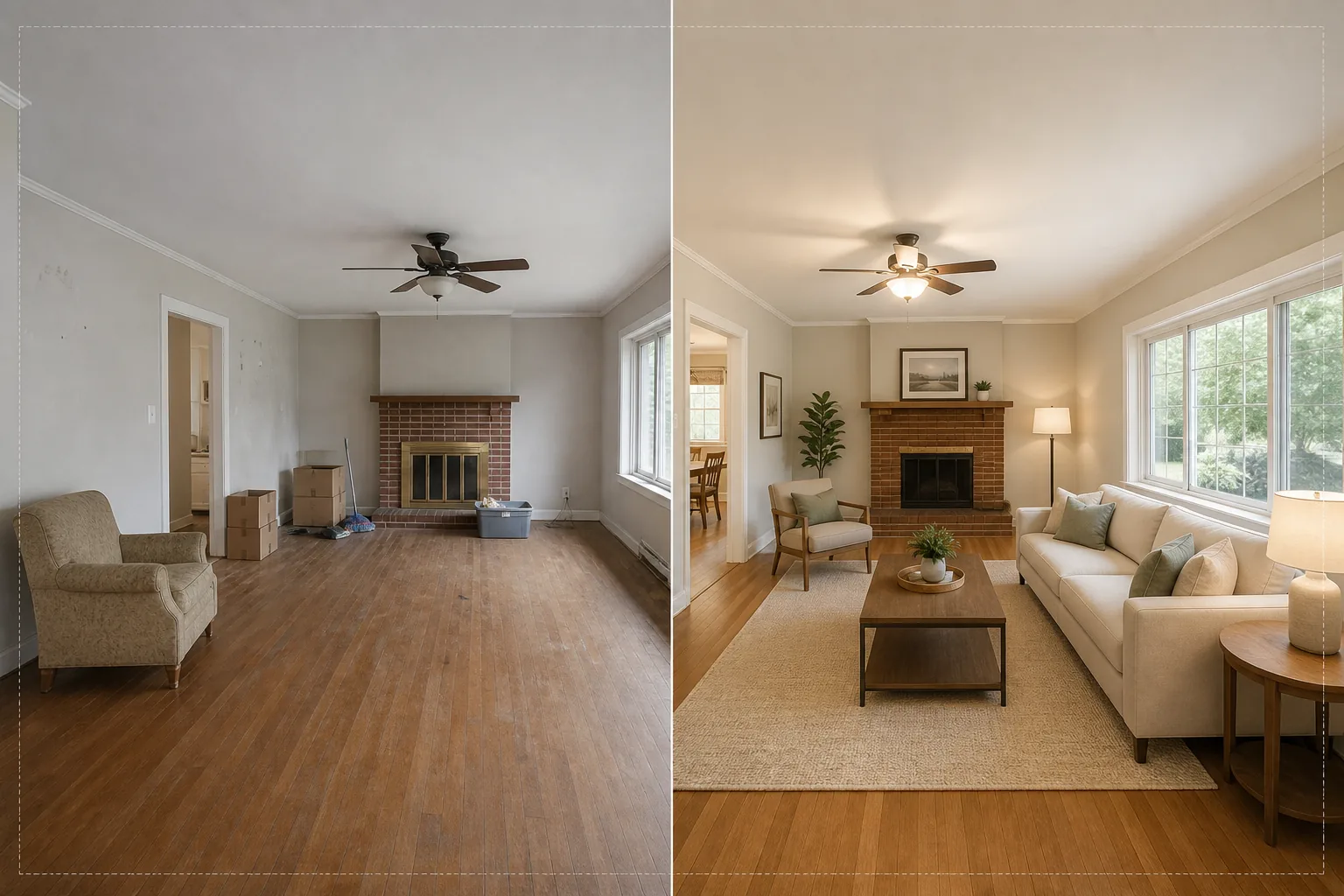
Qué hace esta plantilla
Resuelve el mayor desafío de la fotografía inmobiliaria: hacer que las habitaciones vacías o desordenadas se sientan como un hogar. Magic Eraser elimina primero cualquier desorden existente: muebles viejos, cajas de mudanza, pertenencias personales, marcas en las paredes y rayones en los suelos. Luego, AI Fill coloca muebles apropiados al contexto en la habitación limpia, adaptando el estilo a la arquitectura. Un loft moderno recibe piezas de estilo mid-century con acentos industriales, mientras que una casa colonial tradicional obtiene muebles tapizados clásicos y tonos de madera cálidos. La iluminación y las sombras de los muebles virtuales se calculan a partir de la luz de la ventana existente en la foto, de modo que la ambientación parece presente físicamente en lugar de pegada.
Ajustes de la plantilla
| Estilo de ambientación | Moderno, Tradicional, Escandinavo, Mid-Century o Costero |
| Tipo de habitación | Detección automática (salón, dormitorio, comedor, oficina, cocina) |
| Eliminación de desorden | Elimina automáticamente cajas, objetos personales y muebles viejos antes de la ambientación |
| Renderizado de sombras | Ajustado a la dirección e intensidad de la luz de ventana existente |
| Resolución de salida | 4000×3000px (compatible con MLS a 300 DPI) |
| Temperatura de color | Interior cálido (3200K–4000K para coincidir con la iluminación interior típica) |
Cómo usar esta plantilla
Sube la foto de la habitación vacía o desordenada
Sube una foto gran angular de la habitación. Fotografía desde una esquina para capturar dos paredes y el suelo y lograr la ambientación más realista. La plantilla funciona con fotos de teléfonos inteligentes, cámaras DSLR y cámaras inmobiliarias profesionales, incluidos los objetivos ultra gran angular.
Elimina el desorden existente
Magic Eraser detecta y elimina automáticamente cajas de mudanza, muebles viejos, fotos personales en las paredes y desorden en el suelo. La IA reconstruye el suelo, la pintura de las paredes y los zócalos detrás de los objetos eliminados, de modo que la habitación parece limpia y desocupada.
Ambienta con muebles virtuales
AI Fill coloca muebles apropiados al tipo de habitación detectado y al estilo seleccionado. Un salón recibe un sofá, una mesa de centro, una alfombra, mesas auxiliares y arte de pared. Un dormitorio recibe una cama, mesitas de noche, lámparas y cojines decorativos. Los muebles se ajustan a las dimensiones de la habitación y proyectan sombras realistas.
Exporta para MLS y anuncios
Descarga la foto ambientada en 4000×3000px, lista para subir a MLS, Zillow, Realtor.com y folletos impresos. La imagen incluye etiquetas de metadatos para una catalogación sencilla en tu sistema de gestión de anuncios.
Consejos profesionales para obtener los mejores resultados
- ✓Fotografía desde una esquina a unos 1,20 m de altura: así capturas dos paredes y suficiente superficie de suelo para que la IA coloque los muebles con la perspectiva correcta y sombras de contacto con el suelo.
- ✓Enciende todas las luces de la habitación antes de fotografiar. La IA utiliza las fuentes de luz visibles y los reflejos de las ventanas para calcular dónde deben caer las sombras sobre los muebles ambientados.
- ✓Para anuncios de varias habitaciones, usa el mismo estilo de ambientación en todas para crear una historia de diseño coherente que parezca que un verdadero decorador amuebló toda la vivienda.
Herramientas
Preguntas frecuentes
¿El home staging virtual cumple con las reglas del MLS?
+
La mayoría de los sistemas MLS permiten fotos con ambientación virtual siempre que se etiqueten como tales. La plantilla no añade la etiqueta automáticamente: consulta las reglas de tu MLS local y añade una leyenda de divulgación como 'Ambientado virtualmente' al subirlas.
¿Puedo ambientar un patio o balcón exterior?
+
Sí. La plantilla detecta los espacios habitables al aire libre y los ambienta con muebles de patio, macetas y alfombras de exterior adecuados. Los cálculos de iluminación tienen en cuenta el cielo abierto y la luz solar directa en lugar de la luz ambiental interior.
¿Qué tan realistas son los muebles?
+
Los muebles ambientados proyectan sombras que coinciden con la dirección de la luz existente de la habitación, se asientan en el plano del suelo con la perspectiva correcta y reflejan el color ambiental de las paredes circundantes. A una distancia de visión normal, la ambientación es indistinguible de una fotografía con muebles reales.
Ambienta cualquier habitación en segundos, no en horas
Sube fotos de habitaciones vacías y obtén hermosas imágenes de anuncio amuebladas que hacen que los compradores se enamoren de cada espacio.
Pruébalo gratisRelated templates
More real estate templates for your workflow.
Plantilla de fotografía profesional de bienes raíces para listados de MLS. Mejora tipo HDR, sustitución del cielo, eliminación del desorden y corrección de color para fotografías de propiedades que se venden más rápido.
Mejora fotos de exteriores arquitectónicos con corrección de líneas verticales, reemplazo de cielo, eliminación de coches y peatones, y gradación de color de hora dorada para anuncios y portafolios.
Transforme las fotos de Airbnb y de alquileres vacacionales con iluminación de la habitación, eliminación del desorden, Color correction y corrección de distorsión de lente gran angular para obtener tarifas de reserva más altas.
Mejore las fotografías del portafolio de diseño de interiores iluminando las habitaciones, eliminando el desorden, afinando la textura de los materiales y reproduciendo acabados y telas con colores precisos.
Mejore la fotografía aérea con drones con reemplazo del cielo, resaltado de límites de propiedades, intensidad de color Boost y eliminación de distracciones para estudios de bienes raíces y terrenos.
Limpie, mejore y estandarice imágenes de planos de planta para listados de bienes raíces con eliminación de manchas, definición de líneas y estilo consistente.