
Portafolio de diseño de interiores
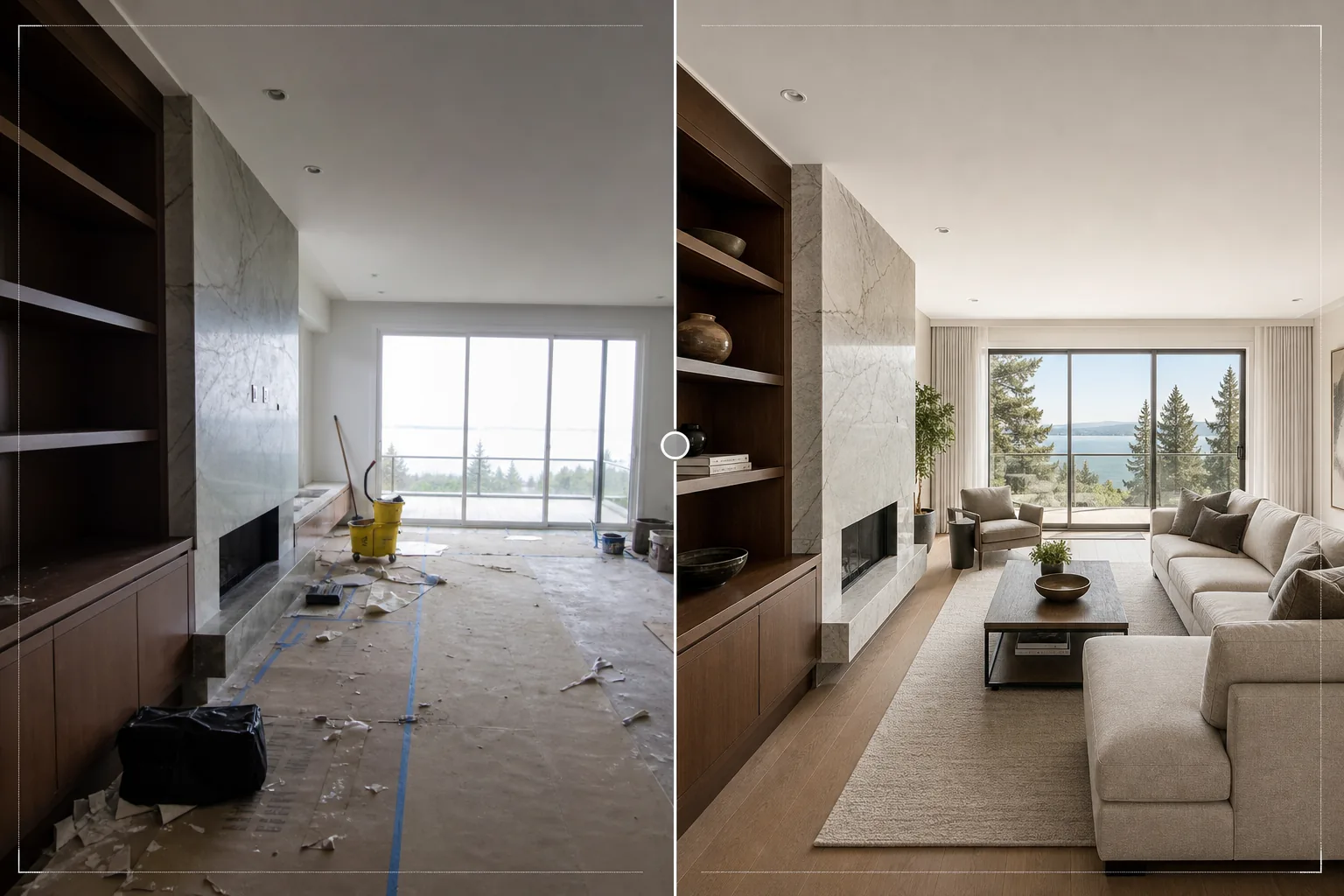
Presente proyectos de diseño de interiores con la calidad visual que merecen. Esta plantilla ilumina las habitaciones para mostrar el flujo de luz natural, elimina los escombros de obra y los objetos personales, mejora las texturas de los materiales como madera, piedra y tela, y corrige la precisión del color para que los acabados se vean fieles a las especificaciones del diseñador.
Pruebe esta plantilla gratisReal Estate template preview
Qué hace esta plantilla
Pule las fotos de proyectos de diseño de interiores para portafolios, perfiles de Houzz, feeds de Instagram y presentaciones a clientes. La fotografía de diseño de interiores requiere representar con precisión las elecciones de material y color del diseñador: un piso de nogal debe verse como nogal, no como caoba. Esta plantilla usa AI Enhance para aplicar una corrección de color precisa que conserva los tonos reales de las vetas de la madera, las vetas de la piedra, las texturas de las telas y los colores de pintura tal como los especifica el diseñador. Magic Eraser elimina los escombros de obra que quedan de una instalación reciente, los objetos personales de los clientes que no se retiraron antes de la sesión de fotos, los enchufes e interruptores visibles que interrumpen las superficies limpias de las paredes y cualquier otro elemento que reste valor al diseño en sí. La iluminación de la habitación garantiza que los espacios se vean naturalmente iluminados y abiertos.
Configuración de la plantilla
| Iluminación de la habitación | Relleno de sombras + recuperación de exposición de ventanas (aspecto de luz natural) |
| Fidelidad de materiales | Renderizado fiel al color para madera, piedra, azulejo y tela |
| Nitidez de texturas | Mejora del detalle de vetas, tramas y vetas de piedra |
| Eliminación de desorden | Elimina objetos personales, escombros de obra y distracciones |
| Resolución de salida | 6000px en el lado largo (listo para impresión de portafolio y carga en Houzz) |
| Corrección de lente | Enderezado vertical y corrección de la distorsión de barril del gran angular |
Cómo usar esta plantilla
Suba su foto de interior
Suba fotos de habitaciones de cualquier etapa del proyecto: instalación recién terminada, sesión de fotos con estilo, o incluso un trabajo en curso si los elementos de diseño ya están colocados. La plantilla admite fotos de teléfonos inteligentes, cámaras de lentes intercambiables y lentes de arquitectura de descentramiento.
Iluminar y corregir el color
La plantilla aumenta el brillo de la habitación para mostrar toda la calidad espacial del diseño, recupera las ventanas sobreexpuestas para mostrar la vista del exterior y corrige la temperatura de color para que los acabados de los materiales se vean fieles a su apariencia real. Las líneas verticales se enderezan y se corrige la distorsión del gran angular.
Eliminar distracciones
Magic Eraser elimina objetos personales, herramientas de obra, productos de limpieza, enchufes eléctricos visibles y otros elementos que interrumpen el espacio diseñado. La IA reconstruye la pared, el piso o la superficie detrás de los objetos eliminados utilizando el patrón del material circundante.
Exportar para el portafolio
Descargue a 6000px en el lado largo para impresiones de portafolio, cargas de proyectos en Houzz y presentaciones de alta resolución. La salida Adobe RGB conserva las sutiles diferencias de color entre acabados similares, que son importantes en la documentación de diseño de interiores.
Consejos profesionales para mejores resultados
- ✓Fotografíe durante el día con todas las cortinas y persianas abiertas. La luz natural del día muestra cómo se siente realmente un espacio diseñado para sus habitantes y revela los colores verdaderos de los acabados. La plantilla realza la luz natural, pero no puede reproducir la calidad de la luz diurna real en una foto nocturna.
- ✓Incluya tanto tomas amplias de la habitación como primeros planos detallados de combinaciones de materiales: donde el piso de madera se encuentra con el borde de piedra de la chimenea, donde el salpicadero se encuentra con la encimera. La plantilla afina estas intersecciones de materiales que muestran la experiencia del diseñador en la selección de especificaciones.
- ✓Apague todas las luces artificiales si es posible y dependa solo de la luz del día. La iluminación mixta (luz del día de las ventanas más luz artificial cálida) crea zonas de temperatura de color en la habitación que la plantilla debe promediar, lo que puede comprometer la precisión de los colores de los materiales en cualquiera de las zonas.
Herramientas
Preguntas frecuentes
¿Puede amueblar virtualmente una habitación vacía?
+
No. La plantilla mejora fotos de habitaciones que ya contienen los elementos de diseño: muebles, acabados, accesorios. No agrega muebles ni accesorios virtuales a espacios vacíos. Para el home staging virtual, use un servicio dedicado de ambientación y luego procese el resultado con esta plantilla para refinar el color y la iluminación.
¿Con qué precisión reproduce los colores de los materiales?
+
La plantilla usa una corrección de color equilibrada a la luz del día que conserva los subtonos específicos de los materiales: grises cálidos frente a fríos, tonos de madera rojizos frente a dorados, vetas de piedra azuladas frente a verdosas. En un monitor calibrado, las imágenes procesadas coinciden con la apariencia real del material lo suficiente para uso en portafolio y especificaciones.
¿Qué pasa con el trabajo de azulejos de baño y cocina?
+
Las líneas de lechada y los patrones de los azulejos se afinan para mostrar la calidad de la instalación. La plantilla admite tanto azulejos de gran formato como patrones de mosaico detallados, realzando la precisión geométrica que demuestra una artesanía de calidad.
Muestre cada proyecto en su mejor versión diseñada
Suba fotos de interiores y obtenga imágenes de calidad de portafolio con colores de materiales precisos, luz natural brillante y composiciones sin distracciones.
Pruébelo gratisRelated templates
More real estate templates for your workflow.
Plantilla de fotografía profesional de bienes raíces para listados de MLS. Mejora tipo HDR, sustitución del cielo, eliminación del desorden y corrección de color para fotografías de propiedades que se venden más rápido.
Mejora fotos de exteriores arquitectónicos con corrección de líneas verticales, reemplazo de cielo, eliminación de coches y peatones, y gradación de color de hora dorada para anuncios y portafolios.
Transforme las fotos de Airbnb y de alquileres vacacionales con iluminación de la habitación, eliminación del desorden, Color correction y corrección de distorsión de lente gran angular para obtener tarifas de reserva más altas.
Mejore la fotografía aérea con drones con reemplazo del cielo, resaltado de límites de propiedades, intensidad de color Boost y eliminación de distracciones para estudios de bienes raíces y terrenos.
Representa virtualmente habitaciones vacías con muebles, decoración e iluminación realistas. Ayuda a los compradores a visualizar los espacios habitables sin costos de preparación física.
Limpie, mejore y estandarice imágenes de planos de planta para listados de bienes raíces con eliminación de manchas, definición de líneas y estilo consistente.