
Plantilla de foto de pasaporte
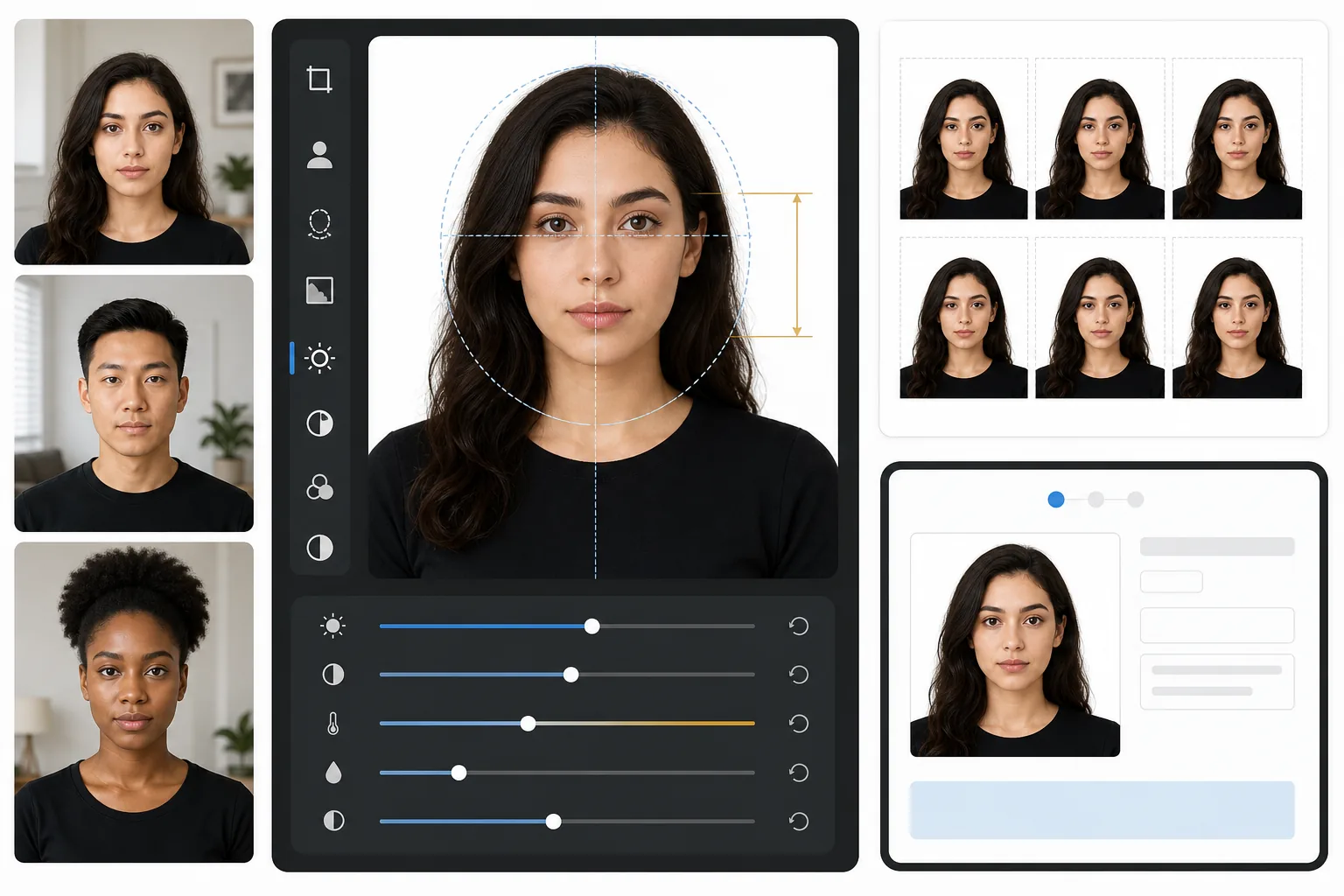
Olvídese de la cabina fotográfica de la farmacia. Esta plantilla crea fotos de pasaporte que cumplen con los requisitos gubernamentales a partir de cualquier selfie bien iluminado: fondo blanco, proporción correcta entre la cabeza y el encuadre (de 1 a 1-3/8 pulgadas desde el mentón hasta la coronilla) y salida de 2×2 pulgadas a 600 DPI que cumple con los requisitos del Departamento de Estado de EE. UU., el HMPO del Reino Unido, la UE y las visas Schengen.
Probar esta plantilla gratisProfessional template preview
Qué hace esta plantilla
Convierte una foto de retrato estándar en una foto de pasaporte o visa que cumple con los requisitos gubernamentales. La plantilla elimina cualquier fondo y lo reemplaza por blanco liso, recorta a las dimensiones exactas de 2×2 pulgadas (51×51mm) que exige el Departamento de Estado de EE. UU., posiciona la cabeza dentro del rango de tamaño requerido y garantiza una iluminación uniforme sin sombras duras. La salida está lista para imprimir a 600 DPI para impresión en papel fotográfico o envío digital directo.
Configuración de la plantilla
| Dimensiones de salida | 2×2 pulgadas (51×51mm) a 600 DPI (1200×1200px) |
| Fondo | Blanco liso (#FFFFFF), sin degradados ni textura |
| Tamaño de la cabeza | 1 pulgada a 1-3/8 pulgadas (25–35mm) del mentón a la coronilla |
| Posición de los ojos | Ojos centrados entre 1-1/8 y 1-3/8 pulgadas desde abajo |
| Perfil de color | sRGB (compatible con laboratorios fotográficos) |
| Formato de archivo | JPEG al 100% de calidad o PNG (para portales de envío digital) |
Cómo usar esta plantilla
Tome un retrato de frente
Colóquese frente a una pared lisa con iluminación uniforme en el rostro. Use luz natural del día o dos lámparas colocadas a la misma distancia a cada lado. Mire directamente a la cámara con una expresión neutra y ambas orejas visibles.
Elimine y reemplace el fondo
Background Eraser elimina cualquier fondo: patrones de papel tapiz, sombras, bordes de muebles, y lo reemplaza por el blanco liso requerido. La herramienta conserva los bordes naturales del cabello y las monturas de las gafas sin crear artefactos de halo.
Recorte automático para cumplir las normas
La plantilla detecta su rostro y lo posiciona dentro del rango de tamaño de cabeza especificado por el gobierno. Los ojos se colocan a la altura correcta y la medida del mentón a la coronilla queda dentro del requisito de 1 a 1-3/8 pulgadas.
Imprima o envíe digitalmente
Descargue el archivo de 600 DPI para imprimir en papel fotográfico brillante de 4×6 (caben cuatro fotos de 2×2 por hoja) o envíe el archivo digital directamente a los portales en línea de renovación de pasaporte y solicitud de visa.
Consejos profesionales para mejores resultados
- ✓Use luz natural del día de frente proveniente de una ventana: crea la iluminación suave y uniforme que prefieren las oficinas de pasaportes y elimina las sombras duras de la fotografía con flash.
- ✓Quítese las gafas antes de la toma si es posible. Muchos países ahora exigen fotos sin gafas, e incluso donde se permiten, los reflejos y las sombras de la montura son el motivo más común de rechazo de una foto.
- ✓Use una prenda superior de color liso que contraste con el blanco: el azul oscuro, el negro o el verde profundo funcionan mejor. La ropa blanca se confunde con el fondo y puede provocar el rechazo.
- ✓Pida a otra persona que tome la foto a la distancia de un brazo en lugar de hacerse un selfie. Los selfies con la cámara frontal introducen una ligera distorsión de gran angular que puede hacer que las proporciones faciales parezcan poco naturales y active una revisión manual.
Herramientas
Preguntas frecuentes
¿El Departamento de Estado de EE. UU. aceptará esta foto?
+
La plantilla sigue las especificaciones exactas publicadas en los requisitos de fotos de pasaporte del Departamento de Estado de EE. UU.: 2×2 pulgadas, fondo blanco, tamaño de cabeza entre 1 y 1-3/8 pulgadas y posicionamiento correcto de los ojos. Sin embargo, la aceptación también depende de su expresión, el ángulo de la cabeza y la iluminación: la plantilla maneja el fondo, el dimensionado y el recorte, pero no puede corregir ojos cerrados o cabezas giradas.
¿Funciona para fotos de pasaporte de fuera de EE. UU.?
+
El valor predeterminado está configurado para pasaportes de EE. UU. (2×2 pulgadas), pero las dimensiones de las fotos de pasaporte varían según el país: por ejemplo, el Reino Unido requiere 35×45mm e India requiere 2×2 pulgadas con diferentes proporciones de tamaño de cabeza. La eliminación de fondo y el posicionamiento del rostro funcionan para cualquier país; ajuste las dimensiones del recorte según su requisito específico.
¿Puedo imprimir esto en casa?
+
Sí. La salida de 600 DPI se imprime exactamente a 2×2 pulgadas en cualquier impresora fotográfica. Para mejores resultados, use papel fotográfico brillante o mate e imprima cuatro copias en una sola hoja de 4×6. La mayoría de los quioscos fotográficos de las farmacias también aceptan el archivo digital para impresiones de alta calidad.
Obtenga fotos de pasaporte que cumplen las normas sin salir de casa
Suba un retrato de frente y obtenga una foto de pasaporte con las especificaciones gubernamentales en segundos. Imprima en casa o envíe digitalmente.
Pruébelo gratisRelated templates
More professional templates for your workflow.
Plantilla de retrato profesional de LinkedIn. Fondo limpio, mejora natural de la piel y una apariencia pulida que obtiene 14 veces más vistas de perfil.
Plantilla de retrato profesional para actores y modelos. Cumpla con los estándares de los directores de casting con resultados listos para imprimir de 8×10, retoques naturales y fondos limpios para las presentaciones de las agencias.
Mejore las fotografías de marketing dental con blanqueamiento dental natural, fondos de retratos consistentes e imágenes comparativas de antes y después para sitios web de consultorios y redes sociales.