
Mejora de la sonrisa dental
Cree imágenes de marketing dental de antes y después profesionales que muestren el trabajo de su consultorio. Esta plantilla aplica un blanqueamiento dental de aspecto natural, elimina el desorden clínico del fondo, uniformiza los fondos de los retratos de pacientes y equilibra la dura iluminación cenital habitual en las fotos de consultorio.
Probar esta plantilla gratisProfessional template preview
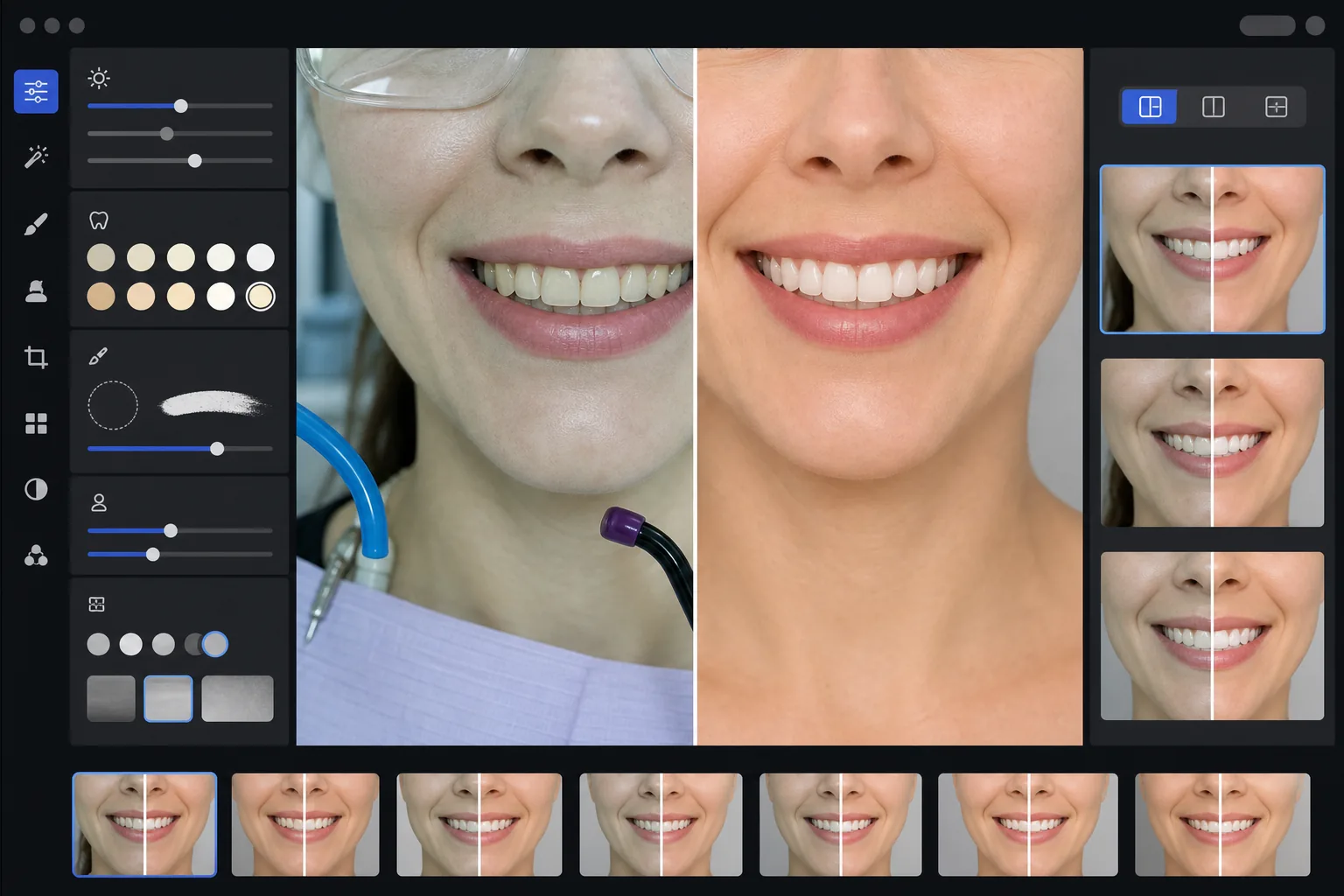
Qué hace esta plantilla
Transforma fotos dentales clínicas en imágenes de marketing pulidas para sitios web de consultorios, redes sociales y materiales de educación del paciente. AI Enhance corrige el poco favorecedor matiz verde-blanco de la iluminación del consultorio dental y aplica un sutil blanqueamiento dental de aspecto natural, aclarando los dientes entre 2 y 3 tonos sin que parezcan artificiales. Magic Eraser elimina elementos clínicos del fondo como mangueras de succión, lámparas de fotopolimerización, marcas de papel de articular en los labios y gafas de protección. Los fondos de los retratos de pacientes se uniformizan a un fondo limpio y consistente en toda su galería de casos.
Configuración de la plantilla
| Blanqueamiento dental | Aclarado natural de +2 a +3 tonos (conserva la translucidez y la textura del esmalte) |
| Corrección de iluminación | Balance de luz diurna de consultorio dental (elimina el matiz clínico verde-blanco) |
| Fondo | Fondo gris o blanco neutro y consistente con viñeteado suave |
| Tono de piel | Corrección de calidez perioral (reduce la palidez causada por la iluminación dental) |
| Color de labios | Recuperación natural de la saturación (contrarresta la iluminación clínica desvaída) |
Cómo usar esta plantilla
Suba fotos clínicas
Suba primeros planos de sonrisas, fotos de antes y después de estilo retrato o imágenes intraorales tomadas en su consultorio. La plantilla funciona con fotos de cámaras dentales específicas, réflex con flash anular y fotos de smartphone tomadas bajo las luces del consultorio.
Corrija la iluminación clínica
AI Enhance neutraliza el matiz verde-blanco de las lámparas cenitales de la unidad dental, da calidez a los tonos de piel alrededor de la boca y recupera el color natural de los labios. El color de los dientes se aclara sutilmente para mostrar el resultado en su mejor versión, manteniéndose realista y honesto.
Limpie fondos y distracciones
Magic Eraser elimina mangueras visibles, puntas de lámparas de fotopolimerización, pinzas de babero, manchas de papel de articular en los labios y equipo clínico en el fondo. El fondo se reemplaza por un fondo neutro consistente que coincide en todos sus pares de antes y después.
Exporte para uso de marketing
Descargue imágenes mejoradas individuales o composiciones de antes y después en paralelo. La salida se dimensiona para galerías de sitios web, publicaciones de Instagram, Google Business Profile y folletos impresos para pacientes, con una resolución adecuada para impresiones de 8x10 pulgadas.
Consejos profesionales para mejores resultados
- ✓Para los pares de antes y después, fotografíe tanto la imagen previa como la posterior al tratamiento desde el mismo ángulo, distancia y posición de iluminación. La plantilla puede corregir las diferencias de exposición entre ambas, pero mantener el ángulo de cámara original produce la comparación más convincente.
- ✓El blanqueamiento dental es intencionadamente conservador: aclara entre 2 y 3 tonos vita en lugar de dejar los dientes blanco papel. Esto resulta más natural y creíble para los posibles pacientes. Si su resultado clínico real es espectacular, la foto honesta con una ligera mejora es más persuasiva que una imagen sobreprocesada.
- ✓Use un separador de mejillas para las tomas intraorales de la sonrisa y obtener la vista más completa del trabajo dental. La plantilla maneja el aspecto ligeramente clínico de las fotos asistidas con separador dando calidez a los tonos de piel y recortando para centrarse en la zona de la sonrisa.
- ✓Procese toda su galería de casos en un solo lote para garantizar un color de fondo, brillo y calidez consistentes en todos los pares de antes y después. Una iluminación dispar entre casos en su sitio web socava la impresión profesional.
Herramientas
Preguntas frecuentes
¿Se considera esto publicidad dental engañosa?
+
La mejora del blanqueamiento se limita a 2-3 tonos vita y conserva la translucidez natural y la textura superficial del esmalte. Esto se mantiene dentro de lo que la iluminación fotográfica profesional y el balance de blancos afectan de forma natural. La plantilla no altera la forma de los dientes, su alineación ni el contorno gingival; solo corrige los efectos de color poco favorecedores de la iluminación clínica que hacen que los resultados se vean peor en las fotos que en persona.
¿Puede crear composiciones de antes y después en paralelo?
+
Sí. La plantilla puede producir imágenes mejoradas individuales o generar una composición en paralelo con un divisor central, fondo consistente y etiquetas de antes/después. Ambas imágenes del par reciben el mismo tratamiento de fondo, por lo que la comparación resulta visualmente limpia y profesional.
¿Funciona con fotos de cámara intraoral?
+
Sí. Las imágenes de cámara intraoral suelen tener una iluminación muy dura y directa que decolora la textura superficial. La plantilla recupera el detalle del esmalte, corrige el matiz blanco extremo y ajusta el contraste para mostrar la anatomía dental de forma natural. El resultado es más detallado y de aspecto más natural que la captura intraoral sin procesar.
Muestre su trabajo dental con fotos de marketing profesionales
Suba fotos clínicas y obtenga imágenes de antes y después mejoradas de forma natural y con un estilo consistente, listas para su sitio web, redes sociales y folletos para pacientes.
Pruébelo gratisRelated templates
More professional templates for your workflow.
Plantilla de retrato profesional de LinkedIn. Fondo limpio, mejora natural de la piel y una apariencia pulida que obtiene 14 veces más vistas de perfil.
Cree fotografías compatibles para pasaportes y visas en casa. Fondo blanco, proporción correcta del tamaño del cabezal, estándar estadounidense de 2×2 pulgadas y salida de 600 DPI que cumple con los requisitos del Departamento de Estado.
Plantilla de retrato profesional para actores y modelos. Cumpla con los estándares de los directores de casting con resultados listos para imprimir de 8×10, retoques naturales y fondos limpios para las presentaciones de las agencias.