
How to remove reflection from glasses in photos
Aprende cómo How to remove reflection from glasses in photos con Magic Eraser. Guía simple paso a paso con herramienta IA gratuita. Funciona en web, iOS y Android.
Last updated
Probar ahora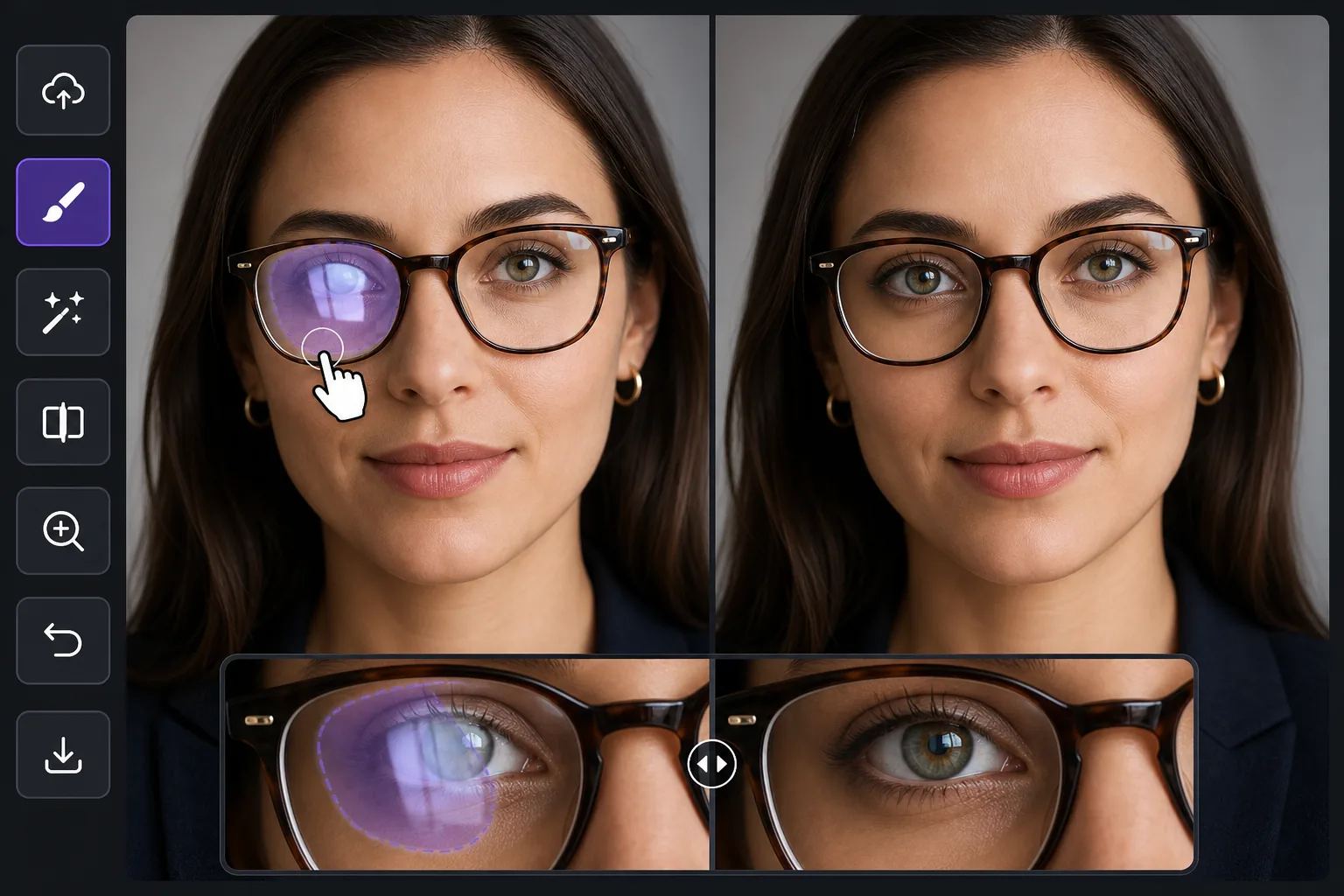
Why glasses glare is harder than ordinary reflection removal con Magic Eraser
Most reflection cleanup happens over a mirror, a window, or a glossy product surface — areas the AI can rebuild as flat, predictable texture. Glasses glare is different because the bright patch sits directly on top of the eyes, the single most important feature in a portrait. Wipe the reflection without care and you flatten the iris, lose a catchlight, or leave one eye looking different from the other. The goal here is not just to remove the white hotspot but to put a believable eye back where the glare was: matching iris color, eyelid line, lashes, and the natural asymmetry of a real face. Magic Eraser synthesizes a plausible reconstruction of the hidden eye from the rest of the face — the visible eye, skin tone, and lighting direction — rather than recovering literal pixels the glare destroyed. That distinction matters: it works beautifully when one eye is clear and only the other is blown out, because the model has a real reference to draw from, and it works on partial glare where part of the eye still shows through the lens.
Before you start
Instrucciones paso a paso
Start with sube la foto. The result preview above and tips below use this guide's existing content; no separate before-and-after proof is assumed.
- 1
Sube la foto
Abre Magic Eraser en web, iOS o Android. Arrastra y suelta tu foto JPEG, PNG, HEIC o WebP. No necesitas cuenta para empezar.
- 2
Selecciona la herramienta y el área
Elige la herramienta adecuada y marca el área a procesar. La IA analiza y aplica los cambios automáticamente en segundos.
- 3
Descarga el resultado
Previsualiza el resultado y descarga la foto editada. Exporta en PNG o JPEG de alta calidad.
Ideal para
- Headshots and LinkedIn portraits where one lens catches a window and washes out an eye
- Family and group photos where overhead light glares off several pairs of glasses at once
- Selfies and video-call screenshots where the screen or phone reflects in the lenses
- Wedding and event portraits shot under bright venue lighting that hits eyeglass lenses
- Profile and dating-app photos where lens glare hides the subject's eyes and expression
Consejos para mejores resultados
Work one eye at a time when both lenses are blown out — clear the lighter side first so the AI has a freshly clean eye to reference for the harder one. Keep your brush inside the lens; painting over the frame or eyebrow gives the model less facial structure to anchor the reconstruction. For mild glare where the iris still shows faintly through the reflection, a tight selection over just the hotspot often preserves the real eye and only fills the bright spot. Remember the result is a synthesized, plausible eye, not the exact eye hidden under the glare, so on important portraits zoom to 100% and confirm the gaze and catchlight read naturally before exporting. If a rebuilt eye looks too symmetrical or glassy, a second pass with a smaller brush usually restores a more natural, slightly imperfect look. When you can, prevent it at capture time by tilting the head down a few degrees or moving the light off-axis — but when the shot is already taken, this is the fastest fix.
Preguntas frecuentes
- ¿La función How to remove reflection from glasses in photos es gratuita?
- Sí, Magic Eraser permite How to remove reflection from glasses in photos gratis con límites diarios. Actualiza a Pro para procesamiento ilimitado y exportaciones de alta resolución.
- ¿Cuánto tiempo tarda How to remove reflection from glasses in photos?
- Solo unos segundos. La IA de Magic Eraser procesa fotos rápidamente — la mayoría de los resultados están disponibles inmediatamente.
- ¿Puedo usarlo en el móvil?
- Sí, Magic Eraser funciona en iOS, Android y todos los navegadores web. Puedes alternar entre dispositivos libremente.
- ¿Se pierde calidad de imagen?
- No, Magic Eraser mantiene la calidad original de la foto. La IA procesa de forma inteligente para conservar detalles y nitidez.