
Cómo quitar las gafas de una foto
¿Deslumbramientos en las lentes, reflejos que ocultan los ojos o simplemente quieres ver cómo te ves sin gafas? Magic Eraser elimina las gafas de los retratos y al mismo tiempo reconstruye de forma natural los ojos, el puente de la nariz y los rasgos faciales circundantes.
Last updated
Quitar gafas ahora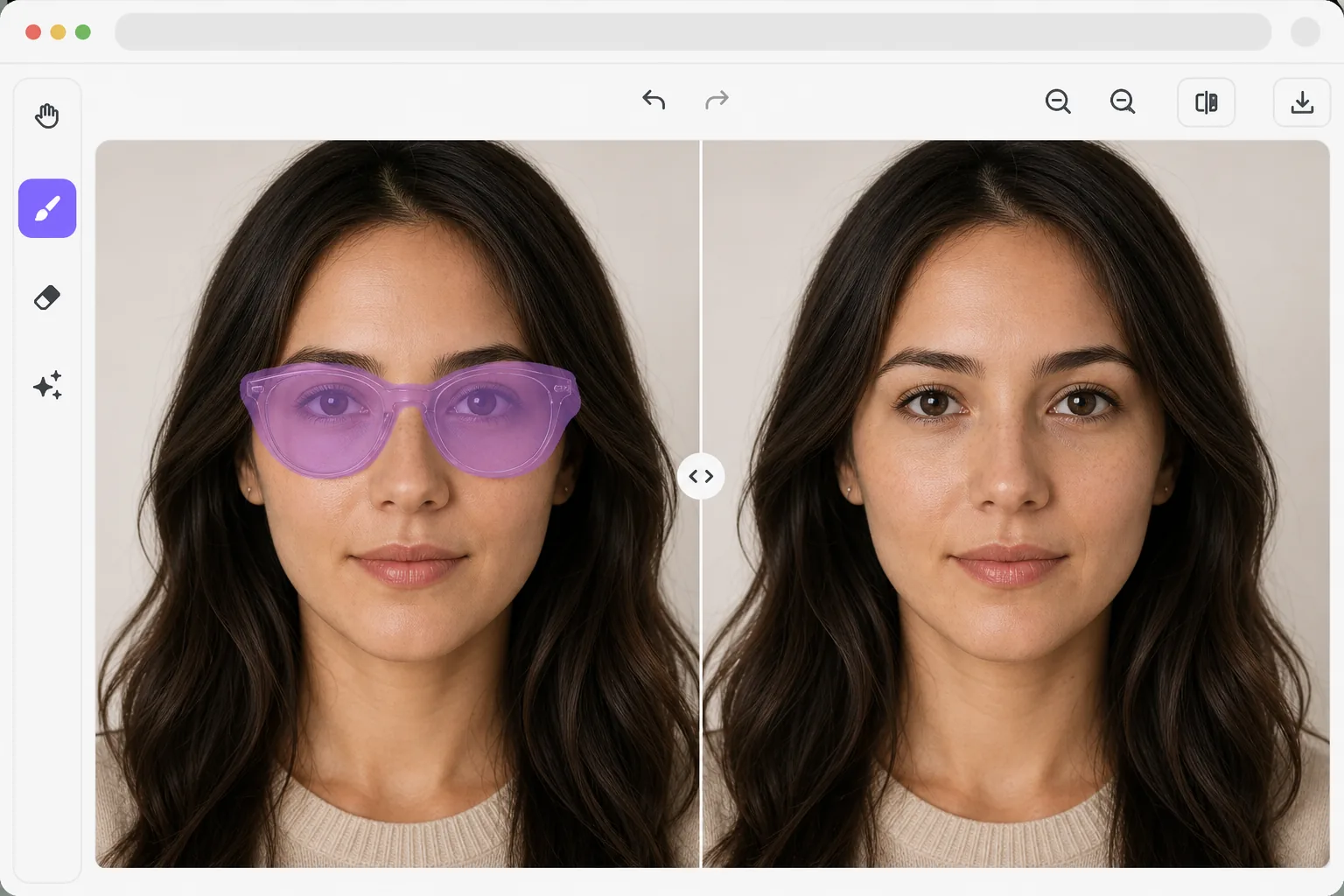
El desafío de quitar las gafas de las fotos
Para quitar las gafas de una foto, abre Magic Eraser en la web, iOS o Android, sube el retrato, pinta sobre toda la montura — el armazón, las lentes, las patillas y cualquier sombra que proyecten — y toca Borrar. La IA reconstruye los ojos, las cejas y el puente de la nariz que quedan debajo, para que el rostro se vea natural sin las gafas. Es gratis y no requiere registro. Funciona mejor con gafas graduadas transparentes, donde los ojos se ven en parte a través de las lentes; con gafas de sol oscuras la IA genera ojos verosímiles a partir de la forma del rostro, que quizá no coincidan con el color exacto de tus ojos, así que tómalo como una recreación y no como un registro fiel. Las gafas son uno de los objetos más difíciles de eliminar de los retratos porque interactúan con el rostro de múltiples maneras: las monturas proyectan sombras, las lentes distorsionan la piel detrás de ellas, los reflejos ocultan los ojos y los auriculares se superponen con el cabello. Simplemente borrar las gafas deja espacios obvios donde deberían estar los ojos, las cejas y el puente de la nariz. La eliminación de gafas con tecnología de inteligencia artificial utiliza la comprensión facial para reconstruir la cara completa detrás de las monturas, generando ojos, cejas y puente nasal naturales que coinciden con los rasgos reales de la persona. La modelo ha aprendido de millones de rostros cómo deberían verse estos rasgos cuando se descubren.
Before you start
Quitar gafas en tres pasos
Start with sube el retrato. The result preview above and tips below use this guide's existing content; no separate before-and-after proof is assumed.
- 1
Sube el retrato
Abra Magic Eraser en la web, iOS o Android. Sube un retrato en el que el sujeto lleve gafas. Los retratos de frente y en ángulo ligero funcionan mejor. La IA maneja gafas graduadas, gafas de sol y gafas de lectura.
- 2
Selecciona las gafas
Cepille todas las gafas: monturas, lentes y auriculares. Incluya cualquier sombra visible proyectada por las monturas en las mejillas y la nariz. Para gafas de sol con lentes oscuros, cubra cuidadosamente toda el área de la lente.
- 3
Revisar la reconstrucción facial y la exportación.
La IA reconstruye los ojos, las cejas, el puente de la nariz y la zona de las sienes que estaban ocultos detrás de las gafas. Compruebe que los rasgos reconstruidos coincidan con la simetría y el tono de piel del rostro. Exporta el retrato sin gafas.
Lo mejor para
- Fotógrafos de retratos que eliminan brillos y reflejos de gafas que oscurecen los ojos.
- Personas con curiosidad por saber cómo quedarían después de LASIK o con lentes de contacto
- Requisitos de pasaporte y fotografía de identificación donde algunas jurisdicciones restringen los anteojos
- Fotografía de moda donde las gafas no forman parte del estilismo previsto.
- Usuarios de redes sociales que quieren una versión sin gafas de su foto de perfil
Consejos para obtener mejores resultados
Los resultados son mejores cuando parte del área de los ojos es visible a través de las lentes: las gafas graduadas transparentes con un brillo mínimo le dan a la IA el mayor contexto para una reconstrucción ocular precisa. Para gafas de sol oscuras donde los ojos están completamente ocultos, la IA genera ojos plausibles en función de la estructura de la cara, pero es posible que no coincidan exactamente con el color o la forma de los ojos originales. Incluya sombras de marco en su selección para obtener el resultado más limpio. Las fotografías de frente producen resultados más precisos que las tomadas desde ángulos extremos, donde un ojo queda significativamente ocluido por el puente de la nariz.
Preguntas frecuentes
- ¿Los ojos reconstruidos coincidirán con mis ojos reales?
- En el caso de gafas graduadas transparentes en las que los ojos son parcialmente visibles a través de las lentes, la IA utiliza esa información para una reconstrucción precisa. Para gafas de sol opacas, la IA genera ojos plausibles que coinciden con su tono de piel y estructura facial, pero pueden diferir del color y la forma exactos de sus ojos.
- ¿Maneja reflejos de lentes?
- Sí. Los reflejos de las lentes se tratan como parte de las gafas y se eliminan durante el procesamiento. La IA reconstruye el área del ojo que estaba oculta detrás del reflejo.
- ¿La extracción de gafas es gratuita?
- Sí. Las funciones de eliminación de objetos están disponibles en la capa gratuita con límites de uso diario. Premium elimina los límites para el procesamiento por lotes.
- ¿Cómo quito las gafas de una foto en Android o iPhone?
- Abre Magic Eraser en cualquier navegador móvil o en la app de iOS o Android, carga el retrato desde tu carrete y pellizca para hacer zoom y poder trazar la montura y las lentes con precisión. Pinta sobre toda la montura — incluida la sombra en las mejillas y la nariz — con el dedo y toca Borrar. La IA reconstruye los ojos y el puente de la nariz directamente en tu teléfono y guarda el resultado de nuevo en tu carrete. Funciona igual que la versión de escritorio y no necesitas instalar ninguna app si usas el navegador.
- ¿Puede quitar las gafas de sol oscuras y mostrar los ojos reales?
- Puede quitar las gafas de sol, pero no puede recuperar unos ojos que nunca vio. Cuando las lentes son totalmente opacas, la IA no tiene información sobre los ojos reales que hay debajo, así que genera unos verosímiles que encajan con el tono de piel y la estructura del rostro: se verán naturales, pero pueden diferir del color y la forma reales de tus ojos. Para un resultado que se parezca a ti, parte de una foto donde al menos una parte del ojo se vea a través de la lente. Las gafas graduadas transparentes dan la reconstrucción más fiel.