
Composición Creativa con Relleno de IA
Usa el relleno generativo como herramienta creativa para construir composiciones imaginativas, arte conceptual e imágenes surrealistas a partir de fotografías ordinarias.
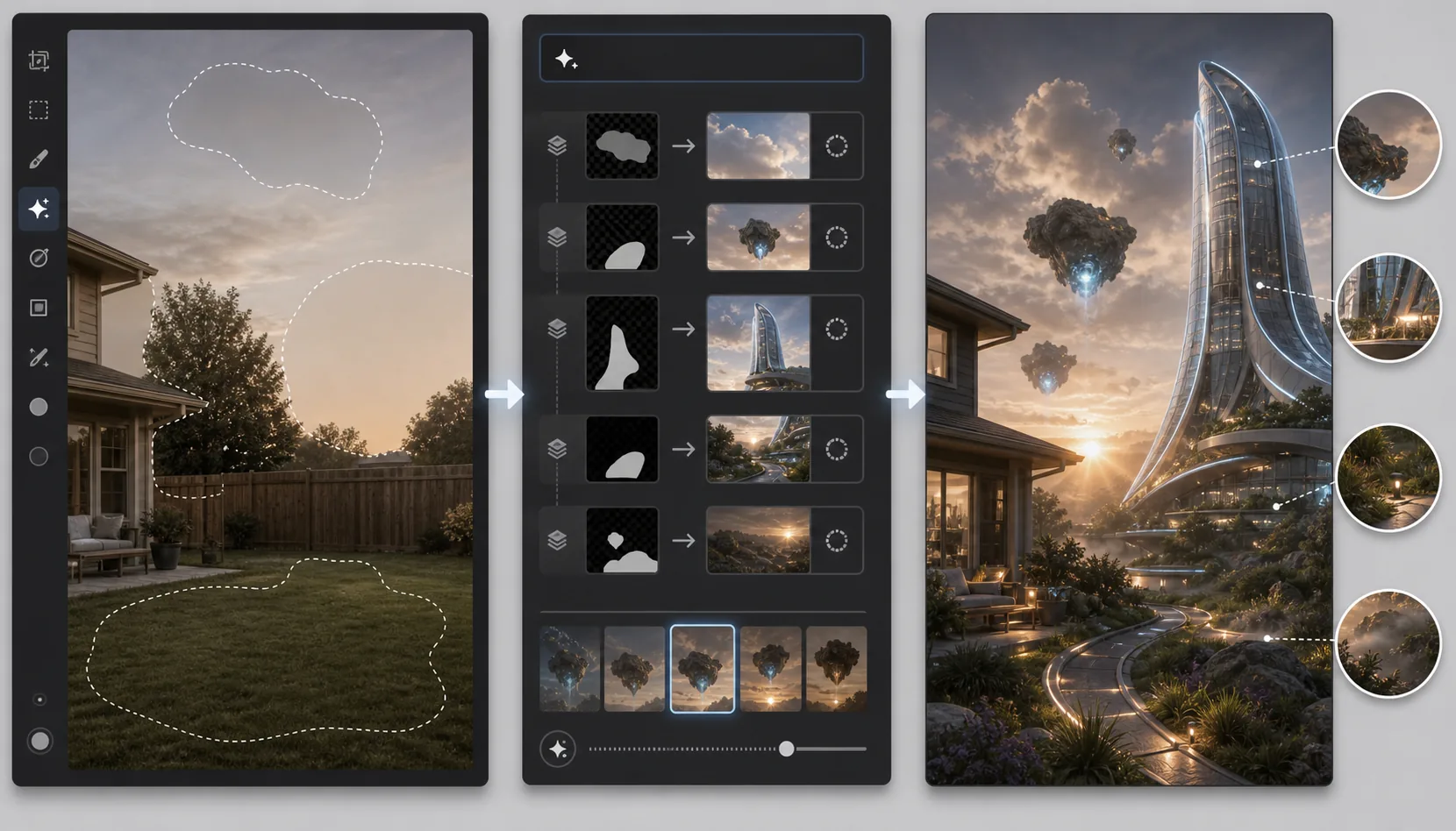
Lesson context before the long read
Review the result preview above, then scan the learning objectives below before reading the full lesson. Updated 2026-05-17.
Example visual uses an existing public asset: /content-images/generative-fill-creative-compositing-academy.webp.
Learning Objectives
- 1Combinar múltiples operaciones de relleno generativo para construir escenas compuestas complejas a partir de una sola foto fuente
- 2Usar indicaciones iterativas para refinar los elementos generados por IA hasta que coincidan con tu visión creativa
- 3Combinar elementos generados con ajustes manuales para crear composiciones finales pulidas y cohesivas
Usar el relleno generativo para efectos artísticos
La composición creativa con relleno generativo transforma fotos ordinarias en escenas imaginativas que serían imposibles o extremadamente laboriosas de crear con la edición tradicional. Puedes convertir un patio trasero suburbano en un paisaje alienígena, añadir arquitectura fantástica al horizonte de una ciudad, o colocar objetos flotantes surrealistas en una escena por lo demás realista. El proceso es iterativo: comienza con una foto base, genera un elemento, evalúalo y refínalo, y luego construye el siguiente elemento encima. Cada generación toma el contexto de todo lo que ya hay en la imagen, por lo que los elementos añadidos en secuencia tienen una iluminación y una perspectiva coherentes.
Combinar múltiples pasadas de generación
Las indicaciones iterativas son la técnica clave para la composición creativa. Tu primera generación podría estar cerca pero no ser exactamente lo que imaginaste. En lugar de aceptar un resultado que es 80% correcto, regenera con una indicación más específica que aborde lo que estaba mal. Si el castillo generado se veía demasiado medieval, indica 'torre futurista de vidrio y acero con arquitectura orgánica de curvas'. Si la iluminación era demasiado plana, añade 'iluminación de contorno dramática del sol poniente por detrás'. Cada iteración te acerca a tu visión, y el modelo a menudo te sorprende con interpretaciones creativas que inspiran nuevas ideas para la composición.
Flujos de trabajo prácticos de composición creativa
El paso final de la composición creativa es la armonización, combinando todos los elementos generados y originales en un conjunto cohesivo. Incluso con una generación de IA coherente, las diferencias sutiles en la nitidez, el nivel de ruido, la temperatura del color y el contraste pueden hacer que los elementos compuestos parezcan pegados. Aplica una gradación de color unificada en toda la imagen para unir la paleta. Iguala los niveles de ruido y grano para que ningún elemento individual se vea más limpio o más granulado que sus vecinos. Añade efectos atmosféricos como neblina, rayos de luz o niebla de profundidad para crear continuidad visual. El resultado debería parecer una única fotografía capturada de una escena imposible en lugar de un collage de partes separadas.
Key Takeaways
- ✓Construye composiciones de forma iterativa, añadiendo un elemento a la vez para que cada generación herede un contexto coherente
- ✓Refina los resultados mediante indicaciones cada vez más específicas en lugar de aceptar primeras generaciones imperfectas
- ✓Armoniza la composición final con una gradación de color unificada, niveles de ruido igualados y efectos atmosféricos