
复古照片修复
让珍贵的老照片重焕生机。此模板可修复数十年来印刷照片所遭受的损坏——去除划痕、折痕和污渍,从褪色的照片中恢复色彩,甚至将棕褐色或黑白原片转换为逼真的全彩,同时保留图像与时代相符的特征。
免费试用此模板Restoration template preview
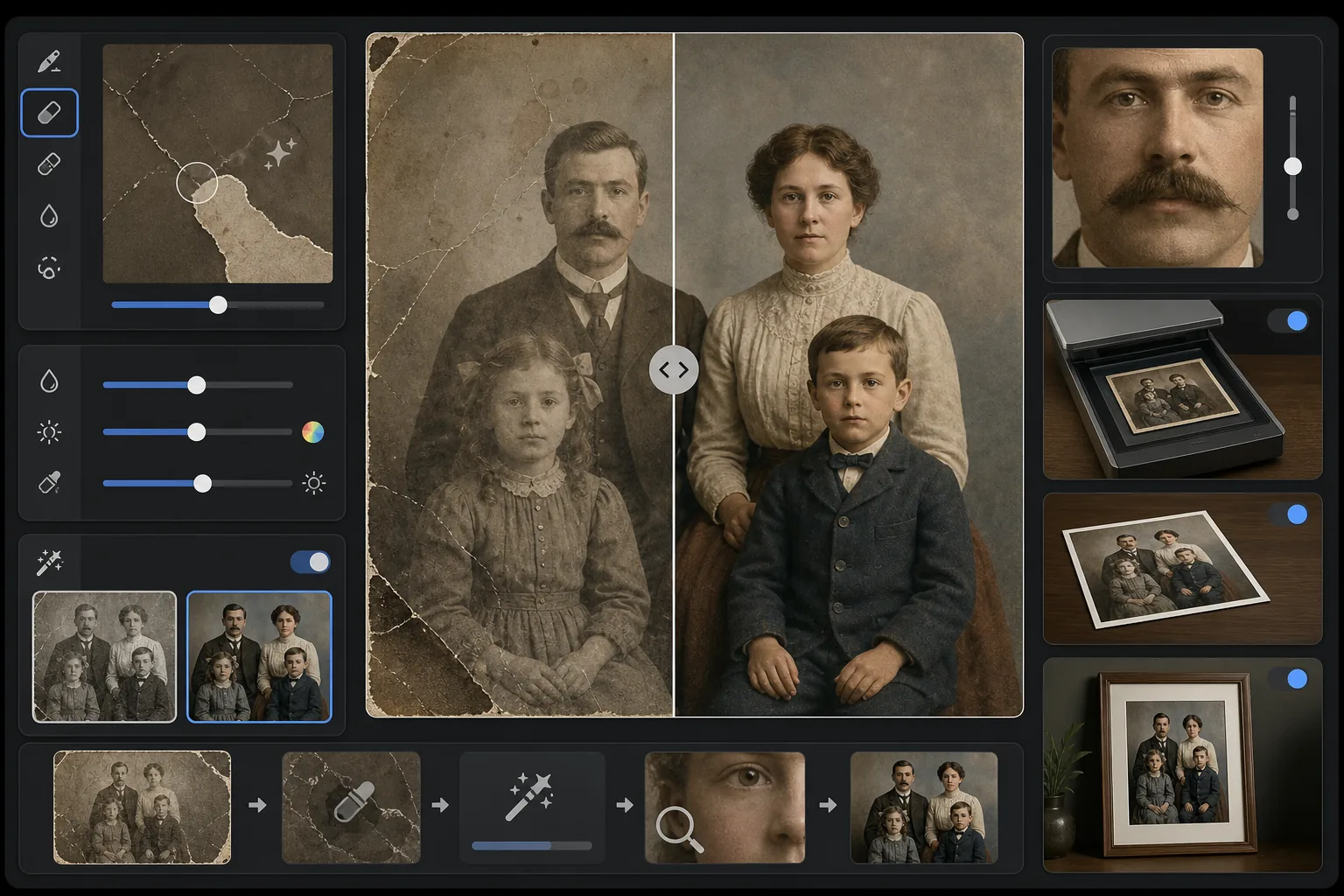
此模板的功能
修复扫描的复古照片上的物理损坏和老化效果。Magic Eraser 通过从周围环境重建缺失的图像内容,去除划痕、折痕、水渍、霉斑和破损边缘。AI Enhance 可恢复数十年来发生偏移或褪色的色彩,锐化因岁月而变柔和的细节,并能以尊重原片时代的时代精准色彩为黑白或棕褐色照片上色。
模板设置
| 损坏修复 | 强力——去除划痕、折痕、污渍和破损边缘 |
| 色彩恢复 | 全光谱——将褪色的色素恢复至原始鲜艳度 |
| 上色模式 | 关闭、轻微或完全(适用于黑白和棕褐色原片) |
| 细节恢复 | 重建因岁月和低扫描分辨率而变柔和的面部和精细细节 |
| 输出尺寸 | 匹配原始扫描尺寸,可选 2× 放大 |
| 时代保留 | 保留与时代相符的颗粒质感和色调质量 |
如何使用此模板
扫描或拍摄原片
以 600 DPI 或更高分辨率扫描复古照片,以获得最多可恢复的细节。如果无法扫描,请在均匀、漫射的光线下将照片放在平整表面上拍摄——避免使用闪光灯,因为它会在光面照片上产生反光斑点。
修复物理损坏
Magic Eraser 可识别并去除划痕、折痕、水渍损坏、霉斑和胶带残留。AI 通过分析周围的图像内容重建缺失区域——填补破损的边角,连接横跨面部的裂缝,并去除污渍变色。
恢复或添加色彩
对于褪色的彩色照片,AI Enhance 通过逆转不同染料层随时间退化的特定方式来恢复原始调色板。对于黑白或棕褐色原片,可选上色功能会根据肤色、植被、天空和织物图案等上下文线索添加逼真的色彩。
锐化并导出
细节恢复可锐化因数十年老化而变柔和的面部特征、文字和精细细节。以原始扫描分辨率导出,或放大至 2× 以便打印比原片更大的尺寸。
获得最佳效果的专业技巧
- ✓以扫描仪支持的最高分辨率扫描——最低 600 DPI,最好 1200 DPI。捕获的细节越多,AI 在重建损坏区域时可利用的素材就越多。
- ✓如果照片卡在相框或相册中,请就地拍摄而不要冒着撕破的风险——模板可以去除相框边缘和相册页面的伪影。
- ✓对于历史照片的上色,请尽可能提供有关时代(年代)和地点的背景信息——服装颜色、汽车颜色和建筑材料因时期和地区而有显著差异。
- ✓在运行完整修复之前,先将照片损坏最严重的区域作为测试进行处理——这能让您确认重建质量符合您的预期。
常见问题
它能修复缺失部分(如撕掉的边角)的照片吗?
+
可以。AI 利用周围图像的上下文重建缺失区域。对于天空、墙壁和植被等背景,效果是无缝的。对于面部或重要细节的缺失部分,重建效果令人印象深刻,但对于关键特征可能需要轻微的手动调整。
黑白照片的上色有多准确?
+
上色使用上下文分析来分配逼真的色彩——肤色、天空蓝、植被绿和常见的织物颜色都非常准确。AI 无法从上下文确定的物体的特定颜色(如裙子的确切色调)会是合理的,而非保证准确。
修复会去除照片的复古特征吗?
+
不会。时代保留设置会保留赋予复古照片其特征的、与时代相符的颗粒质感和色调质量。划痕和污渍等物理损坏会被去除,但原始时代的摄影质量会得到尊重——一张 20 世纪 40 年代的照片看起来仍然像一张 20 世纪 40 年代的照片,只是没有了损坏。