
身份证照片模板
从任意自拍或人像生成符合签证、驾照、国民身份证和员工证件要求的身份证照片。此模板将背景替换为所需的纯色,调整头部尺寸和位置以符合官方规格,校正光线使面部均匀受光,并按所需的精确打印尺寸输出。
免费试用此模板Personal template preview
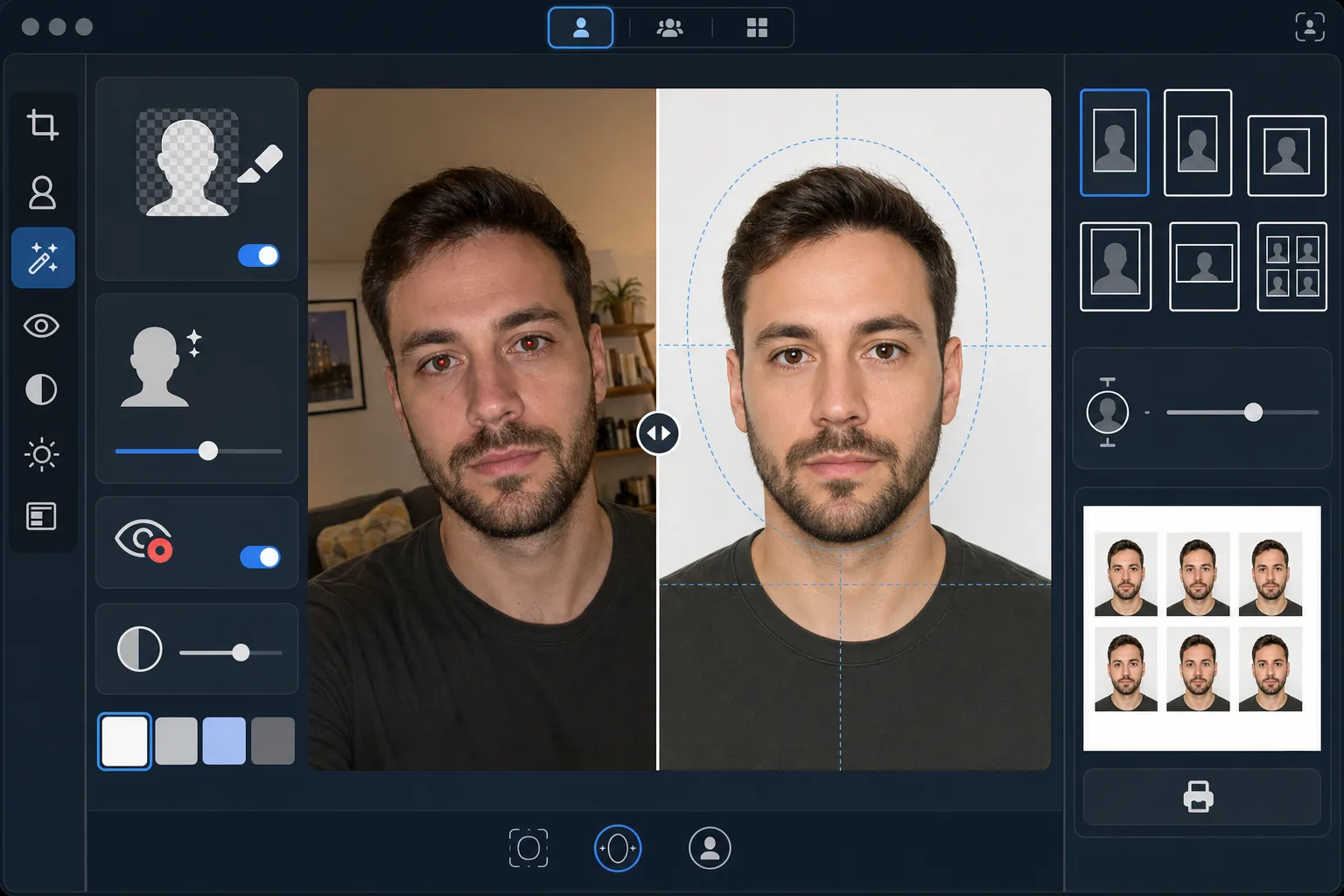
此模板的功能
将任意人像照片转换为符合政府规定的身份证照片。不同证件要求不同的规格——美国护照需要白色背景,头部高度在 25–35mm 之间,打印尺寸为 2×2 英寸,而申根签证则要求浅灰色或白色背景,尺寸为 35×45mm。此模板自动处理最常见的身份证照片标准。Background Eraser 移除原始背景并替换为所需的纯色。AI Enhance 校正不均匀的光线,去除闪光灯造成的红眼,并确保面部均匀受光、一侧没有强烈阴影——这是政府机构常见的退件原因。
模板设置
| 背景颜色 | 白色 (#FFFFFF) 或浅灰色 (#E5E5E5) — 可按证件类型选择 |
| 头部尺寸 | 自动将头部高度调整到画面的 70–80%(可按标准调整) |
| 打印尺寸 | 2×2 in(美国)、35×45 mm(欧盟/申根)、33×48 mm(英国)— 可选 |
| 光线校正 | 面部均匀受光 — 两侧均无阴影 |
| 输出分辨率 | 600 DPI 用于照片打印(兼容自助打印机和家用打印机) |
如何使用此模板
上传一张正面照片
上传一张在视线高度拍摄的清晰正面人像照。照片应展示完整面部和肩部上方,表情中性、双眼睁开。拍摄前请摘下眼镜、帽子和头饰(因宗教原因佩戴的除外)。
选择您的证件类型
选择证件类型——美国护照、欧盟/申根签证、英国护照、驾照或国民身份证。模板会自动调整背景颜色、头部尺寸、打印尺寸和宽高比,以符合您所选证件的官方要求。
背景与光线校正
Background Eraser 移除原始背景并替换为所需的纯色。AI Enhance 校正不均匀的光线,使面部两侧均匀受光,并去除人工照明造成的色偏。闪光灯造成的红眼会被自动校正。
导出以供打印
按您证件类型所需的精确打印尺寸以 600 DPI 下载。输出已为标准 4×6 英寸相纸排版,多张身份证照片平铺在一张纸上,可在家中、药店照片自助机或专业打印店打印。
获得最佳效果的专业技巧
- ✓在光线充足的房间里面向窗户、以素色墙壁为背景拍摄。虽然模板会替换背景,但一开始就让面部获得均匀的自然光,效果会比事后校正人工光造成的强烈阴影更好。
- ✓保持中性表情,闭嘴并双眼睁开。政府身份证照片要求一贯拒绝带有微笑、眯眼或张嘴的照片——许多政府机构会通过自动照片验证系统执行这些规则。
- ✓确保没有头发垂落到脸上或遮挡眉毛。面部必须从下巴底部到额头顶部完全可见。拍摄前请将横过脸部的头发别到后面。
- ✓穿一件与背景颜色形成对比的上衣。如果背景是白色,请避免穿白色衣服——深色或彩色上衣能确保边缘清晰分离,防止肩部与背景融为一体。
常见问题
这能在政府机构被接受吗?
+
此模板遵循每种证件类型的官方规格(国际旅行证件采用 ICAO 9303,国内身份证采用各国特定要求)。不过,最终是否接受取决于审核人员。此模板确保尺寸、背景颜色、头部尺寸和光线符合已公布的要求。
照片中可以戴眼镜吗?
+
大多数国家(包括美国自 2016 年起)现在要求护照和签证照片中摘下眼镜。此模板不会以数字方式去除眼镜——请在拍摄原始照片前摘下。宗教头饰在大多数司法管辖区是允许的。
如何打印输出结果?
+
此模板输出一张 4×6 英寸的相纸,上面以正确尺寸平铺多张身份证照片。可在任意药店照片自助机(CVS、Walgreens、Boots)、家中以 600 DPI 用相纸打印,或在专业打印店打印。请使用光面或哑面相纸——而非普通打印纸。
Related templates
More personal templates for your workflow.
通过背景清理、帽子和礼服 Color correction、瑕疵去除以及框架和公告的打印就绪锐化来增强毕业照片。
通过低光降噪、舞台照明 色彩校正、消除人群干扰以及从黑暗场地拍摄中恢复细节来增强音乐会和活动照片。
创建漂亮的新生儿公告卡照片,具有柔和的背景、柔和的色彩分级、消除医院杂乱以及可打印的邮寄尺寸。
为节日贺卡准备家庭和肖像照片,具有节日背景、暖色调分级、雪花效果和标准卡片尺寸以便打印。
通过温和的修饰、背景简化、温暖尊重的色彩分级以及可打印的服务尺寸来恢复和增强纪念悼念照片。
通过背景替换、照明校正和毛皮细节增强来改变庇护所和救援宠物照片,以帮助动物更快地找到家。