
如何去除照片中的颗粒
高 ISO、低光或旧相机传感器 — 颗粒和噪点可能会毁掉原本精彩的照片。 Magic Eraser 的 AI 降噪可消除颗粒,同时保留传统降噪所破坏的清晰度和细节。
Last updated
立即去除谷物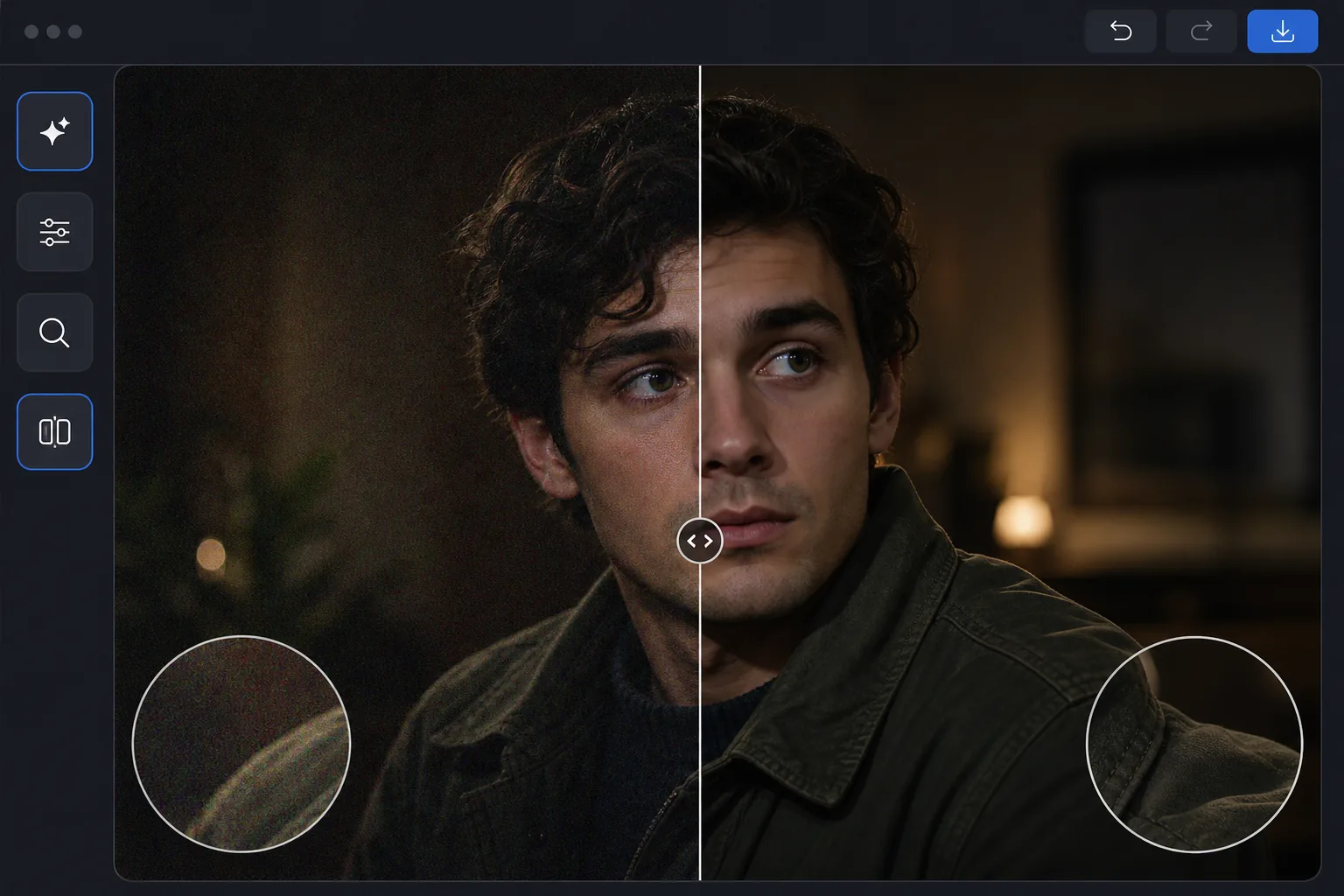
为什么AI降噪比传统降噪效果更好
想去除照片噪点,在网页、iOS 或 Android 上打开 Magic Eraser,选择 AI Enhance,上传有噪点的照片,让 AI 自动降噪——它能区分噪点和真实细节,因此会消除杂色斑点,同时保留边缘、文字和纹理的清晰度,而不会一并模糊掉。免费使用,无需注册。无论是带颗粒感的明度噪点,还是高 ISO 和弱光照片中常见的彩色色度斑点,它都能处理。可以放大到 100% 对比处理前后的效果;如果照片分辨率也偏低,先降噪,再放大。 当相机在低光照或高 ISO 设置下放大传感器信号时,会出现数字噪声(颗粒)。传统的去噪会模糊图像以消除噪声,但在此过程中会破坏细节——文本变得难以辨认,皮肤失去毛孔,织物失去纹理。人工智能去噪的工作方式有所不同:经过数百万个干净/噪声图像对训练的神经网络学会区分噪声和细节。它们可以抑制噪音,同时真正锐化真实细节。结果是一张照片看起来像是在较低 ISO 和更好照明下拍摄的,而不仅仅是嘈杂的原始照片的模糊版本。
Before you start
三步去除颗粒
Start with 上传嘈杂的照片. The result preview above and tips below use this guide's existing content; no separate before-and-after proof is assumed.
- 1
上传嘈杂的照片
在 Web、iOS 或 Android 上打开 Magic Eraser,然后选择 AI Enhance。上传颗粒状照片。 AI 自动检测噪声水平和类型 - 亮度噪声(粒状纹理)、色度噪声(彩色斑点)或两者。
- 2
应用AI去噪
人工智能处理图像,去除颗粒,同时保留边缘、纹理和精细细节。它适当地处理不同的图像区域:像天空这样的平滑区域会得到积极的去噪,而像头发和织物这样的纹理区域会得到仔细的处理以保留细节。
- 3
比较和导出
使用之前/之后滑块进行比较。放大细节区域(文本、眼睛、织物图案)以验证细节保留。以您需要的分辨率导出。对于噪声较大且分辨率较低的照片,请将去噪与 AI 升级相结合,以最大程度地恢复质量。
最适合
- 在高 ISO 设置下拍摄的夜间摄影和天文摄影
- 在昏暗场地不使用闪光灯拍摄的室内活动照片
- 手机相机在低光照条件下拍摄的照片,噪点很明显
- 为了清晰起见,需要清理安全摄像机镜头
- 扫描的胶片照片具有可见的胶片颗粒,需要平滑
获得最佳结果的技巧
当噪点是主要问题时,人工智能效果最佳 - 如果照片也严重模糊或曝光严重不足,请单独解决这些问题。对于同时具有亮度和色度噪点的照片,人工智能会同时处理两者。避免在 AI 去噪之前应用传统降噪,因为预处理可能会删除 AI 所需的细节。对于 RAW 照片,导出时应用最小限度的相机内降噪,然后使用 AI 去噪以获得比相机内置处理更好的效果。通过 AI 去噪,夜空照片比任何传统方法都能更好地保留星星细节。
常见问题
- 去噪会降低图像清晰度吗?
- 与传统的基于模糊的方法不同,人工智能去噪实际上可以保留并增强清晰度。神经网络区分噪声和细节,仅去除噪声,同时保持边缘清晰。
- 它可以修复色度噪声(色斑)吗?
- 是的。 AI 同时处理亮度噪声(颗粒纹理)和色度噪声(随机彩色斑点)。色度噪声特别容易被人工智能识别和消除,因为它具有独特的模式。
- 照片去噪免费吗?
- 是的。 AI Enhance 包括去噪功能,可在免费套餐中使用,但有每日使用限制。 Premium 消除了限制并添加了大型照片集的批处理。
- 在 Android 或 iPhone 上怎么去除照片噪点?
- 在任意手机浏览器或 iOS、Android 应用中打开 Magic Eraser,从相册载入有噪点的照片,选择 AI Enhance。AI 会直接在手机上识别并去除噪点——无需电脑——然后把更干净的版本保存回相册。它和桌面版效果一样,用浏览器的话还不用安装应用,非常适合刚拍完弱光照片就顺手清理。
- 对扫描照片上的胶片颗粒有效吗?
- 有效。AI 对扫描底片和相纸上的胶片颗粒,处理方式和数字传感器噪点类似,能在抹掉颗粒的同时保留人脸、文字和纹理中的真实细节。如果你其实想保留胶片质感,就轻度降噪或干脆跳过——颗粒本身就是那种美感的一部分。对于老旧或受损的扫描件,降噪和放大配合很好:先清掉颗粒,再放大,得到更清晰、更实用的效果。