
如何创建照片蒙太奇
将多张照片组合成一个创意构图 - 剪切主题,将它们排列在共享背景上,并构建讲故事的视觉效果。 Magic Eraser 的人工智能工具使每个人都可以使用专业的照片蒙太奇。
Last updated
立即创建蒙太奇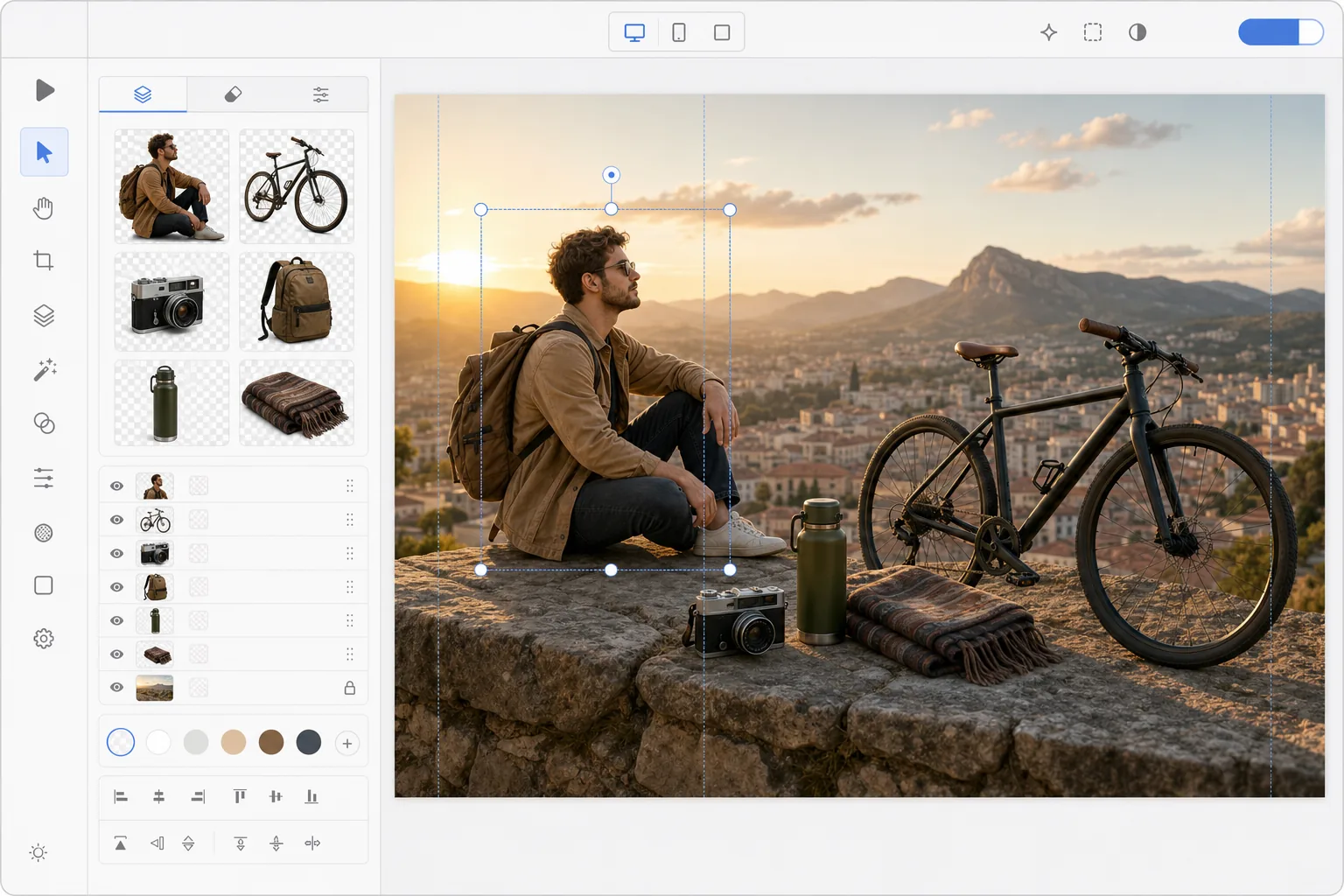
如何制作照片拼贴
想制作照片合成图?在网页、iOS 或 Android 上打开 Magic Eraser,先用背景擦除功能把每张照片里的主体单独抠出来,再切换到设计工具,把抠好的图层拖到同一个画布上,最后加一个背景——可以是一张照片、一种纯色,或一个 AI 生成的场景。完全免费,无需注册。和拼贴不同:拼贴是把整张照片并排摆在一起,而合成图是把抠出来的元素融合在一起,让它们看起来像处于同一个场景中。想要效果逼真,记得让各个主体的光照方向和比例保持一致,并在每个主体下方加一道柔和的阴影。 照片蒙太奇将多个图像的元素组合成一个单一的构图,讲述一个故事,展示进展,或创造超现实的视觉艺术。与拼贴画(将整张照片并排放置)不同,蒙太奇无缝地融合了元素——从不同照片中剪下的主题似乎共存于一个共享场景中。传统的蒙太奇创作需要先进的 Photoshop 技能:精确的蒙版、色彩匹配、透视对齐和阴影绘制。人工智能工具极大地简化了这个工作流程:自动背景去除干净地提取主题,生成填充创建有凝聚力的背景,智能合成匹配元素之间的照明。以前需要几个小时的事情现在只需要几分钟。
Before you start
只需三步即可创建照片蒙太奇
Start with 从照片中提取主题. The result preview above and tips below use this guide's existing content; no separate before-and-after proof is assumed.
- 1
从照片中提取主题
在 Web、iOS 或 Android 上打开 Magic Eraser。使用 Background Eraser 从每张照片中删除背景,为要组合的主题创建透明的剪切图。将每个剪切图导出为透明 PNG。
- 2
在共享画布上排列
切换到设计工具并按照您想要的尺寸创建一个新画布。导入您剪下的 PNG 并将它们排列在合成中。从前到后分层主题,调整大小以实现透视一致性,并定位它们以创建自然或故意超现实的场景。
- 3
添加背景和最后润色
选择或创建背景:使用照片、渐变、纯色或 AI 生成的场景。添加文本叠加、调整构图并导出。其结果是适合社交媒体、营销或创意项目的精美照片蒙太奇。
最适合
- 社交媒体创建者为故事和帖子构建合成图像
- 营销团队根据多张产品照片创建营销活动视觉效果
- 活动组织者设计带有场地和表演者照片的宣传图形
- 艺术家和爱好者创作超现实或奇幻的复合艺术
- 教师和学生从多个源图像构建视觉演示
获得最佳结果的技巧
最令人信服的蒙太奇在所有元素上保持一致的照明方向 - 如果一个主题从左侧照明,所有其他主题也应该如此。按比例缩放主题:一个人相对于建筑物、家具和其他人的大小应该合适。在每个主体下方添加微妙的阴影,使它们融入场景中。对于超现实或艺术蒙太奇,故意的不一致(不可能的规模、混合的视角)成为一种创造性的选择,而不是一种错误。对于营销蒙太奇,请保持构图简洁,竞争注意力的关键元素不超过 3-5 个。
常见问题
- 蒙太奇和拼贴画有什么区别?
- 拼贴画将整张照片并排放置在网格或重叠布局中。蒙太奇从不同照片中提取元素,并将它们混合到一个场景中,其中主题似乎共存 - 它需要剪切主题并将它们合成到共享背景上。
- 我可以使用 AI 生成蒙太奇背景吗?
- 是的。使用 AI 创建或 AI 填充生成自定义背景场景,然后将提取的主题分层在顶部。当没有一张照片提供正确的背景时,这是理想的选择。
- 照片蒙太奇创作是免费的吗?
- 是的。背景删除和设计工具可在免费套餐中使用,但有每日使用限制。 Premium 消除了创建包含许多元素的复杂蒙太奇的限制。
- 怎么在手机上制作照片合成图?
- 用任意手机浏览器打开 Magic Eraser,或下载 iOS、Android 应用,从相册里加载每张照片,用背景擦除功能把主体抠出来。然后打开设计工具,新建一个画布,把透明的抠图拖进来——用双指捏合调整每张图的大小和位置。加上背景后导出,完成的合成图会保存回你的相册。它和桌面版用法完全一样;如果用浏览器,则无需安装任何应用。
- 怎么让合成图看起来真实,而不像生硬拼贴的?
- 逼真感来自整体的一致性,光靠抠图质量是不够的。让每个主体的光照方向保持一致——如果一个是从左侧打光,那就让所有主体都从左侧打光——再调整每个元素的比例,让它们之间的大小关系合理。在每个主体下方加一道柔和的阴影,让它稳稳落在背景上,同时保持透视(视平线和地平线)一致。如果你更想要超现实的效果,那就故意打破这些规则;不合理的比例和混搭的透视反而会被看作一种有意的创意表达。