
Seyahat Blogu Fotoğrafı
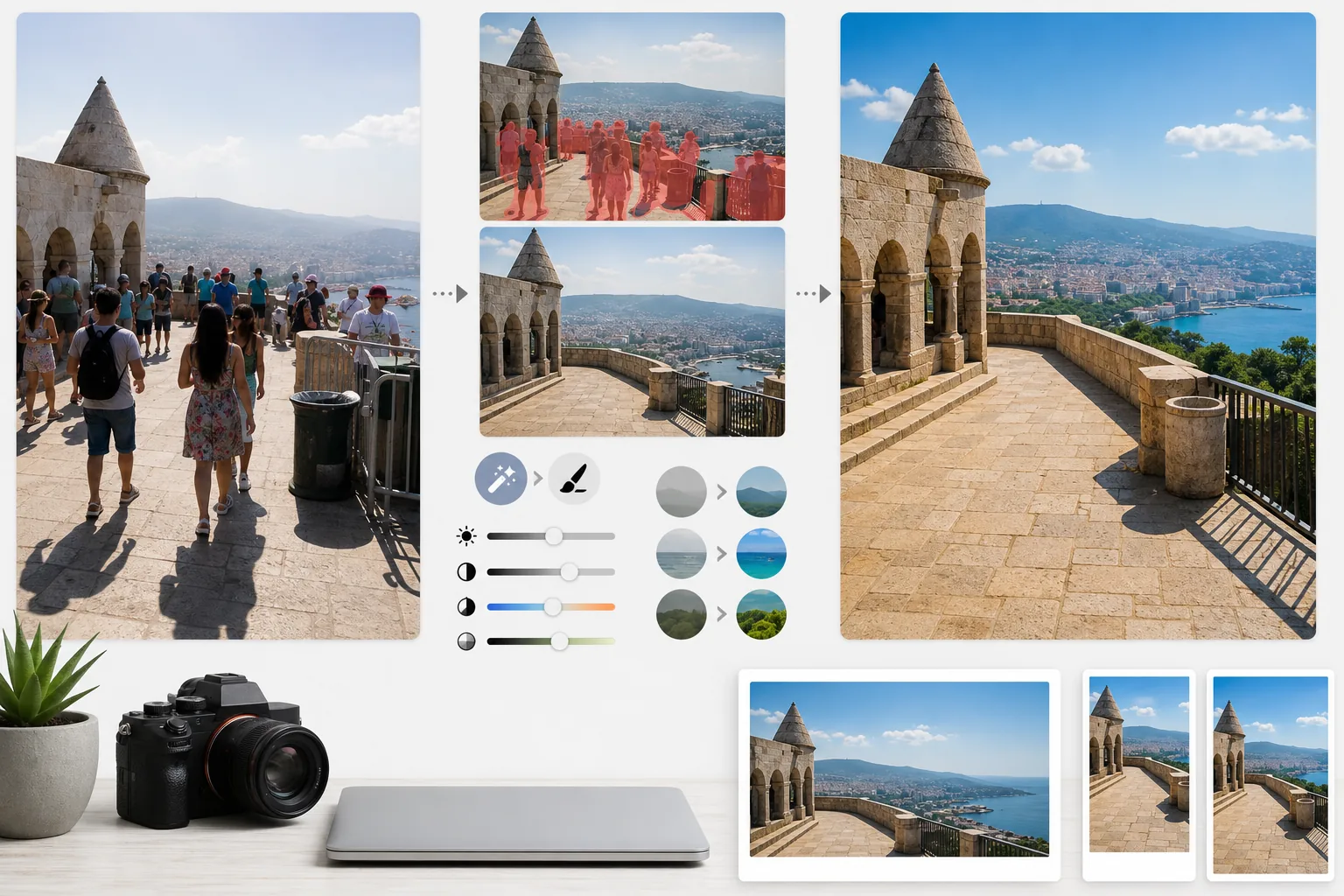
Kalabalık seyahat fotoğraflarını yayın kalitesinde destinasyon fotoğraflarına dönüştürün. Bu şablon, Magic Eraser kullanarak önemli yer ve manzara çekimlerinden turistleri, kareye giren kişileri ve görsel karmaşayı kaldırır, ardından AI Enhance uygulayarak seyahat fotoğrafçılığında yaygın olan zorlu pozlama koşullarını — sert öğle güneşi, karanlık tapınak iç mekânları, arkadan aydınlatmalı gün batımları — düzeltir ve okuyucuların yolculuğu rezerve etmek istemesini sağlayan görüntüler için doğal renkleri güçlendirir.
Bu şablonu ücretsiz deneyinPersonal template preview
Bu şablon ne yapar
Seyahat fotoğrafçılığının en büyük iki sorununu çözer: kalabalıklar ve kötü ışık. Magic Eraser, anıtların önünde duran turistleri, karenizden geçen kareye girenleri ve çöp kutuları, inşaat bariyerleri ve geçici tabelalar gibi yer hissini bozan görsel karmaşayı kaldırır. Yapay zekâ, kaldırılan kişilerin ve nesnelerin arkasındaki mimariyi, kaldırımı ve manzarayı çevredeki bağlamı kullanarak yeniden oluşturur. AI Enhance ardından seyahate özgü pozlama zorluklarının üstesinden gelir — pencerelerin patladığı ve gölgelerin siyah olduğu katedral ve tapınak iç mekân çekimleri, tropik destinasyonlarda renkleri düzleştiren sert öğle güneşi ve ön planın siluet hâline geldiği arkadan aydınlatmalı gün batımı sahneleri. Renkler, kameraların dinamik aralıkta sürekli olarak yetersiz temsil ettiği, destinasyonun insan gözüne gerçekte nasıl göründüğünü yansıtacak şekilde güçlendirilir.
Şablon ayarları
| Turist kaldırma | Önemli yer ve manzara çekimlerinden kişileri otomatik algılayıp kaldırma |
| Pozlama düzeltme | Zorlu ışık için yüksek ışıkların ve gölgelerin HDR tarzı kurtarılması |
| Renk geliştirme | Yapay bir görünüm olmadan doğal doygunluğu (gökyüzü, su, yapraklar) güçlendirme |
| Pus kaldırma | Daha net uzak manzaralar için atmosferik pusu delip geçme |
| Çıktı çözünürlüğü | Uzun kenar 4000px (retina kalitesinde blog kapak görselleri) |
Bu şablon nasıl kullanılır
Seyahat fotoğrafınızı yükleyin
Herhangi bir seyahat fotoğrafını yükleyin — kalabalık önemli yerler, geniş manzaralar, sokak sahneleri, iç mekân mimarisi. Şablon, akıllı telefonlardan, aynasız kameralardan ve aksiyon kameralarından gelen JPEG dosyalarını işler. Azami düzenleme esnekliği için RAW dosyaları da kabul edilir.
Kalabalıkları ve karmaşayı kaldırın
Magic Eraser, karedeki kişileri algılar ve kaldırır. Tüm kişileri kaldırmayı, belirli kişileri (kendinizi veya seyahat arkadaşlarınızı) korumayı ya da yalnızca önemli mimari veya manzara unsurlarını kapatan kişileri seçerek kaldırmayı tercih edebilirsiniz. Yapay zekâ, eksik alanları yeniden oluşturulan zemin, duvarlar ve manzarayla doldurur.
Işığı ve rengi geliştirin
AI Enhance, patlamış gökyüzünü kurtaran ve derin gölgeleri açan HDR tarzı bir işlem uygular — tapınak iç mekânlarında ve dar Avrupa sokaklarında yaygındır. Renkler, gözlerinizin destinasyonda gördüğüne uyacak şekilde, özellikle gökyüzü mavilerinde, okyanus turkuazlarında ve yaprak yeşillerinde güçlendirilir. Daha net dağ ve şehir manzaraları için atmosferik pus azaltılır.
Blog ve sosyal medya için dışa aktarın
Retina kalitesinde blog kapak görselleri için uzun kenar 4000px olarak ya da Instagram, Pinterest ve Facebook için platforma özel boyutlarda indirin. Dosya, çalışmalarını coğrafi etiketleyen fotoğrafçılar için optimize edilmiş EXIF verisi korumasını içerir.
En iyi sonuçlar için profesyonel ipuçları
- ✓Aynı sahnenin birkaç saniye arayla birden fazla çekimini yapın. Turistler kareler arasında hareket ettiğinde, yapay zekâ arkalarındaki zemin ve duvarlar hakkında referans bilgisine sahip olur ve tek bir kareye göre daha temiz yeniden oluşturmalar üretir.
- ✓Kiliselerin, tapınakların ve müzelerin iç mekân çekimleri için çekim sırasında fotoğrafı hafifçe fazla pozlayın. Yapay zekânın parlak yüksek ışıkları kurtarması, aşırı karanlık gölgeleri açmasından daha kolaydır ve iç mekân çekimleri varsayılan olarak az pozlanma eğilimindedir.
- ✓Mümkün olduğunda manzaraları altın saat veya mavi saat sırasında çekin. AI Enhance, öğle vaktinin düz ışığında renkleri güçlendirebilir, ancak altın saatin yönlü sıcak ışığının manzaralarda yarattığı gölgeleri ve derinliği hiçbir renk derecelendirmesi taklit edemez.
Araçlar
Sık sorulan sorular
Fotoğrafta kendimi tutup diğer turistleri kaldırabilir miyim?
+
Evet. Kendinizi veya seyahat arkadaşlarınızı korunan özneler olarak işaretleyebilirsiniz. Yapay zekâ, korunan kişileri özgün konumları, ışıkları ve gölgeleriyle yerinde tutarken sahnedeki diğer herkesi kaldırır.
Çok kalabalık sahnelerde ne kadar iyi çalışır?
+
Kalabalıklar karenin yaklaşık %40'ından azını kapladığında en iyi şekilde çalışır. Aşırı kalabalık sahneler — insanlar arasında zemini göremediğiniz tıklım tıklım bir meydan gibi — temiz bir yeniden oluşturma için çok az arka plan referansı sunar. Bu durumlarda, ön sıraların kısmen kaldırılması çoğunlukla ikna edici bir sonuç üretir.
Pus kaldırma fotoğrafı doğal olmayan gösterir mi?
+
Pus azaltma, doğal görünümlü sonuçlar için kalibre edilmiştir. Uzaktaki dağları ve binaları gizleyen mavi-gri atmosferik saçılmayı kaldırır, ancak manzara fotoğraflarına derinlik kazandıran ince hava perspektifini korur. Sonuç, filtrelenmiş veya aşırı işlenmiş bir görüntüden çok, berrak ve açık bir günde çekim yapmış gibi görünür.
Her destinasyonu kalabalıksız, en iyi hâliyle gösterin
Seyahat fotoğraflarını yükleyin ve okuyucularınıza valizlerini toplama isteği uyandıran, turistsiz ve renkleri güçlendirilmiş görüntüler elde edin.
Ücretsiz deneyinRelated templates
More personal templates for your workflow.
Vizeler, ehliyetler ve ulusal kimlikler için uygun arka plan rengi, kafa boyutu ve yüz ifadesi gereksinimlerine sahip uyumlu kimlik fotoğrafları oluşturun.
Arka plan temizleme, kep ve önlük Color correction, kusur giderme ve çerçeveler ve duyurular için baskıya hazır keskinleştirme ile mezuniyet fotoğraflarınızı geliştirin.
Düşük ışıkta gürültü azaltma, sahne aydınlatması renk düzeltme, kalabalığın dikkatini dağıtma ve karanlık mekan çekimlerinde ayrıntı kurtarma özellikleriyle konser ve etkinlik fotoğraflarını geliştirin.
Yumuşak arka planlara, yumuşak renk geçişlerine, hastane karmaşasını ortadan kaldırmaya ve postaya verilmeye hazır baskıya hazır boyutlara sahip güzel yeni doğan duyuru kartı fotoğrafları oluşturun.
Festival arka planlarına, sıcak renk derecelendirmelerine, kar efektlerine ve baskı için standart kart boyutlarına sahip tatil tebrik kartları için aile ve portre fotoğrafları hazırlayın.
Nazik rötuşlama, arka plan basitleştirme, sıcak ve saygılı renk derecelendirme ve hizmetler için baskıya hazır boyutlar ile anma anı fotoğraflarını eski haline getirin ve geliştirin.