
Kimlik Fotoğraf Şablonu
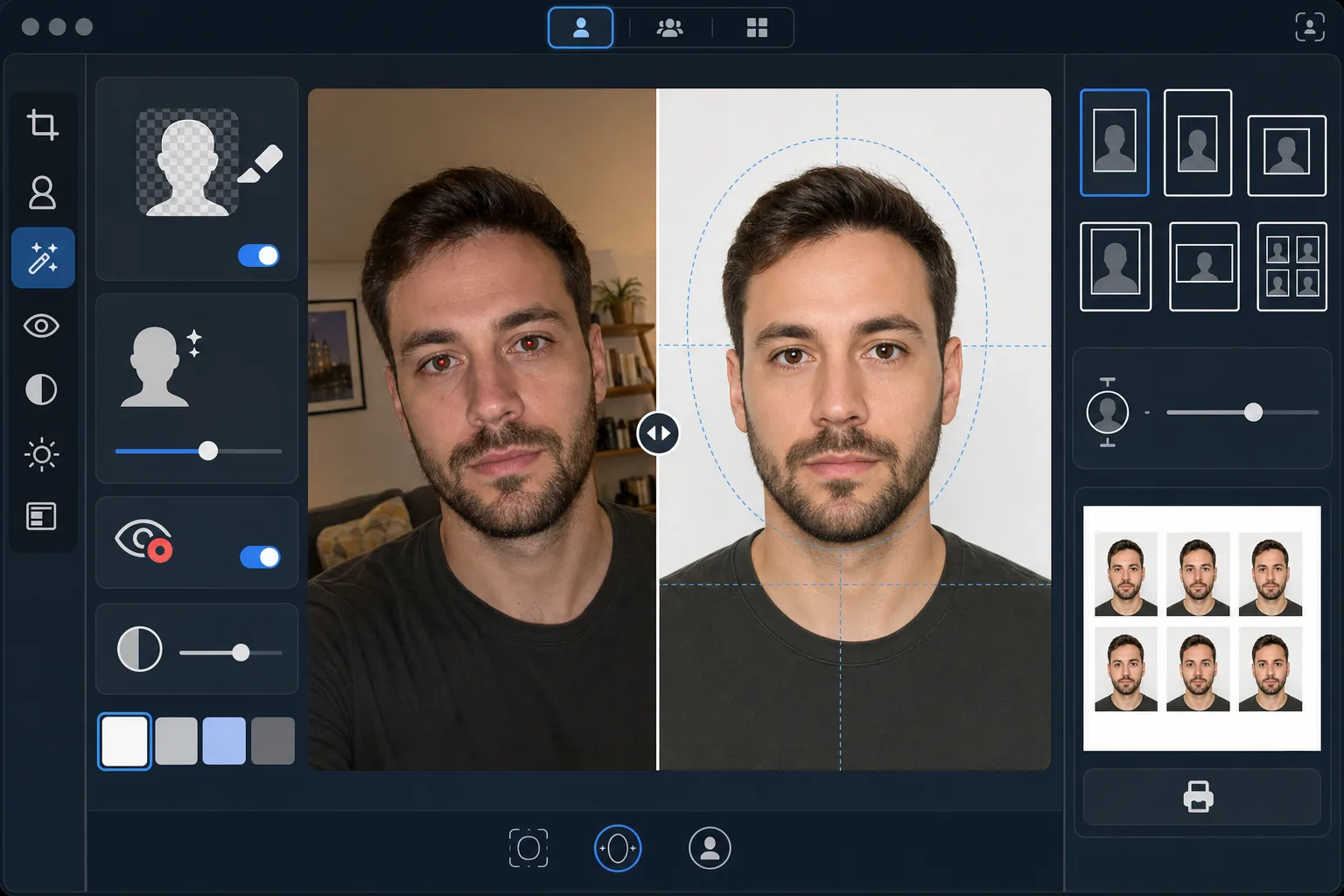
Herhangi bir selfie veya portreden vizeler, ehliyetler, ulusal kimlik kartları ve çalışan kartları için uyumlu kimlik fotoğrafları oluşturun. Bu şablon arka planı gereken düz renkle değiştirir, kafa boyutunu ve konumunu resmi spesifikasyonlara uyacak şekilde ayarlar, yüzün eşit aydınlatılması için ışığı düzeltir ve tam olarak gereken baskı boyutlarında çıktı verir.
Bu şablonu ücretsiz deneyinPersonal template preview
Bu şablon ne yapar
Herhangi bir portre fotoğrafını devlet gereksinimlerine uygun bir kimlik fotoğrafına dönüştürür. Farklı belgeler farklı spesifikasyonlar gerektirir — ABD pasaportları, 2×2 inç baskıda 25–35mm arası kafa yüksekliğiyle beyaz arka plan gerektirirken, Schengen vizeleri 35×45mm boyutunda açık gri veya beyaz arka plan gerektirir. Bu şablon, en yaygın kimlik fotoğrafı standartlarını otomatik olarak işler. Background Eraser orijinal arka planı kaldırır ve onu gereken düz renkle değiştirir. AI Enhance eşit olmayan aydınlatmayı düzeltir, flaştan kaynaklanan kırmızı gözü giderir ve yüzün bir tarafta sert gölgeler olmadan eşit şekilde aydınlatılmasını sağlar; bu, devlet dairelerinde sık görülen bir ret nedenidir.
Şablon ayarları
| Arka plan rengi | Beyaz (#FFFFFF) veya açık gri (#E5E5E5) — kimlik türüne göre seçilebilir |
| Kafa boyutlandırma | Kafa yüksekliğini kare alanın %70–80'ine otomatik sığdırma (standarda göre ayarlanabilir) |
| Baskı boyutları | 2×2 in (ABD), 35×45 mm (AB/Schengen), 33×48 mm (Birleşik Krallık) — seçilebilir |
| Aydınlatma düzeltmesi | Eşit yüz aydınlatması — her iki tarafta da gölge yok |
| Çıktı çözünürlüğü | Fotoğraf baskısı için 600 DPI (kiosk ve ev yazıcısıyla uyumlu) |
Bu şablon nasıl kullanılır
Önden çekilmiş bir fotoğraf yükleyin
Göz hizasında çekilmiş, net, önden bir portre yükleyin. Fotoğraf, nötr bir ifade ve her iki göz açıkken yüzünüzün tamamını ve omuzlarınızın üst kısmını göstermelidir. Fotoğraf çekmeden önce gözlükleri, şapkaları ve başlıkları (dini nedenlerle takılanlar hariç) çıkarın.
Kimlik türünüzü seçin
Belge türünü seçin — ABD pasaportu, AB/Schengen vizesi, Birleşik Krallık pasaportu, ehliyet veya ulusal kimlik kartı. Şablon, arka plan rengini, kafa boyutunu, baskı boyutlarını ve en boy oranını seçtiğiniz belgenin resmi gereksinimlerine uyacak şekilde otomatik olarak ayarlar.
Arka plan ve aydınlatma düzeltmesi
Background Eraser orijinal arka planı kaldırır ve onu gereken düz renkle değiştirir. AI Enhance, yüzün her iki tarafının eşit aydınlatılması için eşit olmayan aydınlatmayı düzeltir ve yapay aydınlatmadan kaynaklanan her türlü renk tonunu giderir. Flaştan kaynaklanan kırmızı göz otomatik olarak düzeltilir.
Baskı için dışa aktarın
Belge türünüz için gereken tam baskı boyutlarında 600 DPI olarak indirin. Çıktı, evde, eczane fotoğraf kioskunda veya profesyonel bir baskı dükkanında basılması için tek bir sayfada yan yana dizilmiş birden çok kimlik fotoğrafıyla standart 4×6 inç fotoğraf kağıdı için biçimlendirilmiştir.
En iyi sonuçlar için profesyonel ipuçları
- ✓Fotoğrafınızı pencereye dönük, iyi aydınlatılmış bir odada düz bir duvarın önünde çekin. Şablon arka planı değiştirse de, yüzünüzde baştan eşit doğal ışıkla başlamak, yapay ışıktan kaynaklanan sert gölgeleri düzeltmekten daha iyi bir sonuç verir.
- ✓Ağzınız kapalı ve her iki göz açıkken nötr bir ifade koruyun. Devlet kimlik fotoğrafı gereksinimleri; gülümseyen, gözleri kısılmış veya ağzı açık fotoğrafları tutarlı şekilde reddeder — bu kurallar birçok devlet dairesinde otomatik fotoğraf doğrulama sistemleriyle uygulanır.
- ✓Hiçbir saçın yüzünüze düşmediğinden veya kaşlarınızı kapatmadığından emin olun. Yüz, çenenin altından alnın üstüne kadar tamamen görünür olmalıdır. Fotoğrafı çekmeden önce yüzü kesen saçları toplayıp iliştirin.
- ✓Arka plan rengiyle kontrast oluşturan bir üst giyin. Arka plan beyazsa beyaz giysilerden kaçının — koyu veya renkli bir üst, kenarların temiz ayrılmasını sağlar ve omuzlarınızın arka planla kaynaşmasını önler.
Araçlar
Sık sorulan sorular
Bu, devlet dairelerinde kabul edilecek mi?
+
Şablon, her belge türü için resmi spesifikasyonları izler (uluslararası seyahat belgeleri için ICAO 9303, yerel kimlikler için belirli ulusal gereksinimler). Ancak kabul, nihai olarak inceleyen yetkiliye bağlıdır. Şablon; boyutların, arka plan renginin, kafa boyutunun ve aydınlatmanın yayımlanan gereksinimleri karşılamasını sağlar.
Fotoğrafta gözlük takabilir miyim?
+
Çoğu ülke (2016'dan beri ABD dahil) artık pasaport ve vize fotoğrafları için gözlüklerin çıkarılmasını istiyor. Şablon gözlükleri dijital olarak kaldırmaz — kaynak fotoğrafı çekmeden önce çıkarın. Dini başlıklara çoğu yargı bölgesinde izin verilir.
Çıktıyı nasıl basarım?
+
Şablon, doğru boyutta yan yana dizilmiş birden çok kimlik fotoğrafıyla 4×6 inçlik bir sayfa çıktısı verir. Herhangi bir eczane fotoğraf kioskunda (CVS, Walgreens, Boots), evde 600 DPI fotoğraf kağıdında veya profesyonel bir baskı dükkanında basın. Parlak veya mat fotoğraf kağıdı kullanın — normal yazıcı kağıdı değil.
Evden çıkmadan uyumlu kimlik fotoğrafları edinin
Bir selfie yükleyin ve pasaportlar, vizeler, ehliyetler ve daha fazlası için devlet gereksinimlerine uygun, baskıya hazır kimlik fotoğrafları edinin.
Ücretsiz deneyinRelated templates
More personal templates for your workflow.
Arka plan temizleme, kep ve önlük Color correction, kusur giderme ve çerçeveler ve duyurular için baskıya hazır keskinleştirme ile mezuniyet fotoğraflarınızı geliştirin.
Düşük ışıkta gürültü azaltma, sahne aydınlatması renk düzeltme, kalabalığın dikkatini dağıtma ve karanlık mekan çekimlerinde ayrıntı kurtarma özellikleriyle konser ve etkinlik fotoğraflarını geliştirin.
Yumuşak arka planlara, yumuşak renk geçişlerine, hastane karmaşasını ortadan kaldırmaya ve postaya verilmeye hazır baskıya hazır boyutlara sahip güzel yeni doğan duyuru kartı fotoğrafları oluşturun.
Festival arka planlarına, sıcak renk derecelendirmelerine, kar efektlerine ve baskı için standart kart boyutlarına sahip tatil tebrik kartları için aile ve portre fotoğrafları hazırlayın.
Nazik rötuşlama, arka plan basitleştirme, sıcak ve saygılı renk derecelendirme ve hizmetler için baskıya hazır boyutlar ile anma anı fotoğraflarını eski haline getirin ve geliştirin.
Hayvanların yuvalarını daha hızlı bulmasına yardımcı olmak için arka plan değiştirme, aydınlatma düzeltme ve kürk ayrıntılarını geliştirme özellikleriyle barınağı dönüştürün ve evcil hayvan fotoğraflarını kurtarın.