
Konser ve Etkinlik Fotoğrafı
Karanlık, gürültülü konser ve etkinlik fotoğraflarını paylaşılabilir anılara dönüştürerek kurtarın. Bu şablon düşük ışık gürültüsünü çarpıcı biçimde azaltır, az pozlanmış çekimlerden ayrıntıları kurtarır, sahne aydınlatmasının agresif renk tonlarını düzeltir, görüşünüzü engelleyen kolları ve telefonları kaldırır ve sanatçıyı veya etkinlik öznesini keskinleştirir.
Bu şablonu ücretsiz deneyinPersonal template preview
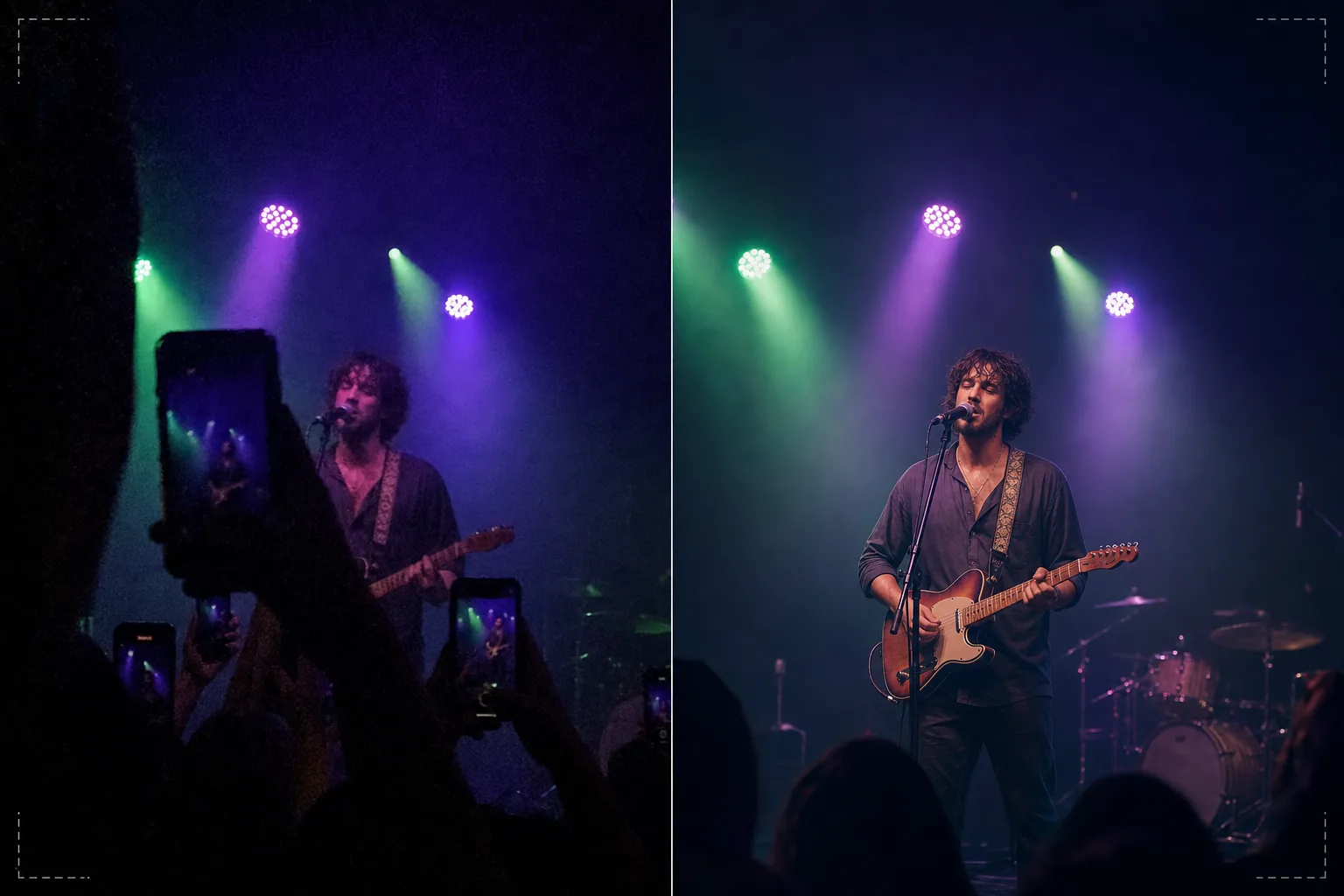
Bu şablon ne yapar
Aydınlatma koşullarının akıllı telefon kameralarını alt ettiği konserlerde, festivallerde, spor etkinliklerinde ve kapalı mekan performanslarında çekilen zorlu fotoğrafları kurtarır. Konser fotoğrafları, insanların düzenli olarak çektiği teknik açıdan en zor çekimlerdir — aşırı düşük ışık yüksek ISO gürültüsünü zorunlu kılar, karışık renkli sahne aydınlatması tuhaf renk tonları oluşturur ve sahneye olan mesafe yüzleri ve ayrıntıları küçük ve yumuşak gösterir. AI Enhance, alttaki ayrıntıları kurtarırken tane desenini kaldıran akıllı bir gürültü azaltma uygular, sahne aydınlatmasının mor, yeşil ve kırmızı renk tonlarını düzelterek doğal ten ve enstrüman tonlarını ortaya çıkarır ve yüz ifadelerini ve enstrüman ayrıntılarını öne çıkarmak için sanatçıyı keskinleştirir. Magic Eraser, görüşünüzü engelleyen diğer izleyicilerin kalkık kollarını, telefonlarını ve başlarını kaldırır.
Şablon ayarları
| Gürültü azaltma | AI gürültü giderme (ISO 12800'e kadar yüksek ISO tanesinden ayrıntı kurtarır) |
| Renk düzeltme | Sahne aydınlatması ton giderme (mor, yeşil, kırmızı, mavi nötrlenir) |
| Gölge kurtarma | Az pozlanmış alanları 3 durağa kadar yükseltme |
| Kalabalık kaldırma | Kalkık kolları, telefonları ve engelleyen başları kaldırma |
| Özne keskinleştirme | Seçici sanatçı/sahne keskinleştirme (bokeh atmosferini korur) |
Bu şablon nasıl kullanılır
Konser fotoğrafınızı yükleyin
Konserlerden, festivallerden, tiyatro gösterilerinden, komedi şovlarından veya spor etkinliklerinden telefon veya kamera fotoğraflarını yükleyin. Şablon, bu mekanların sunduğu uç koşulları halleder — neredeyse karanlık pozlamalar, yoğun renkli sahne ışıkları, hareket eden sanatçılardan kaynaklanan hareket bulanıklığı ve izleyicilerin engellediği görüşler.
Gürültü azaltma ve ayrıntı kurtarma
AI Enhance, alttaki görüntü ayrıntısını korurken yüksek ISO gürültü tanesini kaldırır. Az pozlanmış gölgeler yükseltilerek orijinal çekimde neredeyse görünmeyen yüzler, enstrümanlar ve sahne öğeleri ortaya çıkarılır. Gürültü azaltma, görüntüyü yapay biçimde pürüzsüz göstermek yerine mekanın atmosfer kalitesini koruyacak şekilde ayarlanmıştır.
Renk ve aydınlatma düzeltme
Sahne aydınlatmasının agresif renk tonları düzeltilir, böylece ten tonları, kıyafetler ve enstrümanlar tanınabilir renklerde görünür. Doğal bir görünüm için sahne aydınlatmasını tamamen nötrlemeyi ya da en uç tonları azaltırken atmosferik renkli aydınlatmanın bir kısmını korumak için kısmen düzeltmeyi seçebilirsiniz.
Geliştirilmiş anılarınızı dışa aktarın
Geliştirilmiş fotoğrafı sosyal medyada paylaşmak, kişisel arşiv veya baskı için indirin. Çıktı, canlı etkinliğin atmosfer kalitesini korurken görüntüyü yüzlerin, ifadelerin ve anların görünür olduğu ve hatıra olarak anlamlı olacak kadar net hale getirir.
En iyi sonuçlar için profesyonel ipuçları
- ✓Karanlık atmosferik bölümler yerine parlak sahne aydınlatması anlarında — spot ışıkları, piroteknik, ekran geçişleri — çekim yapın. Şablon önemli ölçüde gölge ayrıntısı kurtarabilir, ancak en parlak anlarda yakalanan fotoğraflar üzerinde çalışılacak en fazla alt veriye sahiptir.
- ✓Hareket eden sanatçıları çekerken seri çekim modunu kullanın. Bir şarkıcının el hareketinden veya bir gitaristin tel çalan kolundan kaynaklanan hareket bulanıklığı sonradan kaldırılamaz, ancak on çekimlik bir seride bir kare, şablonun ardından geliştirebileceği keskin bir anı yakalayabilir.
- ✓Sarsıntıyı en aza indirmek için telefonunuzu iki elinizle tutun ve dirseklerinizi vücudunuza dayayın. Kamera sarsıntısı düşük ışıkta konser fotoğrafçılığının zorluğunu artırır. Daha sabit bir kaynak fotoğraf, gürültü azaltma algoritmasına daha temiz veri sağlar ve daha keskin bir nihai görüntü üretir.
Araçlar
Sık sorulan sorular
Bu, neredeyse tamamen karanlık fotoğrafları düzeltebilir mi?
+
Şablon, 2–3 durak az pozlanmış çekimlerden — özneyi zar zor görebildiğiniz görüntülerden — ayrıntı kurtarabilir. 3 durağın ötesinde az pozlamada sensör verisi çoğunlukla gürültüdür ve kurtarılan görüntü önemli kusurlar gösterir. Orijinal çekim ne kadar parlaksa sonuç o kadar iyidir.
Peki ya konser video görüntüleri?
+
Konser videonuzdan en iyi sabit kareleri çıkarın ve bunları tek tek işleyin. Video kareleri sabit fotoğraflardan daha düşük çözünürlüklüdür ancak gürültü azaltma ve renk düzeltmeden önemli ölçüde yararlanarak video olarak fazla gürültülü olan görüntülerden paylaşılabilir görüntüler üretir.
Kalabalık engellerini kaldırmak doğal görünecek mi?
+
Önünüzdeki kalabalıktan kalkık telefonları, kolları ve başları kaldırmak, engel karenin küçük bir kısmını kapladığında iyi çalışır. AI, kaldırılan öğelerin arkasındaki sahneyi ve arka planı yeniden oluşturur. Öznenin çoğunu kaplayan büyük engelleri kaldırmak daha az etkilidir.
Karanlık konser çekimlerini canlı anılara dönüştürün
Etkinlik fotoğraflarınızı yükleyin ve kameranızın zorlu mekan aydınlatmasında yakalamakta zorlandığı anları kurtarın.
Ücretsiz deneyinRelated templates
More personal templates for your workflow.
Vizeler, ehliyetler ve ulusal kimlikler için uygun arka plan rengi, kafa boyutu ve yüz ifadesi gereksinimlerine sahip uyumlu kimlik fotoğrafları oluşturun.
Arka plan temizleme, kep ve önlük Color correction, kusur giderme ve çerçeveler ve duyurular için baskıya hazır keskinleştirme ile mezuniyet fotoğraflarınızı geliştirin.
Yumuşak arka planlara, yumuşak renk geçişlerine, hastane karmaşasını ortadan kaldırmaya ve postaya verilmeye hazır baskıya hazır boyutlara sahip güzel yeni doğan duyuru kartı fotoğrafları oluşturun.
Festival arka planlarına, sıcak renk derecelendirmelerine, kar efektlerine ve baskı için standart kart boyutlarına sahip tatil tebrik kartları için aile ve portre fotoğrafları hazırlayın.
Nazik rötuşlama, arka plan basitleştirme, sıcak ve saygılı renk derecelendirme ve hizmetler için baskıya hazır boyutlar ile anma anı fotoğraflarını eski haline getirin ve geliştirin.
Hayvanların yuvalarını daha hızlı bulmasına yardımcı olmak için arka plan değiştirme, aydınlatma düzeltme ve kürk ayrıntılarını geliştirme özellikleriyle barınağı dönüştürün ve evcil hayvan fotoğraflarını kurtarın.