
Mezuniyet Fotoğrafı Geliştirme
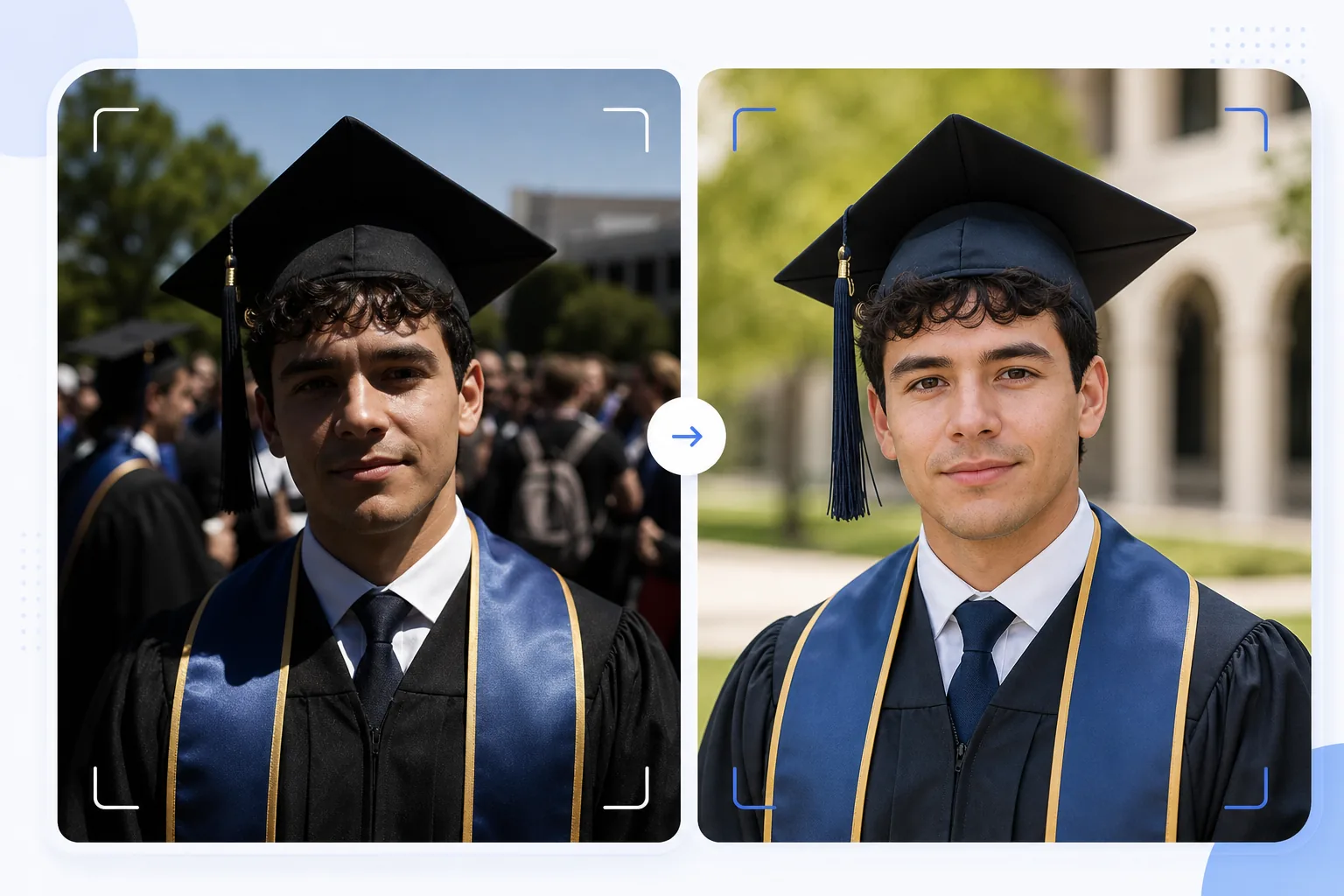
Doğal çekilmiş mezuniyet anlık fotoğraflarını çerçevelenmeye değer portrelere dönüştürün. Bu şablon, mezuniyet törenlerinde sık görülen sert dış mekan ışığını düzeltir, mezunun arkasındaki kareye giren kişileri ve kalabalık karmaşasını kaldırır, kep ve cüppe renklerini canlandırır ve görüntüyü duvarlara ve şömine raflarına asmak üzere büyük boyutlarda basmak için keskinleştirir.
Bu şablonu ücretsiz deneyinPersonal template preview
Bu şablon ne yapar
Mezuniyet gününde hızlıca çekilmiş anlık fotoğrafları; çerçevelemeye, duyuru kartlarına ve sosyal medyada paylaşmaya uygun, özenli portrelere dönüştürür. Mezuniyet törenleri zorlu koşullarda çekilir — sert öğle güneşi kep siperliğinin altında gözlerin çevresinde halka gibi gölgeler oluşturur, kalabalık arka planlar dağınıktır ve cüppe renkleri doğrudan güneş ışığında soluk görünür. AI Enhance, kep altındaki gölgeleri doldurmak için pozlamayı düzeltir, cüppelere ve şeritlere zengin rengini geri kazandırır ve kalabalıkta aceleyle çekilen karelerde yumuşayan yüz ayrıntılarını keskinleştirir. Magic Eraser; kareye giren kişileri, mezunun arkasında görünen kalabalık üyelerini, dikkat dağıtan tabelaları ve diğer tören karmaşasını kaldırarak mezunu daha temiz bir arka plan önünde öne çıkarır.
Şablon ayarları
| Gölge kurtarma | Kep altı gölge doldurma (parlak alanları patlatmadan yüzü aydınlatır) |
| Cüppe rengi geliştirme | Siyah, lacivert, bordo ve altın cüppeler için kumaş rengi onarımı |
| Cilt pürüzsüzleştirme | Doğal cilt dokusunu korurken hafif kusur azaltma |
| Arka plan temizleme | Mezunun arkasındaki kareye giren kişileri ve kalabalık üyelerini kaldırın |
| Çıktı çözünürlüğü | 5000px uzun kenar (300 DPI'da 16×12 inçe kadar baskıya hazır) |
| Keskinleştirme | Portre için optimize edilmiş keskinleştirme (yüz ayrıntısı + cüppe kumaş dokusu) |
Bu şablon nasıl kullanılır
Mezuniyet fotoğrafınızı yükleyin
Herhangi bir mezuniyet töreni fotoğrafını yükleyin — poz verilmiş portre, sahneyi geçerken çekilmiş kare, kep atışı veya doğal bir kutlama anı. Şablon; parlak dış mekan güneşinden loş iç mekan oditoryumlarına kadar her ışık koşulunda akıllı telefonlar ve DSLR'lerle çekilmiş fotoğrafları işler.
Işığı ve rengi düzeltin
AI Enhance, genellikle mezunun gözlerini ve yüzünün üst kısmını karartan kare kepin oluşturduğu sert gölgeleri düzeltir. Cüppe ve şerit renkleri gerçek zengin tonlarına geri döndürülür — siyah cüppeler koyu gri görünmek yerine derinliğini geri kazanır ve onur şeritleri renk doygunluğunu tam olarak gösterir.
Dikkat dağıtıcıları kaldırın
Magic Eraser; öznenin arkasında görünen kalabalık üyelerini, diğer mezunları, katlanır sandalyeleri ve tabelaları kaldırır. Yapay zeka arka planı mekanın temiz bir sürümüyle — çimen, bina cephesi veya perde — yeniden oluşturarak kalabalık bir sahneden portre benzeri bir kompozisyon yaratır.
Baskı ve paylaşım için dışa aktarın
300 DPI'da 16×12 inçe kadar çerçeveli baskılar için 5000px uzun kenarda veya sosyal medya ve dijital duyurular için 2000px'te indirin. Renk profili, ekranda görüntüleme için sRGB veya profesyonel baskı için Adobe RGB olarak ayarlanır.
En iyi sonuçlar için profesyonel ipuçları
- ✓Önceden planlayabiliyorsanız resmi portreyi tören biter bitmez doğrudan güneş yerine gölgeli bir alanda çekin. Gölge, düzeltilmesi en zor sorun olan sert kep gölgelerini ortadan kaldırır. Şablon güneş gölgelerini düzeltebilir, ancak en doğal sonucu gölge verir.
- ✓Hem geleneksel poz verilmiş bir portre hem de doğal bir kutlama anı (aileyi kucaklama, kep atma) yakalayın. Şablon her iki stili de geliştirir ve her birinin özenli bir sürümüne sahip olmak size çerçeveli baskılar ile sosyal medya paylaşımları arasında seçenekler sunar.
- ✓Aileyle grup çekimlerinde mezunu gruptan biraz öne yerleştirin. Bu, Magic Eraser'ın aile üyelerini etkilemeden arka plan dikkat dağıtıcılarını ayırıp kaldırmasına yardımcı olan doğal bir derinlik ayrımı oluşturur.
Araçlar
Sık sorulan sorular
Bu, bulanık mezuniyet fotoğraflarını düzeltebilir mi?
+
AI Enhance, hafif el titremesi veya otomatik odağın biraz kaçmasından kaynaklanan hafif yumuşaklığa sahip fotoğrafları keskinleştirebilir. Ancak yoğun hareket bulanıklığından dolayı belirgin şekilde bulanık olan fotoğraflar (örneğin uzaktan çekilmiş, sahneyi geçerken çekilmiş bir kare) tam olarak kurtarılamaz — şablon ayrıntıyı geliştirir ancak hiç yakalanmamış bir keskinliği yaratamaz.
Peki ya iç mekan tören fotoğrafları?
+
Oditoryum aydınlatmasıyla (sıcak sarı veya karışık floresan) çekilmiş iç mekan mezuniyet fotoğrafları renk sıcaklığı açısından düzeltilir. Şablon, ten tonlarının doğal görünmesi ve cüppe renklerinin gerçekçi çıkması için beyaz dengesini ayarlar. Yüksek ISO ayarlarından kaynaklanan düşük ışık gürültüsü, yüz ayrıntısı korunarak azaltılır.
Arka planı tamamen kaldırabilir miyim?
+
Evet. Tüm arka plan öğelerini kaldırmak ve stüdyo portresi görünümü için bunları düz bir renk veya gradyanla değiştirmek için arka plan temizlemeyi kullanabilirsiniz. Bu, orijinal tören arka planı seçici kaldırma için fazla dağınık olduğunda işe yarar.
Tören anlık fotoğraflarından çerçevelenmeye değer mezuniyet portreleri
Mezuniyet günü fotoğraflarınızı yükleyin ve temiz arka planlara ve canlı kep ile cüppe renklerine sahip, baskıya hazır, geliştirilmiş portreler elde edin.
Ücretsiz deneyinRelated templates
More personal templates for your workflow.
Vizeler, ehliyetler ve ulusal kimlikler için uygun arka plan rengi, kafa boyutu ve yüz ifadesi gereksinimlerine sahip uyumlu kimlik fotoğrafları oluşturun.
Düşük ışıkta gürültü azaltma, sahne aydınlatması renk düzeltme, kalabalığın dikkatini dağıtma ve karanlık mekan çekimlerinde ayrıntı kurtarma özellikleriyle konser ve etkinlik fotoğraflarını geliştirin.
Yumuşak arka planlara, yumuşak renk geçişlerine, hastane karmaşasını ortadan kaldırmaya ve postaya verilmeye hazır baskıya hazır boyutlara sahip güzel yeni doğan duyuru kartı fotoğrafları oluşturun.
Festival arka planlarına, sıcak renk derecelendirmelerine, kar efektlerine ve baskı için standart kart boyutlarına sahip tatil tebrik kartları için aile ve portre fotoğrafları hazırlayın.
Nazik rötuşlama, arka plan basitleştirme, sıcak ve saygılı renk derecelendirme ve hizmetler için baskıya hazır boyutlar ile anma anı fotoğraflarını eski haline getirin ve geliştirin.
Hayvanların yuvalarını daha hızlı bulmasına yardımcı olmak için arka plan değiştirme, aydınlatma düzeltme ve kürk ayrıntılarını geliştirme özellikleriyle barınağı dönüştürün ve evcil hayvan fotoğraflarını kurtarın.