
Arka plan eklemek, dar kırpmaları düzeltmek ve her türlü düzene sığdırmak için görüntüleri yapay zekayla genişletin
Fotoğraf arka planlarını genişletmek, görüntülerin kırpmasını kaldırmak ve görselleri sosyal medya gönderileri, reklamlar, küçük resimler, banner'lar ve e-ticaret düzenleri için uyarlamak için Magic Eraser'nin Yapay Zeka Genişletme aracını kullanın. Daha hızlı bir AI görüntü genişletici iş akışıyla portreler, ürün çekimleri ve pazarlama görselleri etrafında daha fazla tuval alanı oluşturun.
Magic Eraser AI Expand, üretken yapay zekayı kullanarak görüntü sınırlarını genişletir ve fotoğrafların kırpılmasını açar. Orijinal çerçevenin ötesine, mevcut görüntünün stili ve bağlamıyla eşleşen yeni içerik ekler; genellikle portre fotoğrafları manzaraya dönüştürmek, boşluk payı eklemek ve afiş formatları için arka planları genişletmek için kullanılır.
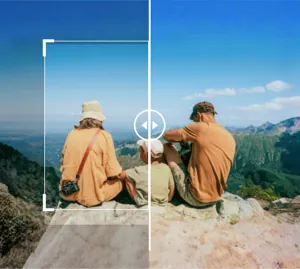

Daha net çerçeveleme için fotoğraf arka planlarını AI ile genişletin
Orijinal kırpmanın ötesine geçin ve AI'nın çevredeki tuvalden daha fazlasını oluşturmasına izin verin, böylece görüntü daha az sıkışık hale gelir. Bu, portreler, ürün fotoğrafları veya kampanya görselleri konu etrafında daha fazla alana ihtiyaç duyduğunda işe yarar.
AI Genişletmeyi Aç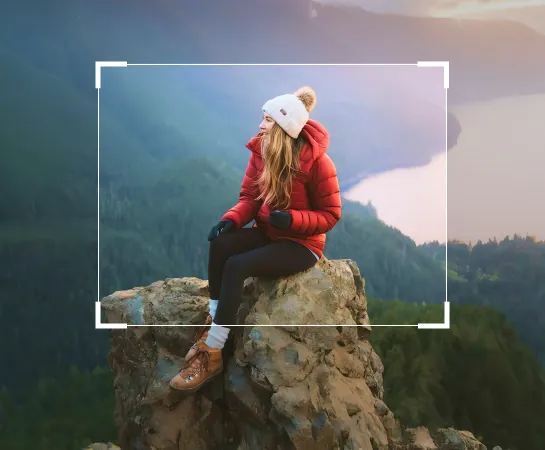
Görüntü arka planlarını tuvali manuel olarak yeniden oluşturmaktan daha hızlı genişletin
Bir fotoğraf çok sıkı kırpıldığında veya metin, düzen veya daha iyi çerçeveleme için yeterli alan bulunmadığında AI Expand, nesnenin etrafında hızla daha fazla alan oluşturmanıza yardımcı olur. Sıfırdan başlamadan reklamlar, sosyal paylaşımlar, küçük resimler ve e-ticaret için kompozisyonları yeniden oluşturmanın pratik bir yoludur.
AI Genişletmeyi Aç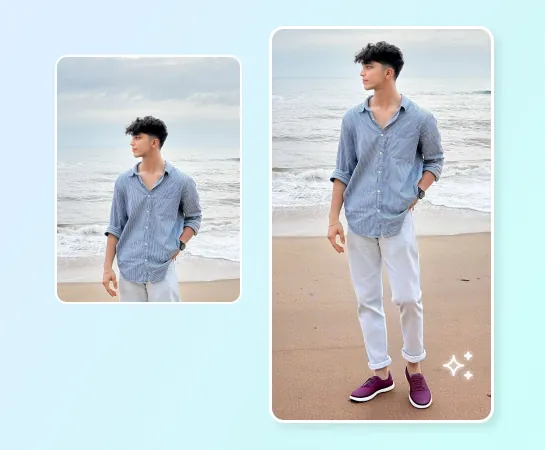
Sosyal içerik, reklamlar, ürün fotoğrafları ve daha geniş düzenler için AI Expand'ı kullanın
AI Expand, portrelerden yaşam tarzı çekimlerine, ürün görsellerinden pazarlama görsellerine kadar en boy oranlarını değiştirmenize ve konunun etrafında daha fazla nefes alma alanı yaratmanıza yardımcı olur. Özellikle yatayı dikeye dönüştürürken, kopyalama için alan yaratırken veya banner ve kampanya görsellerini genişletirken kullanışlıdır.
AI Genişletmeyi Aç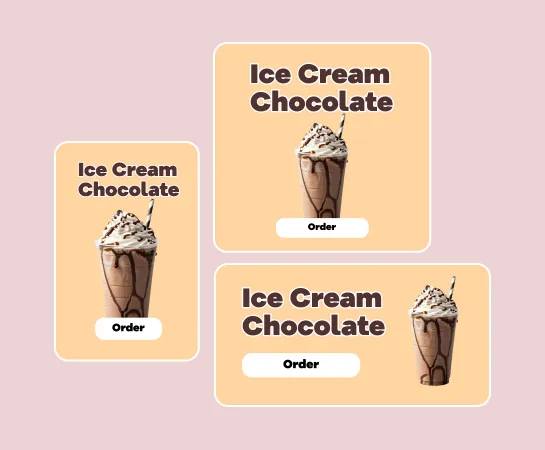
Resim genişletildikten sonra düzenlemeye devam edin
Genişletme genellikle iş akışındaki yalnızca bir adımdır. Daha büyük bir tuval oluşturduktan sonra varlığı tamamlamak için arka planı kaldırma, geliştirme, filtreler, metin veya diğer araçlarla düzenlemeye devam edebilirsiniz. Bu, ekiplere garip kaynak görüntüden düzene hazır görsele kadar daha hızlı bir yol sağlar.
AI Genişletmeyi Aç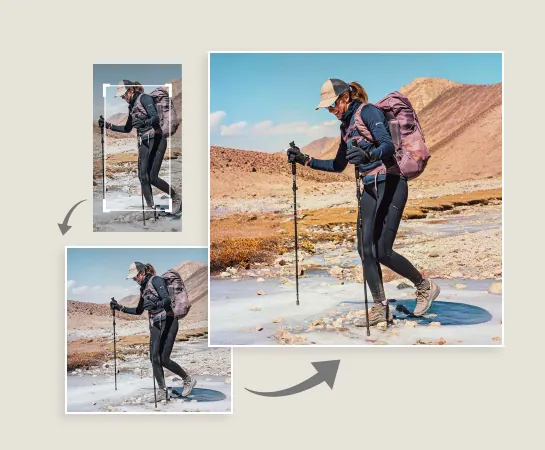
AI ile bir görüntü nasıl genişletilir
Bir resim yükle
Bir portre, ürün resmi, banner öğesi veya daha fazla tuval alanı gerektiren herhangi bir fotoğrafla başlayın.
Bir tuval hazır ayarı seçin
Daha sonra oluşturmak istediğiniz formata göre bir hedef en boy oranı veya düzen yönü seçin.
Çerçeveyi ayarlayın ve oluşturun
Gerekirse görüntüyü döndürün veya yeniden konumlandırın, ardından AI Expand'ın nesnenin çevresinde yeni arka plan alanı oluşturmasına izin verin.
İndirin veya düzenlemeye devam edin
En iyi genişletilmiş sonucu seçin, dışa aktarın veya geliştirme, tasarım veya temizleme iş akışlarına geçin.
İhtiyacınız olan tüm AI görüntü düzenleme araçları
Temizleme ve geliştirmeden oluşturma ve tasarıma kadar Magic Eraser Web'de şu anda mevcut olan ana düzenleme yeteneklerini keşfedin.

Yapay Zeka Genişlet
Daha hızlı bir yapay zeka genişletme iş akışıyla görüntü kenarlarını genişletin ve nesnenin etrafında yeni tuval alanı oluşturun.

Arka Planı Kaldır
Şeffaf varlıklara veya daha temiz kompozisyonlara ihtiyaç duyduğunuzda genişletme sonrasında konuyu kesin.

AI Enhance
Daha parlak bir nihai sonuç için genişletme sonrasında keskinliği, rengi ve ayrıntıları iyileştirin.

Tasarım
Metin, başlıklar ve hafif tasarım düzenleri için eklenen tuval alanını kullanın.

Yapay Zeka Oluştur
Yeni bir yaratıcı yöne ve çerçevede daha fazla alana ihtiyaç duyduğunuzda oluşturulan görselleri genişlemeyle eşleştirin.

Nesneleri Kaldır
Daha basit ve daha odaklanmış bir kompozisyon istediğinizde genişlettikten sonra dikkat dağıtıcı unsurları temizleyin.

Yapay Zeka Filtresi
Daha yaratıcı kampanya varyasyonları için genişletilmiş sonuca yeni bir ruh hali veya stil uygulayın.

AI Dolgusu
Görüntünün daha fazla hedefli oluşturulması gerektiğinde seçili bölgeleri değiştirin veya eksik alanları yeniden oluşturun.
Sık sorulan sorular
Bir resim yükleyin, bir tuval ön ayarı seçin, çerçeveyi ayarlayın ve Magic Eraser'ün konunun etrafında daha fazla arka plan oluşturmasına izin verin. Daha sonra genişletilmiş sonuçları inceleyebilir, bir tanesini uygulayabilir ve dışa aktarabilir veya düzenlemeye devam edebilirsiniz.
AI Expand, portreler, ürün resimleri, sosyal içerik, reklam öğeleri, küçük resimler, afişler ve konu etrafında daha fazla alana veya yeni bir en boy oranına ihtiyaç duyan diğer görseller için iyi çalışır.
Evet. Ana kullanım durumlarından biri, orijinal çerçeve çevresinde yeni alan oluşturarak kaynak görüntüyü daha geniş, daha uzun veya daha platform dostu düzenlere uyarlamaktır.
Evet. Genişletme sonrasında AI Enhance, Arka Planı Kaldır, Nesneleri Kaldır, Tasarım, AI Filtresi ve diğer Magic Eraser iş akışları gibi araçlara devam edebilirsiniz.
Genel akış basittir: Resmi yükleyin, bir tuval ön ayarı seçin, genişletilmiş varyasyonlar oluşturun, en iyi sonucu seçin ve dışa aktarın veya düzenlemeye devam edin.