
Stok Fotoğraf Hazırlama
Fotoğraflarınızın ilk gönderimde stok ajansları tarafından kabul edilmesini sağlayın. Bu şablon, reddedilmeye yol açan ticari markaları, logoları ve markalı öğeleri kaldırır, kalite incelemesinde başarısız olan teknik kusurları temizler ve dosyaları Shutterstock, Adobe Stock, Getty ve iStock'un gerektirdiği kesin teknik özelliklerde dışa aktarır — fotoğrafların stok kütüphanelerinden reddedilmesinin en yaygın nedenlerini ortadan kaldırır.
Bu şablonu ücretsiz deneyinDesign template preview
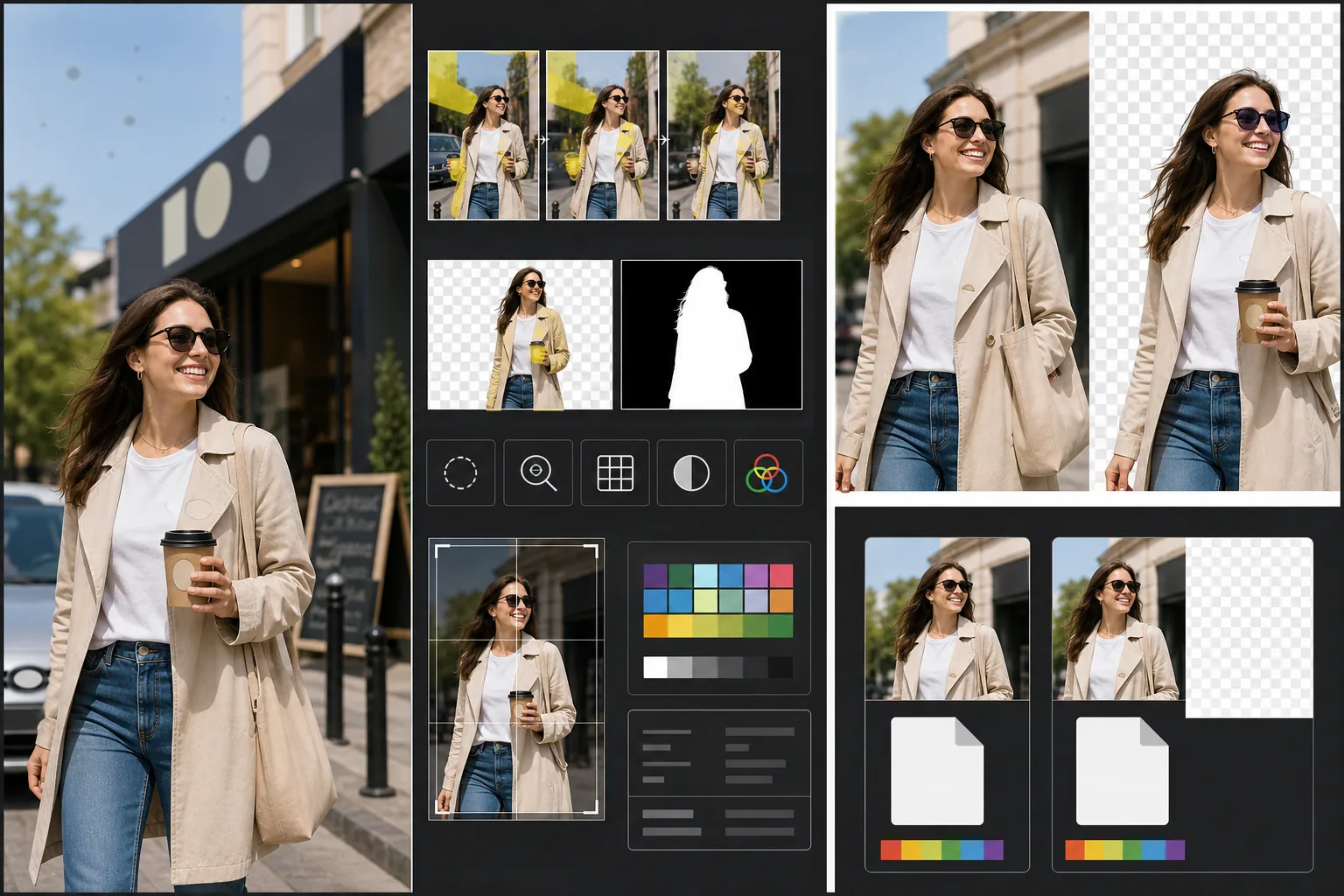
Bu şablon ne yapar
Stok fotoğraf reddine neden olan belirli teknik ve yasal gereklilikleri ele alır. Magic Eraser, mülk izni gerektirecek veya doğrudan reddedilmeye yol açacak görünür ticari markaları, marka logolarını, ürün etiketlerini ve markalı tabelaları algılar ve kaldırır. Buna giysi logoları, araba amblemleri, mağaza tabelaları ve ambalajlardaki marka adları dahildir. Background Eraser, kesim amaçlı görüntüler için temiz bir izolasyon sağlar, hem RGB görüntüsünü hem de stok ajanslarının gerektirdiği ayrı bir alfa maskesini oluşturur. Teknik kalite kontrolleri gürültü düzeylerini, keskinliği, kromatik sapmayı ve sensör toz lekelerini doğrular — hepsi yaygın ret tetikleyicileridir — ve yapay zeka yapabildiğini düzeltirken yeniden çekim gerektiren sorunları işaretler. Nihai dışa aktarım, dosya biçimi, renk profili, çözünürlük ve meta veri gömme açısından ajans teknik özelliklerine uyar.
Şablon ayarları
| Ticari marka algılama | Görünür logoları, marka adlarını ve ürün etiketlerini otomatik algılayıp kaldırın |
| Teknik kalite kontrolü | Gürültü, keskinlik, kromatik sapma ve sensör tozunu doğrulayın |
| İzolasyon maskesi | Kesim görüntüler için alfa kanalı oluşturun (saydamlıklı PNG) |
| Renk profili | sRGB (çoğu stok ajansı tarafından gerekli) |
| Meta veri | Başlık, açıklama ve anahtar kelimeler için IPTC alanlarını gömün |
| Çıktı biçimi | Maksimum kalitede JPEG (seviye 12) veya TIFF (kayıpsız, Getty tarafından tercih edilir) |
Bu şablon nasıl kullanılır
Fotoğrafınızı yükleyin
Stok ajanslarına göndermek istediğiniz fotoğrafı yükleyin. Şablon RAW, JPEG, TIFF ve PNG dosyalarını kabul eder. Mevcut en yüksek kaliteli sürümü yükleyin — stok ajansları teknik kaliteyi tam çözünürlükte değerlendirir ve tekrarlanan kaydetmeden kaynaklanan sıkıştırma kusurları gösteren görüntüleri reddeder.
Ticari markaları ve markaları kaldırın
Magic Eraser, görüntüde görünür ticari markaları, logoları, marka adlarını ve ürün etiketlerini tarar. Algılanan öğeler inceleme için vurgulanır. Onaylanan kaldırmalar, yapay zekanın her ticari markanın arkasındaki yüzeyi yeniden oluşturmasıyla gerçekleştirilir — giysi logosunun altındaki kumaş dokusu, amblemin altındaki araba kaportası, mağaza tabelasının altındaki duvar yüzeyi.
Teknik kalite kontrolünü çalıştırın
Şablon, görüntüyü stok ajansı reddine yaygın olarak neden olan teknik sorunlar açısından analiz eder: gölge alanlarındaki gürültü, yetersiz keskinlik, yüksek kontrastlı kenarlardaki kromatik sapma, sensör toz lekeleri ve beyaz dengesi hataları. Düzeltilebilir sorunlar otomatik olarak giderilir. Düzeltilemeyen sorunlar (şiddetli hareket bulanıklığı gibi) göndermeden önce bilmeniz için işaretlenir.
Ajans meta verisiyle dışa aktarın
Hedef ajansınızı seçin; şablon, o ajansın tercih ettiği biçim ve teknik özelliklerde dışa aktarır. Başlık, açıklama ve anahtar kelimeler için IPTC meta veri alanları dışa aktarmadan önce gömülebilir. Dosya, Shutterstock, Adobe Stock, Getty/iStock veya Alamy katkıda bulunan portallarına doğrudan yüklenmeye hazırdır.
En iyi sonuçlar için profesyonel ipuçları
- ✓Çekime baştan itibaren ticari markaları göz önünde bulundurarak başlayın. Yapay zeka logoları etkili biçimde kaldırsa da, daha az markalı öğe içeren sahneler daha az boyama gerektirir ve daha doğal görünür. Giysi etiketlerini içe doğru çevirin, markasız aksesuarlar seçin ve mümkün olduğunda mağaza tabelalarını dışarıda bırakacak şekilde kamerayı konumlandırın.
- ✓Kameranızın ürettiği en yüksek çözünürlükte gönderin. Stok ajansları arama sonuçlarını kısmen çözünürlüğe göre sıralar — aynı arama sorgusunda 50 megapiksellik bir görüntü, 12 megapiksellik bir görüntünün üzerinde görünür çünkü alıcılar esnek kırpma ve büyük format kullanımı için daha büyük dosyaları tercih eder.
- ✓Mümkün olduğunda stok fotoğraflarınıza insanları dahil edin. Tanınabilir insan özneleri (model izinleriyle) içeren görüntüler, insansız benzer sahnelere göre tutarlı biçimde daha fazla gelir elde eder. Şablonun cilt rötuşu minimum olacak şekilde ayarlanmıştır; stok ajansları bunu aşırı düzenlenmiş cilde tercih eder.
Sık sorulan sorular
Bir araba ambleminin kaldırılması doğal görünecek mi?
+
Evet. Yapay zeka, amblemin arkasındaki araba kaportasını yeniden oluşturur — boya rengini, yansımayı ve yüzey eğriliğini eşleştirir. Yaygın amblem konumları (ön ızgara, bagaj, jant merkezleri) için yeniden oluşturma çok temizdir. Sıra dışı yerleşimler veya çok büyük amblemler, kenarlarda hızlı bir manuel rötuş gerektirebilir.
Bu, gönderimim için anahtar kelimeler oluşturabilir mi?
+
Şablon, başlık, açıklama ve anahtar kelimeleri girebileceğiniz IPTC meta veri alanlarını gömer. Anahtar kelimeleri otomatik oluşturmaz — stok anahtar kelime optimizasyonu, alıcıların nasıl arama yaptığını anlamanıza bağlı uzmanlık gerektiren bir beceridir ve otomatik oluşturulan anahtar kelimeler genellikle satışları yönlendiren ticari kavramları kaçırır.
Bu hangi ajansları destekler?
+
Dışa aktarma ön ayarları Shutterstock, Adobe Stock, Getty Images, iStock, Alamy, Dreamstime ve 500px'i kapsar. Her ön ayar, o belirli ajansın gönderim gereklilikleri için doğru dosya biçimini, renk profilini, maksimum dosya boyutunu ve meta veri gömmeyi yapılandırır.
Fotoğraflarınızı ilk gönderimde kabul ettirin
Fotoğraflarınızı yükleyin ve ticari markaları kaldırılmış, kalitesi doğrulanmış ve format gereklilikleri karşılanmış stok ajansına hazır dosyalar elde edin.
Ücretsiz deneyinRelated templates
More design templates for your workflow.
Web, baskı, sosyal medya ve uygulama simgeleri için net kenar iyileştirme ve çok boyutlu dışa aktarma özelliğine sahip şeffaf PNG logoları oluşturun. Basılı logoların ve dijital dosyaların fotoğrafları üzerinde çalışır.
Yazar pazarlaması ve yayıncı promosyonları için 3D perspektif, gölge oluşturma ve yaşam tarzı arka planlarıyla gerçekçi kitap kapağı maketleri oluşturun.
Arka plan değiştirme, ana bilgisayar portresi izolasyonu ve tipografiye hazır düzenlerle Apple Podcast'ler ve Spotify özelliklerini karşılayan podcast kapak resmi tasarlayın.
Yapay zeka yükseltme, tuval genişletme, doğru renkte prova ve baskıya hazır dosya dışa aktarma özellikleriyle dijital sanat eserlerini ve fotoğrafları geniş formatlı baskıya hazırlayın.