
Kitap Kapağı Maketi
Kitap kapağınızın yaşam tarzı sahnelerine yerleştirilmiş, raflarda duran veya doğal gölgelerle bağımsız bir 3D render olarak gösterilen, fotoğraf gerçekliğinde maketlerini oluşturun. Bu şablon, düz kapak görselinizi alır ve onu sosyal medya duyuruları, yazar web siteleri, Amazon A+ içeriği ve basın kitleri için tanıtım görsellerine dönüştürür — herhangi bir 3D yazılıma gerek yoktur.
Bu şablonu ücretsiz deneyinDesign template preview
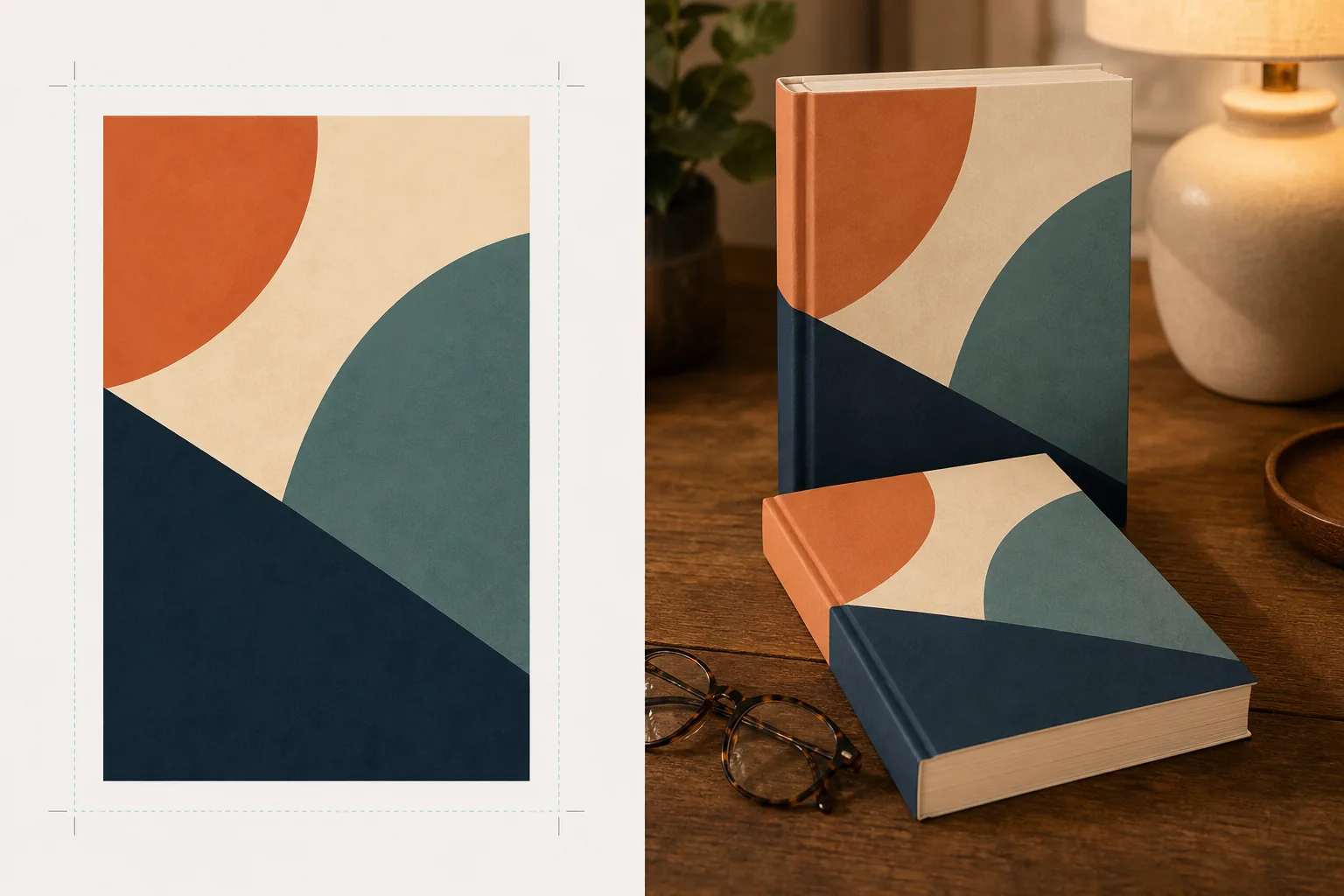
Bu şablon ne yapar
Düz kitap kapağı tasarımlarını, profesyonel ürün fotoğrafçılığı gibi görünen tanıtım maketi görsellerine dönüştürür. Kapak görselinizi düz bir JPEG veya PNG olarak yükleyin; şablon bunu doğru perspektif, sayfa kalınlığı ve sırt kavisi ile gerçekçi bir kitap formuna eşler. Maket daha sonra yaşam tarzı sahnelerine yerleştirilir — okuma gözlüğü olan bir sehpa, bir kitapçı rafı, sıcak lamba ışığı olan bir komodin — ya da temiz bir arka plan üzerinde doğal gölgeyle bağımsız bir ürün olarak render edilir. Seriler veya çok kitaplı tanıtımlar için, birden fazla kapak tutarlı bir perspektifle bir sıraya dizilebilir veya üst üste konabilir. Işık ve gölge yönü sahne ortamıyla eşleşir, böylece kitap monte edilmiş gibi değil, fiziksel olarak mevcutmuş gibi görünür.
Şablon ayarları
| Kitap biçimi | Ciltsiz, ciltli veya şömizli ciltli |
| Sayfa sayısı görünümü | İnce (100 syf.), orta (250 syf.), kalın (400+ syf.) — sırt ve sayfa kenarı genişliğini etkiler |
| Sahne türü | Gölgeli bağımsız, sehpa, kitaplık, komodin veya elde tutulan |
| Perspektif açısı | Önden, dörtte üç veya hafif tepeden eğim |
| Çıktı çözünürlüğü | 3000×3000px (1:1 sosyal) veya 2400×1600px (16:10 banner) |
Bu şablon nasıl kullanılır
Kapak görselinizi yükleyin
Kitap kapağınızı düz bir görsel olarak yükleyin — en azından ön kapak. Şömizli ciltli maketler için sırtı ve arka kapağı da yükleyebilirsiniz. Şablon JPEG, PNG ve PDF dosyalarını kabul eder. Kapak boyutları otomatik olarak algılanır ve kitap oranları buna göre ölçeklenir.
Kitap biçimini ve sahneyi seçin
Ciltsiz, ciltli veya şömiz biçimleri arasından seçim yapın. Sırt ve sayfa kenarı genişliğinin gerçek kitabınızla eşleşmesi için sayfa sayısı aralığını seçin. Ardından bir sahne seçin: gölgeli bağımsız, yaşam tarzı ortamı veya özel arka plan rengi.
Perspektifi ayarlayın ve render alın
Görüş açısını seçin — küçük resim netliği için önden, görsel derinlik için dörtte üç veya düz yerleşimli sosyal gönderiler için tepeden eğim. Şablon, maketi uygun aydınlatma, sayfa kenarı dokusu ve seçilen sahneyle eşleşen gölge yönüyle render eder.
Tanıtım görsellerini indirin
Instagram için 1:1, Twitter/Facebook başlıkları için 16:9 veya web sitenizin hero bölümü için özel boyutlarda dışa aktarın. Her dışa aktarma, şeffaf arka plan seçeneğiyle birlikte kitap maketini içerir, böylece onu kendi özel düzenlerinize yerleştirebilirsiniz.
En iyi sonuçlar için profesyonel ipuçları
- ✓Kapağınızı mevcut en yüksek çözünürlükte yükleyin. 3D perspektif dönüşümü, kitabın geriye doğru giden yüzündeki görünür çözünürlüğü azaltır, bu nedenle yüksek çözünürlüklü bir kaynakla başlamak sırt ve kapaktaki metnin okunaklı kalmasını sağlar.
- ✓Amazon A+ içeriği için beyaz arka plan üzerinde bağımsız maketi kullanın. Bu, kitaba, ürün sayfasında zaten gösterilen düz kapak görselinden onu ayıran üst düzey bir ürün fotoğrafçılığı hissi verir.
- ✓Bir serideki tüm kapakları yükleyerek bir seri yerleşimi oluşturun. Şablon bunları tutarlı bir perspektif ve aralıkla bir sıraya dizer; bu, kapakları tek tek göstermeye kıyasla seri tanıtımı için görsel olarak çok daha etkilidir.
Araçlar
Sık sorulan sorular
Kapağımı gösteren bir e-okuyucu veya tabletin maketini yapabilir miyim?
+
Şablon fiziksel kitap maketlerine — ciltsiz ve ciltli biçimlere — odaklanır. E-okuyucu veya tablet gösterimli maketler için, düz kapağı ayrı olarak bir cihaz fotoğrafı üzerine yerleştirirsiniz.
Sırt metni okunaklı olacak mı?
+
Evet, kaynak kapak dosyası sırt görselini içerdiği sürece. Şablon, sırt görselini ön kapak açısıyla eşleşen bir perspektifle kitap kenarının etrafına sarar. İnce kitaplarda (150 sayfanın altında) sırt dardır ve küçük metin, küçük gösterim boyutlarında okunması zor hale gelebilir.
Bunu sesli kitap veya podcast tanıtımı için kullanabilir miyim?
+
Evet. Sesli kitaplar ve podcastler için kullanılan kare kapak biçimi, CD kutusu tarzı bir maket olarak veya boyutlu gölgeli bağımsız bir kare olarak render edilebilir; bu da ona düz kapak görselinin sahip olmadığı fiziksel bir varlık kazandırır.
Kapak görselinizi çarpıcı tanıtım görsellerine dönüştürün
Düz kapak görseli yükleyin ve sosyal medya, yazar web siteleri ve pazarlama kampanyaları için fotoğraf gerçekliğinde kitap maketleri edinin.
Ücretsiz deneyinRelated templates
More design templates for your workflow.
Web, baskı, sosyal medya ve uygulama simgeleri için net kenar iyileştirme ve çok boyutlu dışa aktarma özelliğine sahip şeffaf PNG logoları oluşturun. Basılı logoların ve dijital dosyaların fotoğrafları üzerinde çalışır.
Arka plan değiştirme, ana bilgisayar portresi izolasyonu ve tipografiye hazır düzenlerle Apple Podcast'ler ve Spotify özelliklerini karşılayan podcast kapak resmi tasarlayın.
Yapay zeka yükseltme, tuval genişletme, doğru renkte prova ve baskıya hazır dosya dışa aktarma özellikleriyle dijital sanat eserlerini ve fotoğrafları geniş formatlı baskıya hazırlayın.
Ticari marka kaldırma, model yayın uyumluluğu düzenleme, teknik kalite kontrolleri ve ajansa özel format gereklilikleri ile fotoğrafları stok ajansına gönderilmek üzere hazırlayın.