
การรีทัชผิวอย่างเป็นธรรมชาติ
ปรับแต่งภาพถ่ายบุคคลให้สวยขึ้นโดยไม่มีลุคแบบพลาสติก เทมเพลตนี้ขจัดรอยตำหนิชั่วคราว ปรับสีผิวให้สม่ำเสมอ และทำให้แสงที่ไม่เรียบเนียนดูนุ่มนวลขึ้น พร้อมทั้งตั้งใจรักษารูขุมขน เส้นริ้วเล็ก ๆ และเนื้อสัมผัสตามธรรมชาติที่ทำให้ผิวดูเหมือนจริง ผลลัพธ์คือภาพถ่ายบุคคลที่ตัวแบบดูเป็นเวอร์ชันที่ดีที่สุดของตัวเองในวันที่ดีที่สุด ไม่ใช่หุ่นที่สร้างโดย AI
ลองใช้เทมเพลตนี้ฟรีPortrait template preview
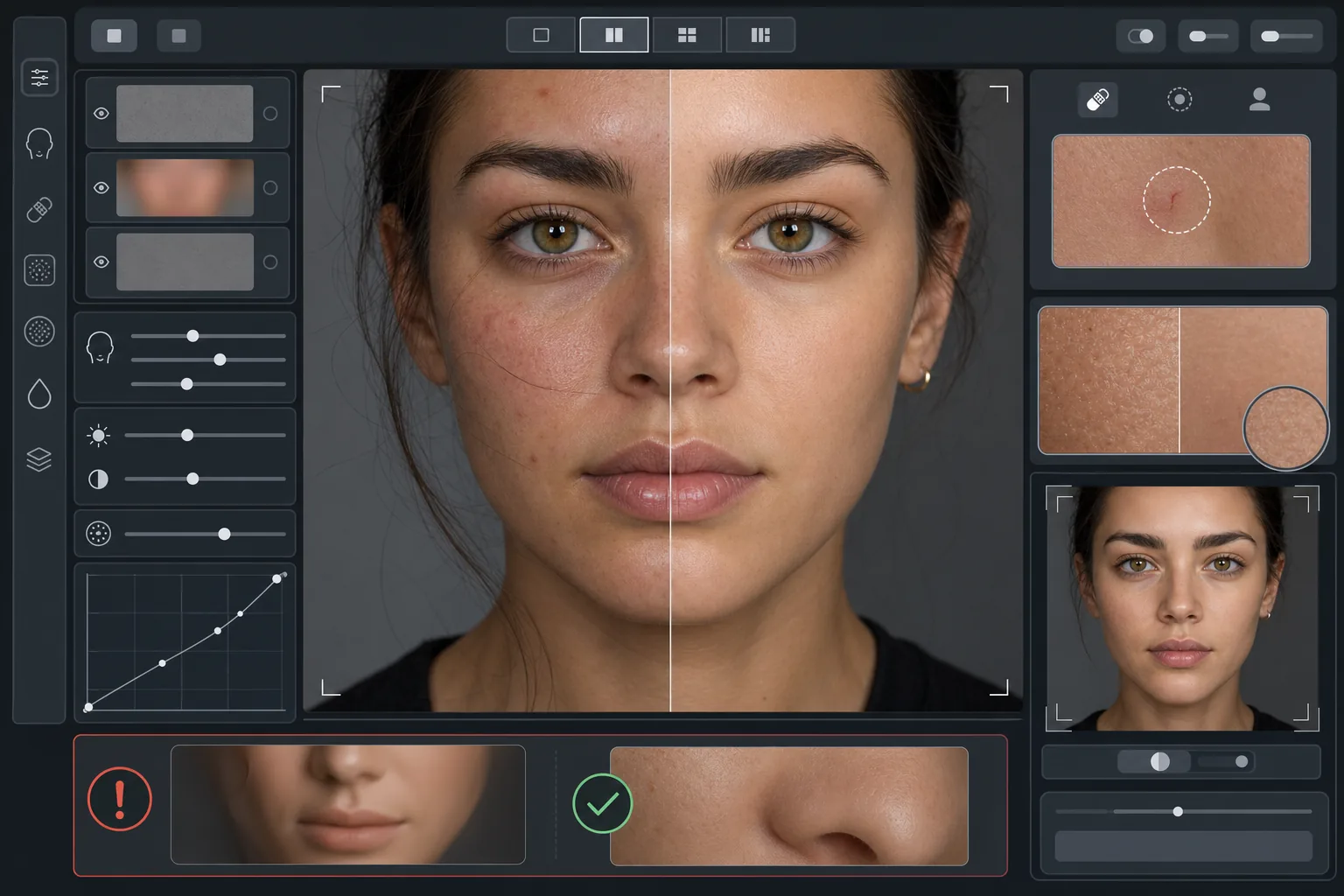
เทมเพลตนี้ทำอะไร
ใช้การรีทัชผิวแบบแยกตามความถี่ที่แยกเนื้อสัมผัสออกจากโทนสี AI Enhance ขจัดรอยตำหนิชั่วคราว (สิว รอยแดง รอยคล้ำใต้ตา) ขณะที่ยังคงรักษาเนื้อสัมผัสผิวที่ละเอียด — รูขุมขน ขนอ่อน และความแปรผันตามธรรมชาติ — ที่สายตามองว่าเป็นของจริง Magic Eraser จัดการการลบเฉพาะจุดในกรณีที่การปรับแต่งด้วย AI กว้างเกินไป เช่น ลบรอยขีดข่วนเพียงรอยเดียวหรือรอยแมลงกัดโดยไม่กระทบผิวโดยรอบ ผลโดยรวมคือผิวที่เรียบเนียนสม่ำเสมอและดูสุขภาพดีซึ่งผ่านการทดสอบด้วยการซูม
การตั้งค่าเทมเพลต
| ความเข้มของการรีทัช | เป็นธรรมชาติ — มุ่งที่รอยตำหนิและรอยแดง รักษาเนื้อสัมผัสไว้ |
| การรักษารูขุมขน | เต็มที่ — รักษาเนื้อสัมผัสผิวตามธรรมชาติทั้งหมดในระดับพิกเซล |
| การปรับโทนให้สม่ำเสมอ | ปานกลาง — ลดรอยด่างและรอยแดงโดยไม่ทำให้ความแปรผันของสีแบนราบ |
| การแก้ไขใต้ดวงตา | ละมุน — ทำให้รอยคล้ำสว่างขึ้นโดยไม่ขจัดเงาตามธรรมชาติ |
| การปรับแสงให้นุ่มนวล | เติมเงาที่แข็งกระด้างและลดจุดแสงจ้าจากแฟลชโดยตรง |
| ความละเอียดของไฟล์ผลลัพธ์ | ตรงกับไฟล์ต้นฉบับ (รักษารายละเอียดทั้งหมดไว้สำหรับการครอปและซูม) |
วิธีใช้เทมเพลตนี้
อัปโหลดภาพถ่ายบุคคล
ใช้ภาพถ่ายบุคคลที่มีแสงดีและใบหน้าอยู่ในโฟกัสที่คมชัด เทมเพลตนี้ทำงานได้ดีที่สุดเมื่อเห็นเนื้อสัมผัสผิวตามธรรมชาติในภาพต้นฉบับ — ภาพที่โฟกัสนุ่มหรือถูกบีบอัดอย่างหนักจะให้เนื้อสัมผัสน้อยกว่าให้ AI รักษาไว้
ใช้การรีทัชแบบธรรมชาติ
AI Enhance ตรวจจับรอยตำหนิชั่วคราว รอยแดงที่ไม่สม่ำเสมอ และความไม่เรียบของโทนสี แล้วแก้ไขโดยยังคงรักษาเนื้อสัมผัสผิวด้านล่างไว้อย่างสมบูรณ์ รูขุมขน เส้นริ้วเล็ก ๆ และความแปรผันของสีตามธรรมชาติยังคงมองเห็นได้ — มีเพียงรอยตำหนิเท่านั้นที่เปลี่ยนไป
แก้ไขเฉพาะจุดในบริเวณที่ต้องการ
ใช้ Magic Eraser สำหรับรอยเดี่ยว ๆ ที่เหลืออยู่ซึ่งคุณต้องการลบ — รอยขีดข่วนที่กำลังหาย ผื่นชั่วคราว หรือเส้นผมที่พาดอยู่บนใบหน้า การลบแต่ละครั้งจะกลมกลืนกับเนื้อสัมผัสผิวตามธรรมชาติโดยรอบ
ตรวจสอบที่การซูมเต็มที่แล้วส่งออก
ซูมไปที่ 100% เพื่อยืนยันว่าเนื้อสัมผัสผิวยังคงอยู่ — รูขุมขนควรมองเห็นได้และดูเป็นธรรมชาติ หากบริเวณใดดูเรียบเกินไป ให้ลดความเข้มของการรีทัชแล้วประมวลผลใหม่ ส่งออกที่ความละเอียดเต็มเพื่อรักษารายละเอียดตามธรรมชาติ
เคล็ดลับมืออาชีพเพื่อผลลัพธ์ที่ดีที่สุด
- ✓เริ่มต้นด้วยความเข้มของการรีทัชที่ต่ำที่สุดและเพิ่มขึ้นเฉพาะเมื่อจำเป็น — การเพิ่มความเรียบเนียนทำได้ง่ายกว่าการกู้คืนเนื้อสัมผัสที่ถูกประมวลผลจนหายไปแล้วมาก
- ✓สำหรับผู้ที่มีสิวหรือโรซาเซีย เทมเพลตนี้จะขจัดรอยตำหนิแต่ละจุดโดยไม่เปลี่ยนสีผิวด้านล่าง — ผลลัพธ์ดูเหมือนวันที่ผิวใส ไม่ใช่คนละคน
- ✓หลีกเลี่ยงการใช้เทมเพลตนี้ซ้อนกับฟิลเตอร์ความงามของกล้องโทรศัพท์ — ฟังก์ชันปรับผิวเรียบเนียนที่ติดมากับกล้องโทรศัพท์หลายรุ่นได้ลดเนื้อสัมผัสไปแล้ว และการประมวลผลซ้ำสองครั้งจะสร้างลุคแบบพลาสติกที่เทมเพลตนี้ออกแบบมาเพื่อหลีกเลี่ยง
- ✓หากเป็นไปได้ ให้ถ่ายในรูปแบบ RAW และแปลงเป็น JPEG ก่อนอัปโหลด — RAW เก็บข้อมูลเนื้อสัมผัสผิวได้มากกว่าซึ่ง AI สามารถรักษาไว้ระหว่างการรีทัช
เครื่องมือ
คำถามที่พบบ่อย
สิ่งนี้แตกต่างจากฟิลเตอร์ความงามที่ทำให้ผิวเรียบเนียนอย่างไร
+
ฟิลเตอร์ความงามใช้การเบลอแบบสม่ำเสมอที่ลบรูขุมขน เส้นริ้วเล็ก ๆ และเนื้อสัมผัสตามธรรมชาติ — สร้างลุคแบบพลาสติกที่สังเกตได้ทันที เทมเพลตนี้ใช้การประมวลผลแบบแยกตามความถี่ที่แยกเนื้อสัมผัสออกจากโทนสี โดยขจัดรอยตำหนิจากชั้นโทนสีในขณะที่ยังคงชั้นเนื้อสัมผัสไว้ไม่แตะต้อง ผลลัพธ์ดูเหมือนผิวจริง ไม่ใช่พื้นผิวที่ถูกเรนเดอร์
สิ่งนี้จะเปลี่ยนรูปทรงของใบหน้าหรือไม่
+
ไม่ เทมเพลตนี้ส่งผลต่อรูปลักษณ์พื้นผิวของผิวเท่านั้น — โทนสี รอยตำหนิ และความสม่ำเสมอของแสง ไม่เคยปรับรูปจมูก กราม ดวงตา หรือโครงสร้างใบหน้าใด ๆ ตัวแบบดูเหมือนตัวเองทุกประการ เพียงแต่ผิวใสขึ้นและมีแสงสม่ำเสมอขึ้น
ฉันสามารถใช้สิ่งนี้สำหรับภาพถ่ายโปรไฟล์ระดับมืออาชีพและงานพอร์ตโฟลิโอได้หรือไม่
+
ได้ มาตรฐานการรีทัชแบบธรรมชาติตอบโจทย์ความคาดหวังระดับมืออาชีพสำหรับภาพถ่ายโปรไฟล์องค์กร พอร์ตโฟลิโอการแสดง โปรไฟล์หาคู่ และโซเชียลมีเดียที่ความสมจริงมีความสำคัญ ตัวแบบจะดูเหมือนภาพถ่ายเมื่อพบตัวจริง — ซึ่งเป็นจุดประสงค์ทั้งหมดของการรีทัชแบบธรรมชาติ
ผิวดีขึ้น แต่ยังคงเป็นคุณ
อัปโหลดภาพถ่ายบุคคลแล้วรับการรีทัชผิวอย่างเป็นธรรมชาติที่รักษาเนื้อสัมผัสไว้ภายในไม่กี่วินาที ไม่มีลุคแบบพลาสติก ไม่มีการปรับผิวเรียบที่ดูแปลก — มีเพียงคุณในวันที่ดีที่สุด
ลองใช้ฟรีRelated templates
More portrait templates for your workflow.
เทมเพลตการรีทัชภาพเหมือนของโรงเรียนที่เหมาะสมกับวัย การกำจัดรอยตำหนิตามธรรมชาติ พื้นหลังที่สม่ำเสมอ และเอาต์พุตมาตรฐานหนังสือรุ่นพร้อมการประมวลผลเป็นชุดสำหรับทั้งชั้นเรียน
เทมเพลตรูปสัตว์เลี้ยงคุณภาพระดับสตูดิโอ จับขอบขน ถอดสายจูงและที่จับ เปลี่ยนพื้นหลัง และทำให้ดวงตาของสุนัข แมว และสัตว์อื่นๆ คมชัดขึ้น
ปรับปรุงภาพถ่ายทารกแรกเกิดและทารกด้วยโทนสีอบอุ่นที่นุ่มนวล ปรับผิวให้เรียบเนียนอย่างอ่อนโยน กำจัดสิ่งค้ำและสิ่งรบกวน และขนาดที่พร้อมพิมพ์สำหรับประกาศและงานศิลปะบนผนัง
รีทัชภาพถ่ายคุณแม่ตั้งครรภ์ด้วยการ ปรับผิวให้เรียบเนียนอย่างอ่อนโยน แสงไฟนวลตา การปรับพื้นหลังให้เรียบง่ายขึ้น และการให้เกรดสีโทนอุ่น เพื่อลุคภาพถ่ายบุคคลตั้งครรภ์ที่เหนือกาลเวลา
ทำความสะอาดภาพครอบครัวโดยลบสิ่งรบกวนในพื้นหลัง แก้ไขค่าแสงที่ไม่สม่ำเสมอ ปรับผิวให้เรียบเนียนอย่างเป็นธรรมชาติ และรับประกันว่าทุกคนจะดูดีที่สุดในเฟรมเดียวกัน