
การรีทัชภาพเหมือนของโรงเรียน
มอบภาพเหมือนที่นักเรียนทุกคนรู้สึกพึงพอใจ พร้อมคงความเป็นธรรมชาติและเหมาะสมกับวัยเอาไว้ เทมเพลตนี้จัดการปัญหาที่พบบ่อยในการถ่ายภาพของโรงเรียน — รอยตำหนิชั่วคราว แสงที่ไม่สม่ำเสมอตลอดการถ่าย และพื้นหลังที่ไม่สอดคล้องกัน — และสร้างภาพที่พร้อมสำหรับหนังสือรุ่นด้วยคุณภาพระดับมืออาชีพที่สม่ำเสมอสำหรับนักเรียนทุกคนในชั้นเรียน
ลองใช้เทมเพลตนี้ฟรีPortrait template preview
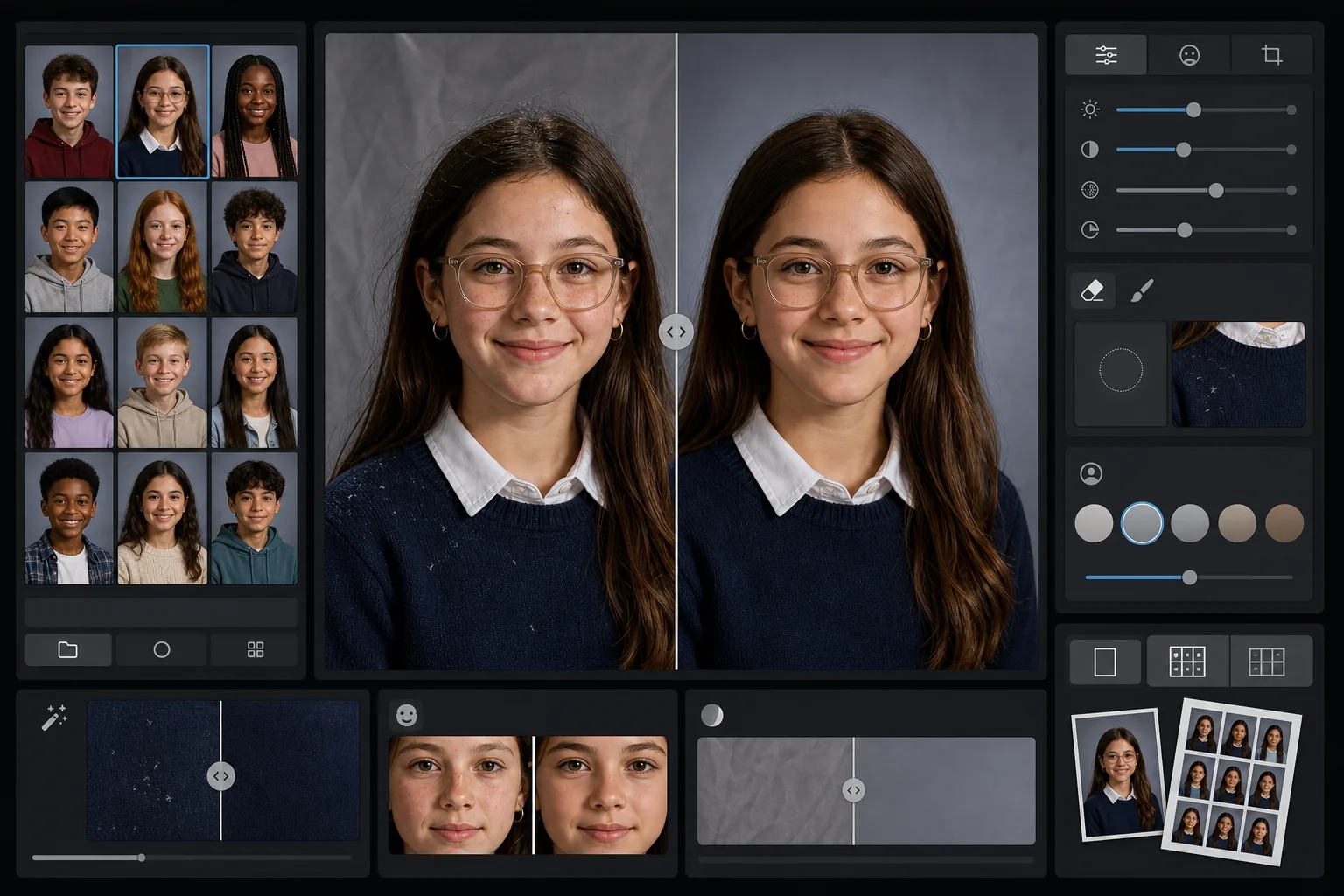
เทมเพลตนี้ทำอะไรได้บ้าง
ใช้การรีทัชที่นุ่มนวลและเหมาะสมกับวัยกับภาพเหมือนของโรงเรียน ซึ่งช่วยปรับรอยตำหนิชั่วคราวให้เรียบเนียนพร้อมคงรูปลักษณ์ตามธรรมชาติของนักเรียนแต่ละคนไว้ AI Enhance แก้ไขการเปิดรับแสงที่ไม่สม่ำเสมอและการเพี้ยนของสีที่เกิดขึ้นเมื่อถ่ายภาพนักเรียนหลายสิบคนภายใต้การจัดแสงเดียวกันตลอดการถ่าย Magic Eraser ลบเส้นผมที่หลุดลุ่ยบนเสื้อผ้า ขอบปกเสื้อที่เบี้ยว และรอยยับของพื้นหลังบนฉากหลังแบบพกพา
การตั้งค่าเทมเพลต
| ระดับการรีทัช | เบา — ลบเฉพาะรอยตำหนิชั่วคราว คงไว้ซึ่งกระและลักษณะตามธรรมชาติ |
| ขนาดเอาต์พุต | 1200×1500px (ภาพเหมือนมาตรฐาน 4:5, 300 DPI ที่ขนาดกระเป๋าสตางค์) |
| การปรับพื้นหลังให้เป็นมาตรฐาน | ปรับโทนของฉากหลังให้ตรงกันในทุกภาพภายในชุดเดียวกัน |
| การแก้ไขการเปิดรับแสง | อัตโนมัติ — ชดเชยความผันแปรของแสงตลอดเซสชันการถ่ายภาพ |
| ความสม่ำเสมอของสี | สมดุลแสงขาวที่สม่ำเสมอในทุกภาพเหมือนที่ประมวลผลแล้ว |
| การทำความสะอาดรายละเอียดที่หลุดลุ่ย | ลบเส้นผมที่ปลิวบนไหล่ ขุยผ้า และรอยยับของฉากหลัง |
วิธีใช้เทมเพลตนี้
อัปโหลดภาพเหมือนของชั้นเรียน
อัปโหลดภาพเหมือนหนึ่งภาพหรือทั้งชุดของชั้นเรียน เทมเพลตรองรับทั้งภาพเดี่ยวหรือเป็นกลุ่ม โดยใช้มาตรฐานการรีทัชเดียวกันกับทุกภาพเพื่อให้ส่วนหนังสือรุ่นมีความสอดคล้องกัน
ใช้การรีทัชที่เหมาะสมกับวัย
AI Enhance ปรับรอยตำหนิชั่วคราวอย่างนุ่มนวล เช่น สิวขึ้นหรือรอยขีดข่วน ในขณะที่ยังคงทำให้นักเรียนทุกคนดูเป็นตัวเอง กระ ปาน เหล็กจัดฟัน และแว่นตาจะถูกคงไว้เสมอ — เป้าหมายคือรูปลักษณ์ที่แท้จริงของพวกเขาในเวอร์ชันที่ดูเรียบร้อย
ปรับการเปิดรับแสงและพื้นหลังให้เป็นมาตรฐาน
สภาพแสงเปลี่ยนแปลงตลอดเซสชันการถ่ายภาพเหมือนเมื่อการจัดฉากเลื่อนไป เทมเพลตแก้ไขการเปิดรับแสงและสมดุลแสงขาวเพื่อให้นักเรียนทุกคนได้รับแสงอย่างสม่ำเสมอ และโทนของฉากหลังตรงกันตลอดทั้งชุด
ทำความสะอาดและส่งออก
Magic Eraser ลบสิ่งรบกวนเล็กๆ น้อยๆ — ขุยผ้าบนเสื้อสเวตเตอร์สีเข้ม เส้นผมที่หลุดลุ่ยพาดหน้าผาก รอยยับบนฉากหลังแบบพกพา ส่งออกที่ความละเอียดมาตรฐานหนังสือรุ่นสำหรับการพิมพ์ หรือ JPEG ความละเอียดต่ำกว่าสำหรับแกลเลอรีออนไลน์ของโรงเรียน
เคล็ดลับจากมืออาชีพเพื่อผลลัพธ์ที่ดีที่สุด
- ✓ประมวลผลทั้งชุดของชั้นเรียนพร้อมกันแทนที่จะทำทีละภาพ — เทมเพลตใช้กลุ่มภาพเพื่อปรับเทียบการเปิดรับแสงและสีให้สม่ำเสมอในทุกภาพเหมือน
- ✓สำหรับนักเรียนที่สวมแว่นตา ในภาพต้นฉบับควรให้นักเรียนก้มคางลงเล็กน้อยเพื่อลดแสงสะท้อน — การเพิ่มประสิทธิภาพด้วย AI ทำงานได้ดีที่สุดเมื่อมองเห็นดวงตาผ่านเลนส์
- ✓ลองรันชุดทดสอบ 5-10 ภาพเหมือนก่อนประมวลผลทั้งโรงเรียน เพื่อยืนยันว่าระดับการรีทัชเป็นไปตามมาตรฐานของคณะกรรมการหนังสือรุ่นของคุณ
- ✓เก็บไฟล์ต้นฉบับที่ยังไม่ได้รีทัชไว้ควบคู่กับเวอร์ชันที่ประมวลผลแล้ว — ผู้ปกครองบางคนชอบภาพที่ไม่ได้แก้ไขเลยสำหรับการใช้งานส่วนตัว
เครื่องมือ
คำถามที่พบบ่อย
การรีทัชเหมาะสมกับเด็กและวัยรุ่นหรือไม่
+
ใช่ เทมเพลตนี้ออกแบบมาโดยเฉพาะสำหรับตัวแบบในวัยเรียน มันลบเฉพาะรอยตำหนิชั่วคราว เช่น สิวที่ขึ้นในวันถ่ายรูป — มันไม่เคยปรับเปลี่ยนรูปหน้า เปลี่ยนสีผิว หรือใช้การปรับผิวให้เรียบเนียนแบบที่ใช้ในการรีทัชความงามของผู้ใหญ่ นักเรียนทุกคนยังคงดูเป็นตัวเอง
ฉันสามารถประมวลผลทั้งชั้นเรียนหรือทั้งโรงเรียนในครั้งเดียวได้หรือไม่
+
ได้ อัปโหลดภาพเหมือนได้มากถึงหลายร้อยภาพในชุดเดียว เทมเพลตใช้มาตรฐานการรีทัชที่เหมือนกันและปรับการเปิดรับแสง สี และความสอดคล้องของพื้นหลังให้เป็นมาตรฐานในทุกภาพ เพื่อให้ส่วนหนังสือรุ่นดูเป็นอันหนึ่งอันเดียวกัน
สิ่งนี้จะลบเหล็กจัดฟัน แว่นตา หรือเครื่องช่วยฟังหรือไม่
+
ไม่ เทมเพลตนี้ออกแบบมาเพื่อคงไว้ซึ่งลักษณะถาวรและกึ่งถาวรทั้งหมด รวมถึงเหล็กจัดฟัน แว่นตา เครื่องช่วยฟัง และอุปกรณ์ทางการแพทย์ มันจัดการเฉพาะรอยตำหนิบนผิวที่เกิดขึ้นชั่วคราวและสิ่งรบกวนจากสภาพแวดล้อม เช่น ขุยผ้าและรอยยับของฉากหลัง
ส่งมอบภาพเหมือนที่พร้อมสำหรับหนังสือรุ่นได้ในไม่กี่นาที
อัปโหลดภาพเหมือนของโรงเรียนทีละภาพหรือทั้งชั้นเรียน แล้วรับภาพที่สม่ำเสมอ รีทัชอย่างเป็นธรรมชาติ และพร้อมพิมพ์ นักเรียนทุกคนดูดีที่สุด
ลองใช้ฟรีRelated templates
More portrait templates for your workflow.
เทมเพลตรูปสัตว์เลี้ยงคุณภาพระดับสตูดิโอ จับขอบขน ถอดสายจูงและที่จับ เปลี่ยนพื้นหลัง และทำให้ดวงตาของสุนัข แมว และสัตว์อื่นๆ คมชัดขึ้น
เทมเพลตรีทัชผิวตามธรรมชาติที่ช่วยขจัดรอยตำหนิพร้อมทั้งรักษารูขุมขนและเนื้อสัมผัส แม้แต่การจัดแสง ไม่มีรูปลักษณ์แบบพลาสติก — แค่มีผิวกล้องที่ดีขึ้น
ปรับปรุงภาพถ่ายทารกแรกเกิดและทารกด้วยโทนสีอบอุ่นที่นุ่มนวล ปรับผิวให้เรียบเนียนอย่างอ่อนโยน กำจัดสิ่งค้ำและสิ่งรบกวน และขนาดที่พร้อมพิมพ์สำหรับประกาศและงานศิลปะบนผนัง
รีทัชภาพถ่ายคุณแม่ตั้งครรภ์ด้วยการ ปรับผิวให้เรียบเนียนอย่างอ่อนโยน แสงไฟนวลตา การปรับพื้นหลังให้เรียบง่ายขึ้น และการให้เกรดสีโทนอุ่น เพื่อลุคภาพถ่ายบุคคลตั้งครรภ์ที่เหนือกาลเวลา
ทำความสะอาดภาพครอบครัวโดยลบสิ่งรบกวนในพื้นหลัง แก้ไขค่าแสงที่ไม่สม่ำเสมอ ปรับผิวให้เรียบเนียนอย่างเป็นธรรมชาติ และรับประกันว่าทุกคนจะดูดีที่สุดในเฟรมเดียวกัน