
แสงนวลสำหรับทารกและทารกแรกเกิด
มอบคุณภาพที่นุ่มนวล อบอุ่น และดูล่องลอยแบบการถ่ายภาพในสตูดิโอมืออาชีพให้กับภาพทารกแรกเกิดและทารก เทมเพลตนี้เพิ่มความอบอุ่นอย่างนุ่มนวล ปรับผิวให้เรียบเนียนอย่างละเอียดอ่อนเหมาะกับการถ่ายภาพทารก กำจัดอุปกรณ์ประกอบฉากที่รบกวนสายตาและความรกของพื้นหลัง และปรับขนาดผลลัพธ์ให้เหมาะกับการ์ดประกาศการเกิด ภาพพิมพ์ติดผนัง และการแชร์บนโซเชียล
ลองใช้เทมเพลตนี้ฟรีPortrait template preview
เทมเพลตนี้ทำอะไรได้บ้าง
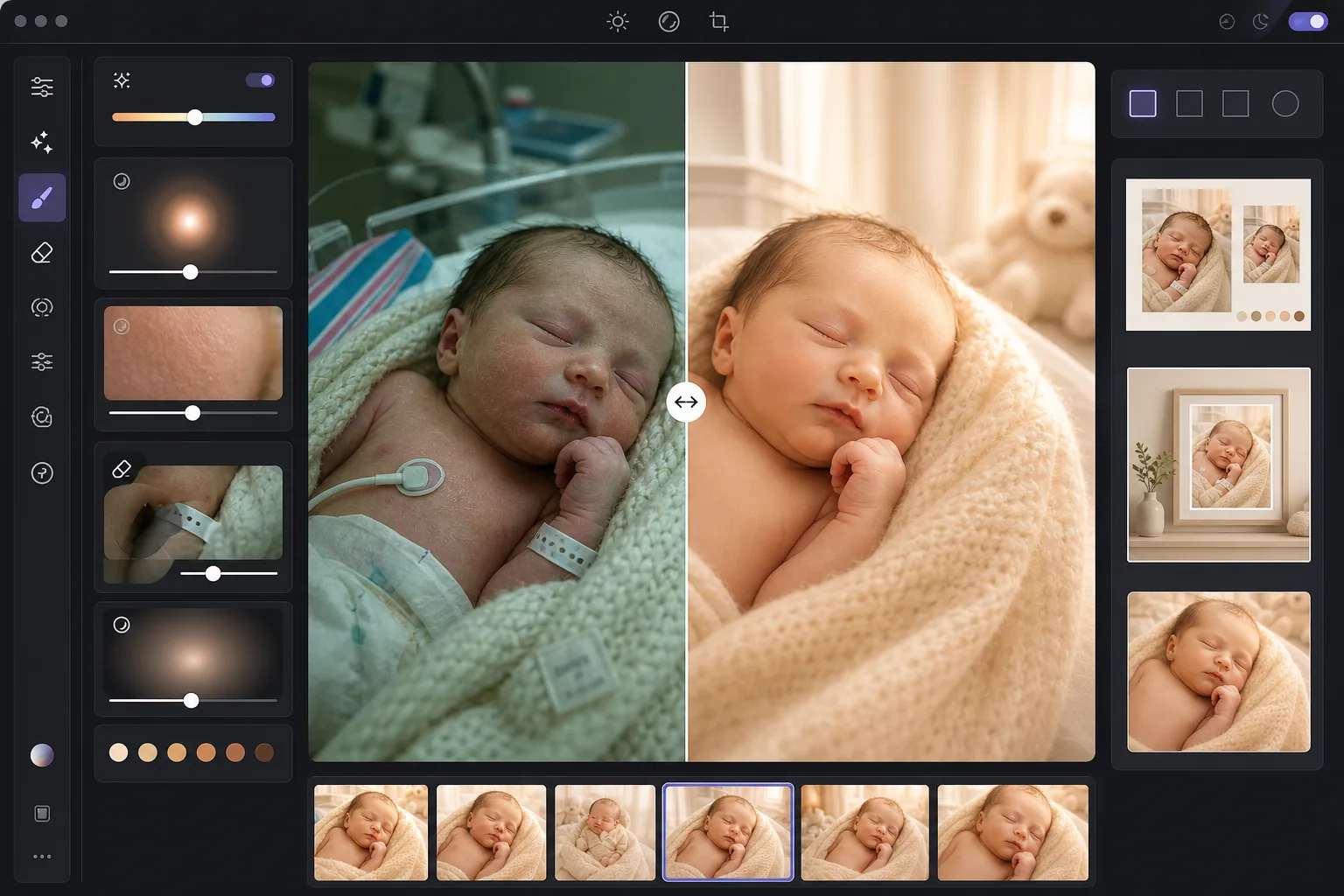
เปลี่ยนภาพทารกแรกเกิดและทารกที่ยังไม่ได้แต่ง — ไม่ว่าจะถ่ายจากสมาร์ทโฟนที่โรงพยาบาลหรือจากการถ่ายภาพที่บ้าน — ให้กลายเป็นภาพที่นุ่มนวล เปล่งประกาย ที่พ่อแม่ทะนุถนอม AI Enhance เพิ่มโทนอบอุ่นอย่างนุ่มนวลที่ช่วยขับผิวทารกแรกเกิด ยกเงาให้สว่างขึ้นโดยไม่สูญเสียบรรยากาศนุ่มนวล และเพิ่มประกายแสงเรืองรองบางเบาที่ห่อหุ้มภาพด้วยความอบอุ่น การปรับผิวให้เรียบเนียนถูกปรับเทียบมาเฉพาะสำหรับทารก — ปรับรอยแดงเป็นจ้ำที่พบบ่อยในผิวทารกแรกเกิดให้สม่ำเสมอ ขณะที่ยังคงรายละเอียดขนอ่อนละเอียดที่ทำให้ภาพทารกดูเป็นธรรมชาติ Magic Eraser กำจัดสายรัดข้อมือของโรงพยาบาล สายน้ำเกลือ สายเคเบิลของเครื่องมอนิเตอร์ ขอบผ้าอ้อม คลิปจุกนมหลอก และความรกของพื้นหลังในห้องเด็ก
การตั้งค่าเทมเพลต
| Warmth | เพิ่มความอบอุ่น +10 พร้อมการปรับโทนกลางไปทางสีทอง (ปรับให้เหมาะกับผิวทารกแรกเกิด) |
| Soft glow | ประกายเรืองรองในส่วนสว่าง (รัศมี 40px, ความทึบ 25%) |
| Skin smoothing | ปรับเทียบสำหรับทารก (ลดรอยจ้ำ คงขนอ่อนไว้) |
| Shadow lift | +0.5 EV ในส่วนเงาพร้อมการไล่ระดับที่นุ่มนวล (ไม่มีการกู้คืนที่รุนแรง) |
| Vignette | ขอบมืดอบอุ่นอย่างนุ่มนวล (ดึงสายตาเข้าสู่กึ่งกลาง ทำให้ขอบมืดลง 15%) |
วิธีใช้เทมเพลตนี้
อัปโหลดภาพทารกหรือทารกแรกเกิด
อัปโหลดภาพทารกแรกเกิด ทารก หรือเด็กวัยหัดเดินที่ถ่ายที่โรงพยาบาล ที่บ้าน หรือในสตูดิโอ เทมเพลตจะปรับให้เข้ากับสภาพแสงที่ต่างกัน — แสงฟลูออเรสเซนต์ที่จ้าของโรงพยาบาล แสงนวลจากหน้าต่างห้องเด็ก หรือแสงผสมภายในบ้าน รองรับทั้งภาพจากสมาร์ทโฟนและกล้องระดับมืออาชีพ
ใช้ความอบอุ่นและแสงนวล
AI Enhance เพิ่มโทนสีทองอบอุ่นให้กับโทนกลางและประกายเรืองรองที่นุ่มนวลให้กับส่วนสว่าง สร้างคุณภาพที่ดูฝันและล่องลอยอันเป็นเอกลักษณ์ของการถ่ายภาพทารกแรกเกิดระดับมืออาชีพ ส่วนเงาจะถูกยกให้สว่างขึ้นอย่างนุ่มนวลเพื่อเผยรายละเอียดในผ้าห่อตัวและผมสีเข้มโดยไม่ทำให้ดูแบนและผ่านการแต่งมากเกินไป
ปรับผิวให้เรียบเนียนและกำจัดสิ่งรบกวน
การปรับผิวเรียบเนียนสำหรับทารกจะปรับรอยแดงเป็นจ้ำและผิวแห้งลอกที่พบบ่อยในผิวทารกแรกเกิดให้สม่ำเสมอ ขณะที่ยังคงขนอ่อนและพื้นผิวธรรมชาติของผิวไว้ Magic Eraser กำจัดสายรัดข้อมือของโรงพยาบาล สายของเครื่องมอนิเตอร์ ขอบผ้าอ้อมที่โผล่ออกมาจากผ้าห่อ ป้ายบนผ้าห่ม และสิ่งของพื้นหลังอย่างตะกร้าผ้าหรือเต้ารับไฟฟ้า
ส่งออกสำหรับการพิมพ์และการประกาศ
ดาวน์โหลดได้หลายขนาด: 5x7 และ 4x6 สำหรับการ์ดประกาศการเกิด, 8x10 และ 11x14 สำหรับภาพพิมพ์ติดผนังใส่กรอบ และ 1080x1080 จัตุรัสสำหรับการประกาศการเกิดบน Instagram ผลลัพธ์ทั้งหมดอยู่ที่ 300 DPI เพื่อการพิมพ์ที่คมชัดบนกระดาษภาพถ่ายหรือกระดาษการ์ด
เคล็ดลับจากมืออาชีพเพื่อผลลัพธ์ที่ดีที่สุด
- ✓แสงที่ดีที่สุดสำหรับภาพทารกแรกเกิดคือแสงนวลทางอ้อมจากหน้าต่างที่มาจากทิศทางเดียว หากคุณถ่ายที่บ้าน ให้วางทารกไว้ใกล้หน้าต่างบานใหญ่ที่มีผ้าม่านบางในช่วงเช้าหรือบ่ายแก่ ๆ เทมเพลตจะขับแสงธรรมชาตินี้ออกมาได้อย่างสวยงาม ในขณะที่แสงแดดตรงที่จ้าจะสร้างเงาที่เทมเพลตต้องใช้ความพยายามมากขึ้นในการแก้ไข
- ✓สำหรับภาพที่โรงพยาบาลที่มีแสงฟลูออเรสเซนต์จากเพดาน เทมเพลตจะกำจัดโทนสีเขียวที่เคลือบอยู่และทำให้ภาพอบอุ่นขึ้นอย่างมาก อย่างไรก็ตาม เงาที่เข้มจากหลอดฟลูออเรสเซนต์บนเพดานจะยังคงเห็นได้เป็นบริเวณมืดที่ถูกยกให้สว่างขึ้นเล็กน้อยใต้คางและจมูก การขอให้พยาบาลปิดไฟเพดานและใช้แสงจากหน้าต่างหรือโคมไฟนวล ๆ จะให้จุดเริ่มต้นที่ดีกว่ามาก
- ✓เมื่อกำจัดสายรัดข้อมือของโรงพยาบาล ให้จัดวางสายรัดให้อยู่บนพื้นผิวข้อมือที่มองเห็นได้แทนที่จะพันรอบและถูกบังบางส่วน สายรัดที่มองเห็นได้ทั้งหมดจะง่ายต่อการให้ AI ลบออกอย่างสะอาดกว่าสายรัดที่หายไปหลังรอยพับของผิว
- ✓สำหรับภาพทารกแรกเกิดที่จัดท่าพร้อมผ้าห่อและอุปกรณ์ประกอบฉาก เทมเพลตจะคงพื้นผิวของผ้าห่มถัก ตะกร้าสาน และผ้าคลุมขนสัตว์ไว้ ขณะที่ปรับเฉพาะผิวของทารกให้เรียบเนียน โปรดประมวลผลภาพทดสอบก่อนเพื่อยืนยันว่าพื้นผิวของผ้าห่อยังคงอยู่ ก่อนที่จะประมวลผลทั้งเซสชันเป็นชุด
เครื่องมือ
คำถามที่พบบ่อย
การปรับผิวให้เรียบเนียนปลอดภัยสำหรับภาพทารกแรกเกิดหรือไม่
+
การปรับผิวให้เรียบเนียนถูกปรับเทียบมาเฉพาะสำหรับผิวทารก โดยจะลดรอยแดงเป็นจ้ำ ปานแดง และผิวแห้งลอกที่พบบ่อยในช่วงสัปดาห์แรก ๆ โดยไม่ลบขนอ่อนละเอียด (ลานูโก) รายละเอียดคิ้ว และขนตาเล็ก ๆ ที่ทำให้ภาพทารกแรกเกิดดูเป็นจริง ผลลัพธ์จะดูเหมือนผิวที่แข็งแรงและสม่ำเสมอ ไม่ใช่ตุ๊กตาที่ถูกแต่งด้วยแอร์บรัช
เทมเพลตนี้ช่วยปรับปรุงภาพที่โรงพยาบาลที่ถ่ายด้วยสมาร์ทโฟนได้หรือไม่
+
ได้ และนี่เป็นหนึ่งในกรณีการใช้งานที่พบบ่อยที่สุด ห้องในโรงพยาบาลมีแสงฟลูออเรสเซนต์ที่จ้าซึ่งทำให้ผิวทารกแรกเกิดดูออกเขียวและสร้างเงาจากเพดานที่ไม่น่ามอง เทมเพลตจะแก้ไขโทนสีที่เคลือบอยู่ ทำให้เงานุ่มลง เพิ่มความอบอุ่นให้โทนโดยรวม และกำจัดอุปกรณ์ทางการแพทย์ที่มองเห็นได้ เปลี่ยนภาพสมาร์ทโฟนที่ดูเหมือนในคลินิกให้เป็นภาพบุคคลที่อบอุ่นและใกล้ชิด
ผลลัพธ์รองรับขนาดการพิมพ์ใดบ้าง
+
เทมเพลตส่งออกที่ 300 DPI ซึ่งรองรับการพิมพ์ที่คมชัดในขนาด 5x7, 8x10, 11x14 และ 16x20 นิ้ว ขึ้นอยู่กับความละเอียดของภาพต้นฉบับ ภาพสมาร์ทโฟนมาตรฐาน 12 ล้านพิกเซลสามารถพิมพ์ได้คมชัดถึง 11x14 นิ้ว ภาพจากกล้องที่มีความละเอียดสูงกว่ารองรับ 16x20 และใหญ่กว่า
เปลี่ยนช่วงเวลาล้ำค่าให้เป็นภาพบุคคลเหนือกาลเวลา
อัปโหลดภาพทารกแรกเกิดและทารก แล้วรับภาพที่นุ่มนวล อบอุ่น และจัดสไตล์อย่างมืออาชีพ พร้อมสำหรับการ์ดประกาศการเกิด ภาพพิมพ์ติดผนัง และการแชร์บนโซเชียล
ลองใช้ฟรีRelated templates
More portrait templates for your workflow.
เทมเพลตการรีทัชภาพเหมือนของโรงเรียนที่เหมาะสมกับวัย การกำจัดรอยตำหนิตามธรรมชาติ พื้นหลังที่สม่ำเสมอ และเอาต์พุตมาตรฐานหนังสือรุ่นพร้อมการประมวลผลเป็นชุดสำหรับทั้งชั้นเรียน
เทมเพลตรูปสัตว์เลี้ยงคุณภาพระดับสตูดิโอ จับขอบขน ถอดสายจูงและที่จับ เปลี่ยนพื้นหลัง และทำให้ดวงตาของสุนัข แมว และสัตว์อื่นๆ คมชัดขึ้น
เทมเพลตรีทัชผิวตามธรรมชาติที่ช่วยขจัดรอยตำหนิพร้อมทั้งรักษารูขุมขนและเนื้อสัมผัส แม้แต่การจัดแสง ไม่มีรูปลักษณ์แบบพลาสติก — แค่มีผิวกล้องที่ดีขึ้น
รีทัชภาพถ่ายคุณแม่ตั้งครรภ์ด้วยการ ปรับผิวให้เรียบเนียนอย่างอ่อนโยน แสงไฟนวลตา การปรับพื้นหลังให้เรียบง่ายขึ้น และการให้เกรดสีโทนอุ่น เพื่อลุคภาพถ่ายบุคคลตั้งครรภ์ที่เหนือกาลเวลา
ทำความสะอาดภาพครอบครัวโดยลบสิ่งรบกวนในพื้นหลัง แก้ไขค่าแสงที่ไม่สม่ำเสมอ ปรับผิวให้เรียบเนียนอย่างเป็นธรรมชาติ และรับประกันว่าทุกคนจะดูดีที่สุดในเฟรมเดียวกัน