
การล้างภาพครอบครัว
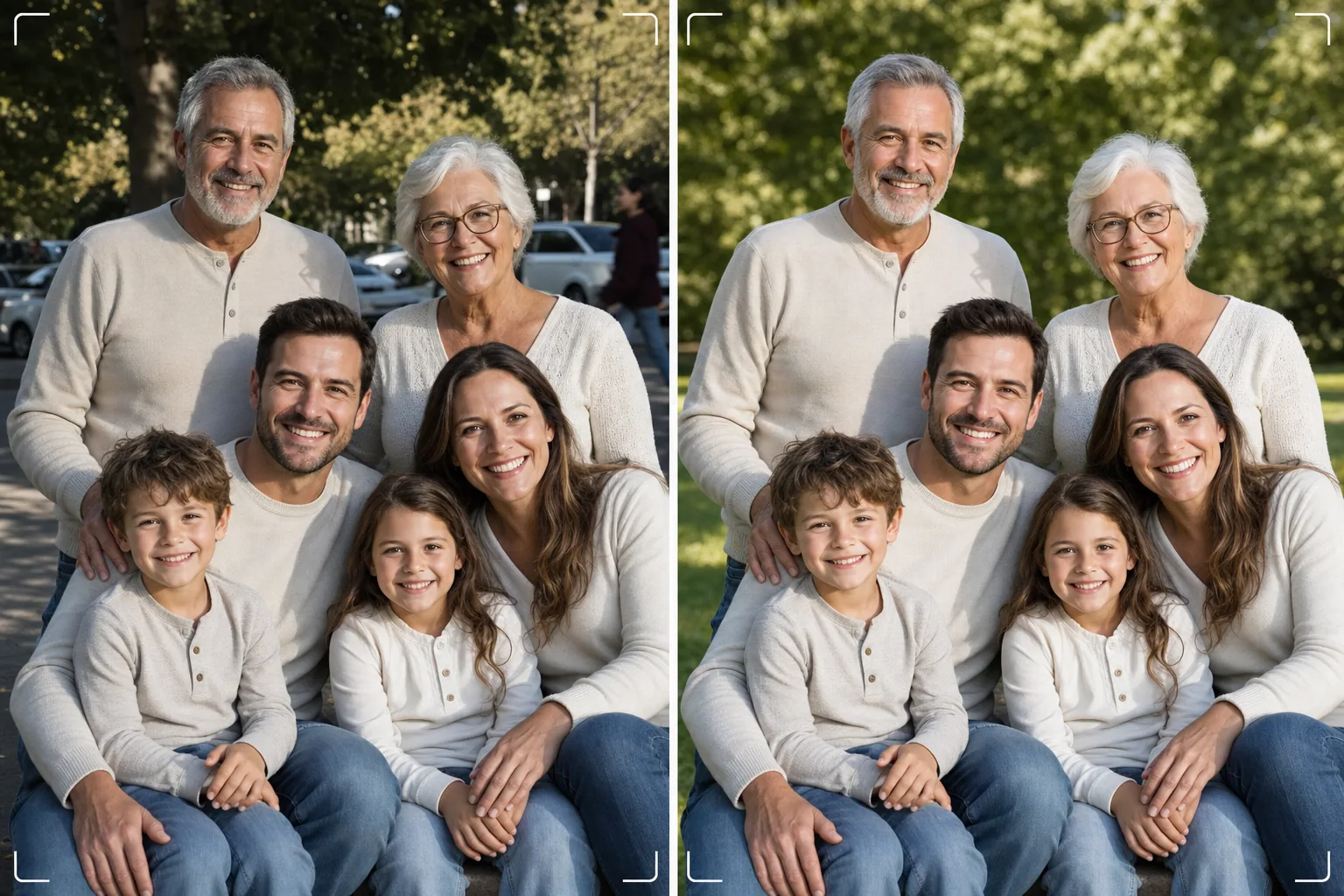
ได้ภาพครอบครัวที่สมบูรณ์แบบโดยไม่ต้องถ่ายเป็นร้อยครั้ง เทมเพลตนี้ลบสิ่งรบกวนในพื้นหลัง แก้ไขแสงที่ไม่สม่ำเสมอทั่วทั้งกลุ่ม ลดจุดบกพร่องบนทุกใบหน้าอย่างเป็นธรรมชาติ และจัดการกับข้อบกพร่องเล็กๆ น้อยๆ ที่ทำให้ภาพหมู่ที่ดีไม่อาจกลายเป็นภาพที่ยอดเยี่ยมได้
ลองใช้เทมเพลตนี้ฟรีPortrait template preview
เทมเพลตนี้ทำอะไรได้บ้าง
แก้ปัญหาภาพครอบครัวที่พบได้ทั่วไป นั่นคือการทำให้ทุกคนดูดีในเฟรมเดียว Magic Eraser ลบคนที่เผลอเข้ามาในภาพ ถังขยะ ป้ายทางออก สายไฟ รถที่จอดอยู่ และสิ่งรบกวนอื่นๆ ที่ทำลายองค์ประกอบภาพหมู่ที่ดีอยู่แล้ว AI Enhance แก้ไขแสงที่ไม่สม่ำเสมอซึ่งเกิดขึ้นเมื่อสมาชิกครอบครัวบางคนอยู่ในร่มเงาในขณะที่คนอื่นอยู่กลางแดดจัด ทำให้ทุกคนมีค่าแสงที่สม่ำเสมอและดูดี การปรับผิวเนียนอย่างเป็นธรรมชาติช่วยลดจุดบกพร่อง รอยคล้ำใต้ตา และรอยแดงบนทุกใบหน้า โดยไม่ทำให้ใครดูเหมือนผ่านการรีทัชอย่างไม่เป็นธรรมชาติ ผลลัพธ์คือภาพครอบครัวที่คุณจินตนาการไว้เมื่อรวบรวมทุกคนไว้ด้วยกัน
การตั้งค่าเทมเพลต
| การล้างพื้นหลัง | ตรวจจับและลบสิ่งรบกวนโดยอัตโนมัติ (ผู้คน ป้าย วัตถุ) |
| การปรับสมดุลแสง | แสงสม่ำเสมอทั่วทุกตัวแบบ (เติมเงา + กู้คืนส่วนสว่าง) |
| การปรับปรุงผิว | ลดจุดบกพร่องตามแต่ละใบหน้าอย่างเป็นธรรมชาติ (คงเอกลักษณ์ของแต่ละคน) |
| การแก้ไขสี | สมดุลแสงขาวที่เป็นหนึ่งเดียวในภาพหมู่ที่มีแสงผสมกัน |
| การเพิ่มความคมชัด | เพิ่มความคมชัดที่รับรู้ใบหน้า (ให้ความสำคัญกับดวงตาและรอยยิ้ม) |
| ความละเอียดของไฟล์ที่ส่งออก | ด้านยาว 6000px (พิมพ์ติดผนังที่ 300 DPI สูงสุด 20×13 นิ้ว) |
วิธีใช้เทมเพลตนี้
อัปโหลดภาพครอบครัว
อัปโหลดภาพหมู่ที่ถ่ายในงานรวมญาติ วันหยุด งานพบปะ หรือเซสชันถ่ายภาพบุคคล เทมเพลตนี้รองรับกลุ่มตั้งแต่สองถึงสามสิบคน เพื่อผลลัพธ์ที่ดีที่สุด ให้เลือกเฟรมที่มีใบหน้ามากที่สุดมองมาที่กล้องด้วยสีหน้าที่ดี — เทมเพลตแก้ไขพื้นหลังและแสงได้ แต่ไม่สามารถเปลี่ยนสีหน้าหรือเปิดดวงตาที่หลับอยู่ได้
ลบสิ่งรบกวนในพื้นหลัง
Magic Eraser ระบุและลบคนแปลกหน้า ป้ายที่รบกวนสายตา ขยะ ยานพาหนะ และองค์ประกอบที่ไม่ต้องการอื่นๆ จากด้านหลังกลุ่มครอบครัว AI สร้างพื้นหลังขึ้นใหม่อย่างเป็นธรรมชาติ โดยเติมหญ้า ท้องฟ้า ผนัง หรือพื้นด้านหลังวัตถุที่ถูกลบออกไป
ปรับสมดุลแสงและปรับปรุงใบหน้า
AI Enhance แก้ไขความแตกต่างของค่าแสงระหว่างสมาชิกครอบครัว — ไม่มีอีกแล้วที่ครึ่งกลุ่มอยู่ในร่มเงาและอีกครึ่งหรี่ตาในแดด แต่ละใบหน้าได้รับการลดจุดบกพร่องเฉพาะบุคคลและการปรับดวงตาให้สว่างขึ้นอย่างละมุน ในขณะที่ยังคงเอกลักษณ์และรูปลักษณ์ที่เป็นธรรมชาติของแต่ละคนไว้
ส่งออกเพื่อพิมพ์หรือแชร์
ดาวน์โหลดที่ด้านยาว 6000px สำหรับงานพิมพ์ติดผนังขนาดใหญ่ หรือที่ 2000px สำหรับโซเชียลมีเดียและการ์ดอวยพรดิจิทัล เทมเพลตส่งออกในรูปแบบ sRGB สำหรับการแสดงผลบนหน้าจอ หรือ Adobe RGB สำหรับการพิมพ์ระดับมืออาชีพ มีอัตราส่วนการครอบตัดหลายแบบ (4:5, 5:7, 8:10) ให้เลือกสำหรับขนาดกรอบรูปทั่วไป
เคล็ดลับมืออาชีพเพื่อผลลัพธ์ที่ดีที่สุด
- ✓ถ่ายภาพต่อเนื่องอย่างรวดเร็วสามถึงห้าภาพ เลือกภาพที่มีคนลืมตาและสีหน้าเป็นธรรมชาติมากที่สุด — เทมเพลตจัดการส่วนที่เหลือทั้งหมด แต่สีหน้าและสถานะการลืมตาไม่สามารถเปลี่ยนได้ในภายหลัง
- ✓จัดวางครอบครัวในร่มเงาโล่ง — ใต้ร่มไม้หรือด้านที่เป็นเงาของอาคาร — แทนที่จะอยู่ในที่ที่มีทั้งแดดและเงาปะปนกัน วิธีนี้ช่วยให้เทมเพลตมีจุดเริ่มต้นที่มีแสงสม่ำเสมอ ซึ่งให้การปรับปรุงที่เป็นธรรมชาติที่สุด
- ✓สำหรับกลุ่มขนาดใหญ่ (สิบคนขึ้นไป) ให้จัดผู้คนเป็นแถวสลับกันโดยให้คนที่สูงกว่าอยู่ด้านหลัง การจัดเป็นชั้นอย่างเป็นธรรมชาตินี้สร้างมิติและทำให้มองเห็นทุกใบหน้า เทมเพลตสามารถเพิ่มความสว่างให้ใบหน้าในแถวหลังที่มืดกว่าเล็กน้อยเนื่องจากอยู่ห่างจากแหล่งกำเนิดแสง
เครื่องมือ
คำถามที่พบบ่อย
เทมเพลตนี้แก้ไขดวงตาที่หลับหรือสีหน้าที่ไม่ดีได้ไหม?
+
ไม่ได้ เทมเพลตช่วยปรับปรุงแสง ลบสิ่งรบกวน และทำให้ผิวเนียน แต่ไม่สามารถเปลี่ยนสีหน้า เปิดดวงตาที่หลับอยู่ หรือจัดตำแหน่งผู้คนใหม่ได้ เลือกเฟรมที่มีสีหน้าดีที่สุดก่อนอัปโหลด — เทมเพลตจะทำให้เฟรมนั้นดูดีที่สุดเท่าที่จะเป็นไปได้
แล้วกลุ่มงานพบปะขนาดใหญ่ล่ะ?
+
เทมเพลตรองรับกลุ่มได้ถึงประมาณสามสิบคน สำหรับกลุ่มที่ใหญ่มาก การปรับปรุงใบหน้าแต่ละคนจะละเอียดอ่อนน้อยลงเนื่องจากขนาดใบหน้าในเฟรมเล็กลง แต่การล้างพื้นหลังและการแก้ไขแสงยังคงมีประสิทธิภาพเต็มที่ไม่ว่ากลุ่มจะมีขนาดเท่าใด
ฉันสามารถลบบุคคลออกจากภาพครอบครัวได้ไหม?
+
ได้ Magic Eraser สามารถลบบุคคลที่ต้องการออกจากกลุ่มได้ เลือกบุคคลที่คุณต้องการลบ แล้ว AI จะสร้างพื้นหลังด้านหลังบุคคลนั้นขึ้นใหม่ วิธีนี้ได้ผลดีที่สุดเมื่อบุคคลนั้นอยู่ขอบกลุ่มมากกว่าอยู่ตรงกลางระหว่างคนอื่นๆ
ภาพครอบครัวที่สมบูรณ์แบบอยู่ห่างเพียงการล้างครั้งเดียว
อัปโหลดภาพหมู่ของคุณ แล้วรับภาพครอบครัวที่สะอาด แสงสม่ำเสมอ ปรับปรุงอย่างเป็นธรรมชาติ พร้อมสำหรับติดผนัง
ลองใช้ฟรีRelated templates
More portrait templates for your workflow.
เทมเพลตการรีทัชภาพเหมือนของโรงเรียนที่เหมาะสมกับวัย การกำจัดรอยตำหนิตามธรรมชาติ พื้นหลังที่สม่ำเสมอ และเอาต์พุตมาตรฐานหนังสือรุ่นพร้อมการประมวลผลเป็นชุดสำหรับทั้งชั้นเรียน
เทมเพลตรูปสัตว์เลี้ยงคุณภาพระดับสตูดิโอ จับขอบขน ถอดสายจูงและที่จับ เปลี่ยนพื้นหลัง และทำให้ดวงตาของสุนัข แมว และสัตว์อื่นๆ คมชัดขึ้น
เทมเพลตรีทัชผิวตามธรรมชาติที่ช่วยขจัดรอยตำหนิพร้อมทั้งรักษารูขุมขนและเนื้อสัมผัส แม้แต่การจัดแสง ไม่มีรูปลักษณ์แบบพลาสติก — แค่มีผิวกล้องที่ดีขึ้น
ปรับปรุงภาพถ่ายทารกแรกเกิดและทารกด้วยโทนสีอบอุ่นที่นุ่มนวล ปรับผิวให้เรียบเนียนอย่างอ่อนโยน กำจัดสิ่งค้ำและสิ่งรบกวน และขนาดที่พร้อมพิมพ์สำหรับประกาศและงานศิลปะบนผนัง
รีทัชภาพถ่ายคุณแม่ตั้งครรภ์ด้วยการ ปรับผิวให้เรียบเนียนอย่างอ่อนโยน แสงไฟนวลตา การปรับพื้นหลังให้เรียบง่ายขึ้น และการให้เกรดสีโทนอุ่น เพื่อลุคภาพถ่ายบุคคลตั้งครรภ์ที่เหนือกาลเวลา