
ภาพถ่ายหน้าตรงสำหรับเรซูเม่
เปลี่ยนภาพถ่ายธรรมดาให้กลายเป็นภาพหน้าตรงที่พร้อมสำหรับการสมัครงาน เหมาะสำหรับเรซูเม่ โปรไฟล์ LinkedIn และพอร์ทัลสมัครงาน เทมเพลตนี้จะลบพื้นหลังที่รบกวนสายตา แทนที่ด้วยพื้นหลังสีพื้นหรือไล่เฉดสีที่สะอาดตา ปรับแต่งผิวอย่างเป็นธรรมชาติ และแก้ไขแสงที่ไม่สม่ำเสมอ เพื่อให้คุณดูมั่นใจและเข้าถึงง่ายในทุกใบสมัคร
ลองใช้เทมเพลตนี้ฟรีBusiness template preview
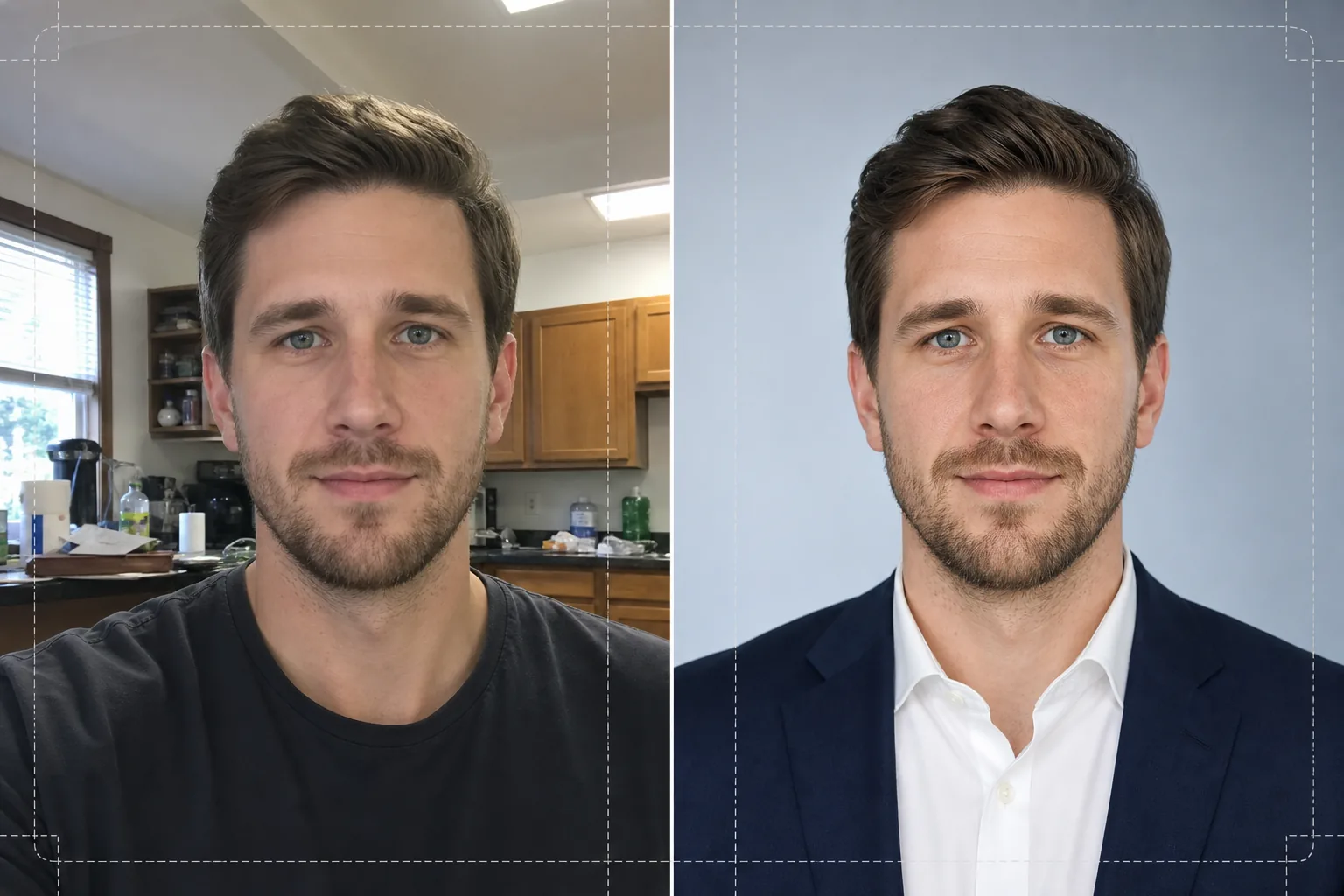
เทมเพลตนี้ทำอะไรได้บ้าง
เปลี่ยนภาพเซลฟี่ ภาพถ่ายจากโทรศัพท์ และภาพบุคคลแบบไม่เป็นทางการให้กลายเป็นภาพหน้าตรงที่ดูดี เหมาะสำหรับเรซูเม่และโปรไฟล์มืออาชีพ Background Eraser จะแยกศีรษะและไหล่ของคุณออกจากสภาพแวดล้อมใดก็ตาม — ห้องครัว สวนสาธารณะ คอกทำงานในออฟฟิศ — และแทนที่ด้วยพื้นหลังสีขาวล้วน เทาอ่อน หรือไล่เฉดสีฟ้านุ่มนวลที่สอดคล้องกับมาตรฐานองค์กร จากนั้น AI Enhance จะแก้ไขความไม่สมดุลของแสงจากหลอดฟลูออเรสเซนต์บนเพดานหรือแสงจากหน้าต่างที่จัดจ้าน ปรับเนื้อผิวให้เนียนขณะที่ยังคงรายละเอียดรูขุมขนตามธรรมชาติ และเพิ่มความคมชัดให้ดวงตาเพื่อให้สายตาของผู้ชมพุ่งไปที่ใบหน้าของคุณ ผลลัพธ์คือภาพบุคคลที่มีแสงสม่ำเสมอและไม่มีสิ่งรบกวน ซึ่งพิมพ์ออกมาคมชัดในขนาด 2x2 นิ้วบนเรซูเม่ หรือแสดงผลคมชัดเป็นรูปอวาตาร์ขนาด 400x400 บนเว็บไซต์หางาน
การตั้งค่าเทมเพลต
| พื้นหลัง | สีขาวล้วน เทาอ่อน (#F0F0F0) หรือไล่เฉดสีฟ้านุ่มนวล |
| การปรับแต่งผิว | เนียนเป็นธรรมชาติ (ลดจุดด่างพร้อย คงเนื้อผิวรูขุมขนไว้) |
| การแก้ไขแสง | แสงเติมด้านหน้าสม่ำเสมอพร้อมประกายแสงเล็กน้อยในดวงตา |
| อัตราส่วนการครอป | แนวตั้ง 3:4 (สัดส่วนภาพหน้าตรงเรซูเม่มาตรฐาน) |
| ความละเอียดของไฟล์ที่ได้ | 1200x1600px (พิมพ์ที่ 300 DPI ได้สูงสุด 4x5.3 นิ้ว) |
วิธีใช้เทมเพลตนี้
อัปโหลดภาพถ่ายของคุณ
อัปโหลดภาพถ่ายใดก็ได้ที่เห็นใบหน้าและไหล่ของคุณอย่างชัดเจน ภาพเซลฟี่ ภาพจากเว็บแคม และภาพหมู่ที่ครอปแล้วใช้ได้ทั้งหมด เทมเพลตนี้รองรับภาพจากอุปกรณ์ใดก็ได้ และชดเชยความบิดเบี้ยวของเลนส์ที่พบได้ทั่วไปในกล้องหน้าของโทรศัพท์
ลบและแทนที่พื้นหลัง
Background Eraser จะตรวจจับศีรษะและไหล่ของคุณโดยอัตโนมัติ และลบทุกสิ่งที่อยู่ด้านหลังคุณ เลือกพื้นหลังสีขาวล้วน เทากลาง หรือไล่เฉดสีฟ้าอ่อน ๆ การตรวจจับขอบจะคงเส้นผมที่ปลิวออกมาและรายละเอียดของปกเสื้อไว้เพื่อให้ได้ภาพตัดที่ดูเป็นธรรมชาติ
ปรับปรุงและตกแต่ง
AI Enhance จะปรับสมดุลแสงทั่วใบหน้าของคุณ ลดเงาที่จัดจ้านใต้คางและจมูก การปรับแต่งผิวจะลบจุดด่างพร้อยชั่วคราวและปรับสีผิวให้สม่ำเสมอโดยไม่ทำให้ดูเหมือนพลาสติก การเพิ่มความคมชัดของดวงตาจะเติมประกายแสงเล็กน้อยที่ทำให้ภาพบุคคลดูมีชีวิตชีวาและตื่นตัว
ดาวน์โหลดและใช้งาน
ส่งออกภาพหน้าตรงที่เสร็จสมบูรณ์ที่ขนาด 1200x1600px ไฟล์นี้ได้รับการปรับให้เหมาะสำหรับทั้งงานพิมพ์ (ใส่ในเรซูเม่ที่ 300 DPI) และดิจิทัล (รูปโปรไฟล์ LinkedIn, Indeed, Glassdoor) มีให้เลือกทั้งรูปแบบ JPEG และ PNG — ใช้ PNG หากคุณต้องการให้พื้นหลังโปร่งใสสำหรับเลย์เอาต์ที่กำหนดเอง
เคล็ดลับระดับมืออาชีพเพื่อผลลัพธ์ที่ดีที่สุด
- ✓ใช้ภาพถ่ายที่คุณหันหน้าเข้ากล้องโดยเอียงไหล่เล็กน้อย การหันแบบสามส่วนสี่เล็กน้อยจะเพิ่มมิติและดูเป็นธรรมชาติกว่าท่าหันตรงเข้ากล้องอย่างสมบูรณ์
- ✓หลีกเลี่ยงภาพที่มีแสงย้อนจัด ๆ — การยืนหน้าหน้าต่างที่สว่างจะทำให้ใบหน้าของคุณกลายเป็นเงาดำและจำกัดปริมาณรายละเอียดที่ AI สามารถกู้คืนได้ในบริเวณเงา
- ✓สวมเสื้อสีพื้นที่ตัดกับพื้นหลังที่คุณวางแผนจะใช้ เสื้อเชิ้ตสีขาวบนพื้นหลังสีขาวจะกลืนกันตรงบริเวณไหล่และทำให้เสียเส้นโครงร่างของรูปร่างคุณ
เครื่องมือ
คำถามที่พบบ่อย
ฉันใช้ภาพเซลฟี่ที่ถ่ายด้วยโทรศัพท์ได้ไหม
+
ได้ เทมเพลตนี้จะแก้ไขความบิดเบี้ยวแบบทรงถังเล็กน้อยจากกล้องหน้าที่ทำให้จมูกดูกว้างกว่าความเป็นจริง อีกทั้งยังจัดการกับระยะชัดลึกที่แคบซึ่งเป็นลักษณะเฉพาะของกล้องโทรศัพท์ เพื่อให้หูและไหล่ของคุณยังคงคมชัด
การปรับแต่งจะดูชัดเจนไหม
+
ไม่ การปรับแต่งผิวจะคงเนื้อผิวรูขุมขนตามธรรมชาติไว้ และลบเฉพาะจุดด่างพร้อยชั่วคราว เช่น สิวและรอยแดง ผลลัพธ์จะดูเหมือนคุณในวันที่ดูดีภายใต้แสงที่ดี ไม่ใช่การรีทัชจนเกินจริง
ฉันควรเลือกสีพื้นหลังใดสำหรับเรซูเม่องค์กร
+
สีขาวล้วนเป็นตัวเลือกที่ปลอดภัยที่สุดสำหรับเรซูเม่ที่พิมพ์ออกมา สีเทาอ่อนเหมาะกับโปรไฟล์ที่ดูบนหน้าจอ เพราะหลีกเลี่ยงความตัดกันที่จัดจ้านของสีขาวบริสุทธิ์บนจอที่มีไฟส่องด้านหลัง ส่วนไล่เฉดสีฟ้าเหมาะกับวงการเทคโนโลยีและสายงานสร้างสรรค์
คว้าการสัมภาษณ์งานครั้งต่อไปด้วยภาพหน้าตรงระดับมืออาชีพ
อัปโหลดภาพถ่ายใดก็ได้ แล้วรับภาพหน้าตรงที่ดูดีและพร้อมสำหรับการสมัครงานสำหรับเรซูเม่ LinkedIn และพอร์ทัลหางานของคุณภายในไม่กี่วินาที
ลองใช้ฟรีRelated templates
More business templates for your workflow.
ปรับแต่งภาพถ่ายของทีมองค์กรด้วยพื้นหลังที่สอดคล้องกัน การแก้ไขแสงแบบมืออาชีพ การให้เกรดสีที่เหมาะสมกับแบรนด์ และคุณภาพของภาพที่สม่ำเสมอทั่วทั้งทีม
ปรับปรุงภาพถ่ายยิมและฟิตเนสด้วยการปรับปรุงความคมชัดของกล้ามเนื้อ การแก้ไขแสงแบบไดนามิก การล้างพื้นหลัง และการจัดระดับสีกีฬาที่มีคอนทราสต์สูง
ปรับปรุงภาพถ่ายพอร์ตโฟลิโอรอยสักด้วยความมีชีวิตชีวาของสีหมึก การปรับรายละเอียดของเส้น ลดรอยแดงของผิวหนัง และพื้นหลังที่สะอาดตาสำหรับพอร์ตโฟลิโอของศิลปินและ Instagram
สร้างภาพถ่ายของทีมมืออาชีพและผู้เล่นแต่ละคนด้วยการเปลี่ยนพื้นหลัง การปรับปรุงสีเสื้อแข่ง และฉากหลังของสนามกีฬาหรือสตูดิโอสำหรับรายชื่อและโปรแกรมต่างๆ
สร้างภาพถ่ายโปรโมตวงดนตรีและนักดนตรีมืออาชีพด้วยการเปลี่ยนพื้นหลัง การปรับปรุงแสงที่น่าทึ่ง และผลงานพร้อมพิมพ์สำหรับชุดสื่อมวลชนและการส่งสถานที่
จัดแสดงผลงานเล็บพร้อมการปรับปรุงรายละเอียดระดับมหภาค ความแม่นยำของสีเจลและยาทาเล็บที่แท้จริง และการวางตำแหน่งมือที่สะอาดสำหรับพอร์ตโฟลิโอ Instagram และหน้าการจอง