
พอร์ตโฟลิโอเพนต์เล็บ
นำเสนอผลงานเพนต์เล็บของคุณด้วยรายละเอียดและความแม่นยำของสีอย่างที่ผลงานสมควรได้รับ เทมเพลตนี้ปรับปรุงภาพถ่ายเล็บระยะใกล้ด้วยการเพิ่มความคมชัดระดับมหภาคที่เผยให้เห็นทุกองค์ประกอบของดีไซน์ชิ้นเล็ก แก้ไขสียาทาเล็บและเจลให้เป็นเฉดสีที่แท้จริงภายใต้แสงกลาง และทำความสะอาดผิวหนังรอบ ๆ และพื้นหลังเพื่อให้ลูกค้ามุ่งความสนใจไปที่ฝีมือของคุณอย่างเต็มที่
ลองใช้เทมเพลตนี้ฟรีBusiness template preview
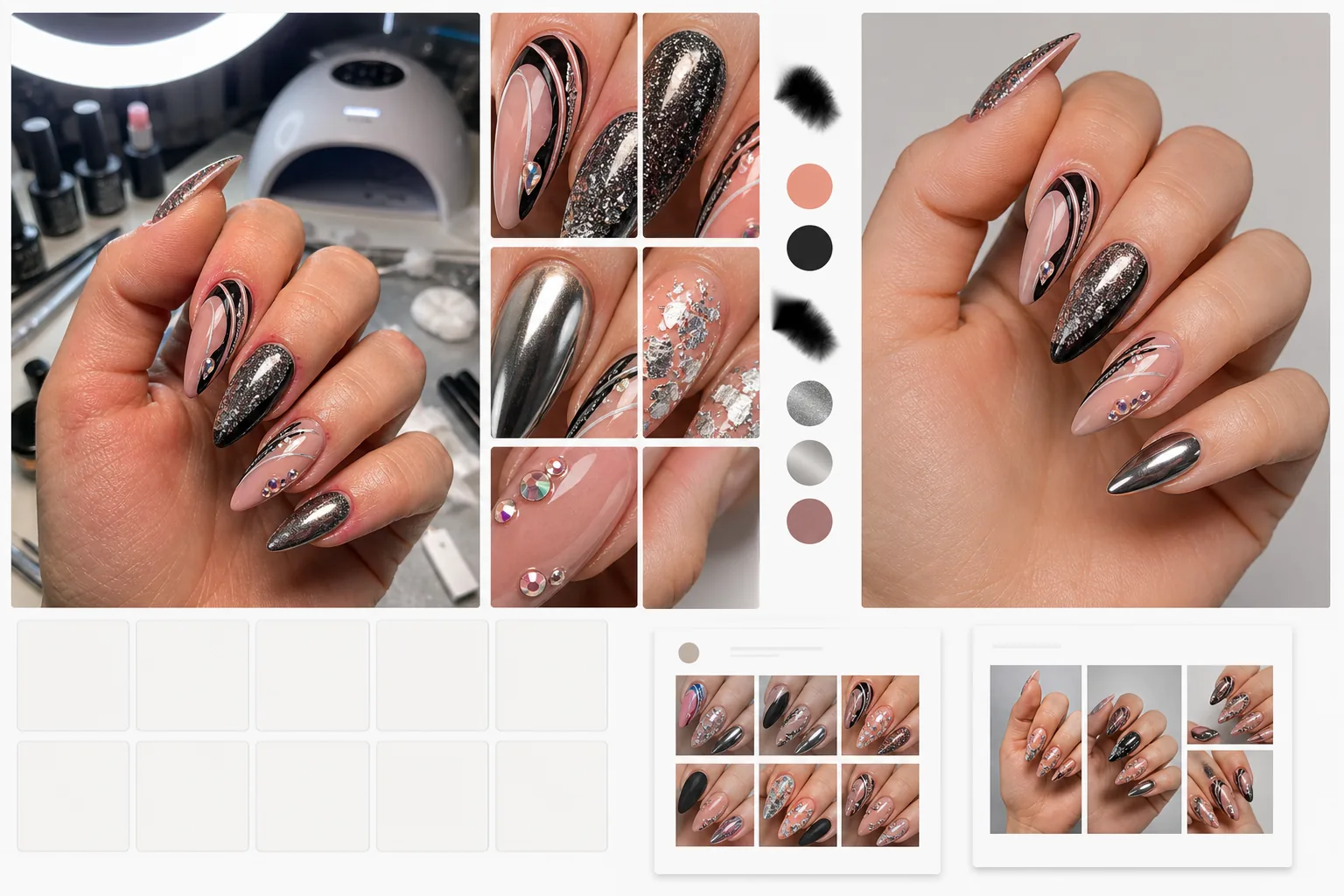
เทมเพลตนี้ทำอะไร
เปลี่ยนภาพถ่ายจากโทรศัพท์ที่ถ่ายบนโต๊ะร้านทำเล็บให้เป็นภาพคุณภาพระดับพอร์ตโฟลิโอที่อวดฝีมือเชิงเทคนิค AI Enhance ใช้การเพิ่มความคมชัดระดับมหภาคที่ดึงรายละเอียดเล็ก ๆ ออกมา — เม็ดกากเพชร ลายเส้นที่วาดด้วยมือ ลายฟอยล์ ผิวโครม และการวางพลอยชิ้นจิ๋ว — ที่กล้องโทรศัพท์ทำให้เบลอเมื่อถ่ายระยะใกล้ สียาทาเล็บและเจลถูกแก้ไขให้ตรงกับเฉดสีจริงของผู้ผลิตด้วยการลบโทนสีอุ่นหรือเย็นที่เกิดจากแสงในร้าน หลอดไฟ UV และไฟวงแหวน Magic Eraser ทำความสะอาดผิวหนังรอบ ๆ — ลบรอยแดงที่หนังกำพร้า เล็บขบ และผิวแห้งเป็นหย่อม — และกำจัดสิ่งรกตาในพื้นหลัง เช่น หลอดไฟ UV ขวดยาทาเล็บ และอุปกรณ์ในร้าน เพื่อให้ภาพพอร์ตโฟลิโอเน้นไปที่งานเพนต์เล็บทั้งหมด
การตั้งค่าเทมเพลต
| การเพิ่มความคมชัดของรายละเอียด | ระดับมหภาค (เห็นกากเพชร ลายเส้น ฟอยล์ พลอย และพื้นผิว) |
| การแก้ไขสี | เฉดสียาทาเล็บ/เจลที่แท้จริงตามมาตรฐานแสงกลาง D50 |
| การทำความสะอาดผิว | หนังกำพร้าเรียบเนียน ลดรอยแดง และสีผิวสม่ำเสมอรอบเล็บ |
| พื้นหลัง | สีขาวสะอาด สีพื้น หรือสภาพแวดล้อมร้านที่เบลอ |
| ความละเอียดของไฟล์ที่ส่งออก | 2000×2000px (สี่เหลี่ยมจัตุรัส 1:1 สำหรับกริด Instagram) |
วิธีใช้เทมเพลตนี้
อัปโหลดภาพเล็บของคุณ
อัปโหลดภาพถ่ายระยะใกล้ของชุดเล็บที่เสร็จแล้ว ภาพจากโทรศัพท์ที่ถ่ายบนโต๊ะร้านภายใต้แสงใด ๆ — โคมไฟตั้งโต๊ะ LED ไฟวงแหวน หลอดไฟ UV สำหรับอบ หรือแสงธรรมชาติจากหน้าต่าง — ใช้ได้ทั้งหมด เข้าใกล้ให้มากที่สุดเท่าที่โทรศัพท์จะให้ได้เพื่อเก็บรายละเอียดสูงสุด
เพิ่มรายละเอียดและสี
AI Enhance เพิ่มความคมชัดให้งานเพนต์เล็บเพื่อเผยรายละเอียดระดับไมโครที่กล้องโทรศัพท์ไม่สามารถแสดงได้เมื่อถ่ายระยะใกล้ สียาทาเล็บและเจลถูกแก้ไขให้เป็นเฉดสีที่แท้จริงด้วยการลบโทนสีจากแสงในร้าน ผิวโครม โฮโลแกรม และแคทอายได้รับการปรับปรุงให้แสดงคุณสมบัติที่เปลี่ยนตามแสง
ทำความสะอาดผิวและพื้นหลัง
Magic Eraser ทำให้รอยแดงที่หนังกำพร้าและผิวแห้งรอบเล็บเรียบเนียนโดยไม่ทำให้มือดูไม่เป็นธรรมชาติ สิ่งรกตาในพื้นหลัง — หลอดไฟ UV ขวดยาทาเล็บ ที่รองมือ และสำลี — ถูกลบออกหรือแทนที่ด้วยพื้นหลังที่สะอาด ความสนใจถูกดึงไปที่งานเพนต์เล็บทั้งหมด
ส่งออกสำหรับพอร์ตโฟลิโอ
ดาวน์โหลดที่ 2000×2000px ในรูปแบบสี่เหลี่ยมจัตุรัสเพื่อเลย์เอาต์กริด Instagram ที่สม่ำเสมอ มีการครอบตัดแบบสี่เหลี่ยมผืนผ้าสำหรับพิน Pinterest และแกลเลอรีบนเว็บไซต์ สไตล์ที่สม่ำเสมอสร้างพอร์ตโฟลิโอที่กลมกลืนซึ่งยกระดับแบรนด์มืออาชีพของคุณ
เคล็ดลับระดับมืออาชีพเพื่อผลลัพธ์ที่ดีที่สุด
- ✓ถ่ายภาพเล็บทันทีหลังทำชุดเล็บเสร็จ ก่อนที่ลูกค้าจะแตะต้องสิ่งใด งานเพนต์เล็บที่เพิ่งทำเสร็จมีเส้นยาทาเล็บที่สะอาดที่สุด พลอยที่สมบูรณ์ที่สุด และพื้นผิวเงาที่สุด — ซึ่งการปรับปรุงด้วย AI จะขับเน้นทั้งหมดนี้
- ✓วางมือให้แบนราบหรือโค้งเล็กน้อยบนพื้นผิวที่สะอาด การกางนิ้วออกเล็กน้อยจะแสดงเล็บแต่ละเล็บอย่างชัดเจนและป้องกันไม่ให้เงาของเล็บหนึ่งทอดลงบนเล็บถัดไป ซึ่งจะบดบังรายละเอียดแม้หลังการปรับปรุงด้วย AI
- ✓ใช้โหมดถ่ายภาพบุคคลหรือโหมดมาโครของโทรศัพท์หากมี โหมดเหล่านี้เก็บรายละเอียดระยะใกล้ได้มากขึ้น ทำให้ AI มีจุดเริ่มต้นคุณภาพสูงขึ้นในการเพิ่มความคมชัดให้องค์ประกอบงานเพนต์เล็บที่ละเอียดอ่อน
เครื่องมือ
คำถามที่พบบ่อย
ผิวโครมและโฮโลแกรมจะดูแม่นยำหรือไม่
+
การปรับปรุงจะรักษาและขับเน้นคุณสมบัติที่เปลี่ยนตามแสงของผิวโครม โฮโลแกรม แคทอาย และดูโอโครม เนื่องจากผิวเหล่านี้ดูแตกต่างกันในทุกมุมแสง เทมเพลตจึงแสดงผิวเหล่านี้ตามที่ปรากฏภายใต้แสงกลางจากด้านบน ซึ่งเป็นการนำเสนอที่จดจำได้ง่ายที่สุดโดยทั่วไป
ฉันสามารถแสดงการเปลี่ยนแปลงเล็บแบบก่อนและหลังได้หรือไม่
+
ได้ อัปโหลดทั้งภาพก่อน (เล็บธรรมชาติ) และหลัง (ชุดที่เสร็จแล้ว) แล้วเทมเพลตจะปรับปรุงทั้งสองภาพด้วยการตั้งค่าเดียวกัน สไตล์ที่สม่ำเสมอทำให้การเปรียบเทียบก่อนและหลังมีผลต่อการตลาดมากขึ้น
ใช้ได้กับงานเพนต์เล็บบนทิปหรือแท่งสวอตช์หรือไม่
+
ได้ เทมเพลตตรวจจับว่าเล็บอยู่บนมือคนหรืออยู่บนทิปสำหรับแสดงและแท่งสวอตช์ แล้วปรับการทำความสะอาดผิวให้เหมาะสม แท่งสวอตช์จะถูกแยกออกและแสดงบนพื้นหลังที่สะอาดเหมือนกับภาพที่ถ่ายบนมือ
แสดงทุกรายละเอียดของฝีมือเพนต์เล็บของคุณ
อัปโหลดภาพจากร้านแล้วรับภาพคุณภาพระดับพอร์ตโฟลิโอที่มีสีจริง รายละเอียดมหภาค และการนำเสนอที่สะอาด
ลองใช้ฟรีRelated templates
More business templates for your workflow.
ปรับแต่งภาพถ่ายของทีมองค์กรด้วยพื้นหลังที่สอดคล้องกัน การแก้ไขแสงแบบมืออาชีพ การให้เกรดสีที่เหมาะสมกับแบรนด์ และคุณภาพของภาพที่สม่ำเสมอทั่วทั้งทีม
ปรับปรุงภาพถ่ายยิมและฟิตเนสด้วยการปรับปรุงความคมชัดของกล้ามเนื้อ การแก้ไขแสงแบบไดนามิก การล้างพื้นหลัง และการจัดระดับสีกีฬาที่มีคอนทราสต์สูง
ปรับปรุงภาพถ่ายพอร์ตโฟลิโอรอยสักด้วยความมีชีวิตชีวาของสีหมึก การปรับรายละเอียดของเส้น ลดรอยแดงของผิวหนัง และพื้นหลังที่สะอาดตาสำหรับพอร์ตโฟลิโอของศิลปินและ Instagram
สร้างเรซูเม่เฮดช็อตที่สวยงามด้วยการเปลี่ยนพื้นหลัง ปรับผิวให้เรียบเนียน และแก้ไขแสง เหมาะสำหรับ CV พอร์ทัลงาน และไดเร็กทอรีขององค์กร
สร้างภาพถ่ายของทีมมืออาชีพและผู้เล่นแต่ละคนด้วยการเปลี่ยนพื้นหลัง การปรับปรุงสีเสื้อแข่ง และฉากหลังของสนามกีฬาหรือสตูดิโอสำหรับรายชื่อและโปรแกรมต่างๆ
สร้างภาพถ่ายโปรโมตวงดนตรีและนักดนตรีมืออาชีพด้วยการเปลี่ยนพื้นหลัง การปรับปรุงแสงที่น่าทึ่ง และผลงานพร้อมพิมพ์สำหรับชุดสื่อมวลชนและการส่งสถานที่