
ภาพถ่ายทีมองค์กร
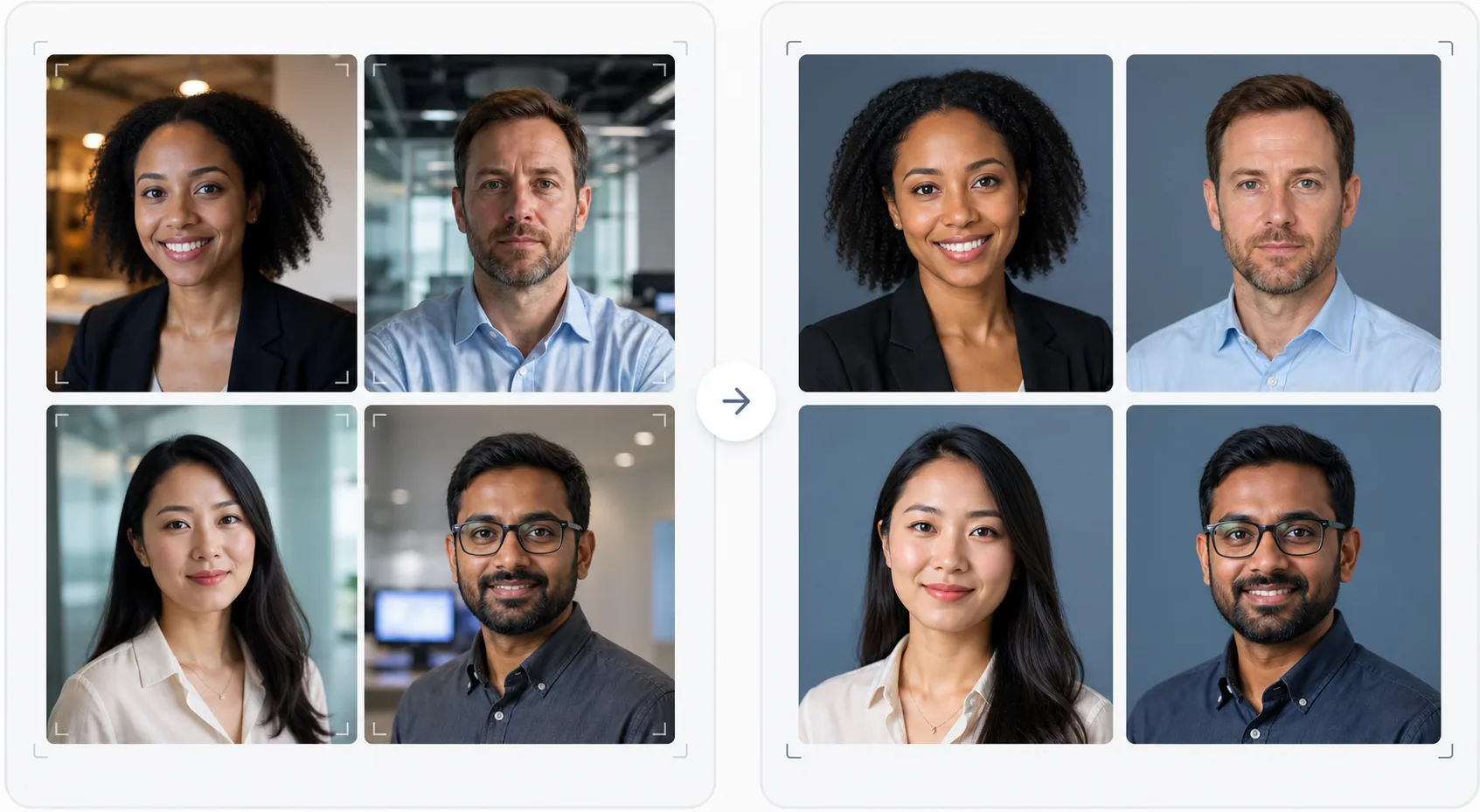
มอบรูปลักษณ์ที่เป็นมืออาชีพและสอดคล้องกันให้กับหน้าทีมของคุณโดยไม่ต้องจ้างช่างภาพที่มีราคาแพง เทมเพลตนี้ทำให้พื้นหลังของภาพศีรษะแต่ละภาพเป็นมาตรฐานเดียวกัน แก้ไขแสงในสำนักงานที่ปะปนกันให้เป็นโทนมืออาชีพที่เป็นกลาง ปรับผิวให้เนียนอย่างละเอียดอ่อน และรับประกันว่าภาพถ่ายของสมาชิกทุกคนในทีมจะมีสไตล์และคุณภาพเดียวกัน
ทดลองใช้เทมเพลตนี้ฟรีBusiness template preview
เทมเพลตนี้ทำอะไร
สร้างภาพถ่ายทีมที่สอดคล้องกันในเชิงภาพสำหรับเว็บไซต์บริษัท หน้าบริษัทบน LinkedIn และสื่อการตลาด เมื่อภาพศีรษะของทีมถูกถ่ายในเวลาที่ต่างกัน โดยคนที่ต่างกัน ด้วยกล้องที่ต่างกัน ผลลัพธ์ที่ได้คือหน้าทีมที่ไม่เข้ากันและดูไม่เป็นมืออาชีพ เทมเพลตนี้แก้ปัญหานี้ด้วยการทำให้พื้นหลัง อุณหภูมิสี สไตล์แสง และการจัดเฟรมการครอบตัดเป็นมาตรฐานเดียวกันในภาพศีรษะทั้งหมด Background Eraser ลบพื้นหลังสำนักงานที่หลากหลายและแทนที่ด้วยพื้นหลังสีทึบหรือไล่ระดับที่สอดคล้องกันในสีแบรนด์ของคุณ AI Enhance ปรับการเปิดรับแสงให้เป็นมาตรฐาน แก้ไขโทนสีเขียวจากหลอดไฟฟลูออเรสเซนต์ในสำนักงาน และปรับผิวให้เนียนอย่างละเอียดอ่อน เพื่อให้สมาชิกทุกคนในทีมดูเรียบร้อยและเป็นมืออาชีพ
การตั้งค่าเทมเพลต
| พื้นหลัง | สีทึบ ไล่ระดับ หรือเบลอสำนักงานที่สอดคล้องกัน (กำหนดค่าตามแบรนด์ได้) |
| การจัดเฟรมการครอบตัด | ศีรษะและไหล่ จัดกึ่งกลาง สอดคล้องกันในภาพทีมทั้งหมด |
| การปรับแสงให้เป็นมาตรฐาน | โทนมืออาชีพที่เป็นกลาง (แก้ไขการผสมของหลอดฟลูออเรสเซนต์ LED และแสงจากหน้าต่าง) |
| การปรับปรุงผิว | ลดจุดด่างพร้อยอย่างละเอียดอ่อนและแก้ไขรอยคล้ำใต้ตา |
| ขนาดผลลัพธ์ | 800 × 800 px (หน้าทีมบนเว็บ) และ 400 × 400 px (ไดเรกทอรี) |
วิธีใช้เทมเพลตนี้
อัปโหลดภาพถ่ายสมาชิกในทีม
อัปโหลดภาพศีรษะของสมาชิกในทีม — ภาพเหล่านี้สามารถมาจากกล้อง สถานที่ และช่วงเวลาที่ต่างกันได้ เทมเพลตนี้จัดการทุกอย่างตั้งแต่ภาพบุคคลระดับมืออาชีพไปจนถึงภาพเซลฟี่จากสมาร์ทโฟนที่ถ่ายที่โต๊ะทำงาน อัปโหลดทั้งทีมเป็นชุดเพื่อการประมวลผลที่มีประสิทธิภาพ
ทำให้พื้นหลังเป็นมาตรฐาน
Background Eraser ลบพื้นหลังเดิมของแต่ละภาพและแทนที่ด้วยตัวเลือกที่สอดคล้องกันสำหรับสมาชิกทุกคนในทีม เลือกจากสีแบรนด์ทึบ ไล่ระดับแบบมืออาชีพ หรือเอฟเฟกต์เบลอสำนักงานแบบมาตรฐาน ภาพทั้งหมดได้รับการปรับแต่งพื้นหลังแบบเดียวกันเพื่อความสม่ำเสมอในเชิงภาพ
ปรับแสงให้เป็นมาตรฐานและปรับปรุง
AI Enhance แก้ไขแสงของแต่ละภาพให้เป็นโทนมืออาชีพที่เป็นกลางและสอดคล้องกัน โทนสีเขียวจากหลอดฟลูออเรสเซนต์ โทนสีอุ่นจากหลอดไส้ และแสงที่ปะปนกันได้รับการแก้ไขทั้งหมด การปรับผิวให้เนียนอย่างละเอียดอ่อนช่วยลดจุดด่างพร้อยและรอยคล้ำใต้ตา ดวงตาได้รับการปรับให้สว่างขึ้นอย่างนุ่มนวลเพื่อสร้างรูปลักษณ์ที่ดูกระตือรือร้นและเข้าถึงง่าย
ส่งออกสำหรับเว็บและไดเรกทอรี
ดาวน์โหลดชุดภาพทั้งหมดที่ขนาด 800 × 800 px สำหรับหน้าทีมบนเว็บไซต์ และ 400 × 400 px สำหรับไดเรกทอรีภายในและลายเซ็นอีเมล ภาพทั้งหมดถูกส่งออกด้วยโปรไฟล์สี การบีบอัด และรูปแบบการตั้งชื่อไฟล์เดียวกัน เพื่อให้อัปโหลดเป็นชุดไปยัง CMS ของคุณได้ง่าย
เคล็ดลับระดับมืออาชีพเพื่อผลลัพธ์ที่ดีที่สุด
- ✓ส่งคำแนะนำการถ่ายภาพง่าย ๆ ให้สมาชิกในทีม: หันหน้าเข้าหากล้องโดยตรง สวมเสื้อสีทึบที่ตัดกับพื้นหลัง ทำให้แสงตกที่ใบหน้าได้ดี (หันหน้าเข้าหาหน้าต่างหากเป็นไปได้) และคงสีหน้าที่เป็นธรรมชาติพร้อมรอยยิ้มเล็กน้อย ภาพต้นฉบับที่ดีกว่าต้องการการแก้ไขด้วย AI น้อยกว่า
- ✓เลือกสีพื้นหลังที่ปรากฏในแนวทางแบรนด์ของคุณ — โดยทั่วไปคือสีเทากลาง สีกรมท่า หรือสีรองของแบรนด์ สิ่งนี้เปลี่ยนหน้าทีมให้เป็นทรัพย์สินของแบรนด์แทนที่จะเป็นเพียงชุดภาพถ่าย
- ✓ประมวลผลสมาชิกใหม่ในทีมผ่านเทมเพลตเมื่อพวกเขาเข้าร่วม โดยใช้การตั้งค่าเดียวกัน สิ่งนี้รักษาความสม่ำเสมอในเชิงภาพไว้ตามกาลเวลาแม้ทีมจะเติบโตและเปลี่ยนแปลง
- ✓สำหรับผู้บริหารระดับสูงและผู้นำ ให้พิจารณาการจัดเฟรมที่แตกต่างเล็กน้อย (ครอบตัดให้แน่นขึ้น โทนสีอุ่นขึ้นเล็กน้อย) เพื่อแยกผู้นำออกจากทีมในวงกว้างในเชิงภาพ ในขณะที่ยังคงพื้นหลังและสไตล์เดียวกัน
เครื่องมือ
คำถามที่พบบ่อย
ฉันสามารถประมวลผลทั้งทีมพร้อมกันได้ไหม
+
ได้ อัปโหลดภาพถ่ายของสมาชิกในทีมทั้งหมดในชุดเดียว เทมเพลตจะใช้พื้นหลัง การแก้ไขแสง และการจัดเฟรมแบบเดียวกันกับทุกภาพ เพื่อรับประกันความสม่ำเสมอที่สมบูรณ์แบบ ภาพถ่ายจะถูกส่งคืนพร้อมขนาด การบีบอัด และโปรไฟล์สีที่ตรงกัน
จะเป็นอย่างไรหากสมาชิกในทีมมีคุณภาพภาพที่แตกต่างกันมาก
+
เทมเพลตจะปรับความแตกต่างด้านคุณภาพระหว่างภาพเซลฟี่จากสมาร์ทโฟนกับภาพบุคคลจากกล้อง DSLR ให้เป็นมาตรฐาน โดยปรับความคมชัด การลดสัญญาณรบกวน และการบีบอัด แม้ว่าแหล่งที่มาจาก DSLR จะให้ผลลัพธ์ที่คมชัดกว่าเล็กน้อยเสมอ แต่ผลลัพธ์ที่ประมวลผลแล้วมีความสม่ำเสมอในเชิงภาพมากพอที่ความแตกต่างด้านคุณภาพจะไม่ชัดเจนบนตารางของเว็บไซต์
สิ่งนี้ใช้ได้กับทีมที่ทำงานจากระยะไกลไหม
+
นี่คือกรณีการใช้งานที่เหมาะสมที่สุดสำหรับทีมที่ทำงานจากระยะไกลซึ่งการถ่ายภาพแบบพบหน้าไม่สะดวก สมาชิกแต่ละคนถ่ายเซลฟี่หรือให้คนอื่นถ่ายภาพที่บ้าน และเทมเพลตจะทำให้ทั้งหมดเป็นมาตรฐานเดียวกันให้ดูเหมือนถ่ายในเซสชันสตูดิโอเดียวกัน
หน้าทีมระดับมืออาชีพโดยไม่ต้องถ่ายภาพ
อัปโหลดภาพศีรษะแต่ละภาพจากแหล่งใดก็ได้ และรับชุดภาพถ่ายทีมที่สอดคล้องกันในเชิงภาพและสอดคล้องกับแบรนด์ พร้อมใช้งานสำหรับเว็บไซต์ของคุณ
ทดลองใช้ฟรีRelated templates
More business templates for your workflow.
ปรับปรุงภาพถ่ายยิมและฟิตเนสด้วยการปรับปรุงความคมชัดของกล้ามเนื้อ การแก้ไขแสงแบบไดนามิก การล้างพื้นหลัง และการจัดระดับสีกีฬาที่มีคอนทราสต์สูง
ปรับปรุงภาพถ่ายพอร์ตโฟลิโอรอยสักด้วยความมีชีวิตชีวาของสีหมึก การปรับรายละเอียดของเส้น ลดรอยแดงของผิวหนัง และพื้นหลังที่สะอาดตาสำหรับพอร์ตโฟลิโอของศิลปินและ Instagram
สร้างเรซูเม่เฮดช็อตที่สวยงามด้วยการเปลี่ยนพื้นหลัง ปรับผิวให้เรียบเนียน และแก้ไขแสง เหมาะสำหรับ CV พอร์ทัลงาน และไดเร็กทอรีขององค์กร
สร้างภาพถ่ายของทีมมืออาชีพและผู้เล่นแต่ละคนด้วยการเปลี่ยนพื้นหลัง การปรับปรุงสีเสื้อแข่ง และฉากหลังของสนามกีฬาหรือสตูดิโอสำหรับรายชื่อและโปรแกรมต่างๆ
สร้างภาพถ่ายโปรโมตวงดนตรีและนักดนตรีมืออาชีพด้วยการเปลี่ยนพื้นหลัง การปรับปรุงแสงที่น่าทึ่ง และผลงานพร้อมพิมพ์สำหรับชุดสื่อมวลชนและการส่งสถานที่
จัดแสดงผลงานเล็บพร้อมการปรับปรุงรายละเอียดระดับมหภาค ความแม่นยำของสีเจลและยาทาเล็บที่แท้จริง และการวางตำแหน่งมือที่สะอาดสำหรับพอร์ตโฟลิโอ Instagram และหน้าการจอง