
การจัดวางเสมือนจริงสำหรับอสังหาริมทรัพย์
จัดแต่งห้องว่างด้วยเฟอร์นิเจอร์และของตกแต่งที่สมจริงเหมือนภาพถ่าย โดยไม่ต้องขยับเฟอร์นิเจอร์จริงแม้แต่ชิ้นเดียว เทมเพลตนี้ใช้ AI Fill เพื่อวางโซฟา โต๊ะ พรม และงานศิลปะลงในห้องที่ว่างเปล่า ขณะที่ Magic Eraser ลบความรกรุงรัง เฟอร์นิเจอร์เก่า และของใช้ส่วนตัวออกก่อนเริ่มจัดวาง ผลลัพธ์คือภาพประกาศที่อบอุ่นและน่าดึงดูด ซึ่งช่วยให้ผู้ซื้อจินตนาการว่าตนเองอาศัยอยู่ในพื้นที่นั้น
ลองใช้เทมเพลตนี้ฟรีReal Estate template preview
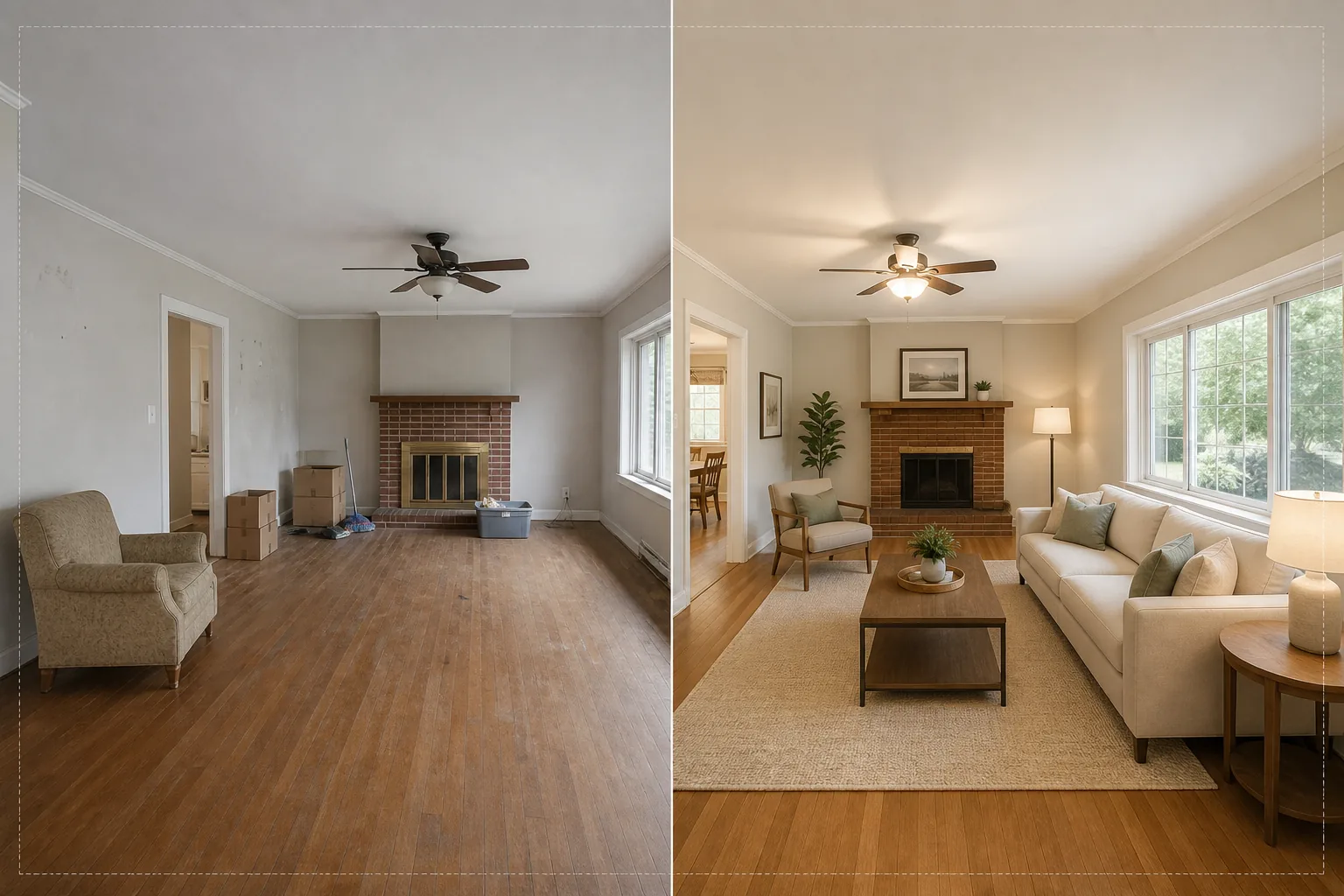
เทมเพลตนี้ทำอะไรได้บ้าง
แก้ปัญหาที่ใหญ่ที่สุดของการถ่ายภาพอสังหาริมทรัพย์ นั่นคือทำให้ห้องที่ว่างเปล่าหรือรกรุงรังดูเหมือนบ้าน Magic Eraser จะลบความรกรุงรังที่มีอยู่ออกก่อน ทั้งเฟอร์นิเจอร์เก่า กล่องย้ายบ้าน ของใช้ส่วนตัว รอยบนผนัง และรอยขูดขีดบนพื้น จากนั้น AI Fill จะวางเฟอร์นิเจอร์ที่เหมาะกับบริบทลงในห้องที่ทำความสะอาดแล้ว โดยจับคู่สไตล์ให้เข้ากับสถาปัตยกรรม ห้องลอฟต์สไตล์โมเดิร์นจะได้เฟอร์นิเจอร์สไตล์มิดเซนจูรีโมเดิร์นพร้อมกลิ่นอายอินดัสเทรียล ส่วนบ้านสไตล์โคโลเนียลดั้งเดิมจะได้เฟอร์นิเจอร์บุนวมแบบคลาสสิกและโทนสีไม้อบอุ่น แสงและเงาบนเฟอร์นิเจอร์เสมือนถูกคำนวณจากแสงหน้าต่างที่มีอยู่ในภาพ ทำให้การจัดวางดูเหมือนมีอยู่จริงทางกายภาพ ไม่ใช่การแปะทับ
การตั้งค่าเทมเพลต
| สไตล์การจัดวาง | โมเดิร์น, ดั้งเดิม, สแกนดิเนเวียน, มิดเซนจูรี หรือชายฝั่ง |
| ประเภทห้อง | ตรวจจับอัตโนมัติ (ห้องนั่งเล่น ห้องนอน ห้องอาหาร ห้องทำงาน ห้องครัว) |
| การลบความรกรุงรัง | ลบกล่อง ของใช้ส่วนตัว และเฟอร์นิเจอร์เก่าออกอัตโนมัติก่อนการจัดวาง |
| การเรนเดอร์เงา | ปรับให้เข้ากับทิศทางและความเข้มของแสงหน้าต่างที่มีอยู่ |
| ความละเอียดของไฟล์ที่ส่งออก | 4000×3000px (เป็นไปตามมาตรฐาน MLS ที่ 300 DPI) |
| อุณหภูมิสี | ภายในโทนอบอุ่น (3200K–4000K เพื่อให้เข้ากับแสงภายในอาคารทั่วไป) |
วิธีใช้เทมเพลตนี้
อัปโหลดภาพห้องว่างหรือห้องที่รกรุงรัง
อัปโหลดภาพมุมกว้างของห้อง ถ่ายจากมุมห้องเพื่อให้เห็นผนังสองด้านและพื้น เพื่อการจัดวางที่สมจริงที่สุด เทมเพลตนี้รองรับภาพจากสมาร์ตโฟน กล้อง DSLR และกล้องอสังหาริมทรัพย์ระดับมืออาชีพ รวมถึงเลนส์อัลตราไวด์
ลบความรกรุงรังที่มีอยู่
Magic Eraser จะตรวจจับและลบกล่องย้ายบ้าน เฟอร์นิเจอร์เก่า ภาพถ่ายส่วนตัวบนผนัง และความรกรุงรังบนพื้นโดยอัตโนมัติ AI จะสร้างพื้น สีผนัง และบัวเชิงผนังด้านหลังวัตถุที่ถูกลบขึ้นมาใหม่ เพื่อให้ห้องดูสะอาดและว่างเปล่า
จัดวางด้วยเฟอร์นิเจอร์เสมือน
AI Fill จะวางเฟอร์นิเจอร์ที่เหมาะกับประเภทห้องที่ตรวจพบและสไตล์ที่เลือก ห้องนั่งเล่นจะได้โซฟา โต๊ะกลาง พรม โต๊ะข้าง และงานศิลปะบนผนัง ห้องนอนจะได้เตียง โต๊ะข้างเตียง โคมไฟ และหมอนตกแต่ง เฟอร์นิเจอร์จะปรับขนาดให้เข้ากับมิติของห้องและทอดเงาที่สมจริง
ส่งออกสำหรับ MLS และประกาศขาย
ดาวน์โหลดภาพที่จัดวางแล้วที่ความละเอียด 4000×3000px พร้อมสำหรับการอัปโหลดไปยัง MLS, Zillow, Realtor.com และโบรชัวร์สำหรับพิมพ์ ภาพมีแท็กข้อมูลเมตาเพื่อให้จัดหมวดหมู่ได้ง่ายในระบบจัดการประกาศของคุณ
เคล็ดลับมืออาชีพเพื่อผลลัพธ์ที่ดีที่สุด
- ✓ถ่ายจากมุมห้องที่ความสูงประมาณ 1.2 เมตร — วิธีนี้จะเก็บภาพผนังสองด้านและพื้นที่พื้นมากพอให้ AI วางเฟอร์นิเจอร์ด้วยมุมมองที่ถูกต้องและเงาสัมผัสพื้น
- ✓เปิดไฟทุกดวงในห้องก่อนถ่ายภาพ AI จะใช้แหล่งกำเนิดแสงที่มองเห็นได้และแสงสะท้อนจากหน้าต่างเพื่อคำนวณว่าเงาควรตกลงที่ใดบนเฟอร์นิเจอร์ที่จัดวาง
- ✓สำหรับประกาศที่มีหลายห้อง ให้ใช้สไตล์การจัดวางแบบเดียวกันในทุกห้องเพื่อสร้างเรื่องราวการออกแบบที่กลมกลืน ราวกับนักออกแบบตัวจริงตกแต่งทั้งบ้าน
เครื่องมือ
คำถามที่พบบ่อย
การจัดวางเสมือนเป็นไปตามกฎของ MLS หรือไม่
+
ระบบ MLS ส่วนใหญ่อนุญาตให้ใช้ภาพที่จัดวางแบบเสมือนได้ตราบใดที่มีการระบุไว้เช่นนั้น เทมเพลตนี้ไม่เพิ่มป้ายกำกับให้โดยอัตโนมัติ — โปรดตรวจสอบกฎ MLS ในพื้นที่ของคุณและเพิ่มคำอธิบายเปิดเผย เช่น 'จัดวางแบบเสมือน' เมื่ออัปโหลด
ฉันจัดวางลานระเบียงหรือระเบียงกลางแจ้งได้ไหม
+
ได้ เทมเพลตนี้จะตรวจจับพื้นที่อยู่อาศัยกลางแจ้งและจัดวางด้วยเฟอร์นิเจอร์ลานระเบียง กระถางต้นไม้ และพรมกลางแจ้งที่เหมาะสม การคำนวณแสงจะคำนึงถึงท้องฟ้าโล่งและแสงแดดโดยตรงแทนแสงแวดล้อมภายในอาคาร
เฟอร์นิเจอร์สมจริงแค่ไหน
+
เฟอร์นิเจอร์ที่จัดวางจะทอดเงาที่สอดคล้องกับทิศทางแสงที่มีอยู่ของห้อง วางอยู่บนระนาบพื้นด้วยมุมมองที่ถูกต้อง และสะท้อนสีแวดล้อมจากผนังโดยรอบ ในระยะการมองปกติ การจัดวางแทบแยกไม่ออกจากภาพถ่ายที่มีเฟอร์นิเจอร์จริง
จัดวางห้องใดก็ได้ในไม่กี่วินาที ไม่ใช่หลายชั่วโมง
อัปโหลดภาพห้องว่างแล้วรับภาพประกาศขายที่ตกแต่งอย่างสวยงาม ซึ่งช่วยให้ผู้ซื้อหลงรักทุกพื้นที่
ลองใช้ฟรีRelated templates
More real estate templates for your workflow.
เทมเพลตภาพถ่ายอสังหาริมทรัพย์ระดับมืออาชีพสำหรับประกาศ MLS การปรับแต่งแบบ HDR, การแทนที่ท้องฟ้า, การกำจัดสิ่งรกรุงรัง และการแก้สีสำหรับภาพถ่ายอสังหาริมทรัพย์ที่ขายได้เร็วขึ้น
ยกระดับภาพภายนอกสถาปัตยกรรมด้วยการแก้ไขเส้นแนวตั้ง แทนที่ท้องฟ้า ลบรถและคนเดินเท้า และปรับสีโทนชั่วโมงทองสำหรับประกาศขายและพอร์ตโฟลิโอ
แปลงโฉมรูปภาพ Airbnb และห้องเช่าวันหยุดด้วยการเพิ่มความสว่างของห้อง การกำจัดสิ่งยุ่งเหยิง Color correction และการแก้ไขความผิดเพี้ยนของเลนส์มุมกว้างเพื่อให้ได้อัตราการจองที่สูงขึ้น
ปรับปรุงภาพถ่ายพอร์ตโฟลิโอการออกแบบตกแต่งภายในด้วยการปรับความสว่างของห้อง การกำจัดสิ่งยุ่งเหยิง การทำให้พื้นผิวของวัสดุคมชัดขึ้น และการแสดงสีที่แม่นยำของพื้นผิวและผ้า
ปรับปรุงการถ่ายภาพทางอากาศด้วยโดรนด้วยการเปลี่ยนท้องฟ้า การเน้นขอบเขตทรัพย์สิน ความมีชีวิตชีวาของสี Boost และการกำจัดสิ่งรบกวนสมาธิสำหรับการสำรวจอสังหาริมทรัพย์และที่ดิน
ทำความสะอาด ปรับปรุง และสร้างมาตรฐานให้กับภาพแผนผังชั้นสำหรับรายการอสังหาริมทรัพย์ด้วยการขจัดคราบ การทำให้เส้นคมชัด และการจัดสไตล์ที่สม่ำเสมอ