
ภาพถ่ายประกาศอสังหาริมทรัพย์
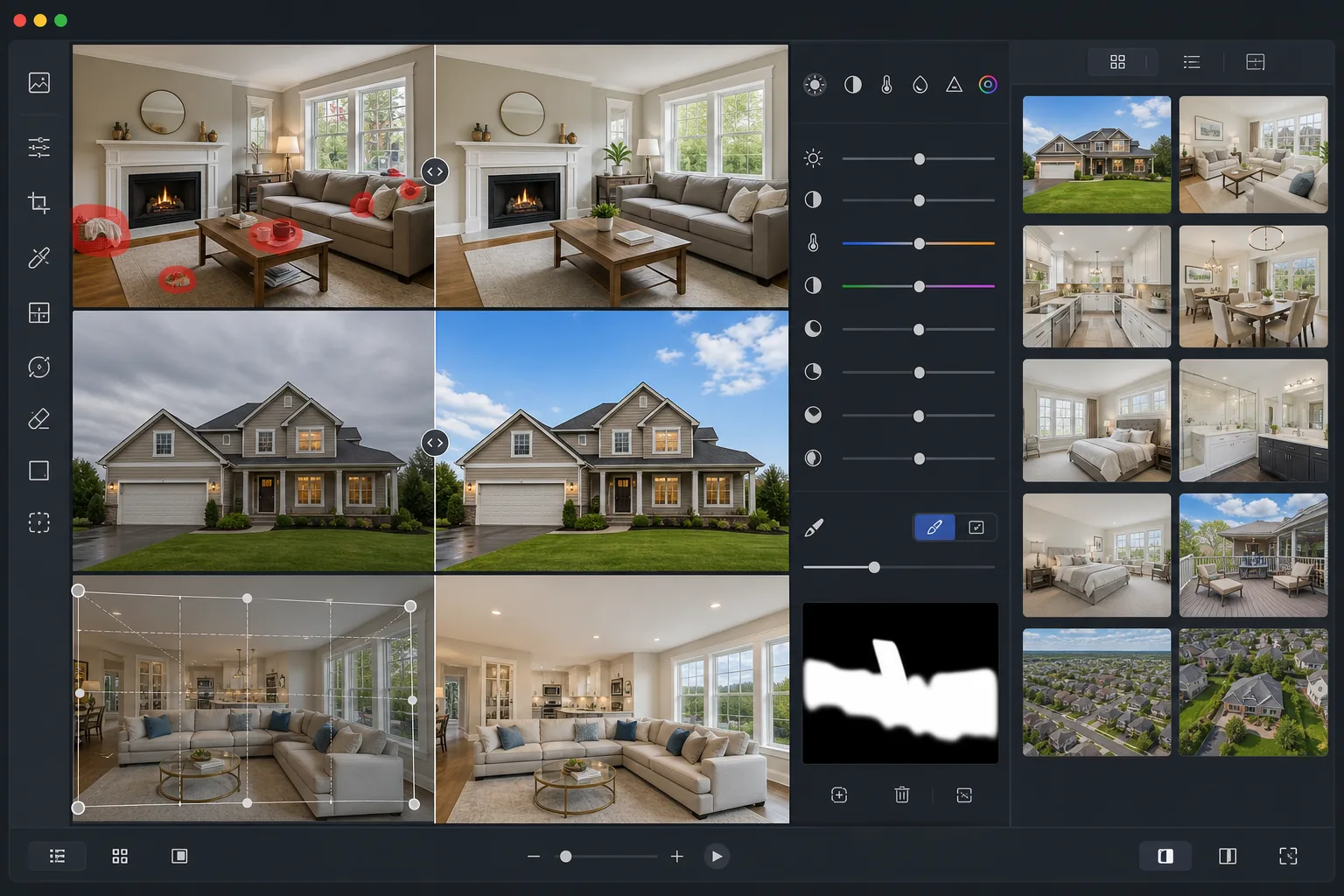
เปลี่ยนภาพถ่ายอสังหาริมทรัพย์ธรรมดาให้เป็นภาพประกาศที่พร้อมสำหรับ MLS เทมเพลตนี้ใช้การกู้คืนช่วงไดนามิกแบบ HDR แทนที่ท้องฟ้าที่มืดครึ้ม กำจัดสิ่งรกรุงรังที่รบกวนสายตา และปรับสมดุลแสงภายใน — มอบลุคที่ดูเรียบหรูในทุกห้องตามที่ผู้ซื้อคาดหวัง
ลองใช้เทมเพลตนี้ฟรีReal Estate template preview
เทมเพลตนี้ทำอะไรได้บ้าง
ปรับปรุงภาพถ่ายอสังหาริมทรัพย์ด้วยการแก้ไขระดับมืออาชีพที่ช่างภาพอสังหาริมทรัพย์ใช้ เทมเพลตนี้กู้คืนหน้าต่างที่สว่างจ้าเกินไป ดึงรายละเอียดในเงามืดของห้องที่มืด แก้ไขแสงภายในที่ผสมกัน และกำจัดสิ่งรกรุงรังในชีวิตประจำวัน เช่น ถังขยะ รถยนต์ในทางเข้าบ้าน และสิ่งของส่วนตัว ผลลัพธ์ดูเหมือนภาพ HDR ที่ถ่ายแบบ bracketing อย่างมืออาชีพโดยไม่ต้องใช้ขาตั้งกล้องหรือเวลาในการแก้ไข
การตั้งค่าเทมเพลต
| ขนาดผลลัพธ์ | 3000×2000px (มาตรฐาน MLS 3:2) |
| ช่วงไดนามิก | การแมปโทนสี HDR (กู้คืนเงา +2 EV) |
| การปรับปรุงท้องฟ้า | แทนที่ด้วยท้องฟ้าสีฟ้าอัตโนมัติในวันที่มืดครึ้ม |
| อุณหภูมิสี | สมดุลแสงกลางวัน 5500K (ลบโทนสีเหลืองในร่ม) |
| รูปแบบไฟล์ | JPEG คุณภาพ 90% (ปรับให้เหมาะกับการอัปโหลด MLS, น้อยกว่า 10MB) |
| การแก้ไขเลนส์ | ปรับเส้นแนวตั้งให้ตรงอัตโนมัติและแก้ไขความบิดเบี้ยวแบบทรงกระบอก |
วิธีใช้เทมเพลตนี้
อัปโหลดภาพถ่ายอสังหาริมทรัพย์ของคุณ
อัปโหลดภาพภายในหรือภายนอกที่ถ่ายด้วยกล้องหรือสมาร์ทโฟนใดก็ได้ เลนส์มุมกว้างเหมาะที่สุดสำหรับห้อง แต่เทมเพลตจะแก้ไขความบิดเบี้ยวแบบทรงกระบอกโดยอัตโนมัติ
กำจัดสิ่งรกรุงรังและสิ่งรบกวน
Magic Eraser กำจัดสิ่งของส่วนตัว รถยนต์ในทางเข้าบ้าน ถังขยะ สายไฟ และองค์ประกอบอื่น ๆ ที่เบี่ยงเบนความสนใจจากตัวอสังหาริมทรัพย์เอง เลือกวัตถุที่จะลบหรือให้ AI ตรวจจับสิ่งรบกวนทั่วไป
ปรับปรุงแสงและสี
AI Enhance ใช้การแมปโทนสีแบบ HDR เพื่อกู้คืนหน้าต่างที่สว่างจ้าเกินไปและทำให้มุมมืดสว่างขึ้น แสงผสมจากแหล่งทังสเตน ฟลูออเรสเซนต์ และแสงกลางวันจะถูกปรับสมดุลโดยอัตโนมัติให้เป็นโทนกลางที่สะอาดตา
ส่งออกสำหรับ MLS และเว็บไซต์ประกาศ
ดาวน์โหลดที่ 3000×2000px สำหรับ MLS, Zillow, Realtor.com และ Redfin ผลลัพธ์ JPEG ได้รับการปรับให้อยู่ภายใต้ขีดจำกัดขนาดไฟล์ของแพลตฟอร์มในขณะที่ยังคงรักษารายละเอียดไว้
เคล็ดลับมืออาชีพเพื่อผลลัพธ์ที่ดีที่สุด
- ✓ถ่ายภายในโดยเปิดไฟทุกดวงและเปิดผ้าม่าน — เทมเพลตสามารถกู้คืนความสว่างของหน้าต่างได้ แต่การมีแสงธรรมชาติบ้างในห้องจะให้เอฟเฟกต์ HDR ที่สมจริงที่สุด
- ✓สำหรับภาพภายนอก ให้ถ่ายจากอีกฝั่งของถนนที่ระดับความสูงเท่าหน้าอกเพื่อจับภาพด้านหน้าทั้งหมดโดยไม่มีมุมเงยที่มากเกินไปซึ่งทำให้เส้นแนวตั้งบิดเบี้ยว
- ✓จัดเตรียมพื้นที่ก่อนถ่าย: เก็บสิ่งของส่วนตัวชิ้นเล็ก ปิดฝาชักโครก และเก็บเคาน์เตอร์ครัวให้เรียบร้อย แม้ Magic Eraser จะลบวัตถุได้ แต่ภาพเริ่มต้นที่สะอาดกว่าจะให้ผลลัพธ์ที่เป็นธรรมชาติที่สุด
- ✓ถ่ายห้องสำคัญทั้งแนวนอนและแนวตั้ง — MLS ใช้แนวนอน แต่แอปมือถือของ Zillow มักครอบตัดเป็นสี่เหลี่ยมจัตุรัส ดังนั้นการมีตัวเลือกจะรับประกันการนำเสนอที่ดีที่สุดในทุกแพลตฟอร์ม
เครื่องมือ
คำถามที่พบบ่อย
สิ่งนี้ตรงตามข้อกำหนดภาพถ่ายของ MLS หรือไม่?
+
ใช่ เทมเพลตส่งออกที่ 3000×2000px ในอัตราส่วน 3:2 ซึ่งตรงตามหรือเกินข้อกำหนดของระบบ MLS หลักทุกระบบในสหรัฐอเมริกาและแคนาดา คุณภาพ JPEG ได้รับการปรับเทียบให้อยู่ภายใต้ขีดจำกัดการอัปโหลดทั่วไปที่ 10MB
ฉันสามารถแก้ไขหน้าต่างที่สว่างจ้าเกินไปในภาพภายในได้หรือไม่?
+
ได้แน่นอน อัลกอริทึมการแมปโทนสี HDR กู้คืนรายละเอียดในหน้าต่างที่เปิดรับแสงมากเกินไปในขณะที่ยังคงรักษาแสงภายในที่เป็นธรรมชาติ ผลลัพธ์แสดงทิวทัศน์ภายนอกผ่านหน้าต่างโดยไม่ทำให้ห้องมืดลง — คล้ายกับการผสมแฟลชกับแสงแวดล้อมแบบมืออาชีพ
ภาพที่แก้ไขแล้วจะดูไม่เป็นธรรมชาติหรือไม่?
+
การปรับปรุงได้รับการปรับเทียบให้ตรงกับลุคของการถ่ายภาพอสังหาริมทรัพย์ระดับมืออาชีพ ไม่ใช่ HDR ที่ประมวลผลมากเกินไป สีคงความสมจริง เงาถูกทำให้สว่างขึ้นอย่างเป็นธรรมชาติ และการแทนที่ท้องฟ้าใช้ภาพถ่ายท้องฟ้าที่ตรงกับทิศทางแสงของภาพต้นฉบับ
ทำให้ทุกประกาศดูเหมือนถ่ายโดยมืออาชีพ
อัปโหลดภาพถ่ายอสังหาริมทรัพย์ของคุณและรับภาพที่พร้อมสำหรับ MLS ภายในไม่กี่วินาที ไม่ต้องใช้การถ่าย bracketing แบบ HDR ไม่ต้องใช้อุปกรณ์แฟลช ไม่ต้องมีประสบการณ์การแก้ไข
ลองใช้ฟรีRelated templates
More real estate templates for your workflow.
ยกระดับภาพภายนอกสถาปัตยกรรมด้วยการแก้ไขเส้นแนวตั้ง แทนที่ท้องฟ้า ลบรถและคนเดินเท้า และปรับสีโทนชั่วโมงทองสำหรับประกาศขายและพอร์ตโฟลิโอ
แปลงโฉมรูปภาพ Airbnb และห้องเช่าวันหยุดด้วยการเพิ่มความสว่างของห้อง การกำจัดสิ่งยุ่งเหยิง Color correction และการแก้ไขความผิดเพี้ยนของเลนส์มุมกว้างเพื่อให้ได้อัตราการจองที่สูงขึ้น
ปรับปรุงภาพถ่ายพอร์ตโฟลิโอการออกแบบตกแต่งภายในด้วยการปรับความสว่างของห้อง การกำจัดสิ่งยุ่งเหยิง การทำให้พื้นผิวของวัสดุคมชัดขึ้น และการแสดงสีที่แม่นยำของพื้นผิวและผ้า
ปรับปรุงการถ่ายภาพทางอากาศด้วยโดรนด้วยการเปลี่ยนท้องฟ้า การเน้นขอบเขตทรัพย์สิน ความมีชีวิตชีวาของสี Boost และการกำจัดสิ่งรบกวนสมาธิสำหรับการสำรวจอสังหาริมทรัพย์และที่ดิน
จัดแสดงห้องว่างแบบเสมือนจริงด้วยเฟอร์นิเจอร์ การตกแต่ง และแสงไฟที่สมจริง ช่วยให้ผู้ซื้อเห็นภาพพื้นที่อยู่อาศัยได้โดยไม่ต้องเสียค่าใช้จ่ายในการจัดวางจริง
ทำความสะอาด ปรับปรุง และสร้างมาตรฐานให้กับภาพแผนผังชั้นสำหรับรายการอสังหาริมทรัพย์ด้วยการขจัดคราบ การทำให้เส้นคมชัด และการจัดสไตล์ที่สม่ำเสมอ