
แผนผังชั้นอสังหาริมทรัพย์
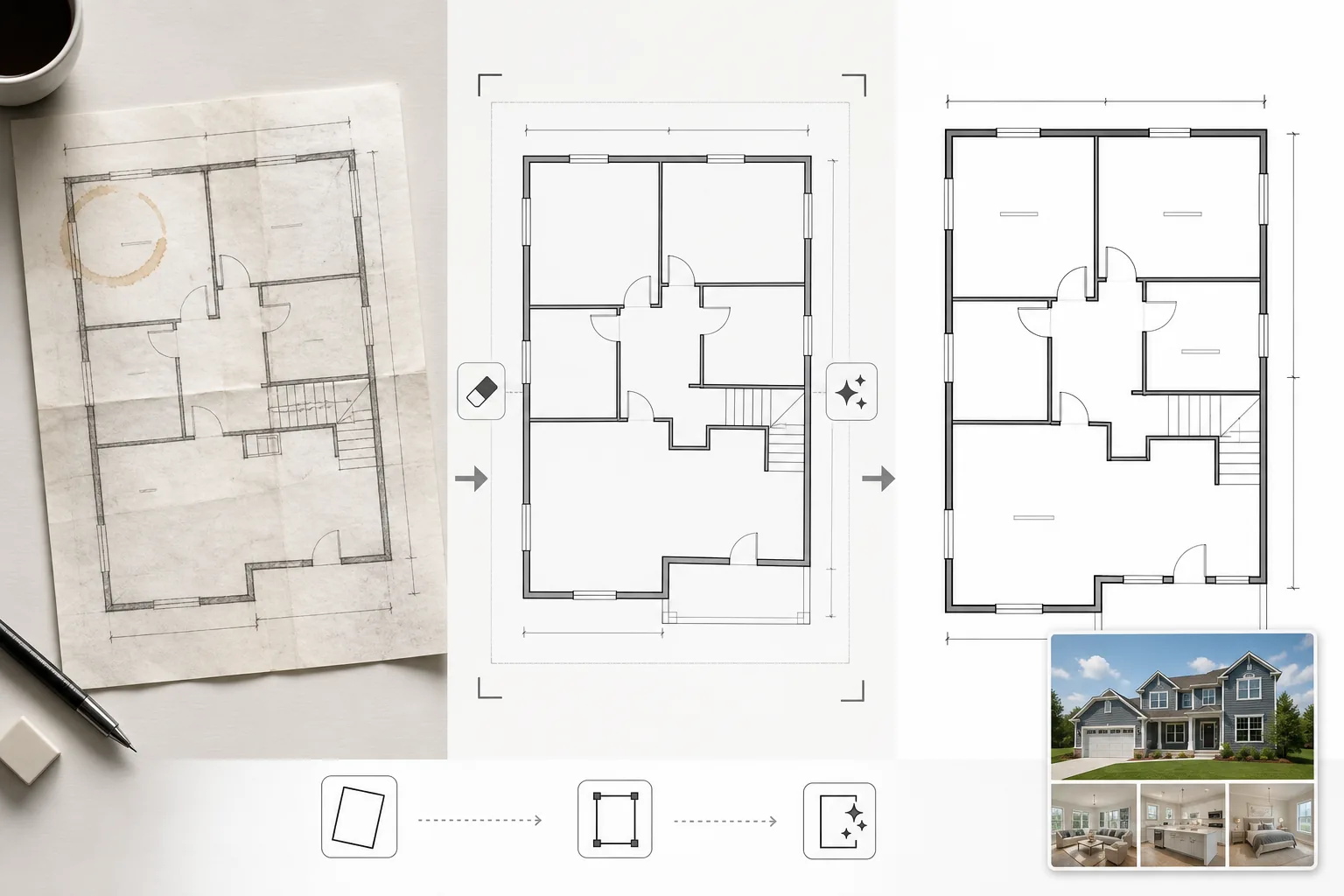
เปลี่ยนแผนผังชั้นที่สแกนหรือถ่ายภาพให้เป็นไดอะแกรมที่สะอาดและเป็นมืออาชีพ เหมาะสำหรับรายการ MLS โบรชัวร์อสังหาริมทรัพย์ และการผสานรวมทัวร์เสมือนจริง เทมเพลตนี้ขจัดคราบ เงา และรอยพับออกจากแผนผังกระดาษ ทำให้เส้นผนังและคำอธิบายขนาดคมชัด และสร้างมาตรฐานให้กับสไตล์ภาพเพื่อให้แผนผังชั้นทุกอันในพอร์ตโฟลิโอรายการของคุณดูสอดคล้องกัน
ลองใช้เทมเพลตนี้ฟรีReal Estate template preview
เทมเพลตนี้ทำอะไร
ทำความสะอาดภาพแผนผังชั้นที่ถ่ายจากพิมพ์เขียวกระดาษ ส่งออกจากซอฟต์แวร์ CAD ที่ล้าสมัย หรือสแกนด้วยคุณภาพต่ำ Magic Eraser ขจัดคราบกาแฟ คำอธิบายดินสอ รอยพับ และสิ่งแปลกปลอมจากเงาในภาพถ่ายโทรศัพท์ของแผนผังกระดาษ AI Enhance ทำให้เส้นผนัง ทิศทางการเปิดประตู และข้อความขนาดคมชัด เพื่อให้ยังคงอ่านได้เมื่อย่อขนาดสำหรับแสดงบนเว็บหรือพิมพ์ในโบรชัวร์ มุมมองได้รับการแก้ไขสำหรับแผนผังชั้นที่ถ่ายในมุมเอียงแทนที่จะสแกนแบบราบ สีพื้นหลังถูกปรับให้เป็นสีขาวสะอาด และเส้นผนังถูกทำให้เข้มขึ้นด้วยความหนาที่สม่ำเสมอเพื่อให้ได้รูปลักษณ์ที่เหมือนกันในทุกแผนผังของรายการ
การตั้งค่าเทมเพลต
| การทำความสะอาดพื้นหลัง | ขจัดคราบ รอยพับ เงา และปรับให้เป็นสีขาวสะอาด |
| การปรับปรุงเส้น | ทำให้เส้นผนังคมชัดและเข้มขึ้นด้วยความหนาที่สม่ำเสมอ |
| ความชัดเจนของข้อความ | ปรับปรุงป้ายกำกับขนาด ชื่อห้อง และคำอธิบายการวัด |
| การแก้ไขมุมมอง | ปรับแผนผังที่ถ่ายภาพให้ตรงเป็นมุมมองจากด้านบนที่แท้จริง |
| ความละเอียดผลลัพธ์ | 3000×2000px (แนวนอน) หรือกำหนดเองเพื่อให้ตรงกับอัตราส่วนภาพต้นฉบับ |
วิธีใช้เทมเพลตนี้
อัปโหลดภาพแผนผังชั้นของคุณ
อัปโหลดแผนผังชั้นที่สแกน ถ่ายภาพ หรือแบบดิจิทัล เทมเพลตนี้รองรับแผนผังกระดาษที่ถ่ายด้วยกล้องโทรศัพท์ การสแกนแบบราบ การส่งออก PDF และภาพหน้าจอจากซอฟต์แวร์สถาปัตยกรรม การบิดเบือนมุมมองจากภาพถ่ายโทรศัพท์ที่ถ่ายในมุมเอียงจะได้รับการแก้ไขโดยอัตโนมัติ
ขจัดสิ่งแปลกปลอมและคราบ
Magic Eraser ระบุและขจัดคราบกาแฟ รอยดินสอ รอยพับ ริ้วรอยจากสแกนเนอร์ และการไล่เฉดสีจากเงาเนื่องจากแสงไม่สม่ำเสมอ พื้นหลังถูกปรับให้เป็นสีขาวสะอาดในขณะที่ยังคงรักษาเส้นและคำอธิบายทางสถาปัตยกรรมทั้งหมดไว้
ปรับปรุงเส้นและข้อความ
AI Enhance ทำให้โครงร่างผนัง ส่วนโค้งประตู สัญลักษณ์หน้าต่าง และตัวบ่งชี้บันไดคมชัด ข้อความขนาดและป้ายกำกับห้องได้รับการปรับปรุงเพื่อให้อ่านได้ง่าย ความหนาของเส้นถูกปรับให้เป็นมาตรฐานเพื่อให้ผนังภายนอกที่หนาและผนังกั้นภายในที่บางกว่ามีลำดับชั้นภาพที่สอดคล้องกัน
ส่งออกสำหรับรายการและการพิมพ์
ดาวน์โหลดแผนผังชั้นที่ทำความสะอาดแล้วด้วยความละเอียดสูงสำหรับการอัปโหลด MLS โบรชัวร์อสังหาริมทรัพย์ และเลเยอร์ซ้อนทัวร์เสมือนจริง สไตล์ภาพที่เป็นมาตรฐานช่วยให้แผนผังชั้นทุกอันในรายการของคุณดูเป็นมืออาชีพและสอดคล้องกัน
เคล็ดลับระดับมืออาชีพเพื่อผลลัพธ์ที่ดีที่สุด
- ✓เมื่อถ่ายภาพแผนผังชั้นกระดาษ ให้วางบนพื้นผิวเรียบและถ่ายตรงจากด้านบนด้วยแสงที่สม่ำเสมอ การแก้ไขมุมมองรองรับมุมปานกลาง แต่จุดเริ่มต้นที่เกือบจะเป็นมุมมองจากด้านบนจะให้ผลลัพธ์ที่คมชัดที่สุด
- ✓นำกระดาษโน้ตและคลิปหนีบกระดาษออกจากแผนผังก่อนถ่ายภาพ AI สามารถลบสิ่งเหล่านี้ได้ แต่คราบกาวที่หลงเหลือและเงาของคลิปบางครั้งอาจทิ้งรอยจางๆ ที่ต้องการการทำความสะอาดเพิ่มเติม
- ✓สำหรับอสังหาริมทรัพย์หลายชั้น ให้ประมวลผลแต่ละชั้นแยกกันและใช้การตั้งค่าการปรับปรุงเดียวกัน วิธีนี้ช่วยให้ความหนาของเส้นผนัง ขนาดข้อความ และโทนพื้นหลังตรงกันในทุกชั้นเพื่อการนำเสนอรายการที่สอดคล้องกัน
เครื่องมือ
คำถามที่พบบ่อย
สิ่งนี้สามารถแปลงภาพร่างคร่าวๆ ให้เป็นแผนผังชั้นระดับมืออาชีพได้หรือไม่
+
เทมเพลตนี้ทำความสะอาดและปรับปรุงแบบวาดแผนผังชั้นที่มีอยู่ — ไม่ได้สร้างแผนผังสถาปัตยกรรมตั้งแต่เริ่มต้น ภาพร่างคร่าวๆ ที่มีผนังและรูปร่างห้องที่วาดอย่างชัดเจนสามารถทำความสะอาดและทำให้คมชัดได้ แต่เส้นโค้งที่วาดด้วยมือและเส้นที่ไม่สม่ำเสมอจะยังคงลักษณะการวาดด้วยมือไว้ เพียงแค่สะอาดขึ้น
ข้อความขนาดจะถูกรักษาไว้อย่างถูกต้องหรือไม่
+
ใช่ การปรับปรุงทำให้ป้ายกำกับขนาดที่มีอยู่คมชัดโดยไม่เปลี่ยนตัวเลข หากข้อความต้นฉบับเบลอเกินกว่าจะอ่านได้ AI จะพยายามคืนความสามารถในการอ่าน แต่ไม่สามารถรับประกันความถูกต้องของข้อความที่เสื่อมสภาพอย่างหนัก — ตรวจสอบขนาดกับเอกสารต้นฉบับเสมอ
ฉันสามารถเพิ่มป้ายกำกับห้องหลังการประมวลผลได้หรือไม่
+
ใช่ พื้นหลังสีขาวสะอาดและเส้นที่คมชัดทำให้ง่ายต่อการซ้อนป้ายกำกับห้อง ไอคอนเฟอร์นิเจอร์ หรือการเข้ารหัสสีโดยใช้โปรแกรมแก้ไขภาพหรือซอฟต์แวร์รายการใดก็ได้
นำเสนอทุกรายการด้วยแผนผังชั้นที่สะอาดและเป็นมืออาชีพ
อัปโหลดแผนผังชั้นที่สแกนหรือถ่ายภาพ และรับไดอะแกรมที่สะอาด คมชัด พร้อมสำหรับรายการในไม่กี่วินาที
ลองใช้ฟรีRelated templates
More real estate templates for your workflow.
เทมเพลตภาพถ่ายอสังหาริมทรัพย์ระดับมืออาชีพสำหรับประกาศ MLS การปรับแต่งแบบ HDR, การแทนที่ท้องฟ้า, การกำจัดสิ่งรกรุงรัง และการแก้สีสำหรับภาพถ่ายอสังหาริมทรัพย์ที่ขายได้เร็วขึ้น
ยกระดับภาพภายนอกสถาปัตยกรรมด้วยการแก้ไขเส้นแนวตั้ง แทนที่ท้องฟ้า ลบรถและคนเดินเท้า และปรับสีโทนชั่วโมงทองสำหรับประกาศขายและพอร์ตโฟลิโอ
แปลงโฉมรูปภาพ Airbnb และห้องเช่าวันหยุดด้วยการเพิ่มความสว่างของห้อง การกำจัดสิ่งยุ่งเหยิง Color correction และการแก้ไขความผิดเพี้ยนของเลนส์มุมกว้างเพื่อให้ได้อัตราการจองที่สูงขึ้น
ปรับปรุงภาพถ่ายพอร์ตโฟลิโอการออกแบบตกแต่งภายในด้วยการปรับความสว่างของห้อง การกำจัดสิ่งยุ่งเหยิง การทำให้พื้นผิวของวัสดุคมชัดขึ้น และการแสดงสีที่แม่นยำของพื้นผิวและผ้า
ปรับปรุงการถ่ายภาพทางอากาศด้วยโดรนด้วยการเปลี่ยนท้องฟ้า การเน้นขอบเขตทรัพย์สิน ความมีชีวิตชีวาของสี Boost และการกำจัดสิ่งรบกวนสมาธิสำหรับการสำรวจอสังหาริมทรัพย์และที่ดิน
จัดแสดงห้องว่างแบบเสมือนจริงด้วยเฟอร์นิเจอร์ การตกแต่ง และแสงไฟที่สมจริง ช่วยให้ผู้ซื้อเห็นภาพพื้นที่อยู่อาศัยได้โดยไม่ต้องเสียค่าใช้จ่ายในการจัดวางจริง