
ก่อนและหลังทางการแพทย์
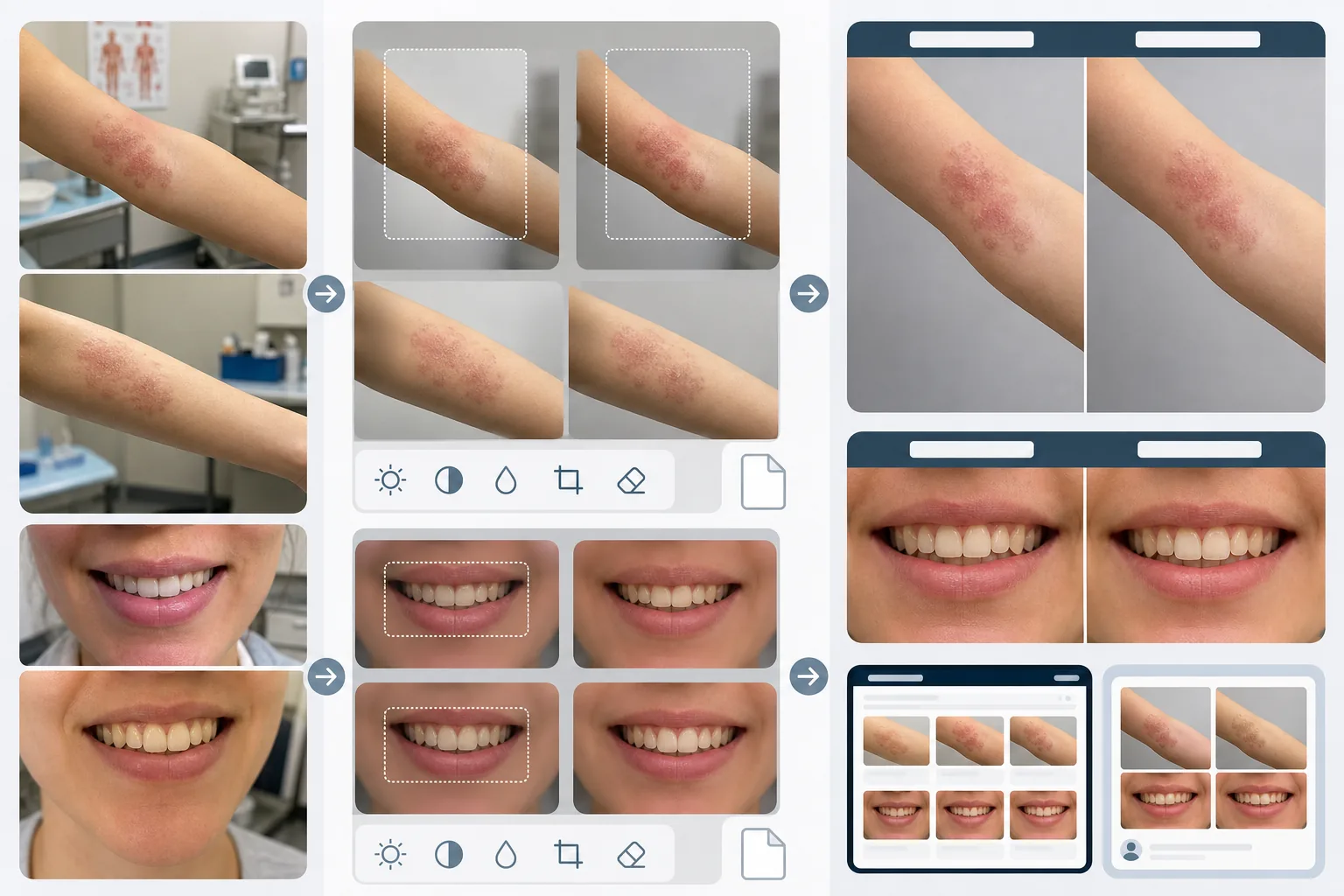
สร้างภาพถ่ายก่อนและหลังที่ได้มาตรฐานทางคลินิกสำหรับคลินิกผิวหนัง ศัลยกรรมตกแต่ง ทันตกรรม และเวชศาสตร์ความงาม เทมเพลตนี้ปรับแสงและสีให้สม่ำเสมอทั่วทั้งคู่ภาพเปรียบเทียบ แทนที่พื้นหลังห้องตรวจที่ไม่สม่ำเสมอด้วยพื้นหลังทางคลินิกที่สะอาดตา และมีเครื่องมือครอบตัดและปิดบังที่คำนึงถึงความเป็นส่วนตัว ทำให้ภาพการตลาดของคลินิกคุณมีความสม่ำเสมอและความเป็นมืออาชีพที่สร้างความไว้วางใจของผู้ป่วย
ลองใช้เทมเพลตนี้ฟรีBusiness template preview
เทมเพลตนี้ทำอะไร
สร้างความสม่ำเสมอทางสายตาที่ทำให้การเปรียบเทียบก่อนและหลังทางการแพทย์น่าเชื่อถือและน่าสนใจ ปัญหาใหญ่ที่สุดของการถ่ายภาพทางคลินิกคือภาพก่อนและหลังถ่ายห่างกันหลายสัปดาห์หรือหลายเดือน ในสภาพแสงที่ต่างกัน ด้วยกล้องที่ต่างกัน และบางครั้งในห้องที่ต่างกัน AI Enhance ปรับการเปิดรับแสง อุณหภูมิสี และสมดุลแสงขาวให้สม่ำเสมอทั้งสองภาพ เพื่อให้ความแตกต่างที่มองเห็นใดๆ เกิดจากหัตถการ ไม่ใช่จากการถ่ายภาพ Magic Eraser ลบความรกของห้องตรวจ — เครื่องมือแพทย์บนเคาน์เตอร์ แผนภูมิบนผนัง รถเข็นอุปกรณ์ที่พื้นหลัง — และแทนที่ด้วยพื้นหลังทางคลินิกที่เป็นกลาง ฟีเจอร์ความเป็นส่วนตัวรวมถึงการตรวจจับและปิดบังเครื่องหมายระบุตัวตนโดยอัตโนมัติ ความสามารถในการครอบตัดเฉพาะส่วนของร่างกาย และการลบข้อมูลเมตาเพื่อปกป้องข้อมูลผู้ป่วย
การตั้งค่าเทมเพลต
| การปรับแสงให้สม่ำเสมอ | จับคู่การเปิดรับแสง อุณหภูมิสี และสมดุลแสงขาวระหว่างคู่ก่อน/หลัง |
| พื้นหลัง | สีเทากลางทางคลินิก สีขาวสะอาด หรือผ้าคลุมผ่าตัดสีฟ้า |
| การปิดบังเพื่อความเป็นส่วนตัว | เบลอลักษณะที่ระบุตัวตนนอกบริเวณที่รักษาโดยอัตโนมัติ |
| ความสม่ำเสมอของมาตราส่วน | จับคู่การจัดเฟรมและกำลังขยายระหว่างภาพก่อนและหลัง |
| การลบข้อมูลเมตา | ลบข้อมูลตำแหน่ง อุปกรณ์ และเวลาประทับ EXIF เพื่อคำนึงถึง HIPAA |
| ความละเอียดเอาต์พุต | 2400×1600px ต่อภาพ (ภาพประกอบเรียงเคียงกันที่ 4800×1600px) |
วิธีใช้เทมเพลตนี้
อัปโหลดภาพก่อนและหลัง
อัปโหลดภาพก่อนและภาพหลังที่สอดคล้องกัน เทมเพลตนี้รองรับภาพถ่ายที่ถ่ายด้วยชุดกล้องทางคลินิก สมาร์ทโฟน และกล้องคอมแพกต์ อัปโหลดเป็นคู่เพื่อให้ AI สามารถจับคู่การตั้งค่าการปรับให้สม่ำเสมอระหว่างทั้งสองภาพได้
ปรับแสงและการจัดเฟรมให้สม่ำเสมอ
AI Enhance จับคู่การเปิดรับแสง อุณหภูมิสี และสมดุลแสงขาวระหว่างสองภาพ หากการจัดเฟรมต่างกัน — ภาพหนึ่งใกล้กว่า อีกภาพกว้างกว่า — เทมเพลตจะปรับการครอบตัดเพื่อให้บริเวณที่รักษาอยู่ในมาตราส่วนและตำแหน่งเดียวกันในทั้งสองภาพ เพื่อการเปรียบเทียบทางสายตาที่เป็นธรรม
ทำความสะอาดพื้นหลังและใช้ความเป็นส่วนตัว
Magic Eraser ลบความรกของห้องตรวจและแทนที่พื้นหลังด้วยพื้นหลังทางคลินิกที่เป็นกลาง การปิดบังเพื่อความเป็นส่วนตัวจะเบลอหรือครอบตัดลักษณะที่ระบุตัวตนนอกบริเวณที่รักษา ข้อมูลเมตา EXIF ที่มีตำแหน่ง ข้อมูลอุปกรณ์ และเวลาประทับจะถูกลบออก
ส่งออกเพื่อการตลาดของคลินิก
ดาวน์โหลดภาพเดี่ยวหรือภาพประกอบเรียงเคียงกันที่มีหัวข้อกำกับว่า 'Before' และ 'After' เอาต์พุตมีขนาดเหมาะสำหรับแกลเลอรีบนเว็บไซต์ จอแสดงผลในห้องให้คำปรึกษา และโซเชียลมีเดีย การนำเสนอทางคลินิกที่สม่ำเสมอสร้างความน่าเชื่อถือกับผู้ป่วยที่มีแนวโน้มซึ่งกำลังเลือกดูแกลเลอรีผลลัพธ์ของคุณ
เคล็ดลับมืออาชีพเพื่อผลลัพธ์ที่ดีที่สุด
- ✓จัดตั้งสถานีถ่ายภาพที่สม่ำเสมอในคลินิกของคุณด้วยแสงคงที่และพื้นหลังที่เป็นกลาง แม้ว่าเทมเพลตจะปรับสภาพแสงที่ต่างกันให้สม่ำเสมอได้ แต่การเริ่มต้นจากการตั้งค่าที่สม่ำเสมอจะให้การเปรียบเทียบที่แม่นยำที่สุดและลดความเสี่ยงของสิ่งแปลกปลอมจากการปรับให้สม่ำเสมอ
- ✓ใช้ทางยาวโฟกัสและระยะกล้องเดียวกันสำหรับการถ่ายก่อนและหลัง เทมเพลตจะปรับความแตกต่างของการจัดเฟรม แต่การบิดเบือนเชิงมุมมองจากระยะเลนส์ถึงวัตถุที่ต่างกันอาจเปลี่ยนแปลงลักษณะใบหน้าหรือเส้นโครงร่างของร่างกายที่ปรากฏอย่างละเอียดอ่อน ซึ่งอาจบั่นทอนความน่าเชื่อถือของการเปรียบเทียบ
- ✓ขอความยินยอมเป็นลายลักษณ์อักษรจากผู้ป่วยเสมอสำหรับการถ่ายภาพก่อนและหลังและการใช้งานตามวัตถุประสงค์ก่อนประมวลผลภาพ เทมเพลตมีฟีเจอร์ความเป็นส่วนตัว แต่ไม่ได้แทนที่ข้อกำหนดทางกฎหมายเรื่องความยินยอมโดยได้รับข้อมูล
เครื่องมือ
คำถามที่พบบ่อย
สิ่งนี้สอดคล้องกับ HIPAA หรือไม่?
+
เทมเพลตมีฟีเจอร์ที่คำนึงถึงความเป็นส่วนตัว — การลบข้อมูลเมตา การปิดบังลักษณะที่ระบุตัวตน และการครอบตัดบริเวณที่รักษา — ที่สนับสนุนการปฏิบัติตาม HIPAA อย่างไรก็ตาม การปฏิบัติตาม HIPAA เป็นความรับผิดชอบขององค์กร เทมเพลตเป็นเครื่องมือ ไม่ใช่โปรแกรมการปฏิบัติตามข้อกำหนด โปรดปรึกษาเจ้าหน้าที่ฝ่ายการปฏิบัติตามข้อกำหนดของคุณเกี่ยวกับข้อกำหนดเฉพาะของคลินิกคุณ
ฉันสามารถประมวลผลภาพก่อนและหลังทางทันตกรรมได้หรือไม่?
+
ได้ เทมเพลตรองรับภาพในช่องปาก ภาพรอยยิ้มระยะใกล้ และการถ่ายภาพทันตกรรมเต็มใบหน้า การปรับแสงให้สม่ำเสมอมีคุณค่าเป็นพิเศษสำหรับภาพทันตกรรม ซึ่งภาพก่อนมักถ่ายภายใต้แสงห้องตรวจ ในขณะที่ภาพหลังถ่ายด้วยแฟลชวงแหวน
ความแตกต่างของพื้นผิวผิวหนังจะถูกรักษาไว้อย่างแม่นยำหรือไม่?
+
ใช่ การปรับให้สม่ำเสมอจะปรับแสงและสีโดยไม่ทำให้พื้นผิวผิวหนังเรียบเนียนขึ้น สิ่งนี้สำคัญมาก — การปรับปรุงพื้นผิวผิวหนังจากหัตถการทางผิวหนังต้องมองเห็นได้ในการเปรียบเทียบ เทมเพลตจงใจไม่ใช้การรีทัชผิวกับภาพก่อนและหลังทางการแพทย์
สร้างความไว้วางใจของผู้ป่วยด้วยการถ่ายภาพทางคลินิกที่สม่ำเสมอ
อัปโหลดภาพก่อนและหลัง แล้วรับภาพเปรียบเทียบที่ได้มาตรฐานและคำนึงถึงความเป็นส่วนตัวสำหรับการตลาดของคลินิกคุณ
ลองใช้ฟรีRelated templates
More business templates for your workflow.
ปรับแต่งภาพถ่ายของทีมองค์กรด้วยพื้นหลังที่สอดคล้องกัน การแก้ไขแสงแบบมืออาชีพ การให้เกรดสีที่เหมาะสมกับแบรนด์ และคุณภาพของภาพที่สม่ำเสมอทั่วทั้งทีม
ปรับปรุงภาพถ่ายยิมและฟิตเนสด้วยการปรับปรุงความคมชัดของกล้ามเนื้อ การแก้ไขแสงแบบไดนามิก การล้างพื้นหลัง และการจัดระดับสีกีฬาที่มีคอนทราสต์สูง
ปรับปรุงภาพถ่ายพอร์ตโฟลิโอรอยสักด้วยความมีชีวิตชีวาของสีหมึก การปรับรายละเอียดของเส้น ลดรอยแดงของผิวหนัง และพื้นหลังที่สะอาดตาสำหรับพอร์ตโฟลิโอของศิลปินและ Instagram
สร้างเรซูเม่เฮดช็อตที่สวยงามด้วยการเปลี่ยนพื้นหลัง ปรับผิวให้เรียบเนียน และแก้ไขแสง เหมาะสำหรับ CV พอร์ทัลงาน และไดเร็กทอรีขององค์กร
สร้างภาพถ่ายของทีมมืออาชีพและผู้เล่นแต่ละคนด้วยการเปลี่ยนพื้นหลัง การปรับปรุงสีเสื้อแข่ง และฉากหลังของสนามกีฬาหรือสตูดิโอสำหรับรายชื่อและโปรแกรมต่างๆ
สร้างภาพถ่ายโปรโมตวงดนตรีและนักดนตรีมืออาชีพด้วยการเปลี่ยนพื้นหลัง การปรับปรุงแสงที่น่าทึ่ง และผลงานพร้อมพิมพ์สำหรับชุดสื่อมวลชนและการส่งสถานที่