
นำถุงขยะออกจากรูปถ่าย
ลบถุงขยะที่กองอยู่บนขอบถนน ยัดอยู่ข้างถังขยะ หรือกระจัดกระจายไปตามถนนจากภาพถ่ายรายการอสังหาริมทรัพย์ ภาพการเดินทาง ภาพถ่ายงานกิจกรรม และภูมิทัศน์เมือง Magic Eraser นำถุงออกและสร้างทางเท้า หญ้า ยางมะตอย หรือผนังด้านหลังขึ้นมาใหม่ ไม่จำเป็นต้องทำการโคลนด้วยตนเอง
อัปเดตล่าสุด
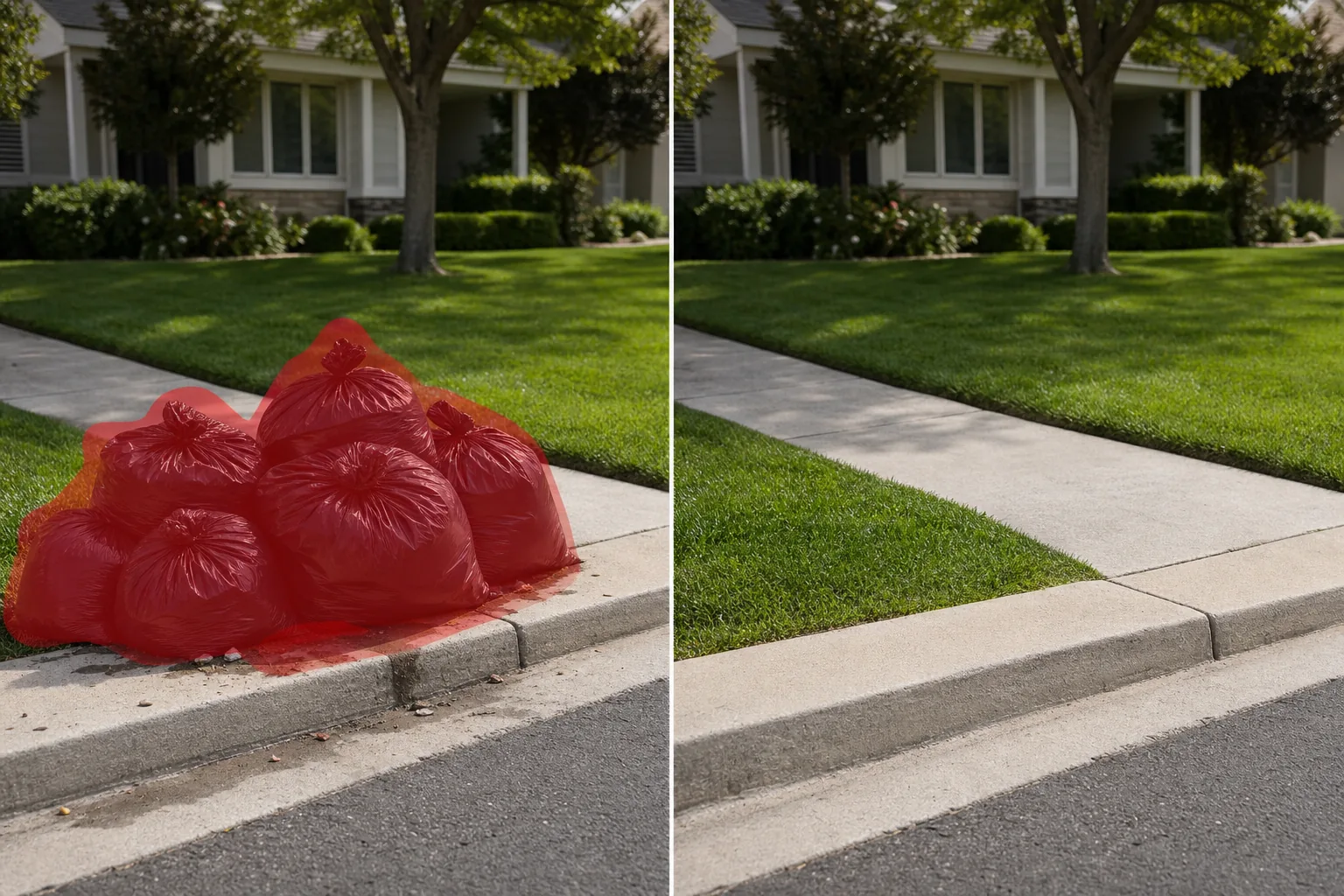
เหตุใดถุงขยะจึงทำลายความน่าดึงดูดใจและการถ่ายภาพสตรีท
ถุงขยะเป็นหนึ่งในมลพิษทางสายตาที่พบบ่อยที่สุดในการถ่ายภาพภายนอก ในการประกาศขายอสังหาริมทรัพย์ ถุงขยะสีดำกองอยู่ที่ขอบถนนในวันที่มีการละเลยสัญญาณวันเก็บเงิน ผู้ซื้อเลื่อนดูรูปถ่ายที่ลงประกาศและตัดสินอย่างรวดเร็ว และกระสอบขยะปูดเป็นแถวบนถนนรถแล่นยังบั่นทอนแม้กระทั่งสนามหญ้าที่ตกแต่งอย่างสวยงามที่สุด ในการถ่ายภาพท้องถนนและการเดินทาง ถุงขยะที่ซ้อนกันบนทางเท้าทำลายแนวความสะอาดของตรอกยุโรปหรือแถวร้านอาหารในตัวเมือง ช่างภาพงานอีเวนต์มักถ่ายภาพภายนอกสถานที่ซึ่งมีถุงขยะสำหรับจัดเลี้ยงวางอยู่ข้างทางเข้าด้านหลัง Magic Eraser จัดการสิ่งเหล่านี้ทั้งหมดภายในไม่กี่วินาที AI ระบุกระเป๋าแต่ละใบ รวมถึงรูปร่างที่หย่อนคล้อย ยอดที่ผูก และเงาระดับพื้นดิน จากนั้นเติมพื้นที่ด้วยพื้นผิวทางเท้า หญ้า อิฐ หรือขอบถนนที่เข้ากัน สำหรับตัวแทนอสังหาริมทรัพย์ที่ไม่สามารถกำหนดเวลาการถ่ายทำเพื่อเก็บขยะได้เสมอไป นี่เป็นขั้นตอนหลังการประมวลผลที่สำคัญ
ถอดถุงขยะออกในสามขั้นตอน
- 1
อัพโหลดรูปภาพของคุณ
เปิด Magic Eraser บนเว็บ iOS หรือ Android แล้วอัปโหลดภาพถ่ายภายนอก ฉากถนน หรือรายการรูปภาพที่มีถุงขยะ รูปแบบ JPEG, PNG, HEIC และ WebP สามารถใช้ได้ทุกความละเอียด
- 2
แปรงทับถุงขยะ
ทาสีทับถุงขยะแต่ละใบ รวมทั้งเงาและรอยรั่วหรือเศษซากที่มองเห็นได้รอบๆ ฐาน หากต้องการกองถุงหลายใบ ให้แปรงทั้งกระจุกด้วยการปัดเพียงครั้งเดียว ขยายแปรงออกไปให้พ้นกระเป๋าแต่ละใบเล็กน้อยเพื่อให้บริบท AI สำหรับพื้นผิวด้านล่าง
- 3
ลบและทบทวน
แตะลบ จากนั้น AI จะกำจัดถุงขยะในขณะที่สร้างขอบถนน ทางเท้า หญ้า หรือทางเท้าด้านหลังขึ้นมาใหม่ ตรวจสอบว่าพื้นผิวที่สร้างใหม่ตรงกับพื้นผิวโดยรอบในด้านสีและเปอร์สเปคทีฟ ดำเนินการรอบที่สองหากยังมีเงาหลงเหลืออยู่ ส่งออกรายการ ผลงาน หรือโพสต์บนโซเชียลมีเดียของคุณ
ดีที่สุดสำหรับ
- ภาพถ่ายภายนอกอสังหาริมทรัพย์ในวันเก็บขยะซึ่งไม่สามารถหลีกเลี่ยงถุงริมทางได้
- รายการ Airbnb และที่พักให้เช่าซึ่งมีถุงขยะใกล้ทางเข้าที่พักช่วยลดการอุทธรณ์การจอง
- การถ่ายภาพสตรีทและการเดินทางในเมืองต่างๆ ที่ถุงขยะบนทางเท้าทำลายองค์ประกอบภาพ
- ภาพถ่ายการตลาดของร้านอาหารและการบริการที่มองเห็นถุงขยะหลังบ้านได้
- การถ่ายภาพสถานที่จัดงานซึ่งมีถุงขยะสำหรับจัดเลี้ยงวางอยู่ใกล้ทางเข้าหรือพื้นที่บรรทุกสินค้า
เคล็ดลับกำจัดถุงขยะให้ดูเป็นธรรมชาติ
ถุงขยะมีรูปร่างไม่แน่นอนและมีรูปร่างไม่แน่นอนซึ่งวางอยู่บนพื้นผิวที่ค่อนข้างสม่ำเสมอ เช่น ทางเท้า ทางเดิน ขอบถนน และหญ้า ซึ่งทำให้ถุงขยะเหล่านี้เป็นตัวเลือกที่ดีในการกำจัด AI ความท้าทายหลักคือกอง: เมื่อถุงหลายใบซ้อนทับกันและสร้างเงารวมกัน ให้แปรงทั้งกลุ่มในรอบเดียว แทนที่จะพยายามเอาถุงออกทีละถุง เนื่องจากจะทำให้ AI มีขอบเขตที่สะอาดขึ้นในการทำงานด้วย สำหรับถุงขยะที่วางชิดผนังหรือรั้ว ให้ติดเงาบริเวณที่ถุงตรงกับพื้นผิวแนวตั้งด้วย หากถุงบดบังหัวจ่ายน้ำดับเพลิง ตู้ไปรษณีย์ หรือวัตถุริมทางอื่นๆ บางส่วน ให้ตรวจสอบผลลัพธ์อย่างระมัดระวัง AI จะสร้างใหม่ตามบริบท แต่อาจไม่ได้สร้างวัตถุที่ซ่อนอยู่ขึ้นมาใหม่อย่างสมบูรณ์ ถุงดำบนยางมะตอยสีเข้มอาจมีคอนทราสต์ต่ำ ซูมเข้าเพื่อให้แน่ใจว่าคุณได้ครอบคลุมรูปร่างทั้งหมดแล้ว ถุงครัวสีขาวบนคอนกรีตมวลเบานำเสนอปัญหาเดียวกัน สำหรับขั้นตอนการทำงานด้านอสังหาริมทรัพย์ ให้รวมการกำจัดถุงขยะเข้ากับการกำจัดถังขยะเพื่อการทำความสะอาดขอบถนนโดยสมบูรณ์ในสองรอบ
คำถามที่พบบ่อย
- สามารถนำถุงขยะออกจากภาพถ่ายได้ฟรีหรือไม่?
- ใช่. เทียร์ฟรีของ Magic Eraser จัดการการกำจัดถุงขยะโดยจำกัดการใช้งานรายวัน พรีเมียม ($29.99/ปี) ขจัดข้อจำกัดและปลดล็อคการส่งออกที่มีความละเอียดสูงกว่าสำหรับภาพถ่ายรายการคุณภาพ MLS
- ฉันสามารถเอาถุงขยะทั้งกองพร้อมกันได้หรือไม่?
- ใช่. แปรงให้ทั่วกองด้วยการลากต่อเนื่องเพียงครั้งเดียว รวมถึงเงาและเศษซากที่กระจัดกระจาย AI ถือว่าคลัสเตอร์เป็นเป้าหมายเดียวในการกำจัด และสร้างพื้นผิวด้านหลังทั้งหมดพร้อมกัน
- จะเกิดอะไรขึ้นหากถุงขยะบางส่วนอยู่ด้านหลังรถหรือตู้ไปรษณีย์?
- แปรงเฉพาะส่วนที่มองเห็นได้ของถุง AI จะลบพื้นที่ถุงขยะที่ถูกเปิดออกและสร้างพื้นผิวขึ้นมาใหม่ โดยปล่อยให้รถหรือกล่องจดหมายไม่เสียหาย ผลลัพธ์ดูราวกับว่าถุงไม่เคยอยู่ที่นั่นเลย
- มันใช้ได้กับถุงรีไซเคิลสีด้วยหรือไม่?
- ใช่. ถุงรีไซเคิลสีน้ำเงิน ถุงใส ถุงครัวสีขาว และถุงขยะสีดำแบบมาตรฐาน ล้วนใช้งานได้ AI ระบุรูปร่างของกระเป๋าโดยไม่คำนึงถึงสี และนำออกจากที่เกิดเหตุ