
ลบ porta-johns ออกจากภาพถ่ายสถานที่ก่อสร้าง
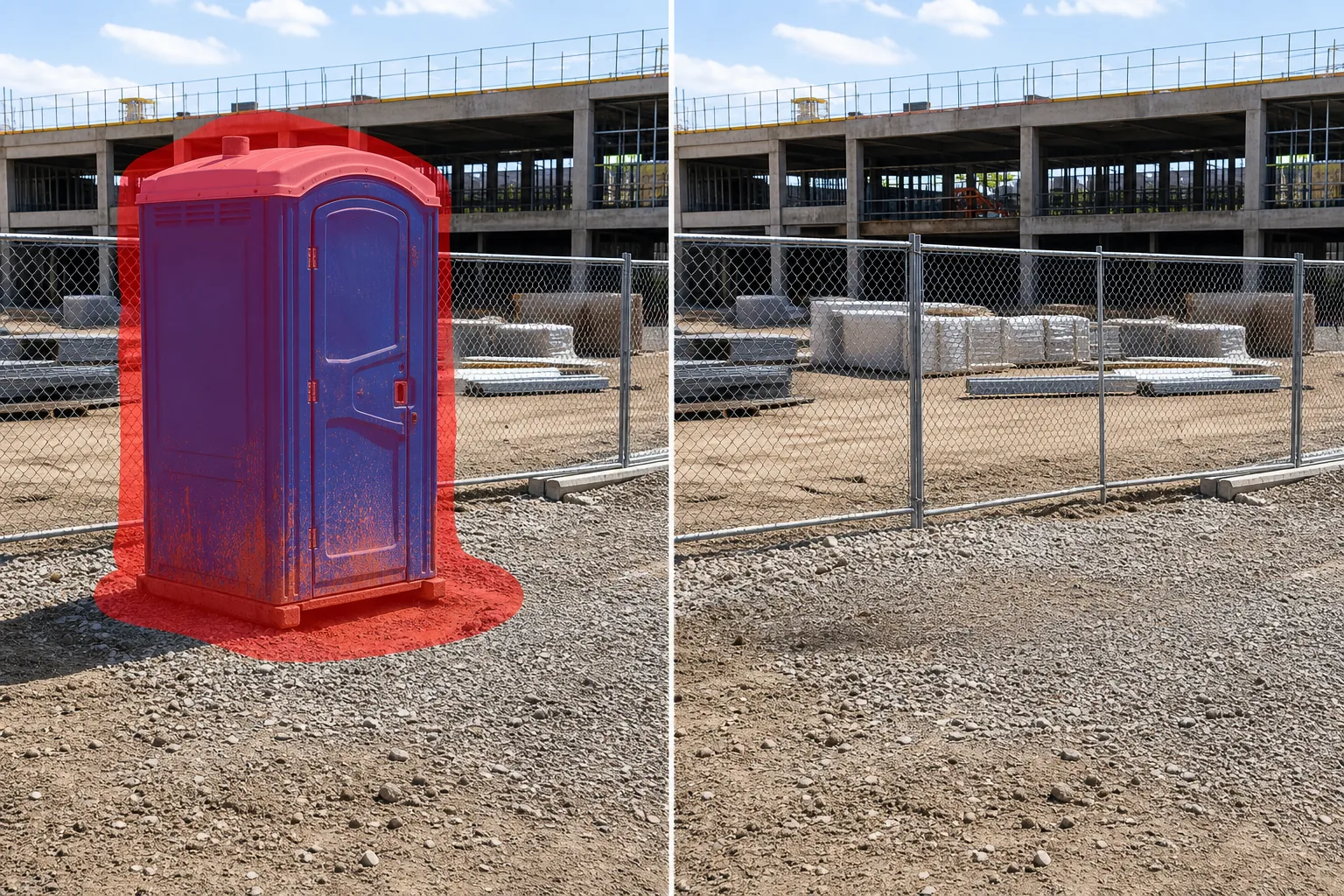
ลบห้องน้ำแบบพกพา ท่าเทียบเรือจอห์น และรถพ่วงเพื่อสุขอนามัยออกจากภาพถ่ายความคืบหน้าของสถานที่ก่อสร้าง การตลาดสำหรับการพัฒนาใหม่ และเอกสารประกอบสถานที่ปฏิบัติงาน Magic Eraser ถอดยูนิตออกและสร้างดิน กรวด รั้ว หรือสิ่งปลูกสร้างที่อยู่ด้านหลังขึ้นมาใหม่ — สร้างภาพสถานที่ระดับมืออาชีพโดยไม่ต้องใช้อุปกรณ์เพื่อสุขอนามัย
อัปเดตล่าสุด
เหตุใดพอร์ตา-จอห์นจึงบ่อนทำลายการถ่ายภาพการก่อสร้างและการพัฒนา
สถานที่ก่อสร้างทุกแห่งจำเป็นต้องมีสุขอนามัยแบบพกพา แต่หน่วยสีฟ้าหรือสีเขียวสดใสเหล่านี้เป็นหนึ่งในวัตถุที่รบกวนการมองเห็นมากที่สุดในการถ่ายภาพสถานที่ปฏิบัติงาน นักพัฒนาที่สร้างสื่อการตลาดสำหรับคอนโดขายล่วงหน้า ทาวน์โฮม หรือพื้นที่เชิงพาณิชย์ไม่สามารถแสดงเว็บไซต์ที่มีพอร์ตาจอห์นกระจายอยู่ทั่วไปให้กับผู้ซื้อได้ ความเกี่ยวข้องกับการก่อสร้างที่ยุ่งวุ่นวายและใช้งานอยู่จะบ่อนทำลายคุณภาพที่มุ่งหวังของการตลาด ผู้รับเหมาทั่วไปที่บันทึกเหตุการณ์สำคัญของโครงการสำหรับข้อมูลอัปเดตของนักลงทุนและรายงานความคืบหน้าต้องการให้เน้นที่โครงสร้างที่เป็นรูปเป็นร่าง ไม่ใช่แถวของห้องน้ำเคลื่อนที่ตามแนวรั้วโดยรอบ ช่างภาพสถาปัตยกรรมที่ถ่ายภาพอาคารในระหว่างขั้นตอนการก่อสร้างขั้นสุดท้ายพบว่ามีพอร์ตาจอห์นเพียงจุดเดียวที่อยู่เบื้องหน้า ระบุทันทีว่าภาพถ่ายนั้นอยู่ระหว่างการก่อสร้าง แทนที่จะใกล้จะเสร็จสมบูรณ์ นอกจากนี้ หน่วยยังท้าทายที่จะถอดออกด้วยตนเองเนื่องจากวางอยู่บนพื้นผิวที่ไม่ปกติ เช่น ดินอัดแน่น พื้นที่ปูด้วยกรวด พื้นปูชั่วคราวที่มีรอยแตก และรูปร่างที่เป็นบล็อกปิดกั้นพื้นที่สำคัญของสิ่งที่อยู่ด้านหลัง ไม่ว่าจะเป็นรั้วแบบโซ่ลิงค์ วัสดุที่ซ้อนกัน เครื่องจักรกลหนัก หรือตัวอาคารเอง AI ของ Magic Eraser จะลบยูนิตออกทั้งหมด จากนั้นเติมพื้นที่ด้วยองค์ประกอบพื้นผิวและพื้นหลังที่สอดคล้องกับฉากโดยรอบ กรวดยังคงดำเนินต่อไปด้วยพื้นผิวและเกรดที่ตรงกัน แนวรั้วเชื่อมต่อกันอีกครั้ง และโครงสร้างด้านหลังยูนิตที่มองเห็นได้บางส่วนจะถูกสร้างขึ้นใหม่ ดังนั้นรูปถ่ายไซต์งานจึงดูเหมือนไม่เคยมีอุปกรณ์สุขาภิบาลอยู่ที่นั่นเลย
ลบ porta-johns ในสามขั้นตอน
- 1
อัปโหลดรูปภาพไซต์ของคุณ
เปิด Magic Eraser บนเว็บ iOS หรือ Android แล้วอัปโหลดภาพสถานที่ก่อสร้าง การพัฒนา หรือสถานที่ปฏิบัติงานที่มีห้องน้ำแบบพกพาที่คุณต้องการนำออก รองรับ JPEG, PNG, HEIC และ WebP ใช้ความละเอียดสูงสุดที่มีอยู่เพื่อสร้างพื้นผิวสกปรกและโครงสร้างพื้นหลังขึ้นมาใหม่พร้อมรายละเอียดทั้งหมด
- 2
แปรงให้ทั่วตัวเครื่อง
ทาสีให้ทั่วพอร์ตาจอห์น — บูธ ฝาครอบระบายอากาศที่หลังคา ประตู และจุดติดตั้งเจลล้างมือหรือสายยางบริการ รวมถึงเงาที่ยูนิตทอดลงบนพื้นและโคลนกระเด็นหรือรอยเปื้อนที่ฐาน หากหลายหน่วยเรียงกันเป็นแถว ให้ปัดข้ามหน่วยทั้งหมดในรอบเดียว
- 3
ลบและส่งออก
แตะ Erase และ porta-john จะหายไป Magic Eraser เติมเต็มพื้นที่ด้วยพื้นผิวที่เข้ากัน เช่น ดินบดอัด กรวด โคลน หรือวัสดุปูพื้นชั่วคราว และสร้างรั้ว อุปกรณ์ หรือองค์ประกอบของอาคารขึ้นมาใหม่ ซึ่งบางส่วนซ่อนอยู่ด้านหลังยูนิต ตรวจสอบแบบเต็มขนาด จากนั้นส่งออกสำรับนักลงทุน โบรชัวร์การตลาด หรือเอกสารสำคัญของโครงการ
ดีที่สุดสำหรับ
- การตลาดเพื่อการพัฒนาใหม่ซึ่งผู้มีความหมายในการก่อสร้างอย่างกระตือรือร้นเช่น porta-johns ขัดแย้งกับการสร้างแบรนด์ที่สร้างแรงบันดาลใจ
- รายงานความคืบหน้าของผู้รับเหมาและการนำเสนอของนักลงทุนที่ควรเน้นที่โครงสร้าง
- การถ่ายภาพสถาปัตยกรรมของอาคารในขั้นตอนการก่อสร้างขั้นสุดท้าย
- ภาพถ่ายการเตรียมสถานที่จัดงานซึ่งมีการสุขาภิบาลชั่วคราวแต่รูปภาพทางการตลาดไม่ต้องการ
- เอกสารโครงการเทศบาลและโครงสร้างพื้นฐานสำหรับรายงานสาธารณะ
เคล็ดลับในการลบ porta-johns ออกจากรูปภาพของไซต์
Porta-johns ในสถานที่ก่อสร้างมักจะนั่งบนพื้นที่ไม่เรียบ เต็มไปด้วยโคลน หรือกรวด ซึ่งน้ำหนักของพวกมันทำให้เกิดการกดทับและรอยกระเด็น รวมระยะขอบกราวด์ที่กว้าง — อย่างน้อยก็ความกว้างของรอยเท้าของยูนิตใต้ฐาน — เพื่อให้ AI ไม่เพียงแต่เติมเต็มยูนิตเท่านั้น แต่ยังรวมถึงพื้นที่ที่ถูกรบกวนรอบๆ ด้วย สำหรับแถวของหน่วย (ทั่วไปบนไซต์ขนาดใหญ่) ให้ลบออกเป็นกลุ่มสองหรือสามหน่วยแทนที่จะลบทั้งหมดในคราวเดียว ซึ่งจะทำให้รายละเอียดการกรอกข้อมูลภาคพื้นดินแม่นยำยิ่งขึ้นสำหรับแต่ละส่วน หากจุดล้างมือหรือรถพ่วงบริการอยู่ติดกับพอร์ตาจอห์น ให้ตัดสินใจว่าจะถอดออกด้วยหรือไม่ การปล่อยให้จุดล้างมือกำพร้าติดกับพื้นที่ว่างดูแปลก เมื่อยูนิตติดกับรั้วแบบ chain-link ให้รวมส่วนรั้วด้านหลังไว้ในพื้นที่แปรงของคุณ เพื่อให้ AI สามารถสร้างแนวรั้วต่อเนื่องขึ้นมาใหม่ได้ สำหรับภาพถ่ายที่ถ่ายระหว่างฝนตกหรือหลังสภาพอากาศล่าสุด รูปแบบของโคลนและแอ่งน้ำรอบๆ ฐานเป็นส่วนหนึ่งของการรบกวนการมองเห็น — ขยายการเลือกของคุณให้ครอบคลุม
คำถามที่พบบ่อย
- สิ่งนี้แตกต่างจากเครื่องมือกำจัด port-a-potty อย่างไร?
- เครื่องมือ 'port-a-potty' มุ่งเน้นไปที่บริบทของกิจกรรม เช่น งานเทศกาล งานแต่งงานกลางแจ้ง และงานแสดงสินค้าที่มีห้องน้ำเคลื่อนที่ปรากฏอยู่บนพื้นหญ้าและใกล้พื้นที่ส่วนกลาง เครื่องมือ 'porta-john' นี้ได้รับการปรับให้เหมาะสมสำหรับการก่อสร้างและบริบทไซต์งานที่มีดิน กรวด รั้ว และเครื่องจักรกลหนักอยู่เบื้องหลัง
- มันสามารถลบแถว porta-johns ที่ไซต์ขนาดใหญ่ได้หรือไม่?
- ใช่. กวาดไปทั่วแถวแล้ว AI จะกำจัดทุกยูนิต เติมพื้นที่ด้วยพื้นดินที่เข้ากัน และสร้างรั้วหรือฉากหลังที่อยู่ด้านหลังขึ้นมาใหม่ สำหรับแถวที่มีตั้งแต่ห้าแถวขึ้นไป ให้ทำงานเป็นกลุ่มตั้งแต่สองถึงสามแถวเพื่อให้ได้ผลลัพธ์ที่สะอาดที่สุด
- แล้วพื้นดินที่ถูกรบกวนตรงที่หน่วยนั่งอยู่ล่ะ?
- รวมพื้นที่พื้นดินไว้ในฝีแปรงของคุณ AI เติมพื้นผิวโดยรอบ โดยจับคู่เกรดกรวด สีดิน และรูปแบบการบดอัดของพื้นผิวที่อยู่ติดกัน รอยยาง โคลน และการกระจัดของกรวดทั้งหมดถูกเรียบออกแล้ว
- ฟรีหรือเปล่า?
- ใช่. เวอร์ชันฟรีครอบคลุมการลบ porta-john โดยมีขีดจำกัดรายวัน พรีเมียม ($29.99/ปี) ปลดล็อกการแก้ไขไม่จำกัดและการส่งออกแบบเต็มความละเอียดสำหรับการถ่ายภาพการก่อสร้างและการตลาดเพื่อการพัฒนา