
ลบมิเตอร์จอดรถออกจากภาพถ่าย
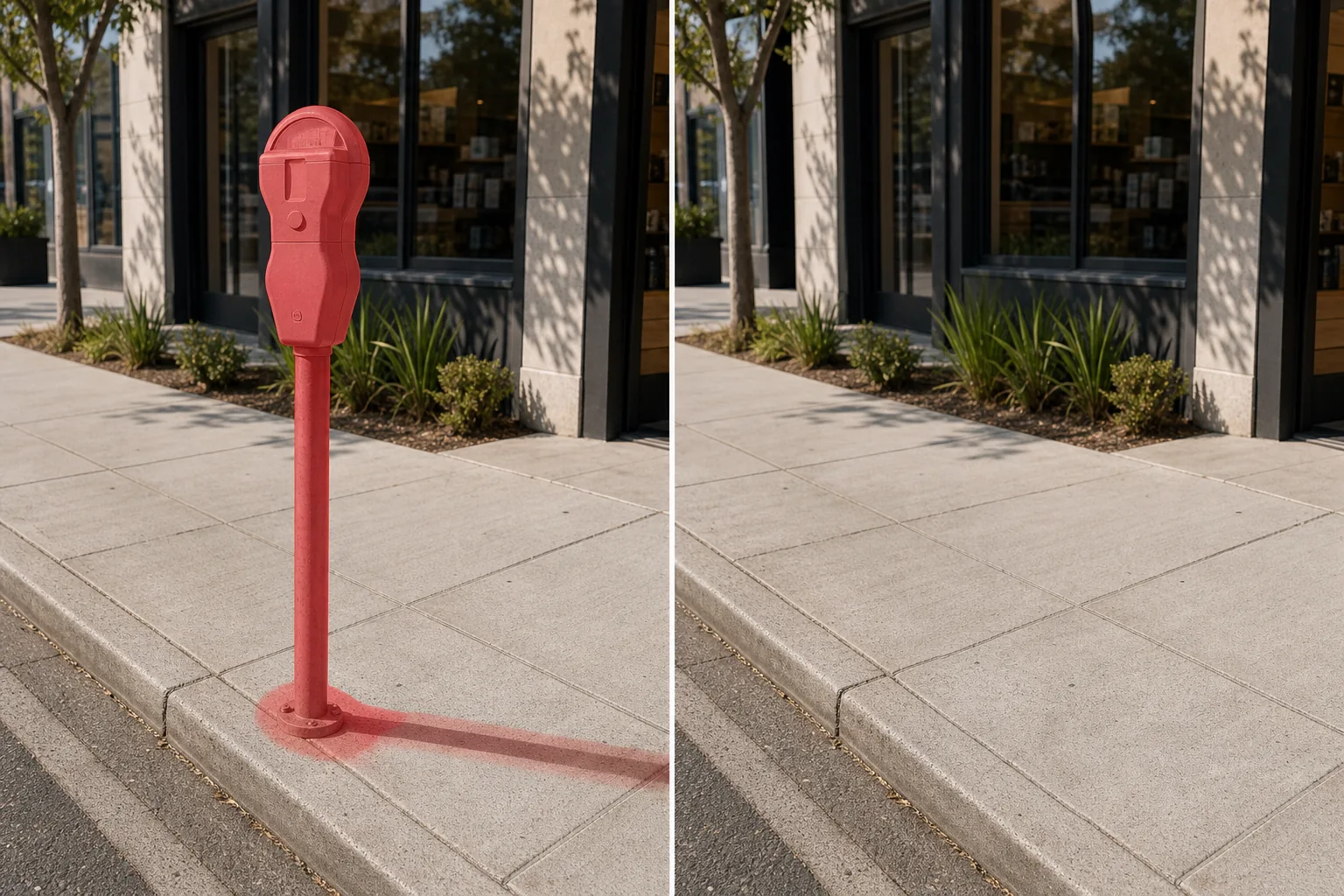
ลบมิเตอร์จอดรถแบบหัวเดียว สถานีจ่ายเงินหลายพื้นที่ และเสามิเตอร์ออกจากภาพถ่ายระดับถนน รายการทรัพย์สินเชิงพาณิชย์ และการถ่ายภาพบรรณาธิการในเมือง Magic Eraser ถอดมิเตอร์และเสาออก จากนั้นสร้างทางเท้า ขอบถนน หรือแถบกระถางต้นไม้ขึ้นใหม่ด้านหลัง โดยไม่จำเป็นต้องทำการโคลนด้วยตนเองที่น่าเบื่อ
อัปเดตล่าสุด
เหตุใดมิเตอร์จอดรถจึงลดการถ่ายภาพในเมืองและเชิงพาณิชย์
มาตรวัดการจอดรถเป็นหนึ่งในอุปสรรคด้านการมองเห็นที่คงอยู่นานที่สุดในการถ่ายภาพเมือง พวกเขาตั้งเรียงรายตามถนนเชิงพาณิชย์แทบทุกแห่ง โดยวางตำแหน่งของตัวเองเป็นระยะๆ ตามแนวขอบถนน ซึ่งเป็นจุดที่กล้องระดับสายตาของช่างภาพจับภาพได้โดยมีรายละเอียดเบื้องหน้าที่คมชัด มิเตอร์หยอดเหรียญแบบคลาสสิกบนเสาเหล็กจะสร้างเส้นแนวตั้งสีเข้มที่ตัดขวางหน้าร้าน กีดขวางทางเข้าอาคาร หรือขัดขวางฉากถนนที่จัดกรอบอย่างระมัดระวัง สถานีจ่ายเงินแบบหลายพื้นที่ที่ทันสมัยนั้นมีขนาดใหญ่กว่า โดยยืนเป็นตู้แบบกล่องพร้อมแผงโซลาร์เซลล์และหน้าจอดิจิทัลที่ครองทางเท้า สำหรับตัวแทนอสังหาริมทรัพย์เชิงพาณิชย์ มิเตอร์จอดรถที่ด้านหน้าพื้นที่ค้าปลีกหมายถึงการจอดรถแบบเสียเงินและการบังคับใช้มิเตอร์ ซึ่งเป็นสัญญาณทางจิตวิทยาที่ละเอียดอ่อนที่สามารถทำให้หน้าร้านดูเหมือนเข้าถึงได้น้อยลงสำหรับผู้เช่าและลูกค้าของพวกเขา ช่างภาพสถาปัตยกรรมที่ถ่ายภาพด้านหน้าอาคารพบว่าเสามิเตอร์ทำให้เกิดการหยุดชะงักในแนวตั้งซ้ำๆ ทั่วทั้งชั้นล่าง ซึ่งทำลายจังหวะของสถาปัตยกรรม การนำมิเตอร์ออกด้วยเครื่องมือแก้ไขแบบดั้งเดิมหมายถึงการสร้างพื้นผิวทางเท้าใหม่ใต้ฐานเสา เชื่อมต่อแนวขอบถนนใหม่ และบางครั้งก็สร้างส่วนหนึ่งของส่วนหน้าของอาคารขึ้นใหม่ซึ่งมองเห็นได้ด้านหลังหัวมิเตอร์ แต่ละเมตรยังทอดเงาแคบๆ ที่โดดเด่นพาดผ่านทางเท้าที่ต้องแก้ไข Magic Eraser จัดการการถอดออกทั้งหมดได้ในครั้งเดียว: หัวมิเตอร์ เสา แผ่นฐาน และเงาทั้งหมดจะถูกลบออก และทางเท้า ขอบถนน และองค์ประกอบพื้นหลังทั้งหมดจะถูกสร้างขึ้นใหม่ด้วยพื้นผิวและเปอร์สเปคทีฟที่ตรงกัน
ถอดมิเตอร์จอดรถในสามขั้นตอน
- 1
อัพโหลดรูปภาพของคุณ
เปิด Magic Eraser บนเว็บ iOS หรือ Android แล้วอัปโหลดฉากในเมือง รูปภาพหน้าร้าน หรือภายนอกระดับถนนที่มีมิเตอร์จอดรถที่ไม่ต้องการ รองรับ JPEG, PNG, HEIC และ WebP ทั้งหมด ใช้ความละเอียดสูงสุดที่มีอยู่เพื่อสร้างรายละเอียดทางเท้าและขอบทางเท้าขึ้นมาใหม่อย่างแม่นยำ
- 2
แปรงให้ทั่วมิเตอร์
ทาสีให้ทั่วมิเตอร์จอดรถ ทั้งหัว เสา ฐานยึด และเงาที่ทอดบนทางเท้า สำหรับสถานีชำระเงินหลายพื้นที่สมัยใหม่ ให้รวมตู้คีออสก์แบบเต็ม แผงโซลาร์เซลล์ และป้ายคำแนะนำใดๆ ที่ติดอยู่ด้วย หากมิเตอร์ซ้อนทับหน้าร้านหรืออาคารด้านหลังบางส่วน ให้รวมโซนที่ทับซ้อนกันเพื่อให้ AI สามารถสร้างส่วนหน้าใหม่ได้
- 3
ลบและส่งออก
แตะลบแล้ว Magic Eraser จะถอดมิเตอร์ออกในขณะที่สร้างทางเท้า ขอบขอบถนน และพื้นผิวอาคารใดๆ ด้านหลังเสาขึ้นมาใหม่ เครื่องหมายจราจร ตะแกรงบ่อต้นไม้ และรอยต่อขยายทางเท้าดำเนินต่อไปอย่างเป็นธรรมชาติผ่านพื้นที่ที่ถูกถม ซูมเข้าเพื่อตรวจสอบ จากนั้นส่งออกด้วยความละเอียดสูงสุด
ดีที่สุดสำหรับ
- รายการอสังหาริมทรัพย์เพื่อการพาณิชย์ที่มีมิเตอร์ริมขอบทางด้านหน้าที่พักทำให้เกิดความยุ่งยากในการจอดรถ
- การถ่ายภาพหน้าร้านร้านค้าปลีกและร้านอาหารเพื่อการตลาดและโซเชียลมีเดีย
- ผลงานทางสถาปัตยกรรมของส่วนหน้าอาคารระดับถนน
- ภาพถ่ายบรรณาธิการในเมืองที่เสามิเตอร์แหวกจังหวะการจัดองค์ประกอบภาพ
- ภาพการท่องเที่ยวและไกด์นำเที่ยวที่แสดงภาพทิวทัศน์ถนนที่เหมาะกับคนเดินถนน
เคล็ดลับในการโน้มน้าวให้ถอดมิเตอร์จอดรถ
มาตรวัดจอดรถสร้างเงาบางๆ ยาวๆ ให้มองข้ามได้ง่าย โดยเฉพาะบนทางเท้าคอนกรีตสีอ่อนซึ่งมีเงาเล็กน้อยแต่มองเห็นได้ รวมความยาวเงาทั้งหมดไว้ในบริเวณแปรงของคุณเสมอ สำหรับแถวเมตรตามแนวบล็อก ให้ทำงานทีละสองหรือสามแถวเพื่อให้ AI สร้างการถมทางเท้าที่แม่นยำสำหรับแต่ละส่วนในพื้นที่ สถานีจ่ายเงินหลายพื้นที่สมัยใหม่มีขนาดใหญ่กว่าและอาจบดบังหน้าต่างหน้าร้านหรือทางเข้าประตูด้านหลังบางส่วน ขยายแปรงของคุณออกไปยังบริเวณหน้าร้านเล็กน้อย เพื่อให้ AI สร้างกระจก กรอบ หรือป้ายที่คีออสก์กั้นอยู่ขึ้นมาใหม่ หากเสามิเตอร์ผ่านหน้าต้นไม้ริมถนน ให้ปัดทับเฉพาะเสาแล้วปล่อยให้ AI สร้างลำต้นของต้นไม้และหลังคาด้านหลังขึ้นมาใหม่ สุดท้าย ให้ตรวจสอบขอบขอบถนนหลังถอดออก — โดยปกติแล้ว AI จะเชื่อมต่อใหม่อย่างสมบูรณ์ แต่หากมิเตอร์ตั้งอยู่ตรงทางตัดขอบถนนหรือทางลาด การผ่านวินาทีอย่างรวดเร็วจะทำให้รูปทรงราบรื่น
คำถามที่พบบ่อย
- สามารถลบสถานีจ่ายเงินดิจิทัลสมัยใหม่ ไม่ใช่แค่มิเตอร์เหรียญแบบคลาสสิกได้หรือไม่
- ใช่. Magic Eraser จัดการทั้งเครื่องวัดเหรียญแบบหัวเดียวแบบดั้งเดิมและสถานีชำระเงินดิจิทัลหลายพื้นที่ที่ทันสมัยพร้อมแผงโซลาร์เซลล์ ตัวคีออสก์ หน้าจอ ป้าย และฮาร์ดแวร์สำหรับติดตั้งสามารถถอดออกได้ทั้งหมด ปัดให้ทั่วทั้งยูนิตและเงา
- เกิดอะไรขึ้นกับทางเท้าที่ติดเสามิเตอร์?
- AI เติมฐานเสาด้วยพื้นผิวทางเท้าที่เข้ากัน ไม่ว่าจะเป็นคอนกรีต อิฐ หรือหิน และสร้างข้อต่อขยายหรือเส้นเลื่อยที่ผ่านพื้นที่นั้นขึ้นมาใหม่ หากแผ่นฐานโลหะเหลือโครงร่างที่มองเห็นได้หลังจากการผ่านครั้งแรก แปรงอันที่สองบนเครื่องหมายของแผ่นจะทำความสะอาด
- สิ่งนี้แตกต่างจากเครื่องมือถอด 'มิเตอร์' หรือไม่?
- เครื่องมือ 'มิเตอร์' ทั่วไปครอบคลุมถึงมิเตอร์สาธารณูปโภคที่ติดตั้งบนผนังอาคาร (ไฟฟ้า แก๊ส น้ำ) เครื่องมือนี้กำหนดเป้าหมายเป็นพิเศษสำหรับมิเตอร์จอดรถริมทางและสถานีจ่ายเงิน - แบบติดตั้งเสาอิสระหรือแบบคีออสก์บนทางเท้า
- ฟรีหรือเปล่า?
- ใช่. รุ่นฟรีจัดการการถอดมิเตอร์จอดรถโดยจำกัดจำนวนรายวัน พรีเมียม ($29.99/ปี) ปลดล็อกการแก้ไขไม่จำกัดและส่งออกแบบเต็มความละเอียดสำหรับเวิร์กโฟลว์การถ่ายภาพเชิงพาณิชย์