
ลบหมอกและหมอกควันออกจากภาพถ่าย
กำจัดหมอก หมอก หมอกควัน และหมอกควันที่พัดพาทิวทัศน์ ทิวทัศน์เมือง และภาพถ่ายกลางแจ้ง Magic Eraser กำจัดการรบกวนในบรรยากาศและคืนรายละเอียดที่คมชัด สีสันสดใส และคอนทราสต์เต็มรูปแบบ - เผยฉากที่ดูเหมือนในวันที่อากาศแจ่มใส
อัปเดตล่าสุด
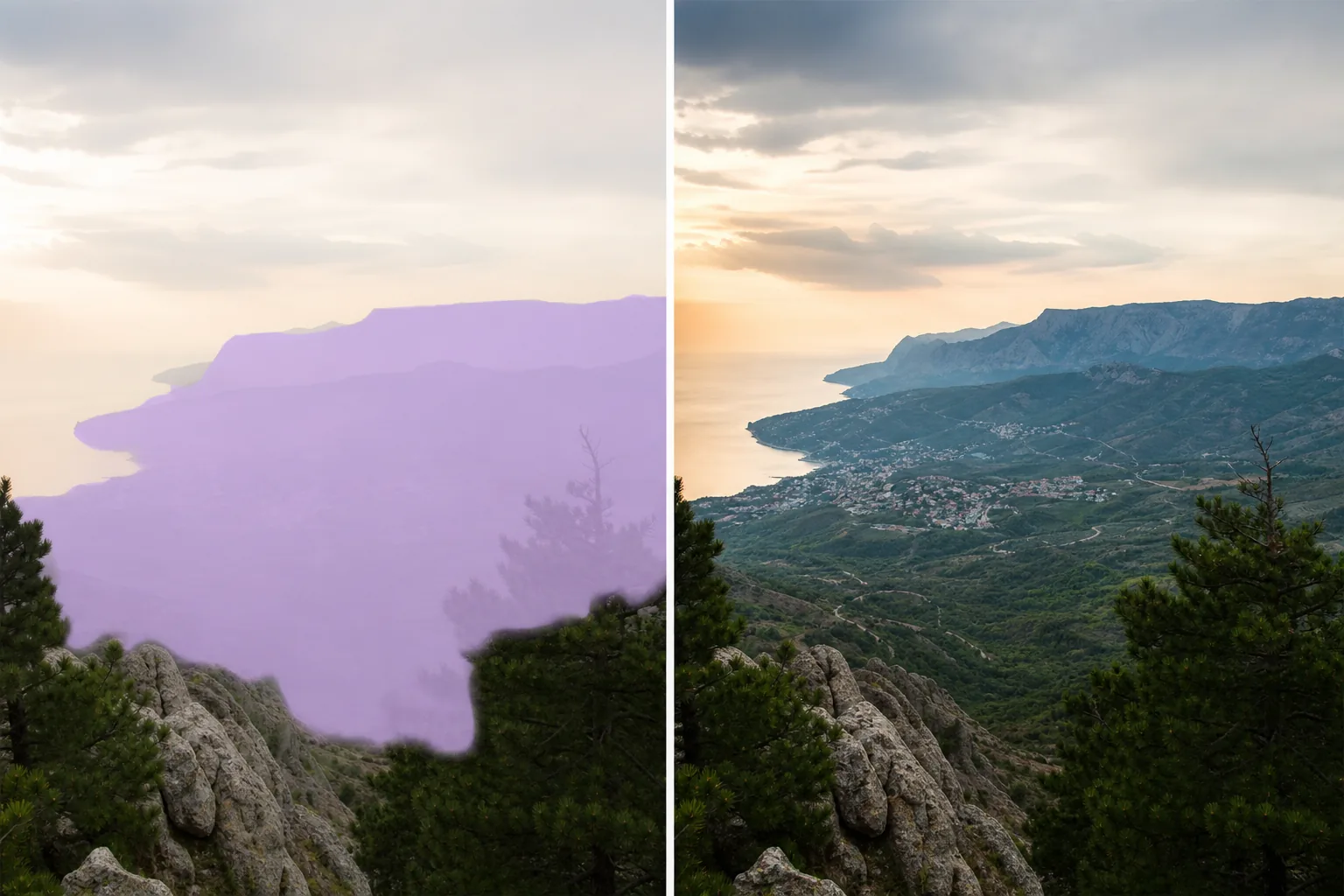
เมื่อบรรยากาศทำลายทัศนียภาพ
หมอก หมอกควัน หมอก และหมอกควัน ต่างก็ทำสิ่งเดียวกันในภาพถ่าย นั่นคือ ลดคอนทราสต์ ทำให้สีดูจางลง ทำให้รายละเอียดในระยะไกลไม่ชัดเจน และเพิ่มสีขาวหรือสีเทาคล้ายน้ำนมทั่วทั้งภาพ ภาพพาโนรามาของภูเขากลายเป็นการไล่ระดับสีแบบเรียบไม่มีสี เส้นขอบฟ้าของเมืองหายไปกลายเป็นหมอกควัน พระอาทิตย์ตกริมชายฝั่งสูญเสียความลึกของสีไปเบื้องหลังหมอกควันในทะเล บางครั้งช่างภาพสามารถรอให้เงื่อนไขต่างๆ คลี่คลาย แต่นักท่องเที่ยว ตัวแทนอสังหาริมทรัพย์ และนักถ่ายภาพงานต่างๆ มักจะได้รับโอกาสเพียงครั้งเดียวในการถ่ายภาพ การลดความมัวหมองในซอฟต์แวร์ตัดต่อแบบเดิมๆ ต้องใช้แถบเลื่อนอย่างระมัดระวังด้วยการตั้งค่าที่แตกต่างกันสำหรับพื้นหน้า กึ่งกลาง และพื้นหลัง และง่ายต่อการใส่ส่วนแปลกปลอมหรือแก้ไขมากเกินไปจนกลายเป็นสีที่ไม่เป็นธรรมชาติ AI ของ Magic Eraser วิเคราะห์ความลึกและความหนาแน่นของเอฟเฟ็กต์บรรยากาศทั่วทั้งภาพ และใช้การแก้ไขแบบไล่ระดับ ช่วยให้เคลียร์ได้มากขึ้นในระยะห่างที่มีหมอกควันสะสม และน้อยลงในเบื้องหน้าที่อากาศแจ่มใสอยู่แล้ว
กำจัดหมอกและหมอกควันในสามขั้นตอน
- 1
อัปโหลดภาพหมอกของคุณ
เปิด Magic Eraser บนเว็บ iOS หรือ Android แล้วอัปโหลดภาพทิวทัศน์ ทิวทัศน์เมือง หรือกลางแจ้งที่ได้รับผลกระทบจากหมอก หมอกควัน หรือหมอกควัน
- 2
แปรงให้ทั่วบริเวณที่มีหมอกหนาหรือใช้สารเสริม
สำหรับหมอกเฉพาะที่ (หุบเขาหมอกใต้ท้องฟ้าแจ่มใส) ให้ปัดปกคลุมบริเวณที่มีหมอกหนา สำหรับหมอกควันโดยรวมที่ส่งผลต่อทั้งภาพ ให้ใช้เครื่องมือ AI Enhancement ที่เปิดใช้งานการลดหมอกควัน โดยจะประมวลผลภาพเต็มด้วยการแก้ไขเชิงลึก
- 3
เคลียร์และปรับ
แตะลบหรือใช้ จากนั้น AI จะลบเอฟเฟ็กต์บรรยากาศ เผยรายละเอียดที่ซ่อนอยู่ คืนความอิ่มตัวของสี และกู้คืนคอนทราสต์ ตรวจสอบองค์ประกอบที่อยู่ห่างไกลเพื่อตรวจสอบว่ารายละเอียดได้รับการกู้คืนโดยไม่มีส่วนใดส่วนหนึ่ง ส่งออกเวอร์ชันที่ชัดเจน
ดีที่สุดสำหรับ
- การถ่ายภาพทิวทัศน์ภูเขาและหุบเขาในสภาพที่มีหมอกหนา
- ภาพถ่ายทิวทัศน์เมืองที่ถ่ายผ่านหมอกควันหรือหมอกควันจากมลภาวะ
- ภาพถ่ายภายนอกอสังหาริมทรัพย์ถ่ายในตอนเช้าที่มีหมอกหนา
- การถ่ายภาพทางอากาศและโดรนผ่านหมอกควัน
- ภาพถ่ายชายฝั่งที่มีชั้นหมอกหรือหมอกในทะเล
- ถ่ายภาพท่องเที่ยวชมวิวทิวทัศน์ในสภาพที่มีหมอกหนา
- การถ่ายภาพสัตว์ป่าในสายหมอกยามเช้า
- การถ่ายภาพสถาปัตยกรรมที่หมอกควันลดรายละเอียดของอาคาร
เคล็ดลับในการกำจัดหมอกควันอย่างมีประสิทธิภาพ
การลดความฝ้าจะทำงานได้ดีที่สุดเมื่อรายละเอียดบางส่วนของฉากยังคงมองเห็นได้ผ่านหมอกควัน โดย AI จะขยายและชี้แจงสิ่งที่อยู่ตรงนั้น แทนที่จะสร้างรายละเอียดใหม่ขึ้นมา หมอกเบาบางและหมอกบางๆ ชัดเจนอย่างมาก เผยให้เห็นสีและพื้นผิวที่แทบจะมองไม่เห็น หมอกหนาทึบที่บดบังองค์ประกอบที่อยู่ห่างไกลโดยสิ้นเชิงไม่สามารถกู้คืนได้เต็มที่เนื่องจากรายละเอียดดั้งเดิมสูญหายไป สำหรับภาพถ่ายที่มีสภาพผสมกัน เช่น พื้นหน้าที่ชัดเจนและพื้นหลังที่พร่ามัว AI จะใช้การแก้ไขแบบค่อยเป็นค่อยไปซึ่งตรงกับความหนาแน่นของหมอกควันในแต่ละความลึก เพื่อหลีกเลี่ยงภาพที่ผ่านการประมวลผลมากเกินไปซึ่งการปรับลดหมอกควันแบบเรียบๆ จะเกิดขึ้น หมอกยามเช้าและหมอกควันสีทองช่วยเพิ่มบรรยากาศที่ช่างภาพบางคนตั้งใจแสวงหา หากคุณต้องการลดหมอกควันโดยไม่กำจัดทั้งหมด ให้ใช้การเลือกแปรงบางส่วนเฉพาะในพื้นที่ที่ได้รับผลกระทบมากที่สุด ขณะเดียวกันก็รักษาคุณภาพบรรยากาศในพื้นที่ที่ไม่ถูกบดบังน้อย สำหรับภาพถ่ายจากโดรน หมอกควันในชั้นบรรยากาศจะเพิ่มขึ้นตามระยะทางและระดับความสูง โดย AI จะพิจารณาการไล่ระดับสีนี้โดยอัตโนมัติ
คำถามที่พบบ่อย
- จะสามารถขจัดหมอกหนาทึบได้อย่างสมบูรณ์หรือไม่?
- AI กู้คืนรายละเอียดที่ซ่อนอยู่หลังหมอก หมอกบางถึงปานกลางทำให้จางลงอย่างมาก หมอกหนาทึบมากซึ่งบดบังฉากโดยสิ้นเชิงไม่สามารถกู้คืนได้ทั้งหมดเนื่องจากรายละเอียดดั้งเดิมหายไป — AI ปรับปรุงการมองเห็น แต่ไม่สามารถสร้างรายละเอียดที่ไม่เคยบันทึกได้
- มันใช้ได้กับหมอกควันและหมอกควันมลพิษหรือไม่?
- ใช่. หมอกควันในเมืองและหมอกควันจากมลภาวะมีรูปแบบบรรยากาศเช่นเดียวกับหมอกธรรมชาติ AI กำจัดหมอกควันและคืนสีและคอนทราสต์ของอาคาร เส้นขอบฟ้า และทิวทัศน์เมือง
- มันจะทำให้รูปภาพของฉันดูผ่านการประมวลผลมากเกินไปหรือไม่?
- AI ใช้การแก้ไขแบบไล่ระดับที่ตรงกับความหนาแน่นของหมอกควันในแต่ละความลึกของภาพ เพื่อหลีกเลี่ยงไม่ให้ภาพดูแบนและอิ่มตัวมากเกินไปซึ่งแถบเลื่อนลดหมอกควันที่รุนแรงจะสร้างขึ้นมา ผลลัพธ์ที่ได้จะดูชัดเจนอย่างเป็นธรรมชาติ ไม่รุนแรงจนเกินไป
- การกำจัดหมอกฟรีหรือไม่?
- ใช่. ระดับฟรีของ Magic Eraser ครอบคลุมการกำจัดหมอกและหมอกควัน อัปโหลดรูปภาพของคุณ ใช้การลดหมอกควัน และส่งออกเวอร์ชันที่ชัดเจนโดยไม่มีค่าใช้จ่าย