
How to remove window reflection from a photo
เรียนรู้วิธีHow to remove window reflection from a photoด้วย Magic Eraser คำแนะนำทีละขั้นตอนง่ายๆ ด้วยเครื่องมือ AI ฟรี ใช้ได้บนเว็บ, iOS และ Android
Last updated
ลองใช้เลย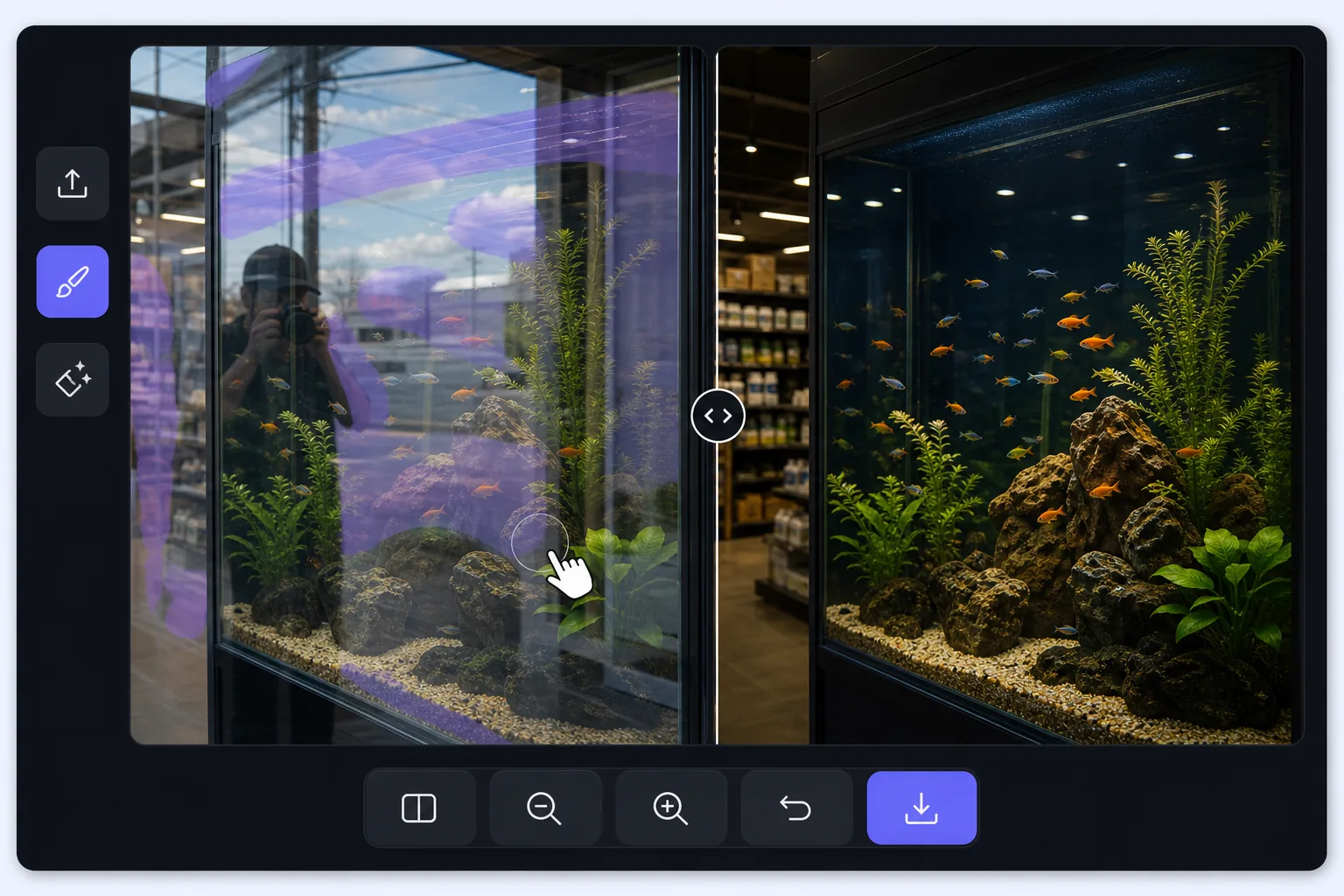
Shooting through glass is a layering problem — Magic Eraser
A window pane does two things at once: it lets you see through to what is behind it, and it reflects whatever is in front of it. When you photograph through it, the camera records both layers stacked together — the storefront mannequin and your own reflection, the aquarium octopus and the gallery lights behind you, the road ahead and the dashboard mirrored in the windshield. The reflected layer is usually brightest where the glass is darkest behind, which is exactly where your subject hides. A polarizing filter helps at capture time, but if the shot is already taken, the reflection is baked in. Magic Eraser approaches it differently: you mark the reflected streaks and shapes, and its AI inpainting reconstructs a plausible version of what was behind the glass using the surrounding visible detail. It is honest to say the result is a synthesized reconstruction, not literal recovery of pixels the reflection covered — but when the subject behind the pane is mostly visible and the reflection only veils part of it, the rebuild is convincing.
Before you start
ขั้นตอนการใช้งาน
Start with อัปโหลดรูป. The result preview above and tips below use this guide's existing content; no separate before-and-after proof is assumed.
- 1
อัปโหลดรูป
เปิด Magic Eraser บนเว็บ, iOS หรือ Android ลากและวางรูป JPEG, PNG, HEIC หรือ WebP ไม่ต้องสร้างบัญชี
- 2
เลือกเครื่องมือและพื้นที่
เลือกเครื่องมือที่เหมาะสมและทำเครื่องหมายพื้นที่ที่ต้องการ AI จะวิเคราะห์และใช้การเปลี่ยนแปลงโดยอัตโนมัติภายในไม่กี่วินาที
- 3
ดาวน์โหลดผลลัพธ์
ดูตัวอย่างผลลัพธ์และดาวน์โหลดรูปที่แก้ไขแล้ว ส่งออกเป็น PNG หรือ JPEG คุณภาพสูง
เหมาะสำหรับ
- Storefront and shop-window photos where your reflection or the street sits on top of the display behind the glass
- Car, train, and bus window shots where the dashboard, your face, or interior lights veil the view outside
- Aquarium and zoo-enclosure photos where gallery lighting and visitors reflect over the animals in the tank
- Museum display cases and glass cabinets where overhead spots reflect across the exhibit you are shooting
- Photos through office, gallery, or skyscraper windows where the indoor room reflects over the cityscape outside
เคล็ดลับเพื่อผลลัพธ์ที่ดีที่สุด
The cleaner the original capture, the more convincing the rebuild: press the lens close to the glass and shoot at a slight angle to push your own reflection out of frame, and cup a hand or use a rubber lens hood against the pane to block stray light. When you do edit, work the reflection in patches rather than one giant selection — the AI has more surrounding subject to reference, so the reconstruction stays faithful to what is actually behind the glass. Watch the boundary between reflected and clear areas; that seam is where artifacts show, so a second light pass along it usually tidies things up. Be realistic about coverage: a reflection that only veils the subject lifts away cleanly, but a hot spec of glare that completely hides a section means the AI is inventing that patch, and on aquarium or storefront scenes with busy detail behind the glass, re-shooting from another angle often beats fighting a fully blocked area.
คำถามที่พบบ่อย
- ฟีเจอร์How to remove window reflection from a photoใช้ฟรีไหม?
- ใช่ Magic Eraser ให้คุณHow to remove window reflection from a photoฟรีภายในโควตาประจำวัน อัปเกรดเป็น Pro สำหรับการประมวลผลไม่จำกัดและส่งออกความละเอียดสูง
- How to remove window reflection from a photoใช้เวลานานเท่าไหร่?
- แค่ไม่กี่วินาที AI ของ Magic Eraser ประมวลผลรูปอย่างรวดเร็ว ผลลัพธ์ส่วนใหญ่พร้อมใช้งานทันทีหลังอัปโหลด
- ใช้บนมือถือได้ไหม?
- ใช่ Magic Eraser ใช้ได้บน iOS, Android และเบราว์เซอร์ทุกชนิด สลับระหว่างอุปกรณ์ได้อย่างอิสระ
- คุณภาพภาพจะลดลงไหม?
- ไม่ Magic Eraser รักษาคุณภาพรูปต้นฉบับ AI ประมวลผลอย่างชาญฉลาดเพื่อรักษารายละเอียดและความคมชัด