
วิธีลบโลโก้ออกจากภาพถ่าย
โลโก้ของคู่แข่งบนเสื้อผ้าในภาพถ่ายไลฟ์สไตล์ ตราสัญลักษณ์ของแบรนด์บนผลิตภัณฑ์ที่คุณกำลังนำกลับมาใช้ใหม่ หรือโลโก้เครือข่ายทีวีที่ฝังอยู่ในภาพหน้าจอ — โลโก้ที่มองเห็นได้จะสร้างความขัดแย้งในการสร้างแบรนด์และหันเหความสนใจไปจากเนื้อหาของคุณ AI ของ Magic Eraser ลบโลโก้ออกอย่างหมดจดและสร้างพื้นผิวด้านล่างขึ้นมาใหม่
Last updated
ลบโลโก้ออกทันที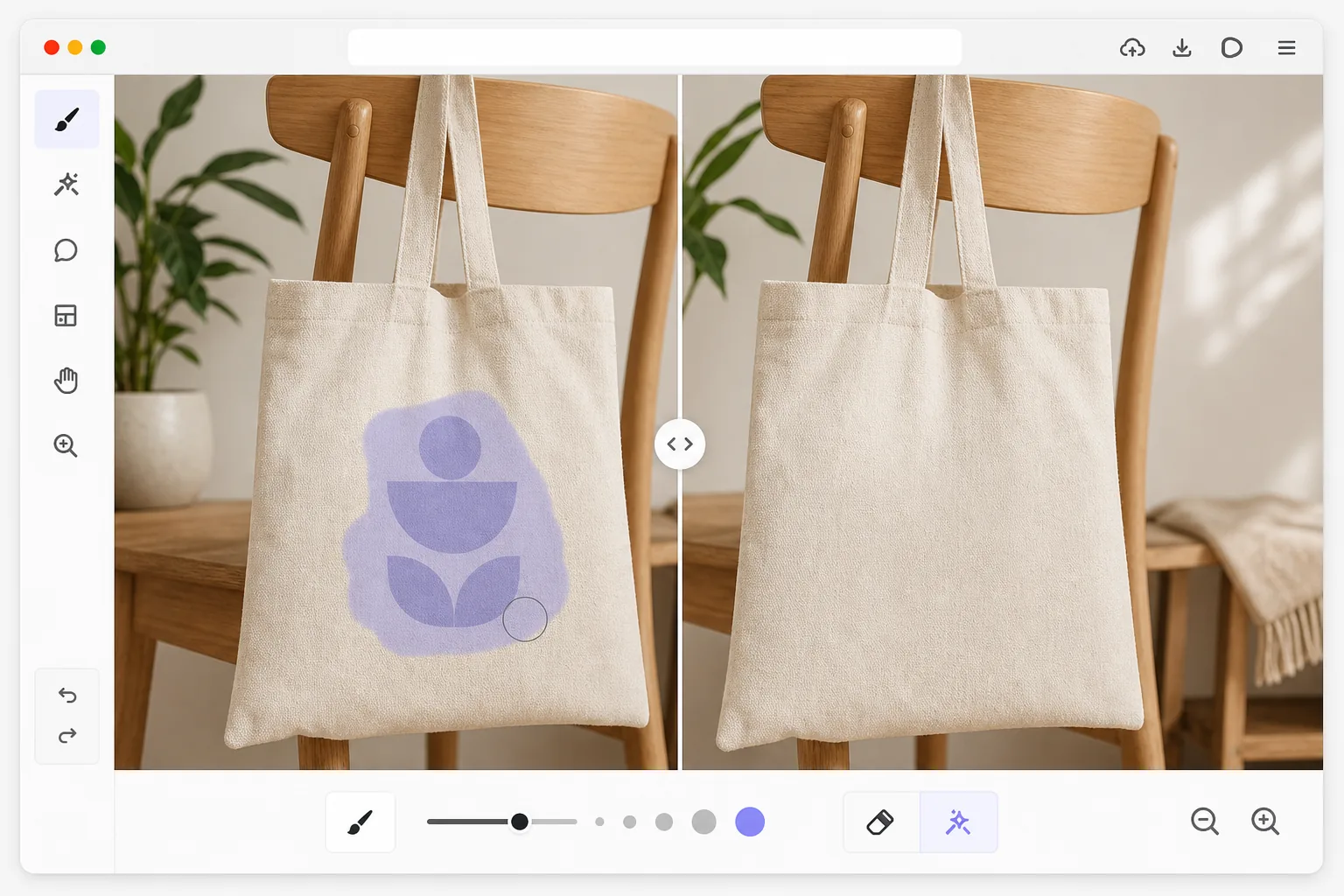
เหตุใดโลโก้จึงลบออกได้ยากกว่าที่เห็น
วิธีลบโลโก้ออกจากรูปภาพ: เปิด Magic Eraser บนเว็บ iOS หรือ Android อัปโหลดรูปภาพ แล้วใช้ brush ระบายให้ทั่วทั้งโลโก้ รวมถึงสโลแกน ขอบ หรือเงาด้วย จากนั้น tap Erase แล้ว AI จะสร้างพื้นผิวด้านล่างขึ้นใหม่ ต่อลายผ้า โลหะ หรือผนังที่อยู่ด้านหลังให้ดูเหมือนไม่เคยมีโลโก้อยู่ตรงนั้นมาก่อน ใช้งานฟรี ไม่ต้องสมัครสมาชิก การระบายเผื่อขอบรอบ ๆ โลโก้นิดหน่อยจะช่วยให้ AI มีพื้นผิวพอที่จะผสานได้อย่างเนียนตา ควรลบโลโก้เฉพาะจากรูปภาพที่คุณเป็นเจ้าของหรือได้รับอนุญาตให้แก้ไขเท่านั้น และอย่าลืมว่าสิทธิในโลโก้และเครื่องหมายการค้าของแบรนด์ไม่ได้เปลี่ยนแปลงไปเพียงเพราะคุณแก้ไขรูปภาพของมัน โลโก้ได้รับการออกแบบมาให้มองเห็นได้ชัดเจนและคงอยู่ตลอดไป โดยใช้สีจัดจ้าน คอนทราสต์สูงกับพื้นหลัง และมักวางไว้บนพื้นผิวที่มีพื้นผิว (ผ้า โลหะ แก้ว ผิวหนัง) การนำโลโก้ออกไม่ใช่แค่การลบกราฟิกเท่านั้น แต่ยังหมายถึงการสร้างสิ่งที่อยู่ด้านหลังขึ้นมาใหม่ด้วย ไม่ว่าจะเป็นรูปแบบการทอของเสื้อเชิ้ต พื้นผิวโลหะขัดเงาของแล็ปท็อป หรือพื้นผิวที่ทาสีของยานพาหนะ วิธีการประทับตราโคลนแบบง่ายๆ ทำให้เกิดรอยเปื้อนที่มองเห็นได้ เนื่องจากพื้นผิวโดยรอบมีทิศทางและรูปแบบที่ต้องดำเนินต่อไปอย่างราบรื่นผ่านพื้นที่โลโก้ การเลือกตามสีล้มเหลวเนื่องจากโลโก้มักจะใช้สีร่วมกับพื้นหลัง AI ของ Magic Eraser เข้าใจพื้นผิวและลวดลายรอบๆ โลโก้ ลบกราฟิกออก และสร้างพื้นผิวด้านล่างที่ต่อเนื่องกันอย่างไร้รอยต่อ ที่ดูเป็นธรรมชาติแม้ภายใต้การตรวจสอบอย่างใกล้ชิด
Before you start
ลบโลโก้ในสามขั้นตอน
Start with อัพโหลดรูปภาพ. The result preview above and tips below use this guide's existing content; no separate before-and-after proof is assumed.
- 1
อัพโหลดรูปภาพ
เปิด Magic Eraser บนเว็บ, iOS หรือ Android แล้วอัปโหลดรูปภาพที่มีโลโก้ที่คุณต้องการลบ เครื่องมือนี้ใช้ได้กับโลโก้ที่พิมพ์บนเสื้อผ้า นูนบนผลิตภัณฑ์ ทาสีบนพื้นผิว หรือซ้อนทับเป็นกราฟิกบนหน้าจอ รูปแบบภาพทั่วไปทั้งหมดได้รับการสนับสนุนที่ความละเอียดเท่าใดก็ได้
- 2
แปรงเหนือโลโก้
ทาสีให้ทั่วโลโก้ รวมถึงข้อความแท็กไลน์ เส้นขอบ หรือเงา ตรวจสอบให้แน่ใจว่าได้ครอบคลุมขอบเขตทั้งหมดของกราฟิก — การขาดเค้าโครงบางๆ หรือเงาตกกระทบจะทำให้โลโก้ไม่ปรากฏ สำหรับโลโก้บนพื้นผิวที่มีพื้นผิว เช่น ผ้าหรือไม้ ให้เว้นระยะขอบเล็กๆ รอบๆ โลโก้เพื่อให้ AI มีการอ้างอิงพื้นผิวเพียงพอสำหรับการสร้างใหม่อย่างราบรื่น
- 3
แตะลบและตรวจสอบ
AI จะลบโลโก้ออกและเติมพื้นที่ด้วยความต่อเนื่องของพื้นผิวและสีโดยรอบ ซูมเข้าเพื่อตรวจสอบว่ารูปแบบพื้นผิวไหลผ่านพื้นที่โลโก้เดิมอย่างเป็นธรรมชาติ โดยไม่มีตะเข็บหรือการซ้ำซ้อนที่มองเห็นได้ หากมีร่องรอยจางๆ หลงเหลืออยู่ ให้แปรงจุดนั้นแล้วลบอีกครั้ง ส่งออกด้วยความละเอียดเต็ม
ดีที่สุดสำหรับ
- การถ่ายภาพไลฟ์สไตล์ที่โลโก้เสื้อผ้าสร้างการเชื่อมโยงแบรนด์ที่ไม่ต้องการ
- การจำลองผลิตภัณฑ์ซึ่งต้องลบตราสินค้าที่มีอยู่ออกก่อนที่จะเพิ่มการออกแบบใหม่
- เนื้อหาโซเชียลมีเดียที่ต้องทำให้โลโก้ของคู่แข่งในพื้นหลังเป็นกลาง
- การล้างภาพสต็อกโดยที่โลโก้จะจำกัดสิทธิ์การใช้งานเชิงพาณิชย์
- การถ่ายภาพอสังหาริมทรัพย์ที่สินค้าที่มีตราสินค้า (เครื่องใช้ไฟฟ้า ติดตั้ง) แสดงโลโก้ของคู่แข่ง
เคล็ดลับเพื่อผลลัพธ์ที่ดีที่สุด
โลโก้บนพื้นผิวเรียบและสม่ำเสมอ (ผนังสีทึบ ผ้าธรรมดา พลาสติกเรียบ) เป็นวิธีที่ง่ายที่สุดในการลบออก เนื่องจาก AI มีพื้นผิวที่เรียบง่ายในการทำซ้ำ โลโก้บนพื้นผิวที่ซับซ้อน (ผ้าลายสก๊อต ลายไม้ อิฐ) ต้องใช้การอนุมานจาก AI มากขึ้น แต่ยังคงให้ผลลัพธ์ที่ยอดเยี่ยมเมื่อคุณรวมพื้นผิวโดยรอบเพียงพอในการเลือกแปรงของคุณ สำหรับโลโก้ที่มีลายนูนหรือแกะลายซึ่งสร้างการเปลี่ยนแปลงพื้นผิวทางกายภาพ (ตัวอักษรที่ยกขึ้นบนหนัง โลหะประทับ) AI จะลบลักษณะที่ปรากฏของภาพออก แต่สัญญาณความลึกที่ขึ้นกับแสงอาจต้องผ่านครั้งที่สอง โลโก้ที่มีหลายสีบางครั้งจะทิ้งสีจางๆ ไว้ในการผ่านครั้งแรก การใช้แปรงอันที่สองอย่างรวดเร็วบนพื้นที่ที่ได้รับผลกระทบจะช่วยแก้ไขปัญหานี้ได้ ตรวจสอบกรณีการใช้งานของคุณสอดคล้องกับหลักเกณฑ์ด้านทรัพย์สินทางปัญญาที่เกี่ยวข้องเสมอ
คำถามที่พบบ่อย
- สามารถลบโลโก้ออกจากเสื้อผ้าได้หรือไม่?
- ใช่. โลโก้บนเสื้อเชิ้ต หมวก รองเท้า และเครื่องแต่งกายอื่นๆ ถือเป็นกรณีการใช้งานทั่วไป AI จะลบกราฟิกที่พิมพ์หรือปักออก และสร้างพื้นผิวผ้าขึ้นใหม่ โดยจับคู่รูปแบบการทอ สี และแสงของวัสดุโดยรอบ เพื่อให้ได้ผลลัพธ์ที่เป็นธรรมชาติซึ่งดูเหมือนไม่เคยมีโลโก้อยู่เลย
- มันใช้งานได้กับโลโก้ที่มีลายนูนหรือ 3D หรือไม่?
- ช่วยลบรูปลักษณ์ภายนอกของโลโก้ที่มีลายนูนได้อย่างมีประสิทธิภาพ สีและคอนทราสต์ของโลโก้หายไป และ AI ก็เติมเต็มด้วยพื้นผิวโดยรอบ การพิมพ์ลายนูนที่ลึกมากอาจทิ้งร่องรอยเงาไว้เล็กน้อย ขึ้นอยู่กับแสง ซึ่งโดยทั่วไปแล้วการผ่านครั้งที่สองจะได้รับการแก้ไข
- ลบโลโก้ฟรีหรือไม่?
- ใช่. เทียร์ฟรีของ Magic Eraser มีเครื่องมือแปรงสำหรับลบโลโก้โดยจำกัดการใช้งานรายวัน อัปโหลด แปรงโลโก้ และส่งออกภาพที่สะอาดตา พรีเมียมขจัดข้อจำกัดและเปิดใช้งานการส่งออกที่มีความละเอียดสูงและการประมวลผลเป็นชุดสำหรับภาพหลายภาพ
- จะลบโลโก้ออกจากรูปภาพบน Android หรือ iPhone ได้อย่างไร?
- เปิด Magic Eraser ในเบราว์เซอร์มือถือใดก็ได้ หรือในแอป iOS หรือ Android โหลดรูปจากคลังภาพของคุณ แล้วใช้สองนิ้วซูมเข้าเพื่อระบายตามแนวโลโก้ได้อย่างแม่นยำ ใช้นิ้วระบายให้ทั่วทั้งกราฟิก รวมถึงสโลแกนหรือเส้นขอบด้วย แล้ว tap Erase จากนั้น AI จะสร้างพื้นผิวด้านล่างขึ้นใหม่บนมือถือของคุณเลย และบันทึกรูปที่สะอาดกลับเข้าคลังภาพ ทำงานเหมือนกับเวอร์ชันบนเดสก์ท็อปทุกอย่าง และไม่ต้องติดตั้งแอปถ้าคุณใช้ผ่านเบราว์เซอร์
- การลบโลโก้ออกจากรูปภาพถูกกฎหมายหรือไม่?
- การแก้ไขพิกเซลของรูปภาพไม่ได้เปลี่ยนว่าใครเป็นเจ้าของแบรนด์ การลบโลโก้ทำได้ไม่มีปัญหากับรูปภาพที่คุณเป็นเจ้าของหรือได้รับอนุญาตให้ใช้ เช่น ตกแต่งรูปสินค้าของคุณเอง ลบเครื่องหมายของคู่แข่งออกจากรูปไลฟ์สไตล์ที่คุณถ่ายเอง หรือลบแบรนด์ออกก่อนจะใส่ดีไซน์ของคุณลงในม็อกอัป แต่ไม่ใช่วิธีที่จะแอบอ้างสินค้าที่มีแบรนด์ของคนอื่นว่าเป็นของคุณ ลบลายน้ำเพื่อนำรูปที่คุณไม่มีสิทธิ์ไปใช้ซ้ำ หรือบิดเบือนแหล่งที่มาของสินค้า หากไม่แน่ใจเกี่ยวกับการใช้งานเชิงพาณิชย์ ควรตรวจสอบกฎเครื่องหมายการค้าและลิขสิทธิ์ที่เกี่ยวข้อง หรือสอบถามเจ้าของสิทธิ