
Remove Glare From Glasses in Photos
เรียนรู้วิธีRemove Glare From Glasses in Photosด้วย Magic Eraser คำแนะนำทีละขั้นตอนง่ายๆ ด้วยเครื่องมือ AI ฟรี ใช้ได้บนเว็บ, iOS และ Android
Last updated
ลองใช้เลย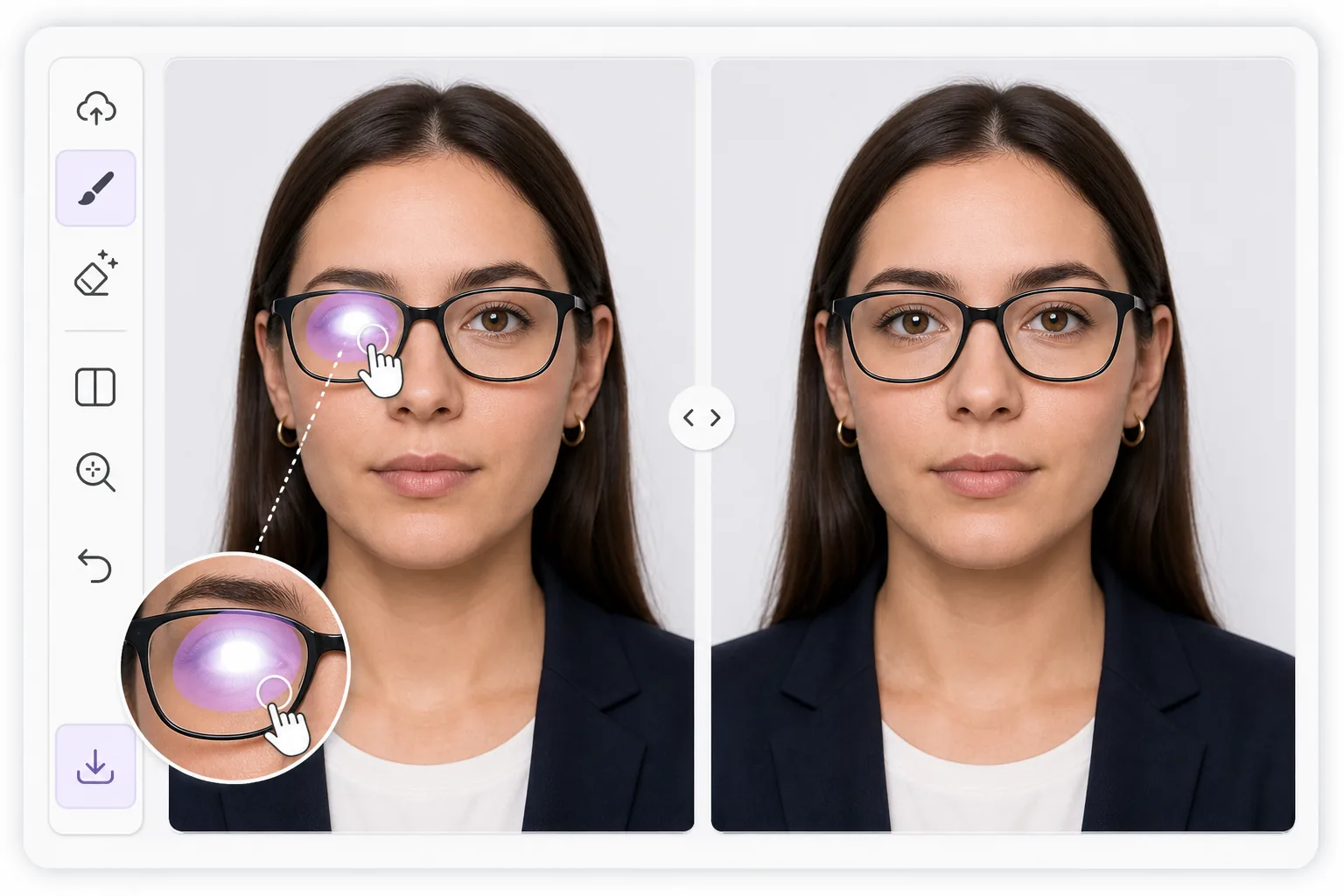
Why lens glare is harder than ordinary glare — Magic Eraser
Reflections on eyeglasses sit directly over the most important part of a portrait: the eyes. A flash, a window, or a ring light leaves a bright patch on the lens that flattens the eye behind it, sometimes erasing the iris or pupil entirely. Unlike glare on a wall or a table, you cannot just smooth it away, because the eye, eyelid, lashes, and lens frame all need to stay believable underneath. Magic Eraser uses AI inpainting to handle this. You brush over the bright spot, and the tool generates a plausible reconstruction of the eye and surrounding skin based on the rest of the face and the second, clearer eye when one is visible. It is honest to say this is synthesis, not recovery of hidden pixels: the original detail behind a blown-out highlight is gone, so the result is the model's best, natural-looking guess. For passport and ID photos that ban reflections, that reconstruction can be the difference between an accepted and a rejected shot, and it works the same way on a casual portrait you just want to look right.
Before you start
ขั้นตอนการใช้งาน
Start with อัปโหลดรูป. The result preview above and tips below use this guide's existing content; no separate before-and-after proof is assumed.
- 1
อัปโหลดรูป
เปิด Magic Eraser บนเว็บ, iOS หรือ Android ลากและวางรูป JPEG, PNG, HEIC หรือ WebP ไม่ต้องสร้างบัญชี
- 2
เลือกเครื่องมือและพื้นที่
เลือกเครื่องมือที่เหมาะสมและทำเครื่องหมายพื้นที่ที่ต้องการ AI จะวิเคราะห์และใช้การเปลี่ยนแปลงโดยอัตโนมัติภายในไม่กี่วินาที
- 3
ดาวน์โหลดผลลัพธ์
ดูตัวอย่างผลลัพธ์และดาวน์โหลดรูปที่แก้ไขแล้ว ส่งออกเป็น PNG หรือ JPEG คุณภาพสูง
เหมาะสำหรับ
- Passport, visa, and ID photos that reject any lens reflection
- Headshots where a ring light or flash leaves a hotspot on one lens
- Family and group portraits where someone's eye is hidden by glare
- LinkedIn and profile pictures that need clear, glasses-on eye contact
- Indoor event photos shot near windows or bright overhead lighting
เคล็ดลับเพื่อผลลัพธ์ที่ดีที่สุด
Work one lens at a time and zoom in before brushing. Tight, accurate strokes that cover only the bright patch give the AI more real detail to copy, so the rebuilt eye matches the face. When only one lens has glare, the clear eye acts as a reference and results look most natural. For heavy reflections that wash out the entire lens, expect a fuller synthesized eye and sanity-check iris color, gaze direction, and pupil size against the original. If the first pass looks off, undo and re-brush a slightly smaller area rather than a larger one. For ID shots, confirm the final image still meets the rule of a neutral expression and no visible reflection before you submit it.
คำถามที่พบบ่อย
- ฟีเจอร์Remove Glare From Glasses in Photosใช้ฟรีไหม?
- ใช่ Magic Eraser ให้คุณRemove Glare From Glasses in Photosฟรีภายในโควตาประจำวัน อัปเกรดเป็น Pro สำหรับการประมวลผลไม่จำกัดและส่งออกความละเอียดสูง
- Remove Glare From Glasses in Photosใช้เวลานานเท่าไหร่?
- แค่ไม่กี่วินาที AI ของ Magic Eraser ประมวลผลรูปอย่างรวดเร็ว ผลลัพธ์ส่วนใหญ่พร้อมใช้งานทันทีหลังอัปโหลด
- ใช้บนมือถือได้ไหม?
- ใช่ Magic Eraser ใช้ได้บน iOS, Android และเบราว์เซอร์ทุกชนิด สลับระหว่างอุปกรณ์ได้อย่างอิสระ
- คุณภาพภาพจะลดลงไหม?
- ไม่ Magic Eraser รักษาคุณภาพรูปต้นฉบับ AI ประมวลผลอย่างชาญฉลาดเพื่อรักษารายละเอียดและความคมชัด