
วิธีลบการประทับวันที่ออกจากภาพถ่าย
กล้องดิจิตอลและกล้องฟิล์มรุ่นเก่าที่มีออโต้เดทประทับตราวันที่สีส้มหรือสีแดงไว้ที่มุมภาพ AI ของ Magic Eraser จะลบข้อความวันที่และสร้างเนื้อหารูปภาพที่อยู่ด้านล่างขึ้นมาใหม่ โดยเปลี่ยนภาพถ่ายที่ลงวันที่ให้เป็นภาพถ่ายที่สะอาดตาเหนือกาลเวลา
Last updated
ลบการประทับวันที่ทันที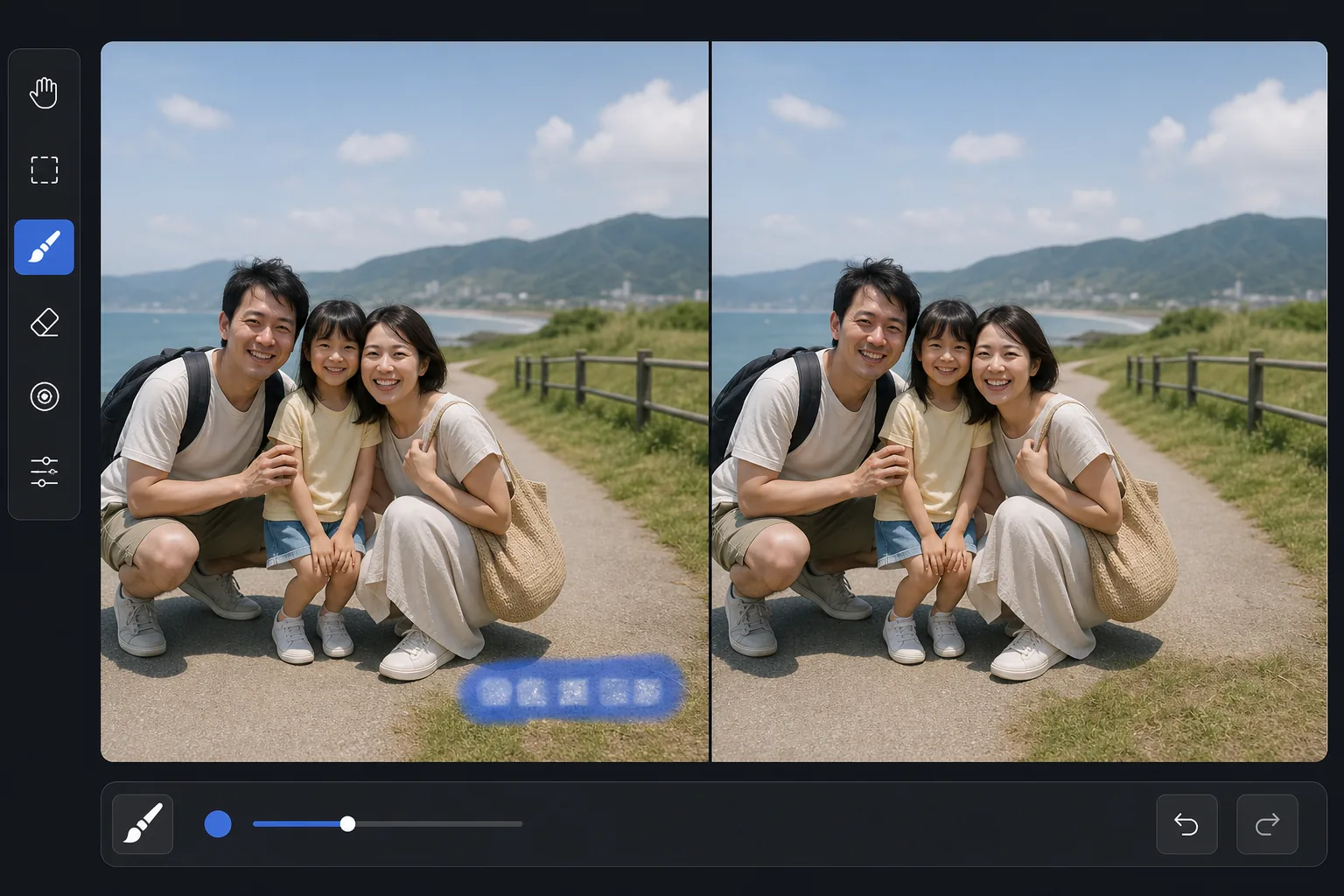
เหตุใดการประทับวันที่จึงฝังอยู่ในภาพ
ไม่เหมือนกับเมตาดาต้าสมัยใหม่ (ข้อมูล EXIF ที่จัดเก็บแยกต่างหากจากรูปภาพ) การประทับวันที่จากยุค 1990-2000 จะถูกเบิร์นลงในพิกเซลของรูปภาพโดยตรง ข้อความสีส้มหรือสีแดงถูกวางซ้อนบนภาพถ่าย ณ เวลาถ่ายภาพ โดยแทนที่เนื้อหาภาพในบริเวณนั้นอย่างถาวร ซึ่งหมายความว่าคุณไม่สามารถ 'ปิด' การประทับวันที่ในรูปภาพที่มีอยู่ได้ง่ายๆ อีกต่อไป เนื่องจากพิกเซลต้นฉบับใต้ข้อความหายไป และแทนที่ด้วยอักขระวันที่ การลบวันที่จะต้องสร้างเนื้อหารูปภาพที่เดิมอยู่ด้านหลังข้อความขึ้นมาใหม่ ซึ่งเป็นงานเดียวกับการลบข้อความที่ซ้อนทับ AI ของ Magic Eraser วิเคราะห์ภาพโดยรอบเพื่อสรุปสิ่งที่อยู่หลังการประทับวันที่ และเติมเต็มพื้นที่ด้วยเนื้อหาที่ดูเป็นธรรมชาติ
Before you start
ลบการประทับวันที่ในสามขั้นตอน
Start with อัพโหลดรูปภาพ. The result preview above and tips below use this guide's existing content; no separate before-and-after proof is assumed.
- 1
อัพโหลดรูปภาพ
เปิด Magic Eraser บนเว็บ, iOS หรือ Android อัปโหลดภาพที่มีการประทับวันที่ ปกติจะมุมขวาล่างเป็นข้อความสีส้ม แดง หรือเหลือง รองรับ JPEG และ PNG จากการสแกน ถ่ายโอนกล้อง หรือเก็บถาวรดิจิทัล
- 2
แปรงทับการประทับวันที่
ระบายสีทับข้อความวันที่ทั้งหมด ครอบคลุมตัวอักษรทั้งหมด ตลอดจนแสงหรือเงาโดยรอบที่เกิดจากข้อความบนแสตมป์ ใส่ระยะขอบเล็กๆ รอบๆ ข้อความเพื่อให้เห็นขอบกึ่งโปร่งใส โดยที่ข้อความจะกลมกลืนกับรูปภาพ
- 3
แตะลบและตรวจสอบ
AI จะลบข้อความวันที่และเติมพื้นที่ด้วยเนื้อหาที่ตรงกับภาพโดยรอบ ดำเนินการต่อด้วยหญ้า ท้องฟ้า กำแพง เสื้อผ้า หรืออะไรก็ตามที่อยู่ด้านหลังตราประทับ ตรวจสอบข้อความที่หลงเหลืออยู่และปรับแต่งด้วยการผ่านครั้งที่สองหากจำเป็น ส่งออกด้วยความละเอียดเต็ม
ดีที่สุดสำหรับ
- การฟื้นฟูภาพถ่ายครอบครัวในยุค 1990-2000 เมื่อการหาคู่อัตโนมัติเป็นคุณสมบัติทั่วไปของกล้อง
- การสแกนและเก็บถาวรภาพพิมพ์เก่าซึ่งการประทับวันที่ทำให้ภาพเสียไป
- การสร้างภาพพิมพ์หรือของขวัญจากภาพถ่ายเก่าๆ ที่การซ้อนทับวันที่อาจทำให้เสียสมาธิ
- การทำอัลบั้มภาพให้เป็นดิจิทัลโดยการนำการประทับวันที่ออกอย่างสม่ำเสมอจะสร้างคอลเลกชันที่สะอาดยิ่งขึ้น
- เตรียมรูปถ่ายเก่าๆ ไว้แชร์ลงโซเชียล โดยไม่ต้องลงวันที่
เคล็ดลับเพื่อผลลัพธ์ที่ดีที่สุด
โดยทั่วไปการประทับวันที่จะอยู่ตรงมุมบนเนื้อหาที่ค่อนข้างเรียบง่าย (ท้องฟ้า หญ้า ผนัง พื้น) AI จัดการสิ่งเหล่านี้ได้อย่างง่ายดายเนื่องจากเนื้อหาที่อยู่รอบๆ ให้การอ้างอิงที่ชัดเจนถึงสิ่งที่ควรแทนที่ข้อความ สำหรับการประทับวันที่บนเนื้อหาที่ซับซ้อน (ใบหน้า รูปแบบโดยละเอียด) AI อาจต้องผ่านครั้งที่สองเพื่อให้ได้ผลลัพธ์ที่สมบูรณ์แบบ หากคุณกำลังประมวลผลชุดภาพถ่ายจากกล้องตัวเดียวกัน การประทับวันที่จะอยู่ในตำแหน่งและสไตล์เดียวกันในทุกภาพ หลังจากยืนยันขนาดแปรงและตำแหน่งที่ใช้ได้กับภาพแรกแล้ว ให้จัดกลุ่มส่วนที่เหลือ สำหรับงานพิมพ์ที่สแกน ให้สแกนที่ความละเอียดสูงก่อน จากนั้นจึงลบการประทับวันที่ออก เนื่องจาก AI มีรายละเอียดมากขึ้นในการทำงานด้วยความละเอียดสูงกว่า การประทับวันที่บางอันจะมีแสงหรือเงากึ่งโปร่งใสรอบๆ ข้อความ แปรงบริเวณนี้เช่นกันเพื่อการกำจัดที่สะอาด
คำถามที่พบบ่อย
- สามารถกู้คืนสิ่งที่อยู่หลังการประทับวันที่ได้หรือไม่
- AI จะสร้างสิ่งที่อยู่เบื้องหลังข้อความในเวอร์ชันที่เป็นไปได้ขึ้นมาใหม่โดยพิจารณาจากภาพโดยรอบ สำหรับพื้นหลังที่เรียบง่าย (ท้องฟ้า หญ้า กำแพง) การสร้างใหม่นั้นเกือบจะสมบูรณ์แบบแล้ว สำหรับพื้นที่ที่ซับซ้อน AI จะสร้างเนื้อหาที่น่าเชื่อถือซึ่งตรงกับบริบทโดยรอบ
- ใช้งานได้กับแสตมป์วันที่ทุกสีหรือไม่?
- ใช่. ประทับวันที่สีส้ม แดง เหลือง และขาวทั้งหมดได้รับการจัดการ AI ระบุข้อความซ้อนทับโดยไม่คำนึงถึงสี และลบออก โดยเติมเนื้อหารูปภาพที่ซ่อนอยู่
- ฉันสามารถลบการประทับวันที่เป็นกลุ่มได้หรือไม่
- สำหรับการลบและการปรับปรุงพื้นหลัง โหมดแบทช์จะทำงานโดยอัตโนมัติ สำหรับการประทับวันที่โดยเฉพาะ การวางแปรงจะแตกต่างกันไปในแต่ละภาพ ดังนั้นการประมวลผลแต่ละรายการจึงให้ผลลัพธ์ที่ดีกว่า แม้ว่าโดยทั่วไปแล้วการประทับตราจะอยู่ในตำแหน่งมุมเดียวกันก็ตาม
- การลบตราประทับวันที่ฟรีหรือไม่?
- ใช่. เทียร์ฟรีของ Magic Eraser มีเครื่องมือแปรงสำหรับลบการประทับวันที่โดยจำกัดการใช้งานรายวัน พรีเมียมลบข้อจำกัดสำหรับการประมวลผลการเก็บถาวรแบบแบตช์