
Magic Eraser เทียบกับ Luminar Neo: โปรแกรมแก้ไข AI ตัวไหนเหมาะกับงานประจำวันมากกว่า?
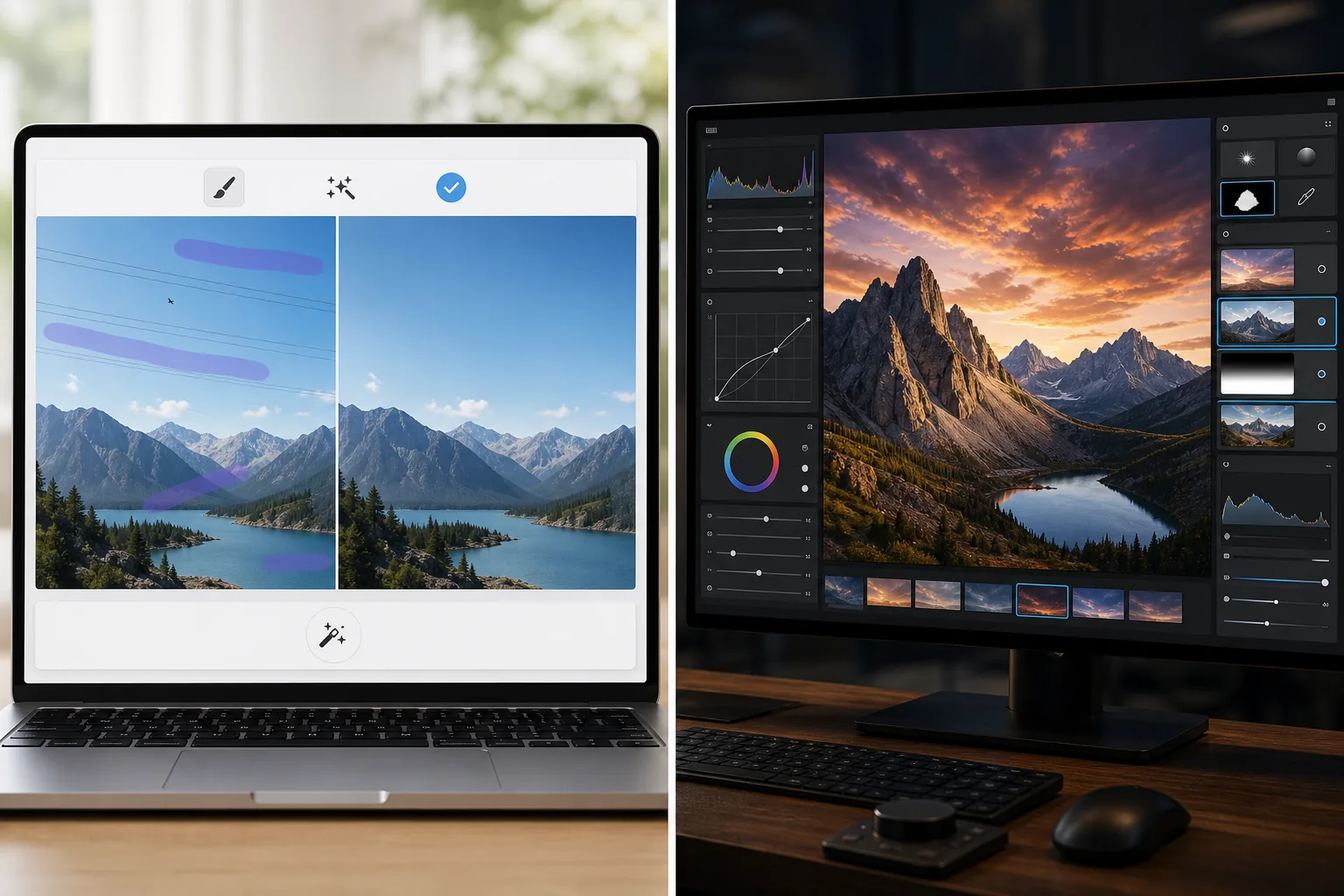
Luminar Neo ทรงพลังสำหรับช่างภาพเดสก์ท็อปที่ต้องการการปรับปรุงเชิงลึกและการควบคุมเชิงสร้างสรรค์ Magic Eraser สร้างขึ้นสำหรับการล้างที่เร็วกว่า เวิร์กโฟลว์ที่เบากว่า และการแก้ไขที่ยืดหยุ่นทั้งบนเว็บและมือถือ
Last updated
ลองใช้ Magic Eraser ฟรีComparison rows are editorial summaries from the latest page review, not a guarantee of current pricing, limits, watermark policy, batch support, speed, or platform availability.
ภาพรวม
Magic Eraser มุ่งเน้นงาน AI ที่ใช้งานจริง: ลบสิ่งรบกวน ลบพื้นหลัง ปรับปรุงภาพ และสร้างภาพที่ประณีตอย่างรวดเร็วจากอุปกรณ์ใดก็ได้
Luminar Neo เป็นโปรแกรมแก้ไขภาพ AI ที่เน้นเดสก์ท็อปพร้อมการปรับปรุงขั้นสูง การจัดแสงใหม่ การแทนที่ท้องฟ้า การมาสก์ และการควบคุมเชิงสร้างสรรค์ที่มุ่งเป้าไปที่ช่างภาพ
การเปรียบเทียบฟีเจอร์
Magic Eraser มุ่งเน้นงาน AI ที่ใช้งานจริง: ลบสิ่งรบกวน ลบพื้นหลัง ปรับปรุงภาพ และสร้างภาพที่ประณีตอย่างรวดเร็วจากอุปกรณ์ใดก็ได้
Luminar Neo เป็นโปรแกรมแก้ไขภาพ AI ที่เน้นเดสก์ท็อปพร้อมการปรับปรุงขั้นสูง การจัดแสงใหม่ การแทนที่ท้องฟ้า การมาสก์ และการควบคุมเชิงสร้างสรรค์ที่มุ่งเป้าไปที่ช่างภาพ
| Feature | Magic Eraser | Luminar Neo |
|---|---|---|
| การลบวัตถุด้วย AI | ใช่ | ใช่ |
| การลบพื้นหลัง | ใช่ | จำกัด |
| การจัดแสงใหม่เชิงสร้างสรรค์ | ไม่ | ใช่ |
| การปรับปรุงด้วย AI | ใช่ | ใช่ — ขั้นสูง |
| การแก้ไขบนเว็บ | ใช่ | ไม่ |
| การเข้าถึงบนมือถือ | ใช่ | จำกัด |
| เหมาะที่สุดสำหรับ | การแก้ไขที่ใช้งานจริงอย่างรวดเร็ว | เวิร์กโฟลว์เดสก์ท็อปของช่างภาพ |
| ความซับซ้อนในการตั้งค่า | ต่ำ | ปานกลางถึงสูง |
Feature rows summarize visible product positioning and should be rechecked against official product pages before purchase, migration, or compliance decisions.
- Last content review June 21, 2026
- Luminar Neo source: official product site (https://skylum.com/luminar)
- Magic Eraser source: https://magiceraser.live/th/product/magic-eraser
- Pricing, feature availability, platform support, and limits can change; recheck official sources before relying on a buying decision.
การเปรียบเทียบราคา
| Plan | Magic Eraser | Luminar Neo |
|---|---|---|
| ระดับฟรี | ฟรี — แก้ไขได้จำกัด | ทดลอง 7 วัน |
| รายเดือน | $9.99/เดือน | $14.95/เดือน |
| รายปี | $4.99/เดือน (เรียกเก็บรายปี) | $9.95/เดือน (เรียกเก็บรายปี) |
ราคา ณ เดือนพฤษภาคม 2026 โปรดตรวจสอบกับผู้ให้บริการแต่ละรายสำหรับอัตราปัจจุบัน
Pricing rows are snapshots from review time. Free tiers, subscriptions, trials, export limits, and regional availability can change without notice.
- Last content review June 21, 2026
- Luminar Neo source: official product site (https://skylum.com/luminar)
- Magic Eraser source: https://magiceraser.live/th/product/magic-eraser
- Pricing, feature availability, platform support, and limits can change; recheck official sources before relying on a buying decision.
ทำไมต้องเลือก Magic Eraser
เร็วกว่าสำหรับทีมที่ไม่ใช่ช่างภาพ
ทีมการตลาด ผู้ขาย และนักสร้างสรรค์มักให้ความสำคัญกับความเร็วและความสม่ำเสมอมากกว่าการควบคุมเดสก์ท็อประดับมืออาชีพ Magic Eraser ได้รับการปรับให้เหมาะกับความเป็นจริงนั้น
เวิร์กโฟลว์เบราว์เซอร์ที่แข็งแกร่งกว่า
Luminar Neo มุ่งเน้นการใช้งานบนเดสก์ท็อป Magic Eraser ทำให้การแก้ไขเข้าถึงได้จากเบราว์เซอร์และอุปกรณ์มือถือโดยไม่ต้องตั้งค่าเวิร์กสเตชัน
ดีกว่าสำหรับงานที่เน้นการล้าง
เมื่อความต้องการหลักของคุณคือการลบสิ่งรกรุงรัง ทำความสะอาดสินค้า แก้ไขภาพประกาศ หรือลบข้อความและผู้คน Magic Eraser ไปถึงได้เร็วกว่า
นำไปใช้ทั่วทั้งทีมได้ง่าย
Magic Eraser มอบเวิร์กโฟลว์มาตรฐานที่ง่ายกว่าให้ทีมสำหรับงานล้างภาพที่เกิดซ้ำโดยไม่ต้องฝึกอบรมเชิงลึกในอินเทอร์เฟซที่มุ่งเป้าไปที่ช่างภาพ
เครื่องมือ
คำถามที่พบบ่อย
Luminar Neo ทรงพลังกว่า Magic Eraser หรือไม่?
+
สำหรับการถ่ายภาพเดสก์ท็อปขั้นสูงและการควบคุมเชิงสร้างสรรค์ ใช่ สำหรับการล้าง AI ที่รวดเร็วและการแก้ไขข้ามอุปกรณ์ที่ง่ายกว่า Magic Eraser มักเหมาะกว่า
Magic Eraser สามารถปรับปรุงภาพเหมือน Luminar Neo ได้หรือไม่?
+
ได้ Magic Eraser มีเครื่องมือปรับปรุงด้วย AI สำหรับการทำให้รายละเอียดคมชัดและปรับปรุงคุณภาพภาพ แม้ว่า Luminar Neo จะมีชุดเครื่องมือปรับปรุงระดับมืออาชีพที่กว้างกว่า
เครื่องมือไหนดีกว่าสำหรับทีมอีคอมเมิร์ซ?
+
Magic Eraser มักดีกว่าสำหรับทีมอีคอมเมิร์ซและการตลาดเพราะเร็วกว่าสำหรับการล้างที่ทำซ้ำได้ การแก้ไขพื้นหลัง และการเตรียมภาพที่พร้อมนำเสนอ
Luminar Neo ทำงานในเบราว์เซอร์หรือไม่?
+
ไม่ Luminar Neo มุ่งเน้นเดสก์ท็อปเป็นหลัก Magic Eraser อิงเบราว์เซอร์และยังมีให้ใช้บนมือถือ
โปรแกรมแก้ไขไหนง่ายกว่าสำหรับมือใหม่?
+
Magic Eraser ง่ายกว่าสำหรับมือใหม่เพราะสร้างขึ้นรอบงานแก้ไข AI ที่ชัดเจนแทนที่จะเป็นเวิร์กโฟลว์การถ่ายภาพที่ซับซ้อนกว่า
ต้องการการแก้ไข AI โดยไม่มีความซับซ้อนของเดสก์ท็อป?
ลองใช้ Magic Eraser ฟรีและรับภาพที่สะอาดขึ้น แก้ไขพื้นหลังเร็วขึ้น และภาพที่คมชัดขึ้นจากอุปกรณ์ใดก็ได้
ลองใช้ Magic Eraser ฟรีกรณีการใช้งานที่เกี่ยวข้อง
ดูว่ามืออาชีพใช้เครื่องมือเหล่านี้ในเวิร์กโฟลว์จริงอย่างไร
ภาพประกาศที่เต็มไปด้วยของส่วนตัว รถจอด หรืออุปกรณ์ก่อสร้าง ทำให้ผู้ซื้อไม่สนใจ Magic Eraser ใช้ AI ทำความสะอาดภาพอสังหาริมทรัพย์ของคุณทันที — ไม่ต้องมีทักษะ Photoshop
รูปสินค้าที่พื้นหลังรกรุงรังทำให้ลูกค้าเลื่อนผ่านร้านคุณทุกวัน Magic Eraser ช่วยสร้างรูปสินค้ามืออาชีพได้ในไม่กี่วินาที ไม่ต้องเก่ง Photoshop อัปโหลด ลบสิ่งรบกวน แล้วลงขายได้เลย
คนแปลกหน้าทำลายรูปท่องเที่ยวของคุณ? พื้นหลังรกๆ ทำให้เซลฟี่ดูไม่ดี? เลิกเสียเวลาหลายชั่วโมงกับ Photoshop ได้แล้ว Magic Eraser ลบสิ่งรบกวน ทำความสะอาดฉากหลัง และขยายรูปให้พอดีทุกแพลตฟอร์ม — แค่แตะครั้งเดียว
คู่มือที่เกี่ยวข้อง
ดูคู่มือและเนื้อหาเชิงบรรณาธิการเพิ่มเติมที่เกี่ยวข้องกับเวิร์กโฟลว์นี้
เรียนรู้วิธีใช้ Magic Eraser เพื่อลบวัตถุ คน ข้อความ และสิ่งรบกวนออกจากรูปภาพ พร้อมผลลัพธ์ AI ที่สะอาดขึ้น
เรียนรู้วิธีลบคนออกจากรูปภาพด้วย AI ภายในไม่กี่วินาที สำหรับรูปท่องเที่ยว อสังหาริมทรัพย์ และรูปสินค้า
คำแนะนำทีละขั้นตอนในการลบลายน้ำจากรูปภาพของคุณด้วย AI เมื่อไหร่ที่เหมาะสม เทคนิค และวิธีใช้ Magic Eraser
การเปรียบเทียบอื่นๆ
ดูว่า Magic Eraser เปรียบเทียบกับเครื่องมือแก้ไขรูปภาพอื่นอย่างไร
Fotor นำเสนอโปรแกรมแต่งภาพออนไลน์ที่ครอบคลุมพร้อมเทมเพลตและเครื่องมือเสริมความงาม ส่วน Magic Eraser มุ่งเน้นการทำความสะอาดภาพด้วย AI ที่ใช้งานจริง การลบพื้นหลัง การปรับปรุงภาพ และการแก้ไขเชิงสร้างสรรค์ เพื่อเวิร์กโฟลว์ประจำวันที่รวดเร็วกว่า
RetouchMe ใช้ช่างรีทัชที่เป็นคนสำหรับการแก้ไขภาพบุคคลและรูปร่าง โดยส่งผลลัพธ์ให้ภายในไม่กี่นาที ส่วน Magic Eraser ใช้ AI เพื่อให้ผลลัพธ์ทันทีในการลบวัตถุ การแก้ไขพื้นหลัง การปรับปรุงภาพ และเครื่องมือเจเนอเรทีฟ — มอบการควบคุมที่มากกว่าและเวลาดำเนินการที่เร็วกว่า
AirBrush เป็นโปรแกรมแก้ไขเซลฟี่และความงามที่เน้นการรีทัชภาพบุคคลและฟิลเตอร์ Magic Eraser เป็นโปรแกรมแก้ไขภาพด้วย AI อเนกประสงค์ที่สร้างขึ้นเพื่อการลบวัตถุ การลบพื้นหลัง การปรับปรุงภาพ และการแก้ไขแบบสร้างสรรค์สำหรับภาพทุกประเภท
เราทดสอบแอปแต่งรูปยอดนิยมสำหรับ iPhone เพื่อค้นหาว่าแอปไหนให้ผลลัพธ์ดีที่สุดสำหรับการแก้ไขด้วย AI การลบวัตถุ การปรับปรุงคุณภาพ และเอฟเฟกต์สร้างสรรค์ นี่คือตัวเลือกของเราสำหรับแอปแต่งรูป iPhone ที่ดีที่สุดในปีนี้
เราได้ทดสอบแอปแต่งรูปยอดนิยมที่มีบน Android เพื่อเปรียบเทียบการแต่งภาพด้วย AI การลบวัตถุ การเพิ่มคุณภาพ และเครื่องมือสร้างสรรค์ นี่คือโปรแกรมแต่งรูป Android ที่ดีที่สุดในปีนี้และการเปรียบเทียบของแต่ละตัว
Meitu เป็นโปรแกรมแต่งความงามและเซลฟี่ยอดนิยมที่มีฟิลเตอร์สำหรับภาพบุคคลมากมาย ส่วน Magic Eraser ตอบโจทย์การแก้ไขที่หลากหลายกว่า — การลบวัตถุด้วย AI การลบพื้นหลัง การปรับปรุงคุณภาพภาพ generative fill และเครื่องมือเชิงสร้างสรรค์ — ทำให้เป็นตัวเลือกที่ดีกว่าสำหรับผู้ที่แก้ไขภาพมากกว่าแค่ภาพเซลฟี่