
Preparação de fotos de banco de imagens
Faça com que suas fotos sejam aceitas pelas agências de banco de imagens já no primeiro envio. Este modelo remove marcas registradas, logotipos e elementos de marca que provocam a rejeição, corrige imperfeições técnicas que não passam na revisão de qualidade e exporta os arquivos nas especificações exatas exigidas por Shutterstock, Adobe Stock, Getty e iStock — eliminando os motivos mais comuns pelos quais as fotos são rejeitadas dos bancos de imagens.
Experimente este modelo gratuitamenteDesign template preview
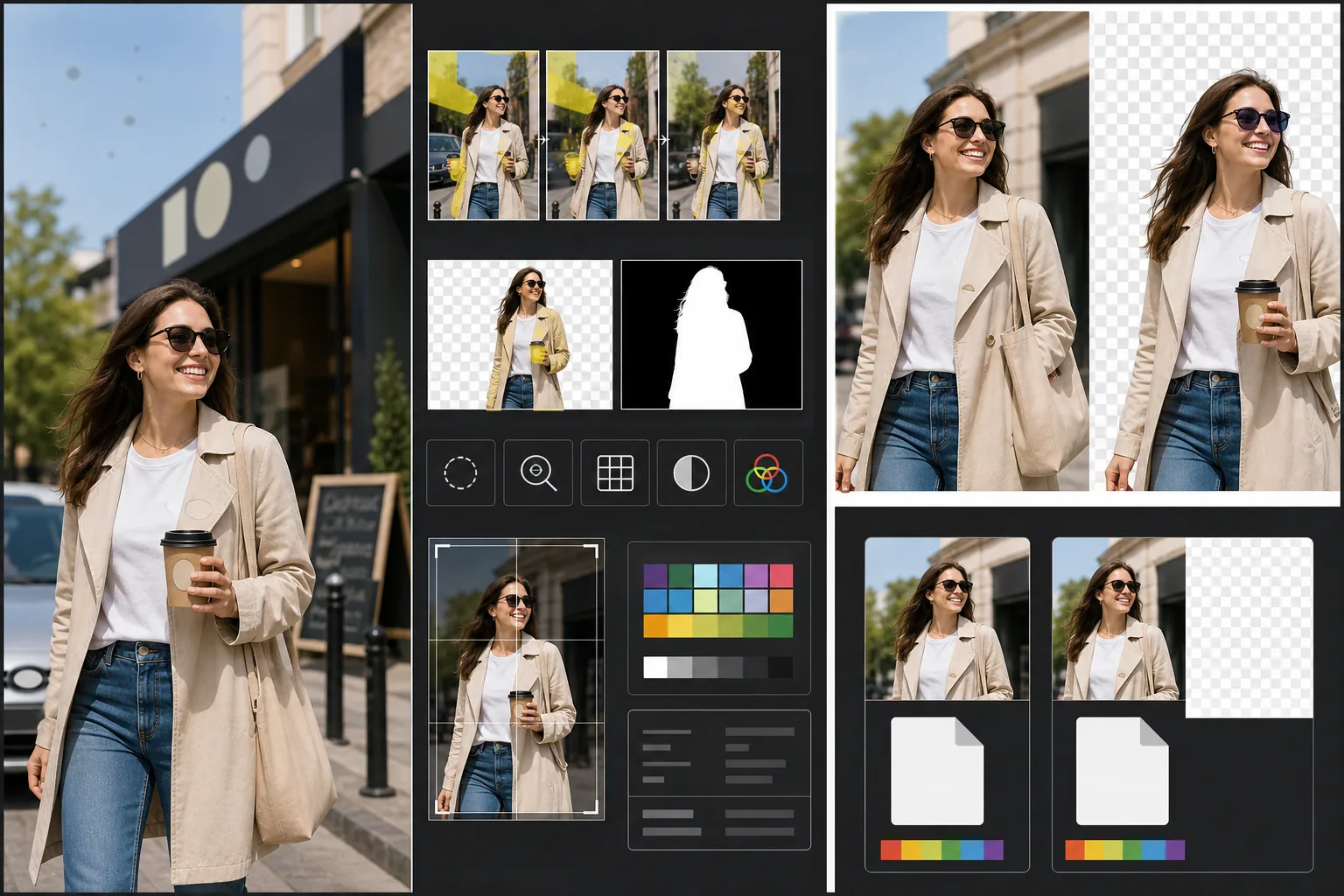
O que este modelo faz
Atende aos requisitos técnicos e jurídicos específicos que causam a rejeição de fotos de banco de imagens. O Magic Eraser detecta e remove marcas registradas, logotipos de marca, etiquetas de produto e placas de marca visíveis que exigiriam autorizações de propriedade ou causariam rejeição imediata. Isso inclui logotipos em roupas, emblemas de carro, placas de loja e nomes de marca em embalagens. O Background Eraser oferece um recorte limpo para imagens destinadas a uso recortado, gerando tanto a imagem RGB quanto uma máscara alfa separada exigida pelas agências de banco de imagens. As verificações de qualidade técnica conferem níveis de ruído, nitidez, aberração cromática e manchas de poeira do sensor — todas causas comuns de rejeição — e a IA corrige o que pode enquanto sinaliza problemas que exigem uma nova captura. A exportação final corresponde às especificações da agência quanto a formato de arquivo, perfil de cor, resolução e incorporação de metadados.
Configurações do modelo
| Detecção de marca | Detecta e remove automaticamente logotipos, nomes de marca e etiquetas de produto visíveis |
| Verificação de qualidade técnica | Verifica ruído, nitidez, aberração cromática e poeira do sensor |
| Máscara de recorte | Gera um canal alfa para imagens recortadas (PNG com transparência) |
| Perfil de cor | sRGB (exigido pela maioria das agências de banco de imagens) |
| Metadados | Incorpora campos IPTC para título, descrição e palavras-chave |
| Formato de saída | JPEG na qualidade máxima (nível 12) ou TIFF (sem perdas, preferido pela Getty) |
Como usar este modelo
Envie sua foto
Envie a foto que você deseja submeter às agências de banco de imagens. O modelo aceita arquivos RAW, JPEG, TIFF e PNG. Envie a versão de maior qualidade disponível — as agências de banco de imagens avaliam a qualidade técnica em resolução total e rejeitam imagens que apresentam artefatos de compressão por salvamento repetido.
Remova marcas e logotipos
O Magic Eraser examina a imagem em busca de marcas registradas, logotipos, nomes de marca e etiquetas de produto visíveis. Os itens detectados são destacados para revisão. As remoções aprovadas são executadas com a IA reconstruindo a superfície atrás de cada marca — a trama do tecido sob um logotipo de roupa, a carroceria sob um emblema, a superfície da parede sob a placa de uma loja.
Execute a verificação de qualidade técnica
O modelo analisa a imagem em busca de problemas técnicos que comumente causam a rejeição das agências de banco de imagens: ruído nas áreas de sombra, nitidez insuficiente, aberração cromática nas bordas de alto contraste, manchas de poeira do sensor e erros de balanço de branco. Os problemas corrigíveis são reparados automaticamente. Os problemas não corrigíveis (como um forte borrão de movimento) são sinalizados para que você saiba antes de enviar.
Exporte com os metadados da agência
Selecione a agência de destino e o modelo exporta no formato e nas especificações preferidos por essa agência. Os campos de metadados IPTC para título, descrição e palavras-chave podem ser incorporados antes da exportação. O arquivo está pronto para ser enviado diretamente aos portais de colaboradores da Shutterstock, Adobe Stock, Getty/iStock ou Alamy.
Dicas profissionais para os melhores resultados
- ✓Pense nas marcas desde o início da captura. Embora a IA remova logotipos com eficácia, cenas com menos elementos de marca exigem menos retoque e parecem mais naturais. Vire as etiquetas das roupas para dentro, escolha objetos de cena sem marca e posicione a câmera para excluir placas de loja quando possível.
- ✓Envie na maior resolução que sua câmera produz. As agências de banco de imagens classificam os resultados de busca em parte pela resolução — uma imagem de 50 megapixels aparece acima de uma de 12 megapixels para a mesma consulta, porque os compradores preferem arquivos maiores para recortes flexíveis e uso em grande formato.
- ✓Inclua pessoas em suas fotos de banco de imagens quando possível. Imagens com sujeitos humanos reconhecíveis (com autorizações de modelo) geram consistentemente mais receita do que cenas semelhantes sem pessoas. O retoque de pele do modelo é calibrado para ser mínimo, o que as agências de banco de imagens preferem em vez de uma pele muito editada.
Ferramentas
Perguntas frequentes
Remover o emblema de um carro ficará natural?
+
Sim. A IA reconstrói a carroceria atrás do emblema, combinando cor da pintura, reflexo e curvatura da superfície. Para os locais comuns de emblema (grade dianteira, porta-malas, centros das rodas), a reconstrução é muito limpa. Posicionamentos incomuns ou emblemas muito grandes podem exigir um rápido retoque manual nas bordas.
Isso pode gerar palavras-chave para o meu envio?
+
O modelo incorpora campos de metadados IPTC nos quais você pode inserir título, descrição e palavras-chave. Ele não gera palavras-chave automaticamente — a otimização de palavras-chave para bancos de imagens é uma habilidade especializada que depende do seu entendimento de como os compradores pesquisam, e as palavras-chave geradas automaticamente costumam ignorar os conceitos comerciais que impulsionam as vendas.
Quais agências isso oferece suporte?
+
As predefinições de exportação abrangem Shutterstock, Adobe Stock, Getty Images, iStock, Alamy, Dreamstime e 500px. Cada predefinição configura o formato de arquivo correto, o perfil de cor, o tamanho máximo de arquivo e a incorporação de metadados para os requisitos de envio específicos daquela agência.
Faça suas fotos serem aceitas no primeiro envio
Envie fotos e obtenha arquivos prontos para agências de banco de imagens, com as marcas removidas, a qualidade verificada e os requisitos de formato atendidos.
Experimente gratuitamenteRelated templates
More design templates for your workflow.
Crie logotipos PNG transparentes com refinamento de borda limpo e exportação em vários tamanhos para web, impressão, mídia social e ícones de aplicativos. Funciona em fotos de logotipos impressos e arquivos digitais.
Gere maquetes realistas de capas de livros com perspectiva 3D, renderização de sombras e planos de fundo de estilo de vida para marketing de autores e promoções de editoras.
Crie capas de podcast que atendam às especificações do Apple Podcasts e Spotify com substituição de plano de fundo, isolamento de retrato do host e layouts prontos para tipografia.
Prepare arte digital e fotografias para impressão em grandes formatos com upscaling de IA, expansão de tela, provas de cores precisas e exportação de arquivos prontos para impressão.